1:00

Introducing Canvas in Gemini
Google · AI · Mar 2025
Silica · Nov 2026 · 0:36 · AI-annotated
Silica’s 0:36 launch film runs 19 scenes, about 1.9 s each. The product is on screen from the first frame and 7 features are revealed. The call to action lands at 0:32 (89% in). The video bookends a rapid montage of captioned feature demos with the same iridescent glass-petal backdrop and Silica lockup, staging each frosted UI window over a different soft-focus wallpaper such as flowers, sky or gradients. Pacing is brisk at about seven cuts per minute, with each feature getting a short 1 to 2 second hold connected by zooms, crossfades and live typing, and every demo is labeled by a dark rounded caption pill with keycap icons.
Is this your launch? to your site or press kit.
Google · AI · Mar 2025
Tire Swing · B2B · Jul 2026
Raycast · Productivity · Jan 2023
An iridescent glassy floral render drifts behind a centered dark app icon holding a white lily. The wordmark Silica scales in beneath it, then the tagline fades in below.
On-screen text: “Silica”, “A code editor for macOS, made of glass.”
Techniques: Kinetic type
Camera: Pull out
A dark app icon showing a white glass flower and the wordmark Silica sit centered over an iridescent glass-flower backdrop. The tagline holds below as a translucent UI window fades in behind the lockup.
On-screen text: “Silica”, “A code editor for macOS, made of glass.”
Techniques: Kinetic type
Camera: Static
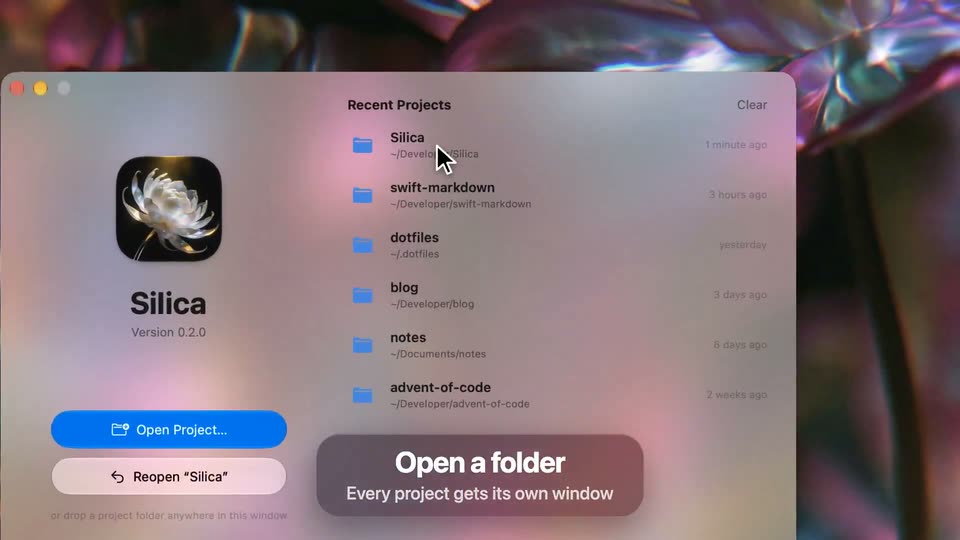
A frosted macOS window on a liquid iridescent background lists recent projects; the cursor hovers, then the window expands into a code editor view. A dark caption card anchors the bottom, and a large title with tagline scales in over the scene.
On-screen text: “Open a folder”, “Every project gets its own window”, “Silica”, “A code editor for macOS, made of glass.”
Techniques: Cursor demo, Kinetic type
Camera: Push in
A code editor window with a file tree sidebar and Swift code is centered over a blurred, multicolored wallpaper. A dark rounded caption pill sits at the bottom. The window and caption hold still for the full clip.
On-screen text: “Open a folder”, “Every project gets its own window”
Camera: Static
A frosted-glass code editor window sits in 3D perspective over a blurred, colorful desktop wallpaper. A dark rounded caption pill at the bottom center holds the tagline. The window is static, tilted slightly with the left edge closer.
On-screen text: “Made of glass”, “Your desktop shines through”
Techniques: 3D mockup
Camera: Pan
A translucent code editor window floats over a floral desktop, a dark frosted caption reading 'Made of glass' pinned at the bottom. The file tree and Swift code scroll slowly upward while the desktop image glows through the frosted panels.
On-screen text: “Made of glass”, “Your desktop shines through”
Camera: Pull out
A flat code-editor window rests on a bed of white daisies and scales up to fill the frame, its syntax-highlighted Swift code growing larger. A dark rounded pill at the bottom swaps between feature captions.
On-screen text: “Made of glass”, “Your desktop shines through”, “Syntax highlighting”, “25 languages, colored as you type”, “A card that lets the desktop shine through”
Techniques: UI zoom
Camera: Pull out
A light gradient field shows a Swift editor as syntax-highlighted code types out line by line in purple, orange, green and blue, a blinking caret trailing the input. A dark rounded pill at the bottom names the effect.
On-screen text: “Syntax highlighting”, “25 languages, colored as you type”
Techniques: Cursor demo
Camera: Pull out
A close-up of colorized SwiftUI code fills the frame with a caption reading Syntax highlighting, then the view zooms out so the code lifts to the top and a 3D macOS window slides up below as the caption swaps to Quick Open.
On-screen text: “Syntax highlighting”, “25 languages, colored as you type”, “Quick Open”, “Fuzzy-find any file in the project”
Techniques: UI zoom, 3D mockup
Camera: Pull out
A code editor is blurred behind a focused Quick Open search panel. As characters are typed into the search field, the file list filters down in real time, while a dark callout at the bottom holds the keyboard shortcut and label.
On-screen text: “Quick Open”, “Fuzzy-find any file in the project”
Camera: Static
A close-up of a Swift code editor pulls back to reveal the full window with a file sidebar and open tabs, while a dark rounded callout at the bottom shows the ⌘P shortcut with the label Quick Open and the line Fuzzy-find any file in the project.
On-screen text: “⌘ P Quick Open”, “Fuzzy-find any file in the project”
Techniques: UI zoom
Camera: Pull out
A blurred desk backdrop frames a code editor window with a file tree and Swift code; the open file switches mid-clip. A bottom caption card shows a command key and P keycap beside the heading Quick Open and a subline.
On-screen text: “P”, “Quick Open”, “Fuzzy-find any file in the project”
Camera: Static
A code editor search panel types “minimap” into the field as the result count falls from 75 to 60 and the file list reflows with highlighted matches. A dark pill at the bottom shows the Find in Project shortcut over blurred code.
On-screen text: “Find in Project”, “Search the text of every file”
Camera: Push in
A dark rounded caption with keycap icons and the text Find in Project sits over a blurred code editor; the frame zooms out to the full window as the caption fades. The scene cuts to the editor on a dark plant-lined desk with a new caption, Markdown Preview.
On-screen text: “Find in Project”, “Search the text of every file”, “Markdown Preview”, “Flip between source and rendered page”
Techniques: UI zoom
Camera: Pull out
A code editor shows a markdown file with a keyboard shortcuts table over a blurred flower photo. The document scrolls up one line. A dark rounded caption at the bottom shows two key icons, the headline Markdown preview, and the line Flip between source and rendered page.
On-screen text: “Markdown preview”, “Flip between source and rendered page”
Camera: Push in
A rendered documentation page showing a keyboard shortcuts table crossfades into a SwiftUI code editor. A dark keycap callout at the bottom reads Markdown preview with the line Flip between source and rendered page.
On-screen text: “Markdown preview”, “Flip between source and rendered page”
Camera: Static
A SwiftUI snippet sits over a blurred gradient that shifts from pale pink to deep blue. A caret blinks at the end of line 9 as the syntax colors and the theme name in a bottom pill cycle from Atom One to Dracula.
On-screen text: “Atom One”, “Nine themes, each in light and dark”, “Xcode”, “Gruvbox”, “Tokyo Night”, “Dracula”
Camera: Static
A blurred blue and orange sky drifts slowly behind a centered white headline. Ten translucent pill labels in tan and blue fade in one by one across three rows beneath it, filling the frame by the mid-point.
On-screen text: “The essentials, built in”, “Tabs”, “Minimap”, “25 languages”, “Indent guides”, “Go to line”, “Word wrap”, “Toggle comment”, “Move and duplicate lines”, “Reopens your tabs”
Techniques: Kinetic type
Camera: Static
Over a dark iridescent petal background that slowly drifts and pulls into focus, a centered lockup appears: the app icon, the title Silica, a tagline, then a GitHub URL pill, each fading in in sequence.
On-screen text: “Silica”, “Free and open source. For macOS 26.”, “github.com/dqhieu/Silica”
Camera: Static