2:12

Sierra: introduction to video
Sierra · Dec 2025
Paper · Jul 2026 · 0:50 · Full motion · AI-annotated
Paper’s 0:50 launch film runs 30 scenes, about 1.7 s each. The product is on screen from the first frame and 3 features are revealed. There is no explicit call to action. The video chains feature beats, each opened by a lowercase headline that completes across two or three cuts before a flat mockup demo plays out on a cream grid. Signature moves are the cursor driven UI interactions, the sliding headline fragments, and one 3D card fan that breaks the flat layout.
Is this your launch? to your site or press kit.
Sierra · Dec 2025
Retell AI · B2B · Nov 2026
On a cream grid canvas, a blue rounded app icon with a white geometric mark sits centered. A black cursor with a white outline glides in from the lower right and stops on the icon's corner.
Techniques: Cursor demo
Camera: Static
A flat product window on a light grid. A blue rounded-square app icon with a black cursor arrow sits in the empty canvas, then both disappear, leaving the blank document view. The title bar and left toolbar stay static in a locked-off frame.
On-screen text: “New Project”
Camera: Static
On a cream grid background, the headline “bringing your work into Paper is easy” fades in above a Paper window that settles from a stacked pair into one. App icons slide into the canvas, a cursor hovers the Chrome icon, then the icons clear and the window scales up.
On-screen text: “bringing your work”, “into Paper is easy”
Techniques: Cursor demo
Camera: Static
A flat browser window mockup of a music app scales up from the lower half toward the camera over a cream grid background, while a dark gray headline sits above it. The interface shows a playlist panel and a track list with a cursor arrow.
On-screen text: “starting from your live web app?”
Camera: Static
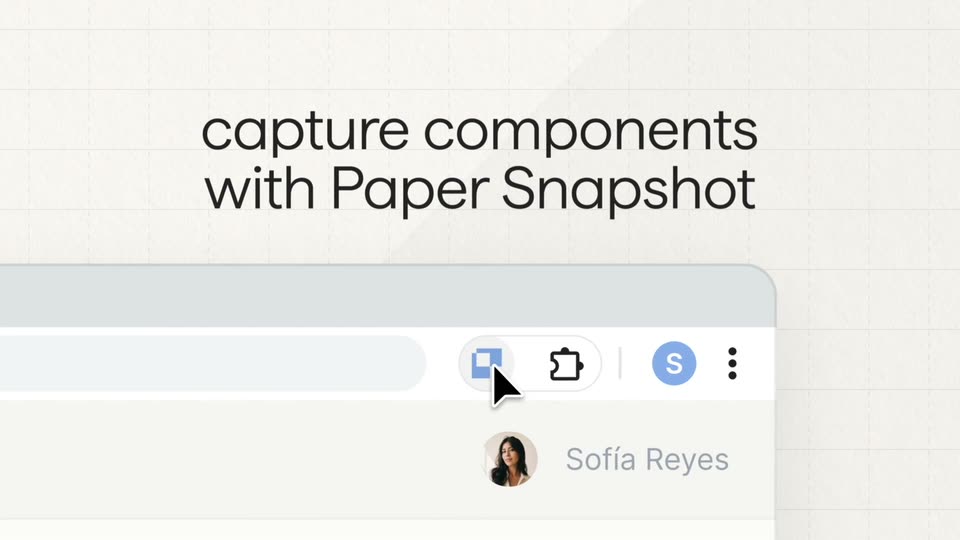
A flat browser window mockup sits below a two-line headline on a gridded cream background. A cursor glides to a blue toolbar icon and hovers, raising a soft circular highlight, while the headline deepens from light gray to black.
On-screen text: “capture components”, “with Paper Snapshot”
Techniques: Cursor demo
Camera: Static
A browser window on a light grid canvas shows the Overflow music app with the Vinyl Sundays playlist, while a capture hint bar floats above it. The window settles upward once, the cursor rests mid-page, and the hint bar fades out at the end.
On-screen text: “Sofía Reyes”, “capture components”, “with Paper Snapshot”
Camera: Static
A white rounded toast sits centered on a dashed cream grid. The label 'Capturing selection...' ticks from 33% to 100%, then the pill widens, the icon becomes a blue checkmark, and the text reads 'Copied to clipboard. Ready to paste into Paper.' The frame stays locked off.
Camera: Static
A white toast with a blue checkmark reads Copied to clipboard. Ready to paste into Paper. on a faint graph-paper grid. It clears to reveal the Overflow App window: traffic-light header, left tool rail, a Copy.ai badge top right, and an empty canvas.
Camera: Static
A Figma-style editor window shows an album card for Vinyl Sundays; its cover photo of a turntable fills in, then a second poster card slides in from the right and the two cards pan left across the canvas, with a cursor icon resting on the cover.
Camera: Static
A fanned row of cards and a phone mockup sit in 3D perspective on a gray field. The camera pans right; the phone shows a dark 'Vinyl Sundays' card with a play button and a swirling color image, while white cards hold serif and bold titles over photos of a turntable, a record, and tea mugs.
Techniques: 3D mockup, Parallax
Camera: Pull out
On a cream grid
On-screen text: “let the agents”, “pull your codebase”
Techniques: Kinetic type, Morph, 3D mockup
Camera: Static
A light grid canvas with small square handles fills the frame. The black lowercase headline sits at top center. A dark code editor window showing React code slides up from the bottom edge into view.
On-screen text: “pull your codebase”
Camera: Static
A white canvas with the headline “straight into” sits above two flat windows, a dark code editor on the left and a browser showing the Overflow App on the right. The canvas scales up and rises while the two windows pan apart toward the edges.
On-screen text: “straight into”
Camera: Pan
A cream design canvas with a faint grid and white selection handles holds the black caption straight into at center. A dark code editor and a Figma window overlap below, all layers drifting at different speeds in a slow parallax pan.
On-screen text: “straight into”
Techniques: Parallax
Camera: Pan
On a cream design canvas with a grid and selection handles, the headline 'the canvas' wipes in through a mask above a browser window. The camera zooms into the window as two wireframe mobile screens fill with album art and a turntable photo.
On-screen text: “the canvas”
Techniques: Masking, UI zoom
Camera: Static
A black headline 'and take it further' sits on a faint grid canvas with selection handles. A browser frame, a code editor and two mobile app screens fade and slide into a layered row beneath it, then the group drifts down and fades out.
On-screen text: “and take it further”
Camera: Pan
A Figma file mockup on a light grid slides up and settles in the center as the headline scales in above it. A cursor sits over the dark app design in the canvas while the side panels stay static.
On-screen text: “copy/paste from Figma”
Techniques: Kinetic type
Camera: Static
A dark interface is shown. A cursor moves from the top left, hovers over the Home menu item to highlight it, then moves to the top right to hover over the search bar.
Techniques: Cursor demo
Camera: Pan
A dark music-library interface is enclosed by a thin blue rectangular outline. A white cursor grips the bottom-right corner and drags it, resizing the frame while the view reframes onto the panel's corner against a pale gray background.
Techniques: Masking, Cursor demo, UI zoom
Camera: Static
A cursor hovers the Copy row of a dark context menu, then the frame zooms out to a design-tool canvas holding a dark music player mockup, while two colorful app icons fade in at the bottom.
Techniques: Cursor demo, UI zoom
Camera: Pull out
Three overlapping app windows sit on a light grid canvas, a dark panel sliding inside the left one. A cursor hovers over the middle window as the layout pans left. At the bottom, a small dock pairs a dark icon with colorful dots against a new blue icon.
Techniques: Cursor demo
Camera: Push in
A white context menu card rests on a light gray field, a black cursor at its top corner. The cursor slides down onto the Paste row, which fills solid blue, then the menu closes to reveal a Home heading above a dark panel.
Techniques: Cursor demo
Camera: Static
A light gray frame holds a gray Home title while a dark music app interface fades in below it. The sidebar with the Overflow logo and menu appears first, then the search bar and album thumbnails slide in from the right.
On-screen text: “Home”
Camera: Static
A dark Overflow sidebar and content panel sit on a light gray field under a gray caption. The menu selection moves from Explore to My Library, the caption becomes Library, and the right panel switches from genre cards to a Liked Songs list.
On-screen text: “Explore”, “Library”
Camera: Static
On a pale gray field, a dark heading cycles from Mobile - Home to Mobile - Explore to Mobile - Library. Two dark phone mockups sit side by side, the right one swapping screens: a playlist header, a library list, then a browse grid.
On-screen text: “Mobile - Home”, “Mobile - Explore”, “Mobile - Library”
Techniques: Split screen
Camera: Pull out
A pale gray backdrop holds a grid of six dark music-app screens, Home, Explore, Library and three mobile views, in a locked-off frame. Three colored name chips, Ksenia, Hugo and Agu, slide into place beside their assigned panels.
On-screen text: “Home”, “Explore”, “Library”, “Mobile - Album”, “Mobile - Library”, “Mobile - Explore”, “Ksenia”, “Hugo”, “Agu”
Camera: Pull out
On a textured off-white canvas, the lowercase phrase bring it drifts from right of center toward the middle while thin blue crosshair guides and a small square handle move around it. A second line, shape it, appears below as a selection box frames the upper left.
On-screen text: “bring it”, “Agu”, “Ksenia”, “Hugo”, “shape it”
Techniques: Kinetic type
Camera: Static
On a cream paper background crossed by thin gray guide lines, a blue selection box with corner handles expands as the lowercase phrase “shape it” slides down out of frame and “ship it” scales up inside the box. Locked-off frame.
On-screen text: “shape it”, “ship it”
Techniques: Kinetic type
Camera: Static
On a cream paper background, the lowercase text “ship it” sits inside a blue selection box with corner handles. The text then vanishes and a light-blue square appears behind a smaller cream square, like a layer placed on a design canvas.
On-screen text: “ship it”
Camera: Static
On a textured off-white background, two overlapping blue squares and the black wordmark Paper assemble at center, then hold still as the sign-off lockup.
On-screen text: “Paper”, “ship it”
Camera: Static