1:17
Explore
00:00:00 / 01:31:20
- Length
- 1:31
- Scenes
- 43 · 2.1 s avg
- Product on screen
- 0:15
- Features shown
- 4
- Call to action
- 1:22 · 90%
- Voiceover
- Yes
- Views
- 40 on YouTube
as of November 19, 2026
Shire’s 1:31 launch film runs 43 scenes, about 2.1 s each. The product shows up at 0:15 and 4 features are revealed. The call to action lands at 1:22 (90% in), over a voiceover. Founder interviews in a raw loft alternate with dark UI demos, all bookended by white logo cards. The signature moves are the viewfinder corner brackets that lock onto subjects and the blur-to-focus interface reveals.
Footage neededEstimated needs: 4 capture groups — your screens or recordings · 1 official logo — reused across the film · 18 filmed passages — shoot, supply or replace · 2 graphic passages — draw or supply · 1 3D passage — build or supply
Is this your launch? to your site or press kit.
More like this


Similar soundtrack
Films whose music sounds like this one, voice left out
1:05

Superhuman - Work together. Plan together. Stay ahead of the game together. Coda
Superhuman · Upbeat corporate electronic pop
2:00

Robin Lobo - ANNOUNCING LUMIAN We raised $3 million to rebuild how Amazon brands
Lumian · Upbeat electronic
1:20
Introducing Shire, scene by scene
· 43 scenes as text
01 · Hook · 0:00–0:04
A man in a black polo stands before a white brick wall wearing a blue sleep mask. He points to a large 5M+ graphic on the right, then removes the mask to smile at the camera. A name lower third at left fades out at the end.
On-screen text: “Harshith Guduru”, “Over 5 million restaurants”, “5M+”, “Co-founder, Shire”, “run just like this.”
Techniques: Kinetic type
Camera: Push in
02 · Problem · 0:04–0:06
A young man in a cream zip sweater speaks to camera in a medium close-up, backlit by a bright industrial window beside a concrete wall. A white serif lower third with his name and title scales in at left, while white sans subtitles run along the bottom.
On-screen text: “Their POS knows”, “Cameron Kuperman”, “Co-founder, Shire”, “every order and transaction,”
Camera: Static
03 · Problem · 0:06–0:09
A young man in a cream sweater stands before a white plank wall and a barred window, speaking to camera and gesturing with his hands. A lower-third name caption sits at left while subtitles run along the bottom.
On-screen text: “Cameron Kuperman”, “Co-founder, Shire”, “every order and transaction,”, “but has no idea”, “what's happening at the tables.”
Camera: Static
04 · Problem · 0:09–0:12
A young man in a dark gray tee with a lavalier mic speaks to camera in front of a bright industrial window. A white serif lower third identifies him as Alex Tabaku, co-founder of Shire, while subtitles caption his line.
On-screen text: “Everything in between depends on”, “Alex Tabaku”, “Co-founder, Shire”, “a manager watching the floor.”
Camera: Static
05 · Problem · 0:12–0:15
A young man in a dark gray t-shirt stands before a white brick wall and a tall window, gesturing with both hands as he speaks. A serif name caption holds in the lower left while white subtitles roll along the bottom.
On-screen text: “Alex Tabaku”, “Co-founder, Shire”, “a manager watching the floor.”, “And during a rush,”, “one manager can't catch it all.”
Camera: Static
06 · Product intro · 0:15–0:16
On a white background, a small rounded square outline at center grows into a tabbed terminal icon while four corner arcs tighten inward; the bottom caption swaps from the first line to the next.
On-screen text: “one manager can't catch it all.”, “So we built Shire,”
Techniques: Morph
Camera: Static
07 · Product intro · 0:16–0:17
On a plain white background, a black line-art icon of a rounded square inside a focus frame slides left and shrinks, while the bold wordmark “Shire” appears to its right, forming a logo lockup. A centered caption at the bottom swaps from the first line to the second.
On-screen text: “So we built Shire,”, “the POS that runs your restaurant for you.”
Camera: Static
08 · Product intro · 0:17–0:19
Black Shire logo and wordmark sit centered on white, with a small tagline beneath. The plate icon then fills with a short clip of a hand holding a phone, revealed through the icon's outline.
On-screen text: “Shire”, “the POS that runs your restaurant for you.”
Techniques: Masking
Camera: Static
09 · Feature reveal · 0:19–0:21
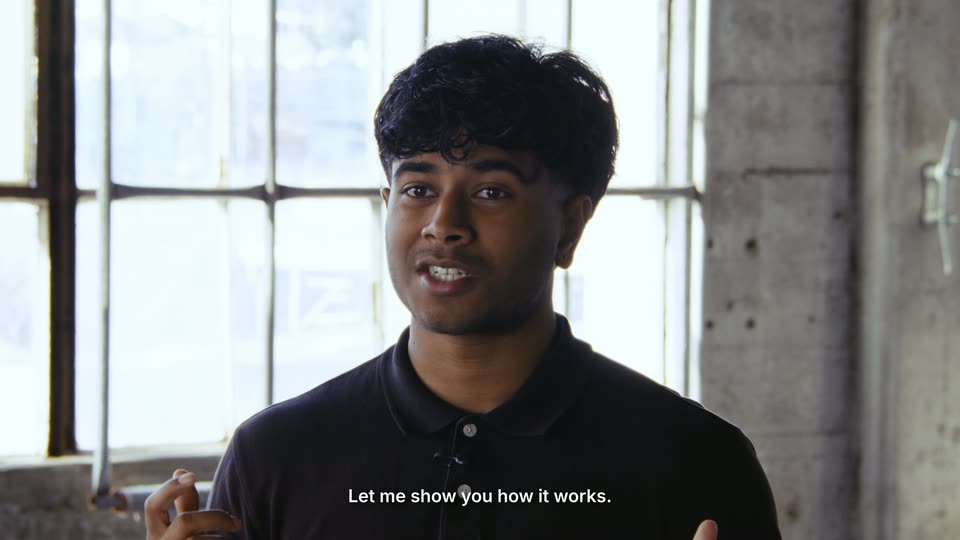
A man in a black polo shirt stands before a bright industrial window, talking and gesturing with his hands. The camera holds a locked-off medium shot. White subtitle captions appear at the bottom of the frame, swapping between two lines.
On-screen text: “the POS that runs your restaurant for you.”, “Let me show you how it works.”
Camera: Static
10 · Feature reveal · 0:21–0:22
A dark dashboard grid shows five live camera feeds of a restaurant floor, each tagged by area, beside a 'Table turns' panel on the right. A white caption sits centered at the bottom.
On-screen text: “Shire works with the cameras”
Camera: Static
11 · Feature reveal · 0:22–0:25
A dark dashboard shows five live camera feeds of a restaurant floor in a grid, with a table-status list on the right. Status labels pop onto the feeds and rows fill the list as a bottom caption changes. The interface then fades and shrinks to the bottom-right corner.
On-screen text: “Shire works with the cameras”, “to see what's happening on the floor.”, “When guests are ready to order,”
Camera: Push in
12 · Feature reveal · 0:25–0:29
A dark dashboard shows a top-down live feed of a restaurant dining room. Corner brackets lock onto a table with a Ready to order tag, then a white alert card slides in from the right listing the triggers, after which the feed blurs out.
On-screen text: “When guests are ready to order,”, “their server gets a ping.”, “The moment a party leaves,”
Camera: Pan
13 · Feature reveal · 0:29–0:30
A dark dashboard shows a blurred patio camera feed on the left beside a task checklist on the right, then the view reframes to a single centered feed of a set patio table labeled Cam 7.
On-screen text: “the busser knows which table to clear.”
Techniques: UI zoom
Camera: Pan
14 · Feature reveal · 0:30–0:31
Dark dashboard screen with a header bar. A tilted patio camera feed card rotates flat into place as a
On-screen text: “the busser knows which table to clear.”, “And when a server's overloaded,”
Camera: Static
15 · Feature reveal · 0:31–0:32
A dark interface shows a patio camera feed tagged 'Plates left' beside a white alert card reading 'Clear Table 9'. The card blurs and tilts as a dashboard grid of small camera thumbnails expands behind it.
On-screen text: “Following the patio turnover”, “And when a server's overloaded,”
Camera: Static
16 · Feature reveal · 0:32–0:33
A tablet on a dark background shows the SHIRE restaurant app: a floor plan of color-coded tables under section tabs, with a waitlist panel on the left. The interface resolves from a blurred ghost into a sharp view while a caption sits at the bottom.
On-screen text: “And when a server's overloaded,”
Camera: Push in
17 · Feature reveal · 0:33–0:36
The Shire host dashboard fills the frame, showing a colored floor plan of numbered tables on the right and a waitlist of guest cards on the left. A caption sits at the bottom. The whole interface then fades out to a plain cream background.
On-screen text: “the next party goes somewhere else.”
Camera: Static
18 · Feature reveal · 0:36–0:38
A tablet in 3D perspective sits on a dark background, showing a restaurant floor plan with numbered tables and an order list. It starts blurred, snaps into focus, then the camera zooms into the screen as captions roll along the bottom.
On-screen text: “Shire keeps track of every table,”, “making sure no guest gets forgotten”
Techniques: 3D mockup, UI zoom
Camera: Push in
19 · Feature reveal · 0:38–0:42
A flat tablet screen shows a restaurant floor plan of color-coded tables. A camera alert card for table 35 sits top right; a second alert for table 18 slides in and brackets the table. The frame pulls back to reveal an orders sidebar. White captions run along the bottom.
On-screen text: “making sure no guest gets forgotten”, “and your staff knows exactly”, “where they're needed.”
Techniques: UI zoom
Camera: Static
20 · Other · 0:42–0:44
A young man in a gray t-shirt stands in a bright room with white brick walls and a tall industrial window, speaking to the camera. He gestures with both hands while talking. A white caption sits at the bottom of the locked-off frame.
On-screen text: “So instead of managers running around”
Camera: Static
21 · Other · 0:44–0:47
A young man in a dark crewneck speaks to camera, centered against a bright multi-pane industrial window and a concrete block wall. He gestures with one hand near the end. White subtitles run along the bottom of the frame.
On-screen text: “So instead of managers running around”, “telling everyone what to do,”, “your staff can focus just on service.”
Camera: Static
22 · Other · 0:47–0:49
The shot dissolves in from the previous scene onto three men working on laptops at a wooden table, bookshelves stacked with books behind them. The camera holds locked off as the seated men type and look at their screens while captions swap at the bottom.
On-screen text: “your staff can focus just on service.”, “And Shire doesn't stop”
Camera: Static
23 · Other · 0:49–0:51
Over-the-shoulder shot of two young men at a table with laptops; the one in the beige polo studies the screen while his friend watches from the right. The frame stays locked off with shallow focus, and white caption lines cycle at the bottom.
On-screen text: “And Shire doesn't stop”, “when your shift ends.”, “After the shift,”
Camera: Static
24 · Feature reveal · 0:51–0:52
A dark dashboard titled “Reviewing lunch on five cameras” shows a grid of five time-lapse security feeds of a restaurant (patio, dining, lounge) plus a “Table turns” status panel on the right that updates its rows. White caption text builds at the bottom: “After the shift,” then “Shire analyzes what happened on the floor”.
On-screen text: “After the shift,”, “Shire analyzes what happened on the floor”, “when your shift ends.”
Camera: Static
25 · Feature reveal · 0:52–0:53
A dark dashboard shows a grid of overhead restaurant camera feeds beside a 'Table turns' status list. The feed tiles drift and overlap in parallax while a white caption anchors the bottom edge.
On-screen text: “Guests left, plates still on the table”, “Shire analyzes what happened on the floor”
Techniques: Parallax
Camera: Static
26 · Feature reveal · 0:53–0:55
A dark dashboard fills the frame, a grid of five live camera feeds of a restaurant patio and dining room with people moving in time-lapse, plus a Table turns status panel at lower right. A white caption line sits centered along the bottom edge.
On-screen text: “Shire analyzes together the plan the floor”, “and puts together a plan”
Camera: Pull out
27 · Feature reveal · 0:55–0:57
A dark dashboard shows five time-lapse camera feeds of a restaurant patio and dining rooms on the left. A right-hand panel lists a morning plan with three numbered suggestions. A white caption sits at the bottom.
On-screen text: “to make the next one even better.”
Camera: Static
28 · Feature reveal · 0:57–0:59
A young man in a cream zip-up sweater speaks to camera in front of a bright, multi-pane window, then the frame cuts to a dark chat interface titled Ask Quincy showing a scheduling request card. Subtitles run along the bottom throughout.
On-screen text: “And it can do the work”, “you don't want to do.”, “Create schedules,”
Camera: Static
29 · Feature reveal · 0:59–1:02
A dark AI chat window sits centered on a locked-off near-black background. Its content cross-fades in place through three AI reports: a schedule change, a supplier switch, and an inventory check. A bottom caption updates phrase by phrase to match the voiceover.
On-screen text: “Create schedules,”, “find cheaper suppliers,”, “order inventory,”, “you don't want to do.”
Techniques: Kinetic type
Camera: Static
30 · Feature reveal · 1:02–1:03
A dark chat panel shows a Back Office message with a five-row restock table and Approve, Reject buttons. The message text slides into its final layout while a cursor rests on Approve. A white caption at the bottom changes from order inventory, to and follow up.
On-screen text: “order inventory,”, “and follow up”
Techniques: Cursor demo
Camera: Static
31 · Feature reveal · 1:03–1:03
A dark assistant panel on the left swaps from an inventory restock list to a staff schedule view, while a phone mockup fades in on the right. A white caption at the bottom changes from “and follow up” to “when employees don't show up.”
On-screen text: “and follow up”, “when employees don't show up.”
Camera: Pull out
32 · Feature reveal · 1:03–1:05
A dark two-panel product UI, a desktop report card on the left and a phone chat mockup on the right, sits on a near-black background. It dims and fades out while a white caption at the bottom swaps from one line to the next.
On-screen text: “when employees don't show up.”, “And because it all runs through your POS,”
Techniques: Split screen, Kinetic type
Camera: Static
33 · Other · 1:05–1:07
A young man in a dark sweater speaks to camera in a locked-off medium close-up, backlit by a large multi-pane industrial window, with a concrete pillar at the right edge. A white subtitle line sits at the bottom of the frame.
On-screen text: “And because it all runs through your POS,”
Camera: Static
34 · Other · 1:07–1:09
Two young men stand by tall industrial windows in a concrete room. The one in a cream sweater holds a phone and taps the screen while his friend in a gray tee gestures toward it, as white subtitles appear at the bottom.
On-screen text: “And because it all runs through your POS,”, “Shire doesn't just tell you”, “what needs to be done,”
Camera: Push in
35 · Other · 1:09–1:11
A young man in a gray t-shirt stands before a white brick wall and a tall window, gesturing with both hands as he speaks to camera. The locked-off medium shot holds him centered while subtitles appear at the bottom.
On-screen text: “what needs to be done,”, “it can actually do it.”
Camera: Static
36 · Other · 1:11–1:13
A young man in a cream zip sweater speaks to camera before a bright multi-pane window, a lavalier mic clipped to his collar. The locked-off medium shot holds while white subtitles change at the bottom.
On-screen text: “it can actually do it.”, “We've worked these floors.”, “We know how hard it is to run a restaurant,”
Camera: Static
37 · Other · 1:13–1:16
Two men stand against a white brick wall, glancing off camera, then a cut moves to a close-up of the man in the black polo speaking before a window. White subtitles sit at the bottom of the frame.
On-screen text: “We know how hard it is to run a restaurant,”, “and we want to make it easy.”, “We're building the operating system”
Camera: Static
38 · Other · 1:16–1:18
A man in a black polo shirt stands in a raw concrete room with a large multi-pane window behind him, speaking to camera and gesturing with his hands. The shot cuts from a tight close-up to a wider medium view as white subtitles roll along the bottom.
On-screen text: “We're building the operating system”, “for restaurants to run themselves.”, “and we want to make it easy.”
Camera: Static
39 · Other · 1:18–1:22
A man in a black polo shirt stands in a white brick room beside a bright window, speaking to camera and gesturing with his hands. Bottom subtitles carry his words. At the end, a white rectangle with curved corner ticks fades in, covering his face and chest.
On-screen text: “for restaurants to run themselves.”, “If you're a restaurant owner,”, “we'd love to talk.”
Camera: Static
40 · CTA · 1:22–1:24
On a plain off-white background framed by four dark corner brackets, the centered line 'Book a demo · shireintelligence.com' fades in, holds, then fades out.
On-screen text: “Book a demo · shireintelligence.com”
Camera: Static
41 · Outro · 1:24–1:25
On a white field, a black rounded square anchors the center while eight clusters of gray concentric arcs draw inward from the corners, darkening as they close around the icon.
Camera: Static
42 · Outro · 1:25–1:30
A black line icon of a rounded square with four corner arcs assembles at center, then shifts left as the wordmark Shire appears beside it; the tagline One POS to rule them all. and a small Backed by Y Combinator line fade in below on white.
On-screen text: “One POS to rule them all.”, “Backed by Y Combinator”
Camera: Static
43 · Outro · 1:30–1:31
A centered Shire logo with a POS terminal icon and radiating signal waves sits above the tagline and a Y Combinator credit. The icon and waves shrink toward the center as the wordmark fades, then black corner brackets of a viewfinder frame draw in around a faint central square.
On-screen text: “Shire”, “One POS to rule them all.”, “Backed by Y Combinator”
Techniques: Morph
Camera: Static