1:48

Introducing Oz: the orchestration platform for cloud agents
Warp · Developer tools · Feb 2026
Composal · Oct 2026 · 1:22 · AI-annotated
Founder-led launch that alternates a white-backdrop talking head with flat white UI cards and 3D-tilted app windows floating on a rippled yellow field. Signature moves are sliding white cards, ticking green checks, morphing diagrams (feature map, CI/CD pipelines, the Build-Verify-Ship-Improve ring), and a steady moderate cut rate.
Warp · Developer tools · Feb 2026
GodHands · B2B · Oct 2026
Deploy · Industrials · Oct 2026
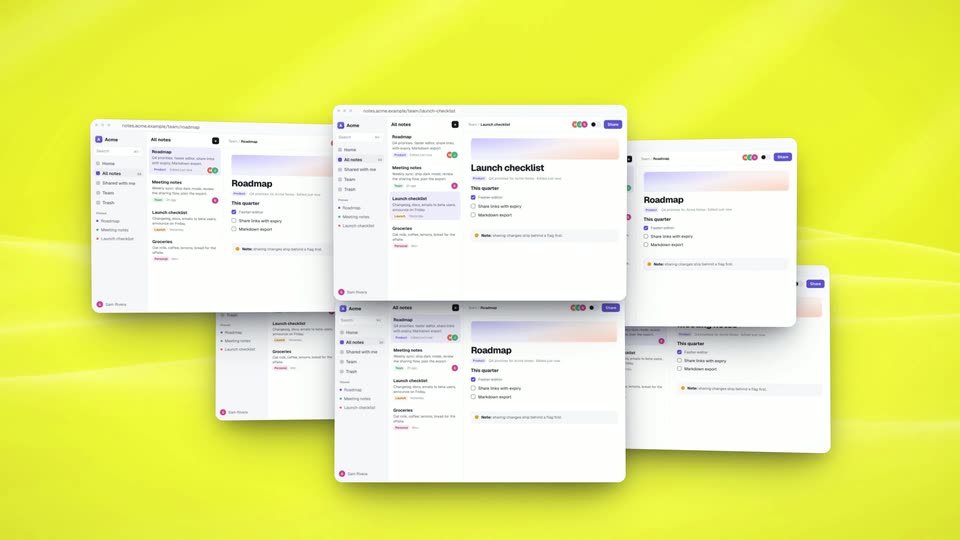
A 3D-tilted notes app window floats on a yellow field, its Roadmap note and task checklist in view. The camera pulls back to show the window is one of many identical panels tiled in a grid, as the checkboxes tick and the note list updates.
Techniques: 3D mockup
Camera: Pull out
A yellow field fills with a dense grid of tiny browser windows, each showing abstract charts, code bars and cursor arrows. The tiles shrink and multiply between frames, the grid expanding to cover the whole screen.
Camera: Pull out
A wall of small white tiles with yellow borders fills the frame, each holding a sliver of colored text. A large dollar sign built from black tiles sits at the center. The camera pulls back to reveal the full symbol against the dense grid.
Camera: Pull out
A full-screen grid of tiny yellow-bordered interface thumbnails fills the frame, each cell a small form or document. A large pixelated black shape, a ring crossed by a diagonal, holds the center as the grid drifts with a faint zoom.
Camera: Static
A man in a blue shirt and glasses stands centered on a white backdrop, gesturing as he speaks. A black lower-third with his handle and title sits bottom left, a black headline appears to his right, then a Composal brand pill. A flat browser mockup fades in behind him.
On-screen text: “@PandelisZ”, “Co-Founder, Composal”, “The software factory”, “Composal”
Camera: Static
A man in a blue shirt stands center frame on a yellow background before a white wireframe browser mockup. As he gestures, blue, yellow and green selection boxes with labels pop onto the wireframe, then four icons labeled Build, Test, Ship, Improve pop in along the bottom.
On-screen text: “Form submits”, “Build”, “Card opens”, “Test”, “Ship”, “Checkout works”, “Improve”
Techniques: Cursor demo
Camera: Static
A presenter in a denim shirt talks at left on a white backdrop. At right, a pull-request card slides in, its checks turning green under a Merged badge, then a notes-app window appears below with a Share dialog and a red error box, and both panels fade out.
On-screen text: “Build”
Techniques: Cursor demo
Camera: Pull out
A bearded man in glasses and a blue shirt gestures mid-sentence against a plain white background. To his left, a headline builds word by word: “Something is broken with how we test today,” with “broken” and “today” popping in yellow on black.
On-screen text: “Something is broken with how we test today”
Techniques: Kinetic type
Camera: Static
A white notes app window, tilted in 3D perspective on a yellow wavy backdrop, fans out into three overlapping windows. The center window shows a Launch checklist view while the left and right windows display other note pages.
Techniques: 3D mockup
Camera: Static
Six tilted browser windows of a notes app float on a yellow field, each tagged Agent 1 to 6 in colored pills. Cursors scroll notes, toggle dark mode and open a share dialog inside each window as the mockups rock in 3D.
On-screen text: “Agent 1”, “Agent 2”, “Agent 3”, “Agent 4”, “Agent 5”, “Agent 6”
Techniques: 3D mockup, Cursor demo
Camera: Push in
On a yellow dotted surface with soft waves, floating notes-app windows blur and shrink while white pill buttons snap into a grid, labeled Search, Sharing, Notes list, Editor, Theme, Trash, Settings. Thin curved lines link the pills, and the Notes list pill takes a dark outline.
On-screen text: “Notes list”, “Sharing”, “Meeting notes”, “Search”, “Trash”, “Editor”, “Theme”, “Settings”
Techniques: Morph, 3D mockup
Camera: Static
A feature map on a yellow dotted background with soft wave bands. White pill chips labeled Search, Sharing, Notes list, Editor, Theme, Trash and Settings float in a loose network, joined by thin black curves that re-route while small dots travel along the paths.
Techniques: Morph
Camera: Static
A man in a denim shirt sits at a laptop on the left, talking to camera. On the right, three white role cards fade in from top to bottom, each with a colored badge, a bold title, Role, Goal and Approach rows, and a small interface sketch.
On-screen text: “Note taker”, “Role Signed-in Acme user”, “Goal Write, pin and find notes”, “Approach Edits only its own notes”, “Workspace admin”, “Role Owner of the workspace”, “Goal Invite people, set sharing”, “Approach Changes members, sharing”, “Invited teammate”, “Role Joins from an invitation”
Camera: Static
A man in a denim shirt and glasses sits at a desk with a laptop, gesturing as he speaks. On the right, three role cards (Note taker, Workspace admin, Invited teammate) sit stacked; a colored highlight steps down through each card's Approach row.
On-screen text: “Note taker”, “Role”, “Signed-in Acme user”, “Goal”, “Write, pin and find notes”, “Approach”, “Edits only its own notes”, “Workspace admin”, “Role”, “Owner of the workspaceGoal Invite people, set sharingApproach Changes members, sharingInvited teammateRole Joins from an invitationGoal Comment on a shared note”
Camera: Static
A browser window mockup of a notes app floats at a slight angle on a yellow background with diagonal light streaks. Three columns show a sidebar, a notes list, and an open Roadmap note with a gradient banner and checklist. A cursor drifts down to the note callout.
Techniques: 3D mockup, Cursor demo
Camera: Static
A flat browser window on a yellow field shows the Acme notes app. A cursor flips the Share toggle, then the screen cuts to the public shared view: the Roadmap note in a red frame, a View only badge, and a Sign in to edit button under the cursor.
Techniques: Cursor demo
Camera: Static
A flat browser window showing a shared Roadmap note, boxed by a red outline and a circled 1 badge, slides right and shrinks on a yellow background as a pale caption with a P2 badge fades in on the left.
On-screen text: “P2”, “A revoked share link is coming back to life about a minute”
Techniques: Kinetic type
Camera: Pull out
On a yellow background, a browser mockup of the notes app and a recording timeline sit left as Logs and Reproduce cards slide in from the right. The note takes a red outline, the timeline highlights Reload signed out, and the matching log line and step glow red.
On-screen text: “A revoked share link keeps working for about a minute”
Techniques: Split screen
Camera: Static
A bug report card (P2, with Observed, Expected, Reproduce, Evidence rows) rests on a yellow background. The cursor moves to the Fix With Agent button and clicks; a coding agent card with a fix checklist slides in from the right, shifting the first card left.
Techniques: Cursor demo
Camera: Pull out
Two white UI panels sit on a yellow gradient. The left shows a coding agent editing a file. On the right, a scenario checklist ticks off four items in sequence, the progress bar fills, the counter climbs to 4 of 4, and the status flips from In progress to Passed.
Techniques: Cursor demo
Camera: Static
A man in a denim shirt sits at a desk with a laptop, gesturing as he speaks. A list of scan results with green checkmarks floats on the left. The caption Every run pops in at lower left, then builds on the last. appears in yellow on a black highlight.
On-screen text: “Every run”, “builds on the last.”
Techniques: Kinetic type
Camera: Static
A presenter in a blue shirt talks and gestures on the right against a white background. Two white cards fade in on the left, a Memories list and a Scenarios list, rows appearing one by one with green checks, the first row highlighted yellow with a Selected pill.
Camera: Static
A bespectacled presenter in a blue shirt stands at right against a white wall. Two white cards, Memories and Scenarios, sit at left. They blur out as a flat yellow disc swells into a shaded sphere and a node timeline with green checks slides across.
On-screen text: “Memories”, “Acme Notes: notes list, search and the editor”, “Sharing: read-only links and revoking them”, “Theme: the chosen mode must follow you between notes”, “Scenarios”, “PR #318”, “A note taker keeps dark mode while opening other notes”, “Selected”, “A note taker pins a note and it stays on top after reloading”, “Not selected”
Techniques: Morph
Camera: Static
Yellow wavy backdrop. Left side shows bold black CI over a smaller italic checks your code. A horizontal line of circular icons, black with arrows then green with pulse marks, slides across the center while a thin vertical divider appears between the groups.
On-screen text: “CI”, “checks your code”
Camera: Static
On a yellow field with faint wavy contour lines, two horizontal pipeline rows animate. The top CI row holds a line of hollow black dots that turn into green checkmarks as they pass a thin vertical marker. The bottom CD row shows a white Build chip sliding rightward along the line into a black Production chip.
On-screen text: “CI”, “checks your code”, “CD”, “ships continuously”
Camera: Static
On a yellow gradient, two pipeline rows animate: a CI line of black dots advances toward green check dots, while a white Build pill slides right along a track toward a black Production pill.
On-screen text: “CI”, “checks your code”, “CD”, “ships continuously”, “Build”, “Production”
Camera: Static
A dark rounded panel on a yellow field holds three horizontal tracks. White note cards glide left to right along each track, the lines fill green and the right-side pills turn green with checkmarks, while the yellow headline builds line by line and the top CI/CD diagram stays softly out of focus.
On-screen text: “Continual Agent Verification”, “Agents walk your users' goals on every change”
Techniques: Kinetic type
Camera: Static
A dark card on a yellow field lists Continual Agent Verification while small white browser cards with cursors slide along three dotted green lines toward check-marked pills. A yellow circle mask then wipes in from the right, opening onto two white panels for Scenarios and User goals.
On-screen text: “CI checks your code”, “CD ships continuously”, “Build”, “Production”, “Continual Agent Verification”, “Agents walk your users' goals on every change”, “Invite a teammate”, “Share a note”, “Export notes”, “Scenarios Scenarios Scenarios Scenarios Scenarios Scenarios Scenarios Scenarios Scenarios Scenarios Scenarios Scenarios Scenarios Scenarios Scenarios Scenarios ”
Techniques: Masking
Camera: Static
On a yellow background, a horizontal line with a moving dot sits above two white panels, Scenarios and User goals. White issue cards labeled Merged slide across the top while the panels update with green checkmarks and Running tags as the selection shifts from #318 to #320.
Camera: Static
Yellow dashboard: a row of white merged-PR cards and a dotted timeline drift right along the top. The left Scenarios panel fades out as a dashed circle with a center dot appears over it, while the right User goals list with green checks stays static.
Camera: Static
A yellow field holds a dashed ring around a center dot, ringed by white pills: Build, Verify, Ship, Improve. The Verify pill inverts to black, a blue arc draws to the center, and a card swaps from New idea to Pull request with a green bar.
Camera: Push in
On a yellow wavy field, a white Scenarios card flips from a red Failed state to all-green checks while the black Verify button turns white. The frame pulls back to center the ring of blocks, with Build, Improve, Ship and Verify labels popping in around it.
On-screen text: “Scenarios”, “Failed”, “Verify”, “Passed”, “Build”, “Improve”, “Ship”
Camera: Pull out
On a yellow field, a ring of dark segments orbits a center dot, with Build, Verify, Ship and Improve pills around it. A white card flips from Scenarios Passed to Shipping, then slides left to New idea as the Improve pill turns black and note cards fill the ring.
On-screen text: “Build”, “Improve”, “Verify”, “Ship”, “Scenarios”, “Passed”, “Shipping”, “New idea”
Camera: Pan
A presenter in a blue shirt stands left of a yellow diagonal panel. The panel builds “You set the direction.”; a white Goal card types “Share links expire after 7 days!”, then five colored Agent pills pop in with cursor icons, before a fade to “Start your verification journey.”
On-screen text: “You set”, “the direction.”, “Start your verification journey”
Techniques: Kinetic type
Camera: Static
A man in a denim shirt and glasses stands on the left against white, hands clasped, beside a yellow diagonal panel holding the headline “Start your verification journey” above a white search bar. “composal.com” types into the bar as a cursor moves to the Start button.
On-screen text: “Start your verification journey”, “composal.com”
Techniques: Cursor demo
Camera: Push in
A presenter in a blue shirt stands left of a white-and-yellow diagonal split, beside a headline and a composal.com search bar with a Start button. He steps off frame left as the yellow panel wipes in to fill the screen.
On-screen text: “Start your verification journey”, “composal.com”, “Start →”
Techniques: Masking
Camera: Push in
Rippling yellow background. A white pill-shaped Composal badge and the black headline “Build your software factory.” fade in left; a white search bar with composal.com and a black Start button sits under the caption “Start your verification journey”; “Backed by Y Combinator” appears at the bottom.
On-screen text: “Start your verification journey”, “composal.com”, “Start →”, “Build your software factory.”, “Backed by Y Combinator”
Camera: Static