3:47


#learnwithtegore #aitutor #tegore | Tegore (YC X25)
Tegore · Education
Screenpipe · Jan 2026 · 0:40 · Full motion · AI-annotated
Screenpipe’s 0:40 launch film runs 12 scenes, about 3.4 s each. The product is on screen from the first frame. There is no explicit call to action; a voiceover carries the film. One continuous screen recording with a rounded facecam pinned to the lower left, cut roughly nineteen times a minute to follow the cursor through the app. Bright white panels on a teal pixel desktop keep the frame legible while the presenter narrates each feature in real time.
Is this your launch? to your site or press kit.
Tegore · Education
Tegore · Education · Mar 2026
Google · AI · Apr 2026
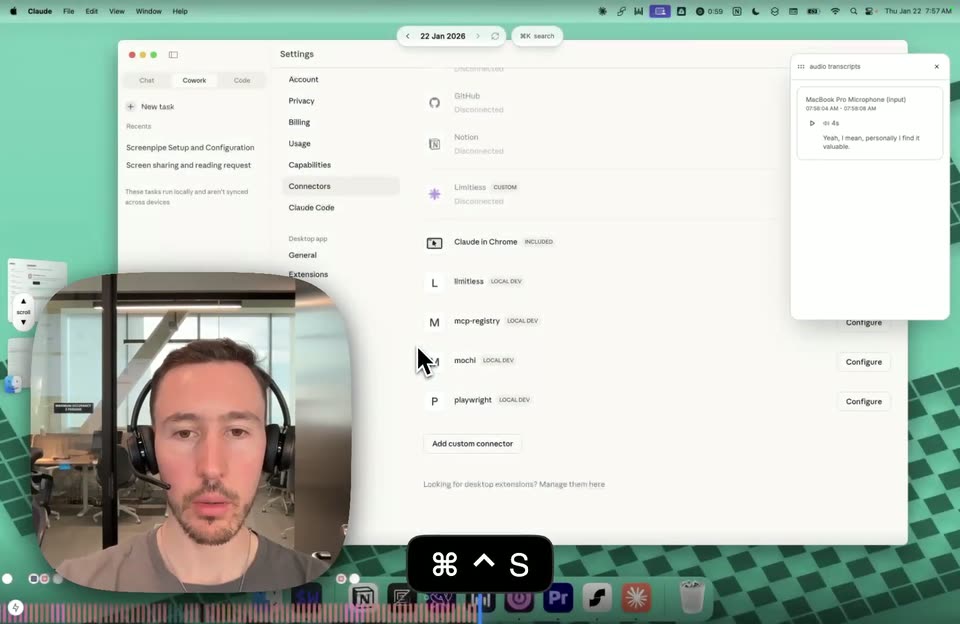
A teal macOS desktop with a pixelated dark green wordmark and a dock of app icons fills the frame. A rounded webcam window in the lower left shows a man wearing headphones talking in an office. A white cursor rests near the center. The shot is locked off.
Camera: Static
A screen recording shows the Claude settings window listing connectors, the cursor hovering at the mochi row; the frame stays locked. A video call of a man with headphones sits lower left, an audio transcript panel upper right, over a teal checkered desktop.
Techniques: Cursor demo
Camera: Static
A dark screen-history interface shows a rounded video thumbnail of a man on the left and a timeline with a moving playhead along the bottom. A white audio-transcripts panel on the right fades out as a WezTerm tooltip with a timestamp appears above the timeline.
Camera: Static
A locked-off screen capture of a developer interface shows terminal logs above, a webcam inset of a man with headphones beside code, and a waveform below. The frame stays still while a cursor and small interface labels shift.
Camera: Static
A gray screen-history interface fills the frame, with a date bar on top and a colored timeline below. A rounded video tile on the left shows a man wearing headphones. A cursor drifts down to the timeline as a small 'Claude' tooltip with a timestamp pops up at the playhead.
Techniques: Cursor demo
Camera: Static
A dense log of API requests and a Claude timestamp bubble fill the frame, then fade to white in half a second; the rounded webcam bubble of a man with headphones remains lower left, and a cursor sits at the bottom.
Camera: Static
A dim macOS desktop brightens, showing a green checkered wallpaper, a Dock of app icons, and a video call window of a man with headphones. A Claude notification banner updates its timestamp while a cursor moves along the Dock.
Techniques: Cursor demo
Camera: Static
A close-up of an extension details panel zooms out to reveal the full Mac desktop: the Claude app with a Screenpipe preview card, an audio transcripts panel on the right, and a small webcam of a man in the lower left. Claude notification bubbles sit above the dock.
Techniques: UI zoom
Camera: Pull out
A macOS screen recording shows the Screenpipe extension preview with an audio transcripts popup centered, while a circular webcam of a man in headphones sits bottom left. A cursor opens a right-hand transcript panel, highlights a summary line, then closes it.
Techniques: Cursor demo
Camera: Static
A macOS settings window shows the Claude Desktop connection with an INSTALLED badge. A small floating transcripts panel overlays it. A cursor glides up, grabs the panel's top bar and drags it to the right edge. A webcam feed of a man with headphones stays pinned lower left.
Techniques: Cursor demo
Camera: Static
A teal checkered desktop frames the Screenpipe Settings window on its Connections tab, with a man wearing headphones in a rounded face-cam at lower left. A cursor glides to the Claude Desktop row and clicks the install button, which switches to a downloading state.
Techniques: Cursor demo
Camera: Static
A teal checkered macOS desktop shows the Claude app; a Screenpipe extension dialog opens over a pixelated shape as a cursor moves across its fields. A man in headphones sits in a rounded webcam inset at the lower left.
Techniques: Cursor demo
Camera: Static