2:40

Durable Actors Launch YC Demo Video
Terse · B2B · Oct 2026
Google Gemma · Apr 2026 · 0:43 · AI-annotated
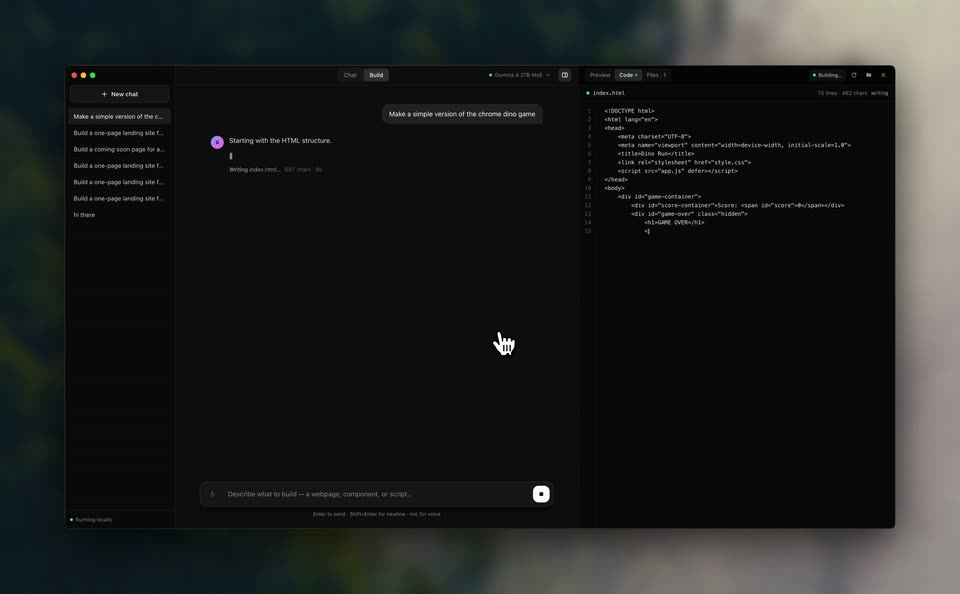
Google Gemma’s 0:43 launch film runs 5 scenes, about 8.6 s each. The product is on screen from the first frame. There is no explicit call to action. One unbroken demo arc: a prompt is typed into the builder, the assistant streams HTML, CSS and JavaScript into the editor, and the right pane flips from code to a live, playable preview that the cursor then plays. Pacing is slow and steady, driven by zoom-ins to the prompt bar and panel flips between code and preview rather than hard cuts.
Is this your launch? to your site or press kit.
Terse · B2B · Oct 2026
Tegore · Education
A dark builder interface zooms in on the prompt bar as a request types out, then pulls back to the full window. The cursor clicks send, a thinking status appears in the chat, and the preview pane begins rendering the game.
Techniques: UI zoom, Cursor demo
Camera: Static
A dark builder window with chat and code panes floats over a blurred background. The chat pane shows the assistant writing HTML and styling, a hand cursor hovers center, and the code pane types before switching to a 'GAME OVER' preview.
Camera: Static
A dark app window floats flat over a blurred backdrop with a soft shadow. The chat pane holds a prompt to build the Chrome dino game; the code pane types CSS line by line, then the right side switches to a white preview showing the game's score bar.
Camera: Static
A dark two-panel app fills the frame. The left chat holds a prompt and plan; the right editor types JavaScript line by line and scrolls up. A hand cursor sits still in the chat. The right panel then flips to a light preview of the dino game's start screen.
Camera: Static
A dark AI build panel sits beside a live preview where a gray square jumps red obstacles on a line. The view zooms into the preview as the cursor plays, a game-over screen appears, the cursor restarts, then pulls back to the full window.
Techniques: UI zoom, Cursor demo
Camera: Pull out