3:47

#learnwithtegore #aitutor #tegore | Tegore (YC X25)
Tegore · Education
Tegore · Mar 2026 · 3:47 · Full motion · AI-annotated
Tegore’s 3:47 launch film runs 7 scenes, about 33 s each. The product is on screen from the first frame. There is no explicit call to action; a voiceover carries the film. The video is a single uncut screen recording that opens with a short presenter intro and then plays one continuous tutoring session in real time, with no music and no scene cuts. Its signature moves are slow push-in and pull-out zooms on the question card, live-typed chat bubbles, and cursor clicks that fill the number line, all framed by a fixed corner webcam tile.
Is this your launch? to your site or press kit.
Tegore · Education
The Browser Company · Productivity · Dec 2022
Google Gemma · Apr 2026
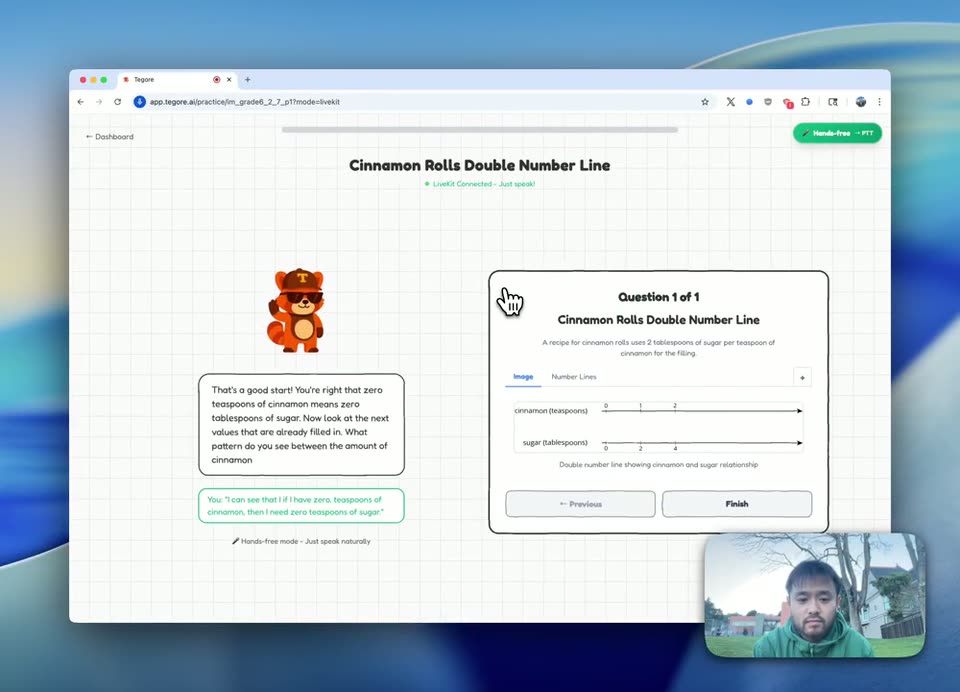
A locked-off browser window shows a math app with a bear mascot and a question card. A webcam feed of a man in a green hoodie sits in the lower right corner. The cursor hovers over the card, then drifts up.
Camera: Push in
A browser window pulls back from a close-up to reveal a math practice app: bear mascot, question card, student video tile. A cursor taps Push-to-talk, then a spoken transcript types into chat bubbles. The view zooms into the card as the cursor clicks a question mark, filling in 3.
Techniques: UI zoom, Cursor demo
Camera: Pull out
Screen recording of the Tegore app: a double number line exercise with a bear mascot and a typing chat bubble. The cursor clicks a blank spot, an input box pops up, the view zooms into the card before pulling back as 6 is entered. A webcam feed overlays the corner.
Techniques: UI zoom, Cursor demo
Camera: Pull out
A math web app shows a double number line with a bear mascot and a presenter webcam inset. The frame opens zoomed on the question card, then pulls back to the full browser window. A cursor clicks blank spots and types values into a small popup as dots fill in.
Techniques: UI zoom, Cursor demo
Camera: Pull out
A browser window shows a math app with a bear mascot typing feedback in a speech bubble, plus a webcam picture-in-picture. The view zooms into the question card as a hand cursor fills the last two number-line slots with 5.
Techniques: UI zoom, Cursor demo
Camera: Pull out
A browser window shows a tutoring app on a grid background, with a cartoon fox avatar left of a question card holding a double number line. A feedback box types text as the line's dots fill green with checkmarks; a webcam feed of a man sits bottom-right.
Techniques: Cursor demo
Camera: Pull out
Close-up of the Practice Complete dialog and slider pulls back to reveal the full browser window of the practice app with the bear mascot and chat input, while a small webcam feed of the presenter sits in the bottom-right corner.
Techniques: UI zoom, Cursor demo
Camera: Pull out