1:50

Chromie - The AI operating system for government contracting
Capto · B2B · Aug 2026
Screenpipe · Feb 2026 · 0:39 · Full motion · AI-annotated
Screenpipe’s 0:39 launch film runs 15 scenes, about 2.6 s each. The product shows up at 0:14 and 1 feature is revealed. There is no explicit call to action; a voiceover carries the film. The video opens with a talking-head complaint over a Reminders window, cuts into a glitching mosaic of tiny screens, then demos the app filling a to-do list before a rapid montage of install and website shots. Its signature moves are the chromatic-aberration glitch transitions, the wall of miniature screen captures, and the typewriter monospace taglines set over a tropical desktop wallpaper.
Is this your launch? to your site or press kit.
Capto · B2B · Aug 2026
ComplyDo · B2B · Oct 2025
Waddle Labs · Industrials · Jul 2026
Films whose music sounds like this one, voice left out
Antigravity A1 · Cinematic electronic
Microsoft · Modern cinematic trailer music
DJI · Cinematic trailer music and electronic dance music
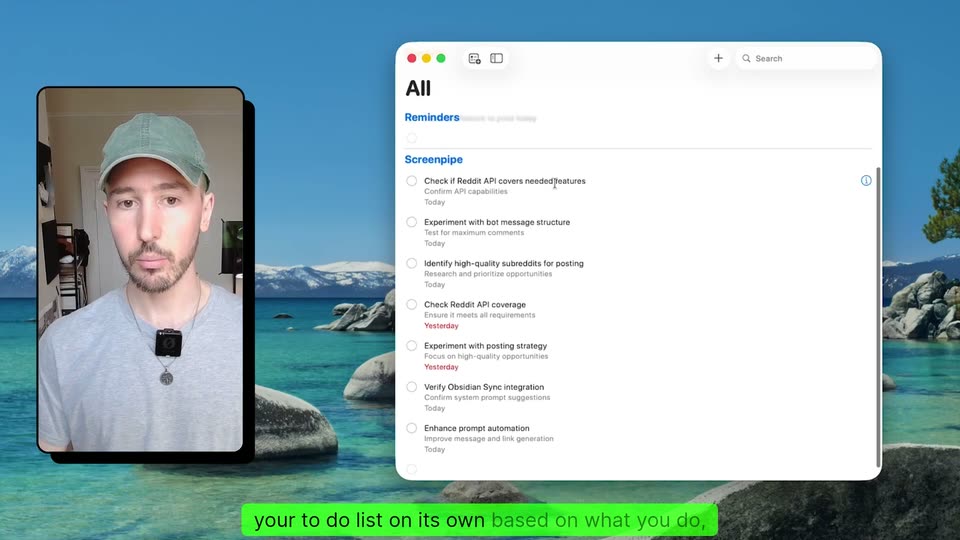
A presenter in a green cap talks from a small inset on the left over a coastal photo, while a Reminders window on the right shows an empty list. A cursor opens the input field and types 'Push the feature to prod today'.
On-screen text: “maintaining a to do list is so annoying.”, “Push”, “It takes just so much time.”
Techniques: Split screen, Cursor demo
Camera: Static
A full-frame grid of small rectangular tiles holds fragments of product interfaces, 3D renders and code editors. A heavy glitch effect distorts every tile with chromatic aberration, color noise and horizontal displacement, and the whole mosaic flickers and shifts.
Camera: Static
A wall of small screen captures, code editors, documents and desktops, fills the frame and slowly pushes in. A centered line of white monospace text carries the tagline, its letters glitching briefly mid-scene.
On-screen text: “it watches everything. quietly. locally.”
Techniques: Kinetic type
Camera: Push in
A locked-off grid of small rectangular tiles fills the frame, each tile a screen capture or UI window. Heavy glitch distortion and red-cyan chromatic aberration fracture the pattern. A small caption sits over the static collage.
On-screen text: “quiietly. 1cocally.”, “wo”
Camera: Static
A talking-head webcam tile sits left of a macOS Reminders window over a coastal wallpaper. The window swaps from an empty list to a full task list, while green-highlighted subtitle captions roll along the bottom.
On-screen text: “What if AI just watch your screen and build your”, “to do list for you?”, “So you just walk and”, “AI just write”, “your to do list on its own based on what you do,”, “what you say,”
Techniques: Split screen
Camera: Static
A macOS desktop with a coastal wallpaper and dock fills the locked-off frame. A central Finder window shows the screenpipe app icon, a right-pointing arrow labeled drag to install, and the Applications folder icon, with a file list open behind it.
Camera: Static
A locked-off macOS desktop with a Finder file list and a drag-to-install window cuts to a Windows desktop showing a browser tab and the screenpipe installer above a terminal.
Camera: Static
A macOS desktop with a Finder window of disk icons over System Settings and a terminal holds, then a glitch transition with RGB split and horizontal displacement tears the whole screen apart.
Camera: Static
A pink-tinted channel page for screenpipe resolves out of a heavy vertical color-glitch into a readable layout, showing a profile header and a grid of video thumbnails.
Camera: Static
An overexposed white frame fades to a desktop view. A Chrome window shows the Screenpipe landing page with a pink headline and a pink button, while a grid of memory cards fills the right side and a dock runs along the bottom.
Camera: Static
A browser window on a macOS desktop shows the screenpipe landing page, with a code terminal docked at the lower left and a blurred recordings panel on the right. The whole frame carries a faint pink glitch edge and stays locked off.
Camera: Static
A 3x3 grid of red-tinted code and terminal panels fills the frame, locked off. Red translucent taglines, see screenpipe in action and RECORDING IS DEAD, flash across the center while small control chips, a Start pill and a Stop button, pop in over the grid.
On-screen text: “see screenpipe in action”, “RECORDING IS DEAD”
Camera: Static
A cream-colored terminal and system diagram fill the frame, with code panels and a flowchart of connected boxes. A pink offset duplicate of the same labels and code overlays the view, giving a glitchy double-exposure. The shot holds steady.
Camera: Static
A dark, dimmed grid of small screen captures fills the frame and holds still. In the center, a white monospace line types out letter by letter, completing the sentence '> your screen is your todo list'.
On-screen text: “> your screen is your todo list”
Techniques: Kinetic type
Camera: Static
A white rounded-square app icon with a black S sits centered on a black starfield, with the screenpipe wordmark, a tagline and a small URL line stacked below. The frame holds still, then fades to black.
On-screen text: “screenpipe”, “your AI finally knows what you're doing”, “open source · local · private · screenpi.pe”
Camera: Static