
0:13
Explore
An AI assistant that has all the context - captures your computer while you work & instant recall
Screenpipe · Nov 2024 · 0:21 · Full motion · AI-annotated
- Length
- 0:21
- Scenes
- 4 · 5.4 s avg
- Product on screen
- 0:00
- Voiceover
- Yes
- Views
- 36 on YouTube
as of November 28, 2026
00:00:00 / 00:21:42
- Length
- 0:21
- Scenes
- 4 · 5.4 s avg
- Product on screen
- 0:00
- Voiceover
- Yes
- Views
- 36 on YouTube
as of November 28, 2026
Screenpipe’s 0:21 launch film runs 4 scenes, about 5.4 s each. The product is on screen from the first frame. There is no explicit call to action; a voiceover carries the film. The video names the product in a single opening shot, then plays one continuous screen-capture demo that zooms in on the timeline, the typed question, and the AI answer. Brisk cuts and pop-in yellow captions keep the pace, with zoom-ins marking each key UI moment.
No filming indicatedEstimated needs: 2 capture groups — your screens or recordings
Is this your launch? to your site or press kit.
More like this



An AI assistant that has all the context - captures your computer while you work & instant recall, scene by scene
· 4 scenes as text
01 · Product intro · 0:00–0:00
A macOS desktop shows a terminal window with a code editor open. A white cursor rests over the code, and a yellow 'screenpipe' label appears at the bottom center.
On-screen text: “screenpipe”
Techniques: Cursor demo
Camera: Static
02 · Demo · 0:00–0:12
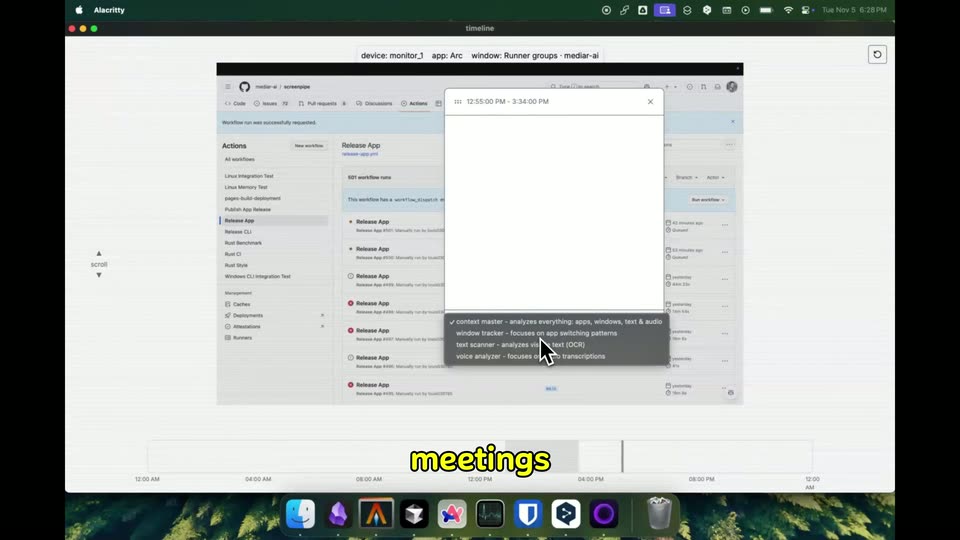
A macOS screen capture shows the ScreenPipe timeline app; the window preview swaps from a blank panel to a GitHub Actions list, then zooms into a popup as the cursor types a question into the input field. Yellow caption words pop in one by one at the bottom.
On-screen text: “ScreenPipe”, “assistant”, “has”, “context”, “screens”, “computer”, “including”, “meetings”, “any”, “moment”
Techniques: Kinetic type, UI zoom, Cursor demo
Camera: Static
03 · Demo · 0:12–0:20
Inside a screen recording, a cursor clicks the ask field of a floating AI panel over a GitHub page. A spinner spins, then a breakdown of app time types in. The view zooms into the list of Cursor, Arc and screenpipe-app, then pulls back to the full desktop.
Techniques: Cursor demo, UI zoom
Camera: Pan
04 · Demo · 0:20–0:21
A macOS screen capture shows a GitHub Actions list on the left and a ChatGPT panel on the right listing app usage notes, with a prompt field at the bottom. A cursor glides from the panel text down to the send icon.
Techniques: Cursor demo
Camera: Static