0:50

Chris Yoo ⚡ CoRL - Fine-tuning VLAs just got so much easier. Today, we're releasing Tra
Dreamscale Labs · Industrials · Oct 2026
Rowboat Labs · Jul 2026 · 1:47 · Full motion · AI-annotated
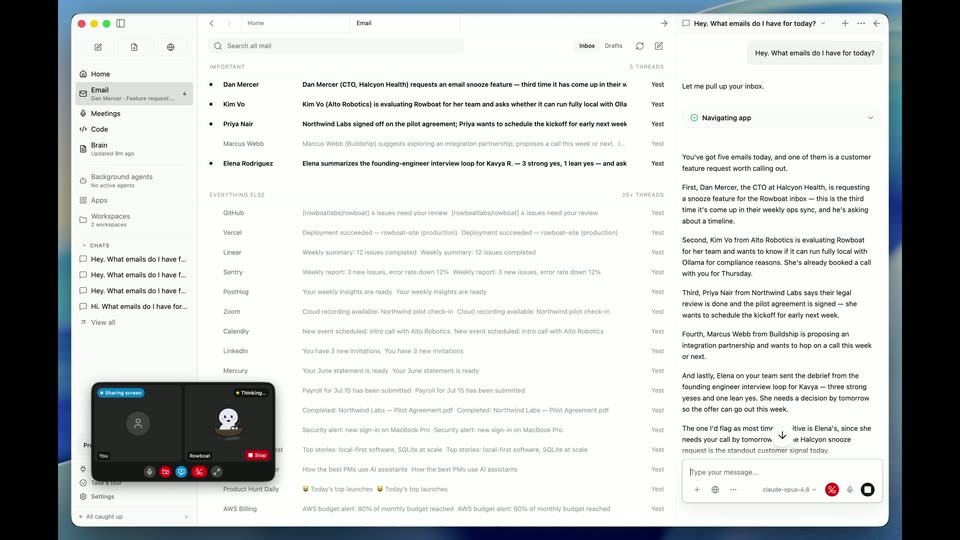
Rowboat Labs’s 1:47 launch film runs 11 scenes, about 9.8 s each. The product shows up at 0:23 and 3 features are revealed. There is no explicit call to action; a voiceover carries the film. The video is one continuous walkthrough that follows a single customer request (a snooze feature) from the inbox, into a custom Feature Requests tracker, and into shipped code, with locked-off caption cards announcing each step. Its style is flat screen recording on a blurred blue desktop, a persistent floating call widget with a boat mascot, and a steady conversational voiceover at a moderate pace.
Is this your launch? to your site or press kit.
Dreamscale Labs · Industrials · Oct 2026
Incredible · Nov 2026
A macOS app window shows the assistant home screen; a cursor clicks the mic and drags a small dark meeting widget to the lower left. The view then switches to an email inbox as the assistant's reply streams in beside it.
Techniques: Cursor demo
Camera: Static
A centered three-line caption fades in from light gray to black on a plain off-white background, then holds on a locked-off frame for the rest of the clip.
On-screen text: “Building a custom app”, “inside Rowboat that collects”, “all such feature requests.”
Camera: Static
A flat screen recording of the assistant app: an inbox with an AI summary panel on the right and a small screen-share widget bottom-left where a user prompt types out. The app navigates to a Mini Apps page, and the view zooms into a ranked Feature Requests board.
Techniques: Cursor demo, UI zoom
Camera: Push in
A light dashboard titled Feature Requests lists ranked rows with source chips and demand scores. A cursor clicks the top row, expanding it into a detail panel showing requester avatars and quoted email, meeting, and Slack entries, then the page scrolls down to reveal the team discussion.
Techniques: Cursor demo
Camera: Pan
A cursor glides to the purple Implement button on a feature request page and clicks it, the label switching to Starting session. The view then pulls back to reveal the full app window with sidebar, chat panel, and a video call tile.
Techniques: Cursor demo, UI zoom
Camera: Pull out
A centered block of dark sans-serif text fades in on a plain white background, then holds still on a locked-off frame. The text states that Rowboat is implementing a snooze feature using Claude Code inside the code section.
On-screen text: “Rowboat is now implementing the snooze feature. It uses Claude Code inside the code section.”
Camera: Static
A flat desktop app fills the frame: left nav, email thread, feature list, and right-hand chat. A cursor glides from the sidebar to the top tab, swapping the middle panel from thread to list while the chat updates. A small video-call window with two avatars floats lower left.
Techniques: Cursor demo
Camera: Static
A desktop app dissolves from a project list into a code editor, split into a file-changes panel and a scrolling agent chat log. A small boat-character voice widget in the corner cycles through Speaking, Listening and Muted as the agent runs builds.
Techniques: Cursor demo
Camera: Push in
A centered block of text on a plain off-white background fades in from pale gray to solid black, holds for a beat, then fades back out. The lines stay locked in place throughout the clip.
On-screen text: “Opening the development version of Rowboat app with the snooze-email feature we just built.”
Camera: Static
A screen-share window over a blurred blue desktop fills from empty to the Rowboat dashboard: sidebar, Good morning greeting, inbox and a right-hand task panel. A small sharing pill with two avatars stays bottom-left while a cursor drifts to the Email row. A locked-off caption narrates the dev build.
On-screen text: “Opening the development version of Rowboat app with the snooze-email feature we just built.”
Techniques: Cursor demo
Camera: Static
A dark email client fills the screen. The view zooms into the inbox header as a cursor clicks a snooze icon, opening a small menu with two time options. After a pause, the camera pulls back to the full window.
Techniques: UI zoom, Cursor demo
Camera: Static