1:33

The new Copilot: where work comes together
Microsoft · AI · Sep 2026
Riverside · Jul 2026 · 0:26 · AI-annotated
motion //t.co/dHQVXx5M9Z
Riverside’s 0:26 launch film runs 9 scenes, about 2.9 s each. The product is on screen from the first frame and 1 feature is revealed. There is no explicit call to action; a voiceover carries the film. A cream headline card names the promise, one unbroken cursor walkthrough of the Motion tool runs through template pick, prompt edit, and confetti payoff, and a black logo card closes it. The style is flat cream and charcoal surfaces with purple accents, tight reframes timed to each cursor action, and a single celebratory confetti burst at the end.
Is this your launch? to your site or press kit.
Microsoft · AI · Sep 2026
Cursor · Developer tools · Oct 2026
Street · Oct 2024
On a cream background, the small black RIVERSIDE logo sits at top. The black headline Generate motion graphics is centered, the word motion tinted purple, then a second line to spice up your videos drops in beneath it.
On-screen text: “Generate motion graphics”, “to spice up your videos”
Techniques: Kinetic type
Camera: Static
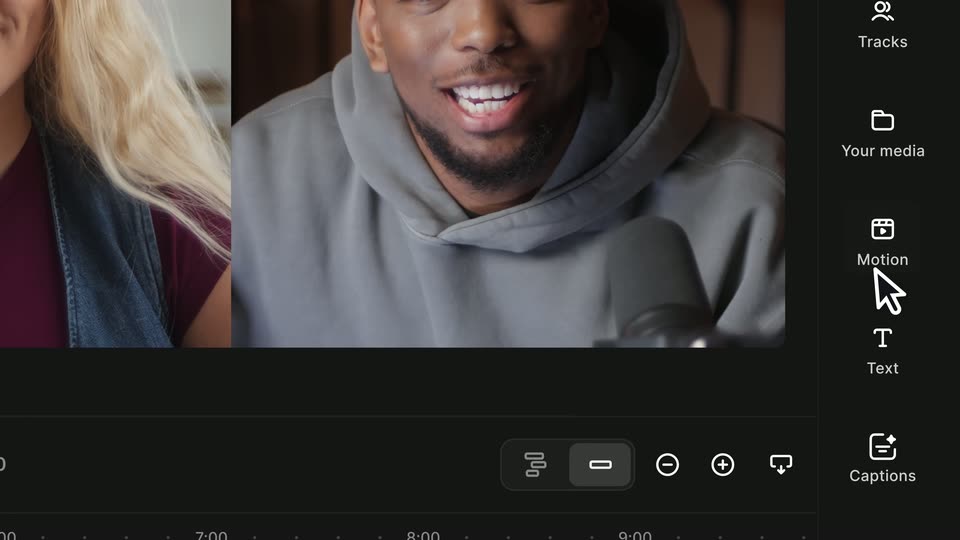
The dark Riverside editor fills the frame; the view reframes toward the right rail as the cursor taps the Motion tool, which lights up purple, while a two-line tagline slides in over the preview.
On-screen text: “Generate motion graphics”, “to spice up your videos”
Techniques: UI zoom, Cursor demo
Camera: Push in
A dark template library interface fills the frame. A cursor hovers the Motion tab, then clicks a Follow button on a card. The view zooms into that template, revealing a split-screen of two talking heads with a white name badge sliding in at the right.
Techniques: Cursor demo, UI zoom
Camera: Pan
A split-screen video call shows a smiling blonde woman and a man in a grey hoodie. A white follow chip with avatar, name, and Follow button slides in, then a purple selection box and toolbars snap around it while a cursor hovers the button.
Techniques: Split screen, Cursor demo
Camera: Static
Above a locked profile card ringed by purple handles, a dark prompt box types an edit command, the word pink in magenta, and a portrait thumbnail snaps into its corner; a white cursor clicks the send arrow.
Techniques: Kinetic type, Cursor demo
Camera: Static
A split video call with a smiling woman left and a man right sits behind a white profile pill framed by a purple selection box with corner handles. The pill's name and handle swap from Justin Walker to Gili Nash, its avatar changes, and a cursor clicks the Follow button as it turns pink.
On-screen text: “change follow button to pink,”, “update name to Gili and use”, “this image for profile icon”
Techniques: Cursor demo, Morph
Camera: Static
A text field on a dark interface types out a sentence letter by letter, then a cursor moves to the send arrow. Above, a profile card with a pink Follow button and purple selection handles holds a hovering cursor.
Techniques: Cursor demo
Camera: Static
A split screen shows a blonde woman and a man in a gray hoodie speaking. A white follow bar with Gili Nash's profile slides up at the bottom, a cursor clicks the pink Follow button, it turns to dark Following, and colored confetti bursts across the frame.
On-screen text: “Great! Now add confetti when the button is pressed”
Techniques: Split screen, Cursor demo, Particles
Camera: Static
On a black background, the white RIVERSIDE logo and wordmark sit centered above the tagline “Record. Edit. Grow.” The last word of the tagline resolves from a partial form into “Grow.” in the first second, then the card holds still for the rest of the clip.
On-screen text: “Record. Edit. Grow.”
Techniques: Kinetic type
Camera: Static