1:13

Introducing Aleph 2.0 | Runway
Runway · AI · May 2026
Invideo’s 0:36 launch film runs 17 scenes, about 2.2 s each. The product is on screen from the first frame and 5 features are revealed. The call to action lands at 0:29 (79% in), over a voiceover. A launch video for the AI Motion Graphics feature on invideo, built as a generation pipeline: a co-branded opener names the product, then five content types (product demo, infographics, app walkthrough, educational content, case study) each arrive as a bold top title while a persistent prompt bar types the request and the card below morphs into the result, closing on a now-on-invideo call and the invideo logo lockup.
Is this your launch? to your site or press kit.
Runway · AI · May 2026
Pika · AI · Aug 2026
Nintendo · Nov 2026
On a dark navy field with a faint dot grid, a blue X forms at center as the white invideo and ANTHROPIC wordmarks slide in on either side. PRESENTS fades in below, followed by the tagline Gorgeous at your fingertips.
On-screen text: “invideo X ANTHROPIC”, “PRESENTS”, “Gorgeous”, “at your fingertips”
Techniques: Kinetic type
Camera: Static
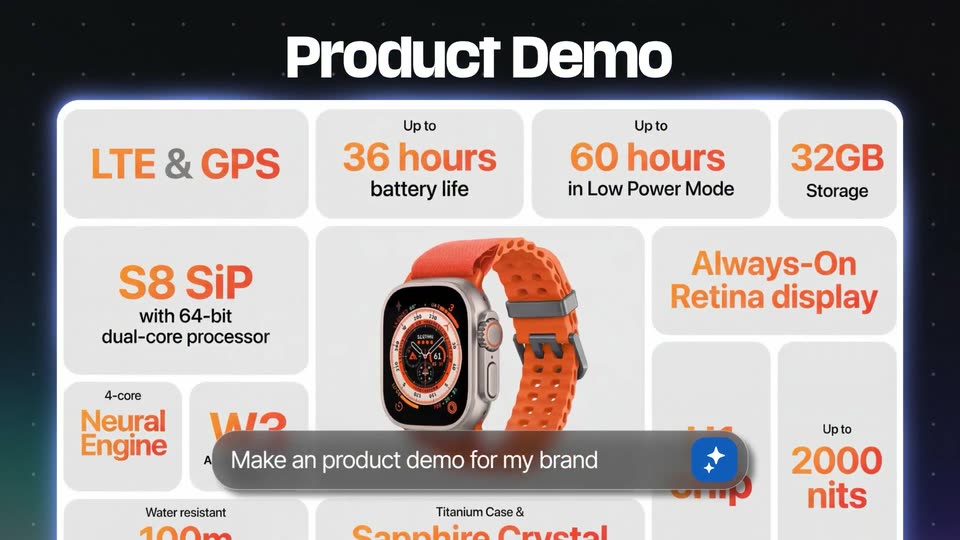
A three-line headline in white and light blue slides in over a dark dot grid, then cuts to a glowing “AI Motion Graphics” that settles into a rounded prompt bar with a blue sparkle button, where “Make an product demo for my brand” types out behind a caret.
On-screen text: “Gorgeous Motion Graphics at your fingertips”, “AI Motion Graphics”, “Make an product demo for my brand”
Techniques: Kinetic type, Morph
Camera: Static
A white spec-sheet card for an orange Apple Watch sits on a dark dotted background, the large white title “Product Demo” fading in above it. A dark prompt bar with white text and a blue sparkle button rests across the bottom of the card.
On-screen text: “Make an product demo for my brand”, “Product Demo”
Camera: Pull out
A bottom input bar shows the prompt being typed, updating from product demo to infographics. The white spec-card grid with an orange watch dissolves into a dark circuit pattern with a white wireframe watch outline as the top title switches to Infographics.
On-screen text: “Product Demo”, “Make an product demo for my brand”, “Infographics”, “Make an infographics for my brand”
Techniques: Morph, Cursor demo
Camera: Static
A rounded satellite view of a racetrack sits under a white title. A glowing blue line draws itself along the circuit, completing the loop, while a dark prompt bar with a blinking cursor and a blue sparkle button stays fixed at the bottom.
On-screen text: “Infographics”
Camera: Static
A dark feature card shows a satellite view of a racing circuit traced by a glowing blue line, with a prompt bar reading a brand request below. The card scrolls up and out as a second card with the same circuit and a new heading slides up into place, while small green DRS zone tags pass through the frame.
On-screen text: “Infographics”, “App Walkthrough”
Techniques: Kinetic type, Parallax
Camera: Static
A front-facing phone mockup cycles through app screens inside a glowing rounded frame, with a chat prompt bar below and a bold white title above. Near the end it cuts to a red field of scattered letter tiles under a new title.
On-screen text: “App Walkthrough”, “Educational Content”
Camera: Static
A red card of cut paper letters on a dark dotted background, edged with a blue glow, fills the frame. A dark input pill below holds a typed prompt with a blinking cursor and a blue sparkle button. A white headline sits above.
On-screen text: “Educational Content”
Camera: Static
A red card holds a hinged paper-cutout portrait that flips open on a spring to reveal a cannon cutout behind it. A prompt pill sits at the bottom while colored letter blocks spelling a brand name and outline text appear at lower left.
On-screen text: “Educational Content”, “PEMBRION”, “MORPHINE”
Techniques: 3D mockup
Camera: Static
A rounded content card on a dark dotted background crossfades from a red collage of vintage cutouts (engraved face, cannon, morphine bottle, letter tiles) to a sepia photo of a steam train with the caption “Trust Was” typing in. The top headline swaps from “Educational Content” to “Case Study” while the bottom prompt bar reads “Make a case study for my brand” beside a blue sparkle button.
On-screen text: “Educational Content”, “Make an educational content for my brand”, “Make a case study for my brand”, “Case Study”, “Trust Was”
Techniques: Masking
Camera: Pan
A dark rounded card with a glowing blue border holds black-and-white factory footage of a conveyor line. A monospace quote types out letter by letter, the word Deception flashing a yellow highlight, while the Case Study title and CTA button stay fixed.
On-screen text: “Case Study”, “Make a case study for my brand”, “Trust Was the Brand. Deception Was the Engine.”
Techniques: Kinetic type
Camera: Static
A rounded card holds a black-and-white halftone photo of censored figures under the title “Case Study”, with a prompt bar below reading “Make a case study for my brand”. The headline types in word by word over the photo, “Clean Diesel” boxed in yellow.
On-screen text: “Case Study”, “When Clean Diesel Was Just a Line of Code.”
Techniques: Kinetic type
Camera: Static
A flat dark card with a dotted grid holds a black-and-white halftone photo of three people. A serif headline overlays the photo with a yellow highlight, and a prompt input pill below it swaps its typed text. The whole panel drifts down as the headline words scale and slide.
On-screen text: “Case Study”
Techniques: Kinetic type
Camera: Pan
A dark dot-grid frame under a Case Study title; a prompt bar types a request and collapses into the glowing headline AI Motion Graphics, which scales up, then the frame pulls back into a tilted 3D card with white corner handles on black.
On-screen text: “Case Study”, “Clean Diesel Was Just a Line of Code.”, “AI Motion Graphics”
Techniques: Kinetic type, Morph, 3D mockup
Camera: Static
A white blob with two black dots wiggles at the center of a black background, then morphs into the InVideo logo mark. The wordmark 'invideo' appears with white dots of varying sizes scattered around it.
On-screen text: “invideo”
Techniques: Morph
Camera: Static
The white invideo wordmark sits centered on black with four white dots in the corners, as the tagline Your Power to Play fades in beneath it.
On-screen text: “Your Power to Play”
Camera: Static
The white invideo wordmark and the tagline Your Power to Play hold centered on a black background in a locked-off frame, then fade down to black.
On-screen text: “invideo”, “Your Power to Play”
Camera: Static