0:20

Incredible - We just launched Incredible for teams. One person shows Incredible h
Incredible · Nov 2026
Resin Technologies · 0:22 · Code only · AI-annotated
Resin Technologies’s 0:22 launch film runs 11 scenes, about 2.0 s each. The product is on screen from the first frame and 1 feature is revealed. There is no explicit call to action. The film opens straight into a tight, locked-off UI walkthrough of the Generate with AI flow (add component, type a part number, watch the progress run, save the result), then cuts to a static black tagline card and a line-drawn logo reveal that ends on the resineda.com lockup. Pacing is quick inside the interface (around 13 cuts per minute) and slows to held frames for the closing brand cards, with a warm copper accent carried over neutral warm gray and near-black fields.
Is this your launch? to your site or press kit.
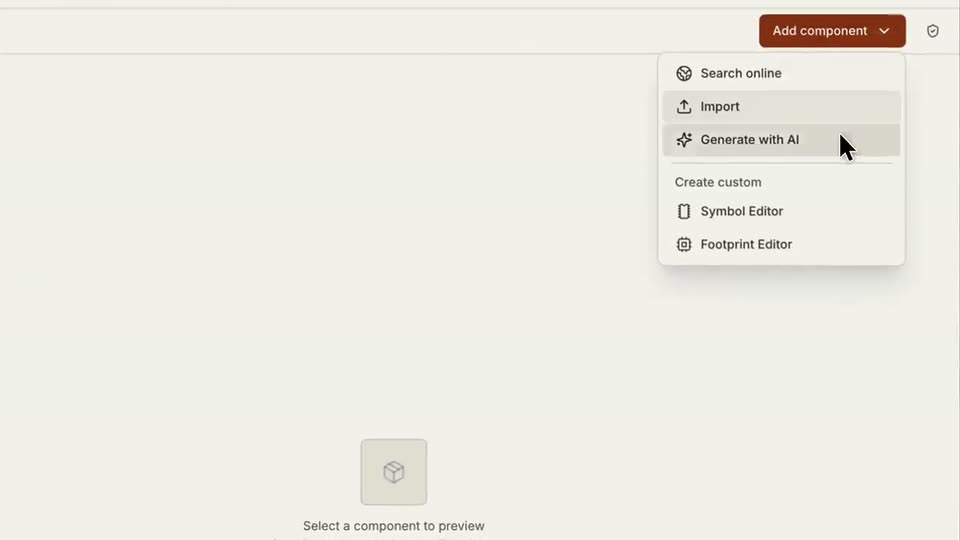
A component library screen with a left list fills the frame. The cursor clicks the orange Add component button, the view zooms into the form panel, and a dropdown menu opens with the cursor resting on Import.
Techniques: UI zoom, Cursor demo
Camera: Push in
A product modal titled Generate with AI opens over a dimmed dashboard. A cursor types a part number, clicks Find parts, and a single result row appears. The panel scrolls down to reveal an orange Generate button, which the cursor presses.
Techniques: Cursor demo
Camera: Pan
A centered “Generate with AI” modal sits over a dimmed, blurred app screen. The status line cycles from “Finding the datasheet” to “Reading the datasheet” to “Reading package dimensions”, a segmented progress bar fills, and the whole modal slowly scales up.
Techniques: UI zoom
Camera: Push in
A modal dialog titled Generate with AI sits centered over a dimmed interface, showing a partially filled progress bar and the part code STM32H743IIT6. The dialog sharpens into focus as the blurred background resolves into a panel.
Camera: Static
A Generate with AI dialog shows a yellow symbol and red footprint preview beside package fields. A cursor clicks the orange Save to personal library button; it flips to Done and a green toast confirms, then the dialog fades out to reveal the component in the library list.
Techniques: Cursor demo
Camera: Push in
A dimmed electronics design interface shows component panels, a yellow footprint outline and a red IC footprint on a dark square. A white headline fades in at the center and holds still.
On-screen text: “A new way to design electronics.”
Camera: Static
A white sentence sits centered on a plain black background, locked off and static for the full duration of the clip.
On-screen text: “A new way to design electronics.”
Camera: Static
A single line of light gray text sits centered on a black background, fading in and out over a brief moment.
On-screen text: “A new way to design electronics.”
Camera: Static
A black frame holds a single centered line of gray text that sits still and then fades to black over a brief moment.
On-screen text: “A new way to design electronics.”
Camera: Static
A copper line outline traces a stylized letter R at center on black, the strokes drawing in to complete the mark over a faint dark glow. The frame stays locked.
Camera: Static
A layered white R mark holds center on a near-black field. The letters esin appear beside it to complete the word Resin, then a small peach URL fades in beneath.
On-screen text: “resineda.com”
Camera: Static