0:24

Magnitude HN Demo
Magnitude · B2B · Sep 2026
Resend · Oct 2026 · 0:06 · Clip · AI-annotated
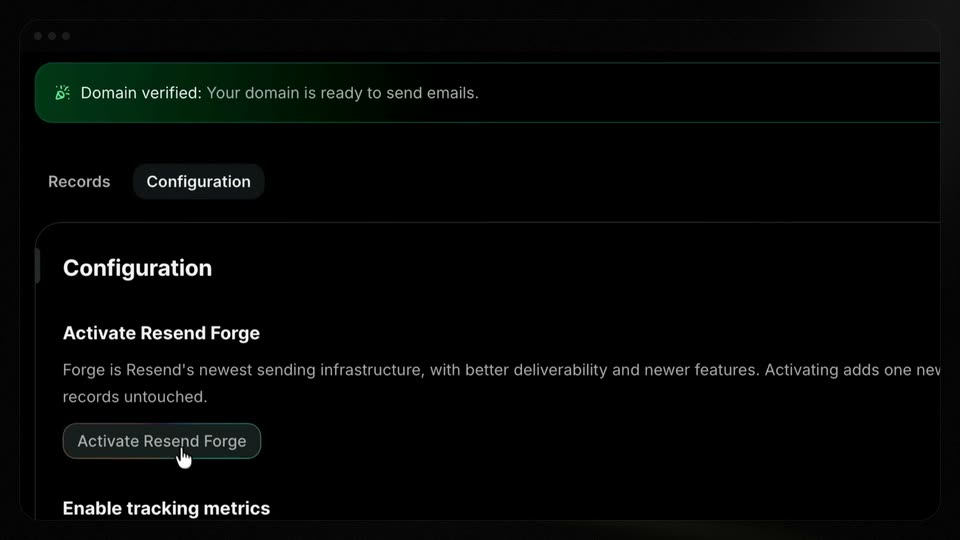
Resend’s 0:06 clip runs 2 scenes, about 3.5 s each. The product is on screen from the first frame and 1 feature is revealed. A two-scene feature demo built around cursor-driven UI states, opening with a blur-to-focus settle on the configuration panel and cutting to the activation flow where a click triggers a green success tint. Its signature is the green confirmation state that closes each step, paired with smooth blur transitions and a near-black palette.
Is this your launch? to your site or press kit.
Magnitude · B2B · Sep 2026
Alpic · Dec 2025
A dark domain settings screen sharpens in from a blur, reframing onto the Configuration panel with its green verified banner. A white cursor glides down and hovers the Activate Resend Forge button, which lights up green, then the whole interface blurs out.
Techniques: UI zoom, Cursor demo
Camera: Push in
A dark onboarding screen shows a Return-Path card. A cursor clicks the white Activate Forge button; it shows a loading spinner, the card tints green with a checkmark, and the input fills with the full domain. The DNS Records section scrolls up below.
Techniques: Cursor demo
Camera: Push in