1:51

Tiny (YC F24) Launch Video
Tiny · B2B · Nov 2024
Replit’s 2:44 launch film runs 17 scenes, about 9.7 s each. The product is on screen from the first frame. The call to action lands at 2:01 (74% in), over a voiceover. The video alternates between a locked-off talking-head shot in a striped studio and screen recordings framed on a starry backdrop, keeping the presenter in a small corner inset during all demos. Handwritten slides and slow zoom-ins on UI elements carry the explanation at a steady, unhurried pace, with the starry field and purple glow as the signature visual move.
Is this your launch? to your site or press kit.
Tiny · B2B · Nov 2024
HumanLayer · B2B · Nov 2024
GitHub · Developer tools · Nov 2026
Locked-off shot of a man in a cap and clear glasses speaking in front of a white wall with orange and black stripes, a RØDE microphone on a boom arm at left. He smiles, then gestures with his hands as he talks; a leafy plant fills the right edge.
Camera: Static
A white presentation slide lists auth points in a handwritten font with a small Replit login mockup at the top right. The view zooms in on the login mockup while a speaker talks in a bottom-right picture-in-picture.
On-screen text: “What is Auth?”, “A system for managing users and access”, “Why Replit Auth”, “1. Auth is hard”, “2. Your app isn't an auth app”, “3. Add reliable auth with a single prompt”, “We'll take care of that for you”
Techniques: UI zoom
Camera: Push in
A browser window floats on a dark starry background, showing a Replit login panel with social sign-in rows on the right. The left panel shifts from a permissions card to an explainer slide reading 'What is Auth?' with a numbered list and an arrow. A presenter in a cap and glasses sits in a small live-action inset at the bottom right.
Camera: Pull out
A white slide with handwritten text lists three points on Replit Auth, with two small login screenshots top right. A man in a cap and glasses speaks in a bottom-right video inset. At the end, the frame zooms out to reveal the app's toolbar.
Techniques: UI zoom
Camera: Pull out
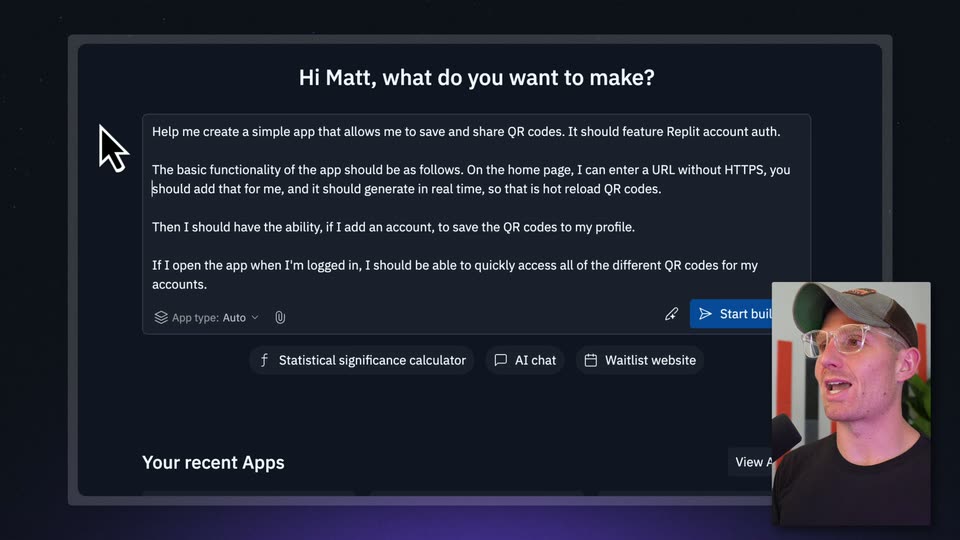
A browser window shows the Replit prompt screen, pre-filled with a request to build a QR code app. The view zooms into the prompt box, holds as the cursor hovers, then zooms back out, while a capped presenter speaks in a lower-right picture-in-picture.
On-screen text: “QR Snap”
Techniques: UI zoom, Cursor demo
Camera: Pull out
A locked-off screen capture shows a browser window with an AI chat panel on the left and the QR Snap web app on the right, its heading reading Create and Manage QR Codes. A small webcam feed of a man in a cap and glasses sits in the bottom right corner.
Camera: Push in
A cursor types a URL into the QR Snap input field, a black QR code fills the preview box, then the cursor slides right and hovers the blue Sign In button. A man in a cap and clear glasses talks and gestures in a small bottom-right inset.
Techniques: Cursor demo
Camera: Static
A login page with a pink brain icon and a permissions list sits on a dark starry field; a cursor hovers over the Google and X buttons while a man in a cap talks in a bottom-right inset. The view zooms in at the end.
Techniques: Split screen, Cursor demo, UI zoom
Camera: Push in
A screen recording of a Replit preview window shows a deployed page with a brain icon and a permissions list. A cursor glides to the top-left and clicks the Back to my page link while a talking-head webcam sits in the lower-right corner.
Techniques: Cursor demo
Camera: Pan
A dark console frames a white preview pane: an OAuth page with a pink brain icon and permission list clears to blank, a cursor drifts across, then the view switches to a QR generator tab and a dark QR popup opens. A presenter's face sits bottom-right.
Techniques: Cursor demo
Camera: Pan
A dark browser window fills the frame on a starry backdrop, its cursor drifting downward while a dev URL fades into the address bar. A small picture-in-picture of a bespectacled presenter in a green cap sits in the bottom-right corner.
Techniques: Cursor demo
Camera: Static
A browser window displays a web app for creating QR codes. A cursor clicks a blue button on the right, and the interface updates. A picture-in-picture video of a man speaking sits in the bottom right corner.
Techniques: Cursor demo
Camera: Static
A browser window shows a Replit consent dialog with a pink brain icon and permission list, beside a presenter in a bottom-right inset. The frame zooms in on the dialog, then a cursor moves to the Allow button and clicks it, leaving a blank page.
Techniques: UI zoom, Cursor demo
Camera: Static
A white screen on a dark starry backdrop loads the QR Snap interface, the heading and two panels fading in, while a small live-action clip of a man in a cap and glasses plays in the bottom right corner.
Techniques: Split screen
Camera: Static
A locked-off screen shows the QR Snap web app with a generate panel on the left and a saved codes list on the right. A cursor glides over the list and header while a man in a corner picture-in-picture talks and gestures.
Techniques: Cursor demo
Camera: Static
A man in a grey cap and clear-framed glasses speaks to camera in front of a RØDE studio mic, gesturing with his hands. He sits against a white wall with orange and black vertical stripes, a leafy plant filling the right edge. The shot is locked off.
Camera: Static
A dark starry sky holds still while a soft purple glow drifts up from the bottom edge. The word RODE sits locked near the lower part of the frame, with no other motion.
On-screen text: “RODE”, “ODE”
Camera: Static