3:51

JSX Tool Demo
Coasts · B2B · Nov 2025
HumanLayer · Nov 2024 · 3:18 · AI-annotated
HumanLayer’s 3:18 launch film runs 26 scenes, about 7.6 s each. The product is on screen from the first frame. The call to action lands at 2:35 (79% in), over a voiceover. The video is built as a presenter intro, a hand-drawn concept slide, then one long screen-capture demo that cuts between the GitHub repo, the code editor, the terminal and Slack, and closes on the GitHub page with the presenter returning for the final pitch. Its style is defined by zoom-ins with soft blurs on code, cross-dissolves between Slack and the editor, and small dark badges at the bottom center that mark steps and shortcuts.
Is this your launch? to your site or press kit.
Coasts · B2B · Nov 2025
Replicas · B2B · Mar 2026
Cursor · Developer tools · Feb 2026
Films whose music sounds like this one, voice left out
Loom · Product Tutorial
A man in a white cap and black hoodie speaks to the camera, a microphone and pop filter in the lower foreground. Two framed abstract prints hang on the white wall behind him. The locked-off shot holds steady as he talks, then the frame blurs out at the end.
Camera: Static
A static white slide displays two hand-drawn flowcharts, Gen 2 and Gen 3 Agents, with blue arrows and labels. A small webcam inset at the bottom right shows a man in a cap gesturing as he talks.
Camera: Static
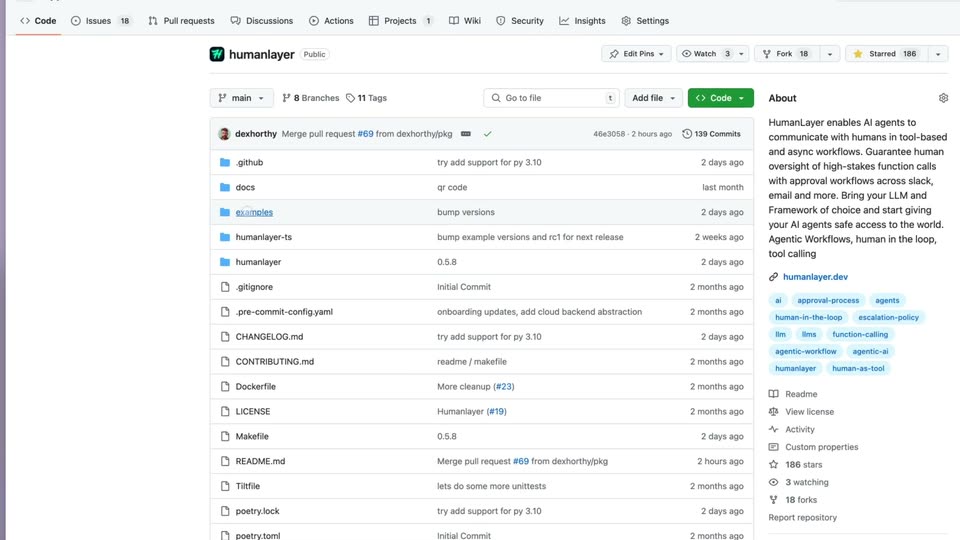
A GitHub repository page for the humanlayer project begins blurred, then snaps into focus, revealing a file list on the left and an About panel with topic tags on the right. The view holds steady on the code tab.
Camera: Static
A GitHub repository page for the humanlayer examples folder is shown full-frame, then the view zooms into a subdirectory listing Python example files and reframes onto one source file displaying lines of code.
Techniques: UI zoom
Camera: Static
A code editor window shows a Python file; the view scrolls down through the source as the frame zooms in on key blocks, then back out, highlighting the human-as-tool and approval decorator lines.
Techniques: UI zoom
Camera: Pull out
A dark code editor fills the frame, split into an empty terminal pane left and a file tree with Python code right. A translucent window mockup and caption fade out over the code, leaving the editor clean. A small V2 logo badge sits at the bottom center.
Camera: Static
A dark code editor scrolls up through a Python file that defines LinkedIn message threads, then the view zooms in with a soft blur onto a block of code. A small white dot hovers near the right edge throughout.
Techniques: UI zoom
Camera: Push in
A dark code editor shows a Python file listing inbound LinkedIn messages. The code scrolls down, zooms in on the message text, then returns to the full file. A small blue close button appears in the bottom-left corner.
Techniques: UI zoom
Camera: Pull out
A terminal window fills the screen as a Python command is typed and executed, showing a loading spinner. The view then shifts to a split layout, revealing a code editor on the right side with syntax-highlighted Python code. A small black badge with a white logo remains at the bottom center.
Techniques: Split screen
Camera: Push in
A Slack thread in the #dm-with-the-ceo channel scrolls down past a HumanLayer bot message, revealing Approve, Reject and Respond buttons; a tooltip first labels the channel in the sidebar.
Camera: Push in
A dimmed chat interface frames a centered modal titled Respond to Agent. Text types into the feedback field: follow up with both sarah and terry. A black keyboard-shortcut chip pops up at the bottom, then a loading spinner appears and the Submit button grays out.
Camera: Static
A Slack channel view fills the screen, showing a HumanLayer agent message with Approve, Reject and Respond buttons. The shot opens and closes on cross-dissolve transitions, each marked by a dark rounded badge (an X, then a 2) at the lower center.
Camera: Pull out
A code editor fills the frame, split into a terminal log left and a Python file right showing the send_linkedin_message function. The terminal prints LinkedIn thread data and a 'waiting for human response' line as the view zooms in. A step badge at the bottom counts from 2 to 4.
Techniques: UI zoom
Camera: Push in
A split view of a Slack workspace and a code editor reframes onto the Slack thread. A cursor clicks the Approve button on a message request, and the thread updates from one reply to two.
Techniques: Split screen, UI zoom, Cursor demo
Camera: Static
A dark terminal log scrolls up on the left while a code editor with a file tree and Python code holds on the right. A black rounded badge with a cursor icon and the numeral 2 sits at the bottom center.
On-screen text: “2”
Techniques: Split screen
Camera: Pull out
A split screen pairs a terminal on the left with a code editor on the right. The terminal log scrolls upward as new lines appear, while the editor shows Python code with a file tree. A command-2 shortcut badge flashes at the bottom of the left pane.
Techniques: Split screen
Camera: Static
A desktop screen shows a dark terminal on the left and a code editor on the right. The terminal appends log lines and simulated LinkedIn messages line by line, while the editor displays a static Python file with colored syntax.
Camera: Static
The Slack channel scrolls up and zooms onto an agent message with green Approve and red Reject buttons. A dark countdown badge showing 4 sits at center, then fades out. A blue pill reading 3 new messages pops in at the top right.
Techniques: UI zoom
Camera: Push in
A dimmed chat workspace sits behind a centered Reject Action modal. The feedback field types 'please offer 20% off too' letter by letter, then a spinner appears over the code block and a dark X badge pops in at the bottom of the screen.
Camera: Static
A Slack workspace thread view fills the frame, listing two approval requests with Approve and Reject buttons and a HumanLayer bot note. The view zooms in slightly, cropping the right edge and the message input bar.
Techniques: UI zoom
Camera: Static
A split-screen screen capture. The left half is a dark terminal streaming an AI agent's conversation logs, new lines appearing as the text scrolls up. The right half shows a code editor with a file tree and a Python file defining LinkedIn threads and messages, held static.
Techniques: Split screen
Camera: Pull out
A Slack-style DM thread zooms in from a full browser window to a close-up of the messages. A new line with a 20% discount appears and is underlined, then a cursor clicks Reject and a spinner spins as the reply count updates, while a black countdown badge ticks down.
Techniques: UI zoom, Cursor demo
Camera: Push in
A code editor screen shows a terminal of agent logs scrolling on the left and Python source on the right; a small black logo badge sits at the bottom center, then the view zooms out to reveal the full editor tabs and project tree.
Techniques: UI zoom
Camera: Pull out
A GitHub repository page for HumanLayer fills the frame, the README title and intro text on the left, a contributors and languages sidebar on the right. The whole page drifts rightward with a slight horizontal ghosting.
Camera: Pan
A sharp GitHub README page for HumanLayer fills the frame, showing the large title, description, links and a right sidebar. The page then defocuses and blurs into a man in a dark shirt standing before a white wall with two framed prints.
Camera: Pull out
A man with a thick mustache, white cap and black hoodie speaks to the camera, a microphone with pop filter at the bottom edge. He stands before a white wall holding two framed geometric prints and a light switch. The shot stays static at a steady pace.
Camera: Pull out