0:31


Call Arc | For questions on the go
The Browser Company · Productivity · May 2024
Relvy AI · Nov 2024 · 1:23 · Full motion · AI-annotated
Relvy AI’s 1:23 launch film runs 24 scenes, about 3.5 s each. The product shows up at 0:16 and 4 features are revealed. The call to action lands at 1:12 (87% in). The video opens on black with typed pain statements, then moves to a flat violet stage where white rounded UI cards and tilted 3D mockups demo each feature under typed headlines. Pacing holds near three cuts a minute, with left to right text wipes, typing reveals, and 3D to 2D flattening as the signature moves.
Is this your launch? to your site or press kit.
The Browser Company · Productivity · May 2024
Roma · Consumer · Nov 2026
Films whose music sounds like this one, voice left out
RootPath · Electronic, chiptune
Retool · Lo-fi hip-hop / chillhop
DeepPrinciple · Modern corporate electronic
A white sentence reveals from left to right on a black background, holds briefly, then fades to black.
On-screen text: “Production downtime costs $$$$”
Techniques: Kinetic type
Camera: Static
On a black background, a thin gray clock face fades in on the left while its hands tick forward. The static line “every single minute ...” sits centered, “every” in white and the rest in gray.
On-screen text: “every single minute ...”
Camera: Pull out
A tilted 3D mockup of the Datadog log screen rotates slowly against a black background. On the left, a white headline reveals word by word. The interface shows a dark sidebar and a dense log table.
On-screen text: “Monitoring production systems is hard”
Techniques: Kinetic type, 3D mockup
Camera: Pull out
A white rounded log card filled with dense timestamped entries sits over a purple field as a large white headline at the left edge slides out. The card shrinks and drifts into the top-left corner while the background brightens from dark indigo to violet.
Camera: Static
A flat purple field fills the frame as a stack of monitoring widgets fades in. A white log table, a gauge panel and a line chart sit on the left, while bar charts, a donut chart and small gauges materialize across the bottom and right.
Camera: Static
A purple stage ringed by monitoring dashboards, gauges and log panels that fade in, then out. White text types out line by line in the center. At the end a green-and-purple angular logo mark appears as Au begins to type.
On-screen text: “Engineering teams”, “...are drowning in alerts”, “...or flying blind with none”, “Au”
Techniques: Kinetic type
Camera: Static
The Relvy logo, a purple and green arrow mark, sits centered on a white background. Below it the tagline “Automate troubleshooting” types in left to right, then fades out and is replaced by “Discover and Debug incidents before they escalate”.
On-screen text: “Automate troubleshooting”, “Discover and Debug incidents before they escalate”
Techniques: Kinetic type
Camera: Static
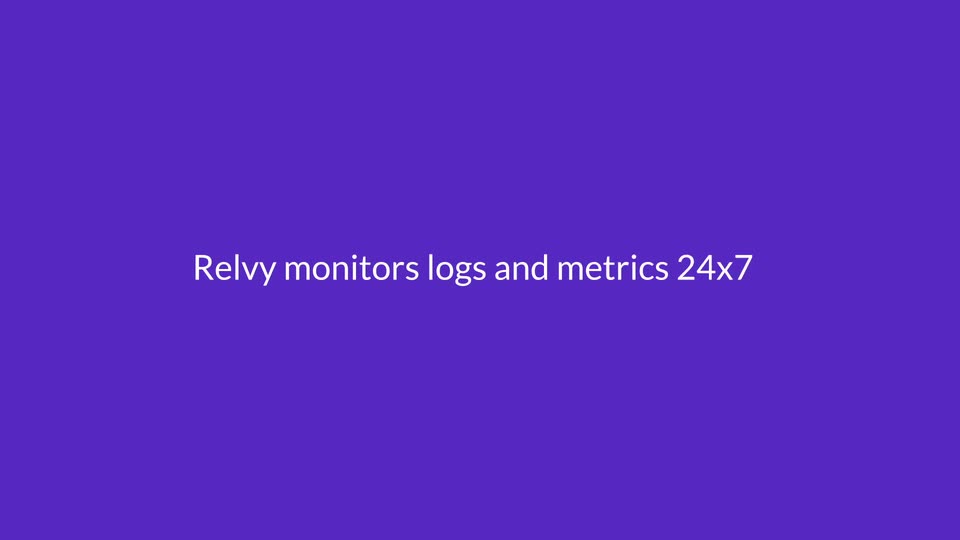
A white sentence types out letter by letter on a flat purple background, then holds still. In the final beat it drifts up as a white app bar with the Relvy logo, a Slack chip and a Get in Touch button slides in from the bottom edge.
On-screen text: “Relvy monitors logs and metrics 24x7”
Techniques: Kinetic type
Camera: Static
A white card with the Relvy dashboard rises into frame on a purple field under the headline “Relvy monitors logs and metrics 24x7”. The view scrolls down to an expanded alert, the headline changes to “Get actionable alerts - without manual setup”, then it zooms in on the alert.
On-screen text: “Relvy monitors logs and metrics 24x7”, “Get actionable alerts - without manual setup”
Techniques: UI zoom
Camera: Push in
A white alert card with a timestamp and a button slides up out of the top of a flat purple screen. The white headline slides into the center of the frame and holds for the rest of the shot.
On-screen text: “Relvy debugs incidents like your best on-call engineer”
Techniques: Kinetic type
Camera: Static
A single white headline holds center on a flat violet field, then drifts up and to the left while its opacity drops, exiting the frame.
On-screen text: “Relvy debugs incidents like your best on-call engineer”
Techniques: Kinetic type
Camera: Static
A purple field holds a large white headline at the top while a tilted 3D mockup of a debugging dashboard sits below. The mockup shows a sidebar, an investigations list, and a code diff panel. The headline slides in.
On-screen text: “Relvy debugs incidents like your best on-call engineer”
Techniques: Kinetic type, 3D mockup
Camera: Pan
A white headline slides across the top of a solid purple background. Below it, a tilted 3D mockup of the Relvy interface shows an investigations list on the left and a code diff panel on the right.
On-screen text: “Relvy debugs incidents like your best on-call engineer”
Techniques: Kinetic type, 3D mockup
Camera: Static
On a purple field, a white headline slides in above a rounded mockup of the Relvy dashboard. The screen shows an investigations list on the left and a possible root-cause panel with code diffs on the right.
On-screen text: “Relvy debugs incidents like your best on-call engineer”
Techniques: Kinetic type
Camera: Push in
A white dashboard card floats on a purple field. The headline types out, then the card crossfades from a root-cause panel with a code diff to the full interface, which scrolls and zooms into the step-by-step analysis as a step expands.
On-screen text: “Automated root cause analysis in minutes”, “Finds relevant code changes”, “Relvy debugs incidents like your best on-call engineer”
Techniques: Kinetic type, UI zoom
Camera: Pull out
A purple background holds a white headline above a rounded Relvy dashboard mockup. The log panel scrolls through stack-trace lines, highlights a TypeError row, then swaps to a green line chart that spikes.
On-screen text: “Correlates logs and metrics”
Camera: Static
A purple background holds a row of white product-interface cards. The camera pans right across them, starting on a Relvy logs-and-metrics view and ending on a Slack channel and a dashboard, while the white headline scrolls out of the top of the frame.
On-screen text: “Correlates logs and metrics”
Camera: Pan
A Slack channel window sits on a purple field beside a white headline. A thread panel slides open and the view zooms into it as an AI bot posts step-by-step log analysis. The headline on the left fades out and re-enters word by word with a new line.
On-screen text: “Already using Slack for on-call alerts?”, “Relvy integrates with your existing workflows”
Techniques: UI zoom, Kinetic type
Camera: Push in
Three white app cards sit tilted in 3D on a purple field. The camera pushes in until the center onboarding screen fills the frame flat, showing the Relay welcome page, connection steps, and a service table.
Techniques: 3D mockup, UI zoom
Camera: Pan
A white onboarding settings panel sits on a purple field and scrolls vertically through its connection steps and service table. Above it, a white headline types out word by word, finishing the tagline about setup time.
On-screen text: “Setting up Relvy is easy - less than 5 minutes”
Techniques: Kinetic type
Camera: Push in
On a flat purple field, a white setup card scrolls down past integration toggles and a service-name table. The large white headline at the top swaps from a setup tagline to a second line that types in.
On-screen text: “Setting up Relvy is easy - less than 5 minutes”, “Major integrations supported”
Techniques: Kinetic type
Camera: Pull out
A purple and green R mark builds in above a black headline on a pale lavender field, the words fading from gray to black in a left-to-right wipe.
On-screen text: “Stop worrying about production outages”
Techniques: Kinetic type
Camera: Static
The Relvy logo stays centered on white as taglines type in below it, each fading out as the next line types in. The URL www.relvy.ai types in at the bottom, and the frame fades to gray at the end.
On-screen text: “Stop worrying about production outages”, “Get back to building!”, “www.relvy.ai”, “Automate Troubleshooting”
Techniques: Kinetic type
Camera: Static
On a black background the white Relvy wordmark sits centered, with the tagline “Automate Troubleshooting” and the URL “www.relvy.ai” stacked beneath it. All elements hold static on a locked-off frame for the full shot.
On-screen text: “Relvy”, “Automate Troubleshooting”, “www.relvy.ai”
Camera: Static