1:00
Explore
Deep Principle - We’re introducing Mira Science, a general-purpose computing platform
Deep Principle · Nov 2026 · 1:01 · AI-annotated
- Length
- 1:01
- Scenes
- 25 · 2.5 s avg
- Product on screen
- 0:04
- Features shown
- 5
- Voiceover
- Yes
- Views
- 2.2M on X
as of November 21, 2026
00:00:00 / 01:02:00
- Length
- 1:01
- Scenes
- 25 · 2.5 s avg
- Product on screen
- 0:04
- Features shown
- 5
- Voiceover
- Yes
- Views
- 2.2M on X
as of November 21, 2026
Deep Principle’s 1:01 launch film runs 25 scenes, about 2.5 s each. The product shows up at 0:04 and 5 features are revealed. There is no explicit call to action; a voiceover carries the film. The video alternates dim live-action lab shots with bright flat UI cards on a soft off-white gradient, each feature announced by a two-tone headline (black plus orange) before its demo plays out. Pacing is slow and locked-off, with cards scaling in, counters ticking and cursors tagged Mira clicking through tables, while orange corner brackets and the MIRA badge keep the interface consistent.
Footage neededEstimated needs: 6 capture groups — your screens or recordings · 1 official logo — reused across the film · 7 filmed passages — shoot, supply or replace · 1 graphic passage — draw or supply · 1 3D passage — build or supply
Is this your launch? to your site or press kit.
More like this


Similar soundtrack
Films whose music sounds like this one, voice left out
0:23

Anton Osika - Today, we’re launching Drafts in @Lovable. Build a new feature, try
Lovable · Lo-fi hip-hop / chillhop
0:50

Slashy Launch Video
Slashy · Electronic
0:45
Lamina Labs (YC P26) - Today, we're introducing ChatGPT for Explainer Videos. With just o
Lamina Labs · Modern electronic corporate background music
Deep Principle - We’re introducing Mira Science, a general-purpose computing platform, scene by scene
· 25 scenes as text
01 · Problem · 0:00–0:03
A scientist in a white coat and blue gloves leans over a laptop in a dim lab. A two-tone headline fades in over the shoulder, then two data cards appear: a green TLC plate on the left, a 1H NMR spectrum on the right.
On-screen text: “Something's Off With The Results”
Camera: Push in
02 · Problem · 0:03–0:04
A scientist in a white coat and blue gloves types at a laptop in a dim lab. A white TLC plate card hovers at left, an NMR spectrum card with an orange results banner hovers at right. The camera is locked off with no motion.
Camera: Static
03 · Product intro · 0:04–0:07
Two data cards, a green TLC plate and an NMR spectrum, shrink and fly from the edges into the drop zones of a centered chat card. A cursor drags them in, then a prompt is typed into the field as the cursor moves to the orange Analyze button.
Techniques: Cursor demo, Kinetic type
Camera: Static
04 · Product intro · 0:07–0:09
A white prompt card sits on a soft gradient background. Black body text types out a chemistry request word by word while a cursor hovers over the orange Analyze button. The card then shrinks and morphs into a small white tile holding a circular loading spinner.
Techniques: Kinetic type, Cursor demo, Morph
Camera: Static
05 · Product intro · 0:09–0:10
A light gradient field with a faint dot grid and soft orange and blue glows, framed by thin orange corner brackets. A centered orange circle holds a white M mark that morphs into a thin line-drawn loop, while a small INSIDE MIRA label sits in the top-left.
On-screen text: “INSIDE MIRA”
Techniques: Morph
Camera: Static
06 · Feature reveal · 0:10–0:11
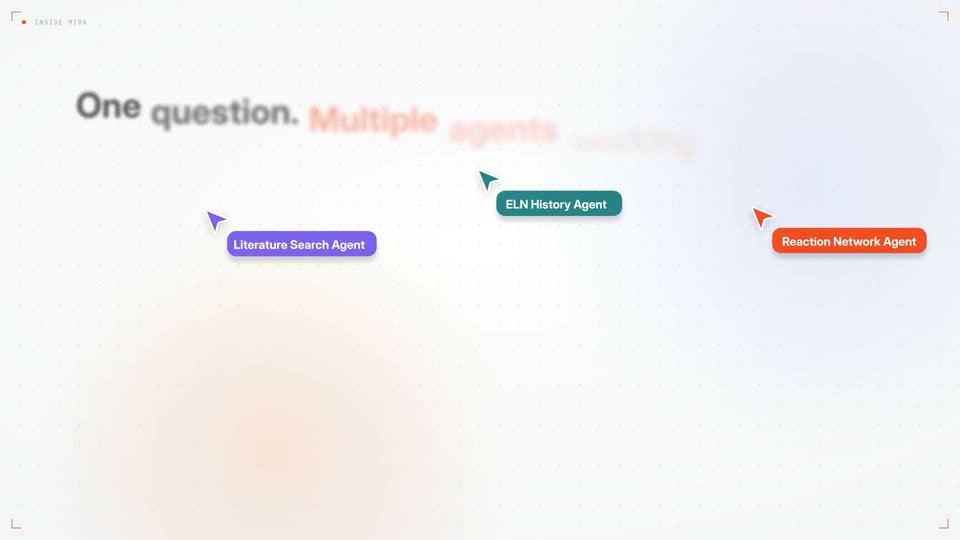
On a pale dotted grid, the orange MIRA mark at center fades out as a two-tone headline blurs into focus, then three pill labels with cursor arrows in purple, teal and orange pop in around the center. Static locked-off frame, corner brackets and a small top-left caption stay put.
On-screen text: “INSIDE MIRA”, “One question. Multiple agents working in parallel.”
Techniques: Kinetic type
Camera: Static
07 · Feature reveal · 0:11–0:13
A plain light background holds a black and orange headline, “One question. Multiple agents working in parallel.” Three colored agent pills sit mid-frame with small drifting arrow marks. Two product panels, a literature grid and an ELN search list, rise in beneath the first two pills.
On-screen text: “One question. Multiple agents working in parallel.”, “INSIDE MIRA”
Techniques: Particles
Camera: Pull out
08 · Feature reveal · 0:13–0:20
Three flat UI cards sit side by side under a bold headline. Counters tick up and progress bars fill as document grids, a record list, and a node graph populate; cursor arrows and colored callout labels drift across each card. The view then zooms into the bottom row of totals.
On-screen text: “One question. Multiple agents working in parallel.”
Techniques: Cursor demo, UI zoom
Camera: Push in
09 · Feature reveal · 0:20–0:22
A dense grid of white data cards with chemical labels and red outlines forms a network background. A pill badge reading Cloud Compute Cluster sits at the top as the view zooms out to reveal a large two-color headline.
On-screen text: “Cloud computing. Beyond desktop limits.”, “Parallel multi-GPU computing · 150 reaction edges built · Reaction network keeps expanding”
Techniques: UI zoom, Kinetic type
Camera: Pull out
10 · Feature reveal · 0:22–0:23
A full-bleed grid of reaction-status tiles drifts slowly downward behind locked foreground text. A white pill badge with an orange cloud icon reads Cloud Compute Cluster at top, while a bold black-and-orange headline sits center over a red subline.
On-screen text: “Cloud Compute Cluster”, “Cloud computing. Beyond desktop limits.”, “Parallel multi-GPU computing : 234 reaction edges built · Reaction network keeps expanding”
Techniques: Parallax
Camera: Pull out
11 · Demo · 0:23–0:24
Over a white dotted grid, a white pill label with an orange cloud icon reads at top center. A white results card scales in below it, showing a bold header, one agent row with a purple icon, and an orange action button at the bottom.
On-screen text: “INSIDE MIRA”
Camera: Pull out
12 · Demo · 0:24–0:25
A white results card sits on a pale gradient field. Three agent rows fade in in sequence, each with a colored icon and a checkmark that pops in on the right. An orange report button anchors the bottom. A small tag and orange corner brackets frame the shot.
On-screen text: “INSIDE MIRA”
Camera: Static
13 · Feature reveal · 0:25–0:27
On a pale gradient field with a fine dot grid and orange corner marks, the headline 'Answers you can trace.' pulls from a soft blur into sharp focus, the last two words in orange; a small 'INSIDE MIRA' label stays fixed in the top-left.
On-screen text: “INSIDE MIRA”, “Answers you can trace.”
Camera: Static
14 · Feature reveal · 0:27–0:35
A white Summary Report card sits on a soft gradient background as the headline “Answers you can trace.” fades in. A cursor clicks item 01, and linked panels cascade in on the right: three molecular structure cards, a Python code window, and a file list.
On-screen text: “INSIDE MIRA”, “Answers you can trace.”, “Potential Cause → Related Molecular Structures”, “Methanol 1,4-addition → Structure Generation Script”
Techniques: Cursor demo
Camera: Static
15 · Feature reveal · 0:35–0:38
A flat interface shows a Summary Report card while a cursor hovers the Improved Conditions row, fanning out source paper cards to the right. The cursor then moves to the Recommendation row, which highlights orange as the papers blur and fade out.
On-screen text: “INSIDE MIRA”, “Improved Conditions → Original Source Papers”, “Answers you can trace.”
Techniques: Cursor demo
Camera: Static
16 · Feature reveal · 0:38–0:38
A white summary report card sits centered on a light dotted background, its third row highlighted in orange with a cursor pointing at it. A faded research document and a small lab video thumbnail sit behind it on the right and top left.
Camera: Static
17 · Feature reveal · 0:38–0:41
A scientist in a lab coat sits at a laptop in a dim lab, green equipment behind. A white Summary Report card floats left with three numbered points and an orange Next button. A dark pill at the bottom shows a waveform and the prompt line. The camera drifts right.
On-screen text: “INSIDE MIRA”, “Mira, tell me how to run my next experiment.”
Camera: Push in
18 · Feature reveal · 0:41–0:41
A scientist in a white coat and blue gloves holds a tablet in a dim, green-lit lab. A white summary report card on the left folds and fades out as the scientist turns toward a monitor. A dark caption pill sits at the bottom.
On-screen text: “INSIDE MIRA”, “Mira, tell me how to run my next experiment.”
Camera: Pull out
19 · Feature reveal · 0:41–0:43
A white experiment card fades in from a blurred, low-opacity state to sharp focus, its Materials table filling row by row with chemical entries. Orange cursor pointers tagged Mira sit over cells, a Procedure panel appears at right, and a tagline pill rises at the bottom.
On-screen text: “INSIDE MIRA”, “Your next experiment. Every step laid out for you.”
Camera: Static
20 · Feature reveal · 0:43–0:49
A white experiment card fills in as the Mira cursor clicks through skeleton outlines, populating the materials table, attachment chips and six procedure steps. The view scrolls down then pulls back to the full card, and a green confirmation banner slides across.
On-screen text: “Your next experiment. Every step laid out for you.”
Techniques: Cursor demo, UI zoom
Camera: Pull out
21 · Feature reveal · 0:49–0:52
A document card with a green 'Experimental Procedure Generated' banner dissolves as the frame morphs into a full-screen shot of a scientist in a dark lab beside green-lit equipment. A white 'Start Experiment' card with a logo appears at the bottom right.
On-screen text: “Start Experiment”, “12 Materials · 6 Steps · 6 Attachments”
Techniques: Morph
Camera: Push in
22 · Feature reveal · 0:52–0:53
A man in a white lab coat and blue gloves walks toward a green-lit lab machine and taps its touchscreen. A white rounded card with an orange logo and the text Start Experiment stays fixed in the lower right corner.
On-screen text: “Start Experiment”, “12 Materials · 6 Steps · 6 Attachments”
Camera: Pan
23 · Feature reveal · 0:53–0:55
A 3D render of a glass-enclosed lab machine with vial racks stands left of a white robotic arm on a wheeled base in a bright room. The camera pans right, revealing a black-framed doorway, while a small caption slides in.
On-screen text: “Start Experiment”, “AAA”
Techniques: 3D mockup
Camera: Pull out
24 · Outro · 0:55–0:58
A 3x3 grid of lab footage fades in from white, showing scientists in cleanroom suits at benches and microscopes. Centered text reads 'A whole research team.' in black over 'On your desktop' in orange, both locked in place.
On-screen text: “A whole research team.”, “On your desktop”
Techniques: Split screen
Camera: Pull out
25 · Outro · 0:58–1:01
A centered blue line-art mark with stacked layers and a yellow hexagon, beside the dark navy wordmark Deep Principle, holds on a soft off-white ground; both start defocused and snap to sharp within the first second, then remain locked off.
Camera: Static