0:46
Explore
00:00:00 / 01:17:24
- Length
- 1:17
- Scenes
- 48 · 1.6 s avg
- Product on screen
- 0:00
- Features shown
- 10
- Voiceover
- No
- Views
- 795K on X
as of November 17, 2026
Kling AI’s 1:17 launch film runs 48 scenes, about 1.6 s each. The product is on screen from the first frame and 10 features are revealed. There is no explicit call to action. The video opens with a logo card, gives a quick tour of the dark interface, then fires a rapid montage of prompt-driven demos where a typed command bar announces each effect before the before/after morph plays, and closes on a sign-off card. Pacing is fast at 140 BPM with hard cuts, a dark green-accented UI, and in-place morphs as the signature move.
Footage neededEstimated needs: 7 capture groups — your screens or recordings · 1 official logo — reused across the film · 20 filmed passages — shoot, supply or replace · 1 graphic passage — draw or supply · 15 3D passages — build or supply
Is this your launch? to your site or press kit.
More like this


Kling AI - Kling Omni Launch Week Day 1: Introducing Kling O1 — Brand-New Creati, scene by scene
· 48 scenes as text
01 · Product intro · 0:00–0:02
On a near-black background with a faint dot grid and a soft green glow at the base, the Kling 01 wordmark and green ring mark fade and scale up to full brightness, then the tagline below fades in with a slight left-to-right stagger.
On-screen text: “Brand New, Multimodal, Supercharged Creation Tool”
Camera: Static
02 · Demo · 0:02–0:03
The Kling O1 logo and tagline sit centered on a dark field, then scale and exit left as a blurred app interface with a sidebar and content cards slides in from the right.
On-screen text: “Kling 01”, “Brand New, Multimodal, Supercharged Creation Tool”
Techniques: Kinetic type
Camera: Static
03 · Demo · 0:03–0:05
A dark app interface angled in 3D perspective sits beside a blurred white foreground panel. A white cursor glides down the left sidebar and clicks the O1 tile, which highlights in green as the main panel shows the NEXTGEN Initiative banner.
Techniques: 3D mockup, Cursor demo
Camera: Push in
04 · Feature reveal · 0:05–0:12
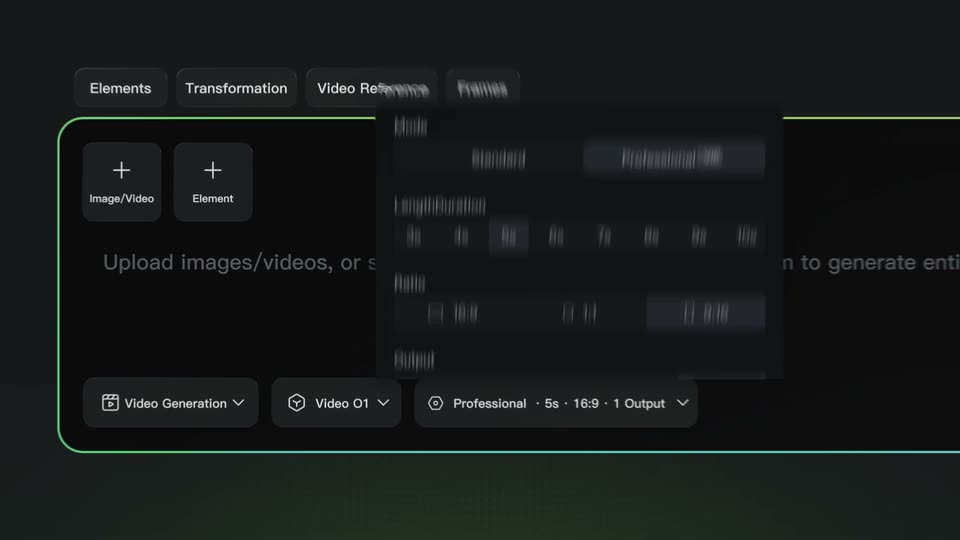
A dark video-generation panel with a green border sits on a dotted grid. The view zooms in as the mode dropdown opens into a settings sheet with duration and ratio options, then pulls back to a row of image thumbnails and a typed prompt beside a green Generate button.
Techniques: UI zoom
Camera: Static
05 · Feature reveal · 0:12–0:13
A prompt panel with a Generate button overlays a woman with pink curly hair on a plain wall. The panel dissolves away, leaving her centered with six small product images (glasses, draped fabric, pearl necklace, polka-dot skirt, white socks, puppy) floating around her.
Camera: Pull out
06 · Feature reveal · 0:13–0:13
A person in a pink curly wig and white crop top with shorts stands centered against a plain gray wall. Six rounded product photos, sunglasses, pearls, socks, draped fabric, a polka-dot skirt and a small dog, drift outward around her with motion blur.
Camera: Static
07 · Feature reveal · 0:13–0:14
A person wearing a pink curly wig, brown sunglasses, a pink halter top and layered pearl necklaces holds a small white dog with a pink bow tie. They stand centered against a plain gray studio backdrop, nearly still, in a static medium shot.
Camera: Static
08 · Feature reveal · 0:14–0:16
A person with a pink curly wig, sunglasses and pink sculptural boots stands full body against a pale gray studio backdrop, cradling a small white and brown dog, tilting their head between poses.
Camera: Static
09 · Feature reveal · 0:16–0:19
A dark video-generation panel fills the frame as a prompt types itself out and a bottle thumbnail snaps into the element slot. A strip of four bottle options slides in above, then the panel fades to reveal a 2x2 grid of live-action clips.
Techniques: Split screen
Camera: Static
10 · Feature reveal · 0:19–0:22
A four-panel split screen of live shots: a blue KLING 01 bottle on a rock at dusk, a woman in white on a beach lounger sipping, a woman in a cream dress on a night balcony reaching for the bottle, and the bottle on a marble table with glasses.
Techniques: Split screen
Camera: Static
11 · Feature reveal · 0:22–0:25
A dark UI panel with a green Generate button holds a small portrait thumbnail and a prompt line that types out word by word. A row of four frame thumbnails then slides in above the panel, all on a near-black dotted background.
Camera: Static
12 · Feature reveal · 0:25–0:28
A two-by-three grid of clips shows a young woman in a black and white outfit reading, chatting at a cafe, lying on a picnic blanket, walking a city street, roller skating, and riding a bike. The panels hold steady while the whole grid slowly pushes in.
Techniques: Split screen
Camera: Static
13 · Feature reveal · 0:28–0:28
A rendered mountain valley with drifting snow fills the frame while a dark prompt bar sits along the bottom. The prompt text appears word by word, adding image and video references before a green send button.
On-screen text: “Add the snow scene from”, “@Image1”, “to”, “@Video1”
Techniques: Kinetic type, Particles
Camera: Static
14 · Feature reveal · 0:28–0:29
A locked-off 3D winter landscape of green hills, snow drifts and decorated pines fills the frame, a lone figure stands right of center, and a floating prompt bar at the bottom swaps its text from a snow-scene command to a cat command.
Camera: Static
15 · Feature reveal · 0:29–0:31
A giant moss-covered stone cat lies on a grassy hill scattered with snow and small Christmas trees, a lone figure standing nearby for scale. A white prompt bar at the bottom holds a cat thumbnail, the prompt text, and a green arrow button, all locked in place.
Camera: Static
16 · Feature reveal · 0:31–0:32
A giant moss-covered stone cat lies in a snowy meadow, holding a silver Klin can that tilts in its paw. A prompt bar at the bottom switches from adding the drink to adding the cream.
Techniques: 3D mockup
Camera: Static
17 · Feature reveal · 0:32–0:32
A giant moss-covered stone cat lies in a snowy meadow, lifting a pink ice cream cone to its mouth while a tiny person stands nearby for scale. A rounded command bar with a thumbnail, prompt text and a green send button sits at the bottom.
Camera: Static
18 · Feature reveal · 0:32–0:37
A foggy Victorian street plays as a horse-drawn carriage approaches; a prompt bar at the bottom updates its text while a thin vertical line sweeps, and the crowd, then the horses, then the carriage vanish one by one, leaving an empty cobblestone road.
Camera: Static
19 · Feature reveal · 0:37–0:39
A 3D render of sunlit Greek ruins with a tall stone pillar. A dark command bar at the bottom types a prompt beside an avatar and a green arrow. The pillar morphs into a pink cat statue with a green collar as the camera orbits.
Techniques: Morph
Camera: Push in
20 · Feature reveal · 0:39–0:40
A 3D LEGO clown minifigure stands in a Greek ruin under a cloudy sky; it morphs into a Christmas tree figure with a star topper and a rifle. A dark command bar at the bottom updates its prompt text.
Techniques: Morph
Camera: Static
21 · Feature reveal · 0:40–0:40
A low-angle 3D render of a statue on a ruined colonnade under a cloudy sky. The armored knight holding a raised sword is replaced by a roaring T-rex skeleton as the prompt in the bottom command bar updates.
Camera: Static
22 · Feature reveal · 0:40–0:41
A 3D object in an ancient columned ruin swaps from a crystal-topped ice cream cone to an astronaut teddy bear. A prompt bar at the bottom updates its text to match each result.
Techniques: Morph
Camera: Static
23 · Feature reveal · 0:41–0:42
A metallic robot with purple glowing seams and a blue Kling logo on its chest strides toward the camera across a sunlit stone ruin. A prompt bar at the bottom reads the edit instruction as the figure scales up.
Camera: Pull out
24 · Feature reveal · 0:42–0:46
Close-up of a woman wearing over-ear headphones by a sunlit window; her hair shifts from blonde to pink, then red, then rainbow while a prompt bar at the bottom updates its text. The Kling wordmark scales in.
On-screen text: “Kling”
Techniques: Morph
Camera: Push in
25 · Feature reveal · 0:46–0:48
A woman in a grey turtleneck and glossy orange pants stands in a white studio, her long hair drifting. A prompt bar with a thumbnail and a green send button sits at the bottom, typing a command. The camera stays locked-off on her.
Camera: Pull out
26 · Feature reveal · 0:48–0:51
A product interface shows a two-by-three grid of live-action clips, each framing a woman in a white turtleneck and orange pants from side, front, back, low, and overhead studio angles. A bottom prompt bar appears at the start with a thumbnail and green upload button.
On-screen text: “Generate different angles of”, “@Video1”
Techniques: Split screen
Camera: Pull out
27 · Feature reveal · 0:51–0:53
A white-haired model in a white shirt and trousers stands centered on a seamless white set. The camera pushes in from a long shot to an extreme close-up of the face as a transparent visor appears. A gray prompt bar at the bottom updates its text to match the shot.
On-screen text: “Generate a long shot of @Video1”, “Generate an extreme close-up shot of @Video1”
Camera: Static
28 · Feature reveal · 0:53–0:55
A generated portrait of a person with white hair and metallic face jewelry fills the frame, zooming in from a letterboxed card to full screen. A prompt bar at the bottom holds a thumbnail, the typed prompt, a purple @Video1 tag that slides in, and a green send button.
Techniques: UI zoom
Camera: Pan
29 · Feature reveal · 0:55–0:57
A close-up of a rendered face with blue gem studs, iridescent glitter makeup and a silver ear implant. A framed preview of the face scales up to fill the screen while a prompt bar rests along the bottom edge.
Techniques: UI zoom
Camera: Static
30 · Feature reveal · 0:57–0:58
A man in a rust-orange suit walks across a wet, empty brick street, glancing back over his shoulder. A small command pill sits at the bottom of the frame, holding a walking thumbnail and a green arrow button, as the prompt text fills in beside it.
On-screen text: “Change the background of”, “@Video1”
Camera: Pan
31 · Feature reveal · 0:58–0:58
A man in an orange suit walks across a wet stone courtyard, classical columns and a green lawn behind him. A caption bar at the bottom shows a thumbnail, the words “Change the background of” and a purple tag reading “@Video1” beside a green upload icon.
On-screen text: “Change the background of”, “@Video1”
Camera: Static
32 · Feature reveal · 0:58–0:59
A man in an orange suit walks right across a stone terrace before the Great Wall. A small bottom control bar with a thumbnail, the label Change the background of @Video1 and a green up-arrow button appears, then vanishes. Locked-off frame.
Camera: Static
33 · Feature reveal · 0:59–1:00
A man in a rust-orange suit walks in profile across a wide stone plaza at night, the Sydney Opera House glowing white behind him under a dark sky. The camera holds a locked-off wide shot.
On-screen text: “mmnser”
Camera: Static
34 · Feature reveal · 1:00–1:00
A man in a rust-orange suit walks in profile across a wet village road, snow on the ground, Dutch windmills and half-timbered houses behind him; the camera holds a static wide frame as he strides left to right.
On-screen text: “mmnser”
Camera: Static
35 · Feature reveal · 1:00–1:01
A man in a burnt-orange suit walks in profile from left to right across a wide white sand beach. Turquoise water, a low resort line and palm trees sit behind him under a blue sky with white clouds.
Camera: Static
36 · Feature reveal · 1:01–1:01
A man in a rust-orange suit walks in profile across an empty bridge deck, the red Golden Gate towers and a blue sky with white clouds filling the background. The camera holds a static side view as he strides steadily to the right.
Camera: Static
37 · Feature reveal · 1:01–1:02
A man in a rust-orange suit walks in profile across a wet crosswalk, the Colosseum filling the background. He strides left to right at a steady pace under an overcast sky.
Camera: Static
38 · Feature reveal · 1:02–1:02
A man in a rust-orange suit walks across a wet stone platform in front of a Venetian canal at dusk, buildings and moored boats lining both banks under a pink sky.
Camera: Static
39 · Feature reveal · 1:02–1:04
First-person view from a moving motorcycle: gloved hands grip the bars, a fluffy tabby cat perches on the fuel tank, the road runs through a tree-lined field at golden hour. A dark caption pill with a green up-arrow button sits bottom center; the handle @Video1 scales in.
On-screen text: “Change the weather in”, “↑”, “@Video1”
Camera: Static
40 · Feature reveal · 1:04–1:05
First-person view from a motorcycle: snow-dusted leather gloves grip the handlebars while a fluffy ginger cat sits on the tank. The white forest road melts into a rainy green highway as the bike rolls forward. A small caption pill with a green arrow rests at the bottom.
On-screen text: “Change the weather in”, “@Video1”
Techniques: Morph
Camera: Static
41 · Feature reveal · 1:05–1:05
First-person view over a motorcycle handlebar. A tabby cat sits on the fuel tank and a raccoon perches on the right grip. Gloved hands hold the bars as the road blurs past and the light shifts from cool mist to warm sunset.
Camera: Static
42 · Feature reveal · 1:05–1:06
First-person view from a motorcycle seat: two leather-gloved hands grip the chrome handlebars as a fluffy orange tabby cat perches on the silver fuel tank, facing forward. The bike rolls down a sunlit country lane, the tree line shifting from misty green to autumn red with motion blur.
Techniques: Parallax
Camera: Static
43 · Feature reveal · 1:06–1:07
First-person view of gloved hands on a motorcycle handlebar with a tabby cat perched on the tank, riding forward as the background cuts from a coastal highway to a city street.
Camera: Static
44 · Feature reveal · 1:07–1:07
Locked first-person view from a motorcycle: leather-gloved hands grip the chrome bars while a tabby cat sits on the fuel tank. The whole scene shifts from a sunlit race track with a start gantry to a desert at sunset, the rider and cat holding their position.
Techniques: Morph
Camera: Static
45 · Feature reveal · 1:07–1:09
First-person view from a motorcycle rolling along a snow-covered road at night. A tabby cat sits on the fuel tank, leather-gloved hands grip the handlebars, and green aurora bands fill the sky. The camera glides forward steadily.
Techniques: Parallax
Camera: Static
46 · Feature reveal · 1:09–1:13
A boy in a bedroom holds a phone and poses for a selfie while his look morphs through styles: knight armor, a 3D character, a pixel clown, then a colorful sweater. A dark prompt bar at the bottom types the command.
On-screen text: “Change the style of”, “@Video1”
Techniques: Morph
Camera: Static
47 · Outro · 1:13–1:14
A cartoon woman with wavy brown hair stands in a warm bedroom, holding a green phone toward a mirror and raising a peace sign. A white caption sits centered over her chest as the shot holds still.
On-screen text: “Kling AI O1 Does It All”
Camera: Static
48 · Outro · 1:14–1:17
A near-black card with a faint green glow at the bottom. A white headline holds center while an italic tagline scales in beneath it, then both fade out and the white Kling AI line logo fades in as the sign-off.
On-screen text: “Kling AI O1 Does It All”, “Input anything. Understand everything. Generate any Vision.”
Techniques: Kinetic type
Camera: Static