
2:08
Explore
00:00:00 / 01:06:25
- Length
- 1:06
- Scenes
- 15 · 4.5 s avg
- Product on screen
- 0:00
- Features shown
- 1
- Call to action
- 0:59 · 89%
- Voiceover
- Yes
- Views
- 151 on YouTube
as of November 25, 2026
Reducto’s 1:06 launch film runs 15 scenes, about 4.5 s each. The product is on screen from the first frame and 1 feature is revealed. The call to action lands at 0:59 (89% in), over a voiceover. The video alternates between a talking-head presenter in a bright home office and full-screen motion graphics on a solid deep purple field, following a problem, single feature demo, and availability structure. Its signature moves are 3D tilts and focus pulls on flat diagrams, plus a caption pill that swaps short phrases in sync with the voiceover.
Footage neededEstimated needs: 1 capture group — your screens or recordings · 1 official logo — reused across the film · 6 filmed passages — shoot, supply or replace · 1 graphic passage — draw or supply · 2 3D passages — build or supply
Is this your launch? to your site or press kit.
More like this
0:31

Arc for Students | Everything in its right place
The Browser Company · Productivity · Sep 2023
1:32

Introducing Juicebox for Mobile
Juicebox · Nov 2026
Similar soundtrack
Films whose music sounds like this one, voice left out
1:28

Introducing Cofia
Cofia · Corporate narration
2:59

Alara Dental - Transforming Dental Supply Purchasing
Alara · Corporate voiceover
1:50

Airweave AI // Launch YC Demo
Airweave · Speech over minimal electronic stings
Introducing Deep Split, scene by scene
· 15 scenes as text
01 · Product intro · 0:00–0:00
A woman with long dark hair and glasses sits in a home office, speaking directly to the camera. Behind her, a wooden door and grey acoustic panels line the wall. A name caption sits in the lower right corner.
On-screen text: “Palak Agarwal”, “Developer Relations Lead, Reducto”
Camera: Static
02 · Problem · 0:00–0:25
A woman in a gray sweatshirt speaks to camera in an office, white subtitles on a magenta brush banner along the bottom. A document thumbnail appears at right and multiplies into a grid of pages, while large white stats text fades in at left, then “Deep Split” appears behind her.
On-screen text: “Palak Agarwal”, “Developer Relations Lead, Reducto”, “Before you can”, “extract anything”, “meaningful from a document,”, “You need to be able to separate it correctly”, “And the truth”, “is most pipelines skip”, “that step entirely.”, “In practice,, that could be a packet, with over hundreds of pages, in 150 categories of content., crammed all together, And getting that wrong, is going to give”
Techniques: Kinetic type
Camera: Static
03 · Feature reveal · 0:25–0:27
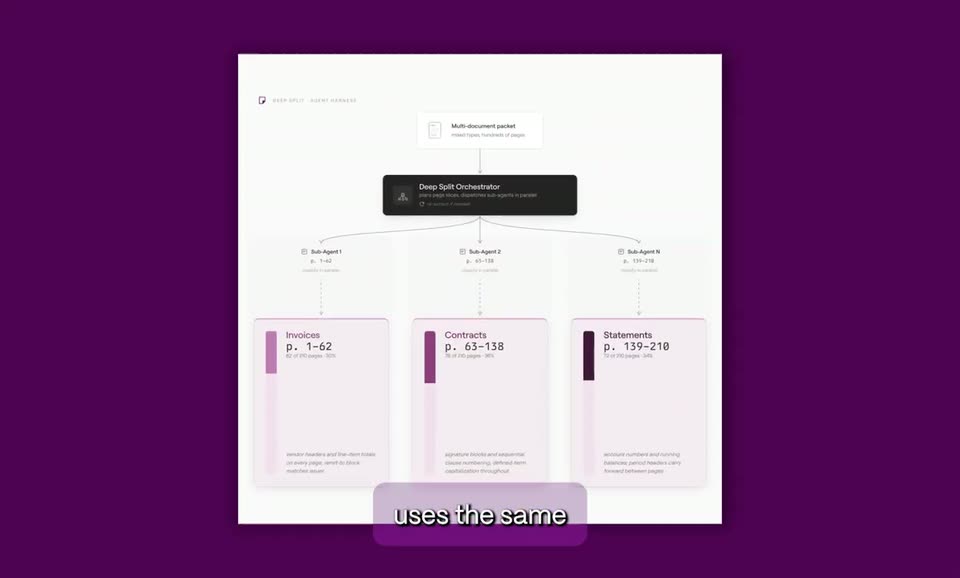
A white architecture flowchart on a dark magenta field tilts into 3D perspective, showing an orchestrator node feeding three sub-agents and result cards. A purple pill caption at the bottom cycles through phrases in sync with the voiceover.
On-screen text: “how it works.”, “uses the same”, “Deep Split”
Techniques: 3D mockup, Kinetic type
Camera: Push in
04 · Feature reveal · 0:27–0:28
A white architecture diagram rests on a solid purple field, opening soft and out of focus, then pulling sharp to reveal a flowchart with a dark orchestrator node and labeled cards. A translucent purple caption pill reading agent harness architecture stays fixed at the bottom.
On-screen text: “agent harness architecture”
Camera: Push in
05 · Feature reveal · 0:28–0:29
A white interface with a purple logo and header 'DEEP SPLIT · AGENT HARNESS' top left; the frame starts blurred, then the header focuses and scales while a diagram and dark terminal box stay soft. A purple subtitle pill below swaps from 'agent harness architecture' to 'we built for Deep Extract.'
On-screen text: “agent harness architecture”, “we built for Deep Extract.”
Camera: Static
06 · Feature reveal · 0:29–0:44
A blurred close-up of the dark orchestrator card pulls back to reveal a flow diagram: a document packet feeding three sub-agent columns and three pink result cards whose progress bars fill. Page ranges flash yellow, the canvas recedes onto a purple field, and a white wipe rises from the bottom.
On-screen text: “we built for Deep Extract.”, “An orchestrator plans”, “how to slice the document,”, “dispatches sub-agents”, “to classify page ranges”, “in parallel, and re-extracts”, “until the results hold up.”, “Every assignment comes back”, “with contextual evidence so”, “you can easily understand why each page was categorized the way it was. To show you what that”
Techniques: UI zoom, Masking
Camera: Pull out
07 · Feature reveal · 0:44–0:51
A document-splitting interface displays a legal term sheet in a viewer next to a settings panel. The view zooms into the term sheet and scrolls through its pages as caption phrases appear at the bottom.
On-screen text: “To show you”, “what that looks like”, “in practice, here's an 18-page”, “Series A term sheet offering”, “terms, investor”, “rights, and more,”, “all in a single document.”
Techniques: UI zoom
Camera: Push in
08 · Feature reveal · 0:51–0:52
A dense legal term sheet fills the frame, then the view pulls back into a blurred grid of many pages. A lavender caption pill reading And with Deep Split holds at the bottom center, and a small floating preview window with a close button sits in the lower left.
On-screen text: “And with Deep Split”
Techniques: UI zoom
Camera: Pull out
09 · Feature reveal · 0:52–0:53
A tilted 3D view of a document-parsing interface straightens and reframes onto a multi-page results grid as a cursor hovers over the pages. A lavender caption pill at the bottom cycles through short phrases.
On-screen text: “And with Deep Split”, “we get back four cleanly”, “labeled sections”
Techniques: 3D mockup, Cursor demo, UI zoom
Camera: Pan
10 · Feature reveal · 0:53–0:59
A close-up of the results pane scrolls down through labeled document sections as a cursor glides over the pages; caption phrases swap in at the bottom. The view then pulls back to reveal the whole app window, tilted in 3D on a purple field.
On-screen text: “labeled sections and data”, “that was previously buried”, “is now organized and ready”, “for whatever comes”, “next downstream.”
Techniques: Cursor demo, UI zoom, 3D mockup
Camera: Pull out
11 · CTA · 0:59–1:00
A woman with glasses and a gray sweatshirt speaks to the camera in a room with a wooden door and wall panels, gesturing with her right hand. A purple caption box with white text appears at the bottom center of the frame.
On-screen text: “next downstream.”
Camera: Static
12 · CTA · 1:00–1:00
A woman with glasses speaks to camera in a studio room; the shot racks out of focus and two lines of white text settle over her chest, announcing the release.
On-screen text: “Now Available”, “in Studio & via API”
Camera: Static
13 · CTA · 1:00–1:03
A defocused medium shot of a person in an office holds still while white text is centered over the frame. The background stays soft and the text remains locked in place.
On-screen text: “Now Available”, “in Studio & via API”
Camera: Static
14 · CTA · 1:03–1:04
A woman with long dark hair and glasses, in a gray sweatshirt, sits centered in a static medium close-up before a white wall with acoustic panels and a wooden door. She smiles and speaks to the camera while a purple caption bar at the bottom shows her words.
On-screen text: “Now Available”, “in Studio & via API”, “We're really excited”, “to hear what you think.”
Camera: Static
15 · Outro · 1:04–1:06
On a dark purple background, a small white tagline clears as the peach outlined square mark with a filled corner and the white lowercase reducto wordmark fade in at the center, slightly blurred, then settle sharp and hold.
On-screen text: “to hear what you think.”
Camera: Static