0:18
Screen Studio - Screen Studio 3.1 is here Introducing Masks: Blur sensitive data or
Screen Studio · Mar 2025
Recraft · Feb 2026 · 0:18 · Clip · AI-annotated
Recraft’s 0:18 clip runs 2 scenes, about 9.3 s each. The product is on screen from the first frame and 1 feature is revealed. One uninterrupted feature walkthrough: the camera opens wide on the editor, dives into the Extract prompt menu, and rides the extracted caption into a grid of generated portraits. Pacing is slow and deliberate, built from smooth zooms, lateral drifts and pull-backs over a flat purple backdrop.
Is this your launch? to your site or press kit.
Screen Studio · Mar 2025
Raycast · Productivity · Jan 2023
Loom · Productivity · Sep 2023
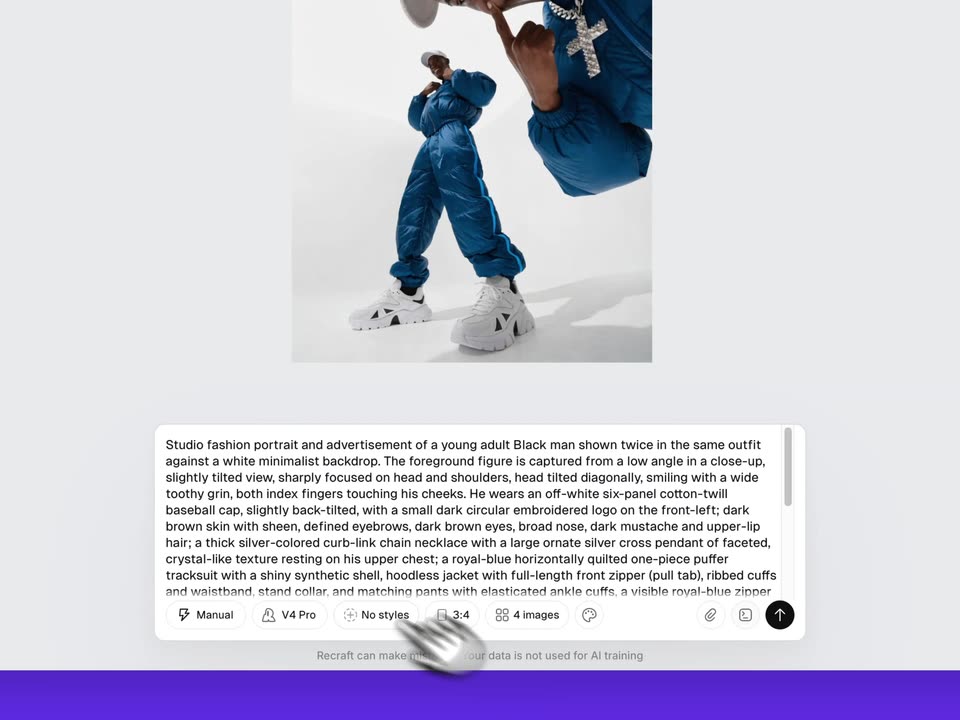
A wide editor view on a purple background zooms into a dark context menu; a hand cursor hovers over Extract prompt to reveal a tooltip. The camera then moves to the image showing Generating, then to the prompt bar as a long caption fills it and is highlighted.
Techniques: UI zoom, Cursor demo
Camera: Push in
A Recraft window settles flat on a purple field as four gray Generating tiles fill with portraits of a man in a blue puffer suit and white cap. The camera zooms into the grid, drifts across the images with a white cursor, then pulls back to the full interface.
Techniques: 3D mockup, UI zoom, Cursor demo
Camera: Pull out