
1:31
Explore
Ramp Copilot on Microsoft Teams - Employee Mobile Demo
Ramp · Dec 2023 · 0:45 · Full motion · AI-annotated
- Length
- 0:45
- Scenes
- 5 · 9.0 s avg
- Product on screen
- 0:00
- Features shown
- 1
- Call to action
- 0:37 · 83%
- Voiceover
- Yes
- Views
- 653 on YouTube
as of November 27, 2026
00:00:00 / 00:45:03
- Length
- 0:45
- Scenes
- 5 · 9.0 s avg
- Product on screen
- 0:00
- Features shown
- 1
- Call to action
- 0:37 · 83%
- Voiceover
- Yes
- Views
- 653 on YouTube
as of November 27, 2026
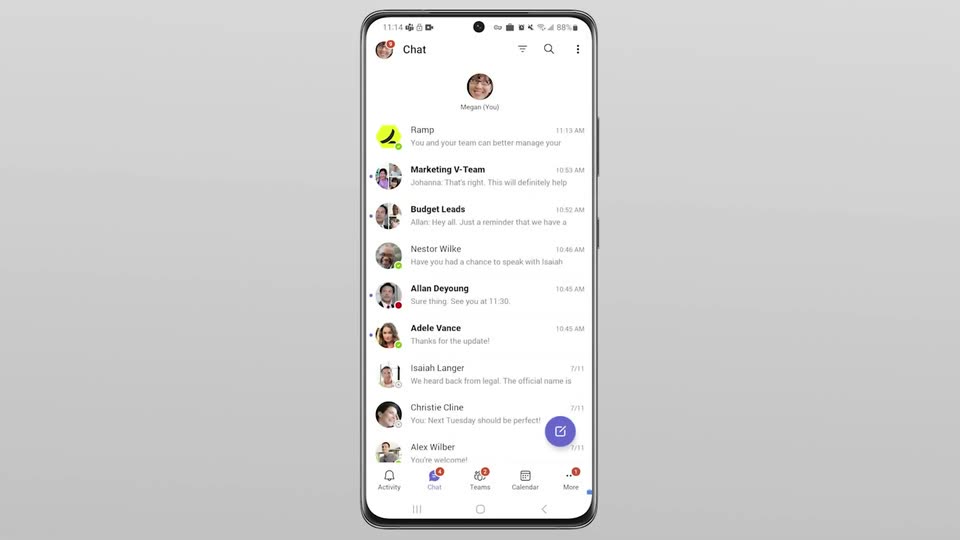
Ramp’s 0:45 launch film runs 5 scenes, about 9.0 s each. The product is on screen from the first frame and 1 feature is revealed. The call to action lands at 0:37 (83% in), over a voiceover. The video is built as a black logo sting, a white brand lockup card, one long phone demo, and a black end card with a URL. Pacing is slow and deliberate, with long static holds where fades, a tap ripple, and typewriter text in the Teams chat carry all the motion.
No filming indicatedEstimated needs: 1 capture group — your screens or recordings · 1 official logo — reused across the film · 1 3D passage — build or supply
Is this your launch? to your site or press kit.
More like this



Similar soundtrack
Films whose music sounds like this one, voice left out
1:00


Phone Harness: Give your AI agent a real iPhone or Android
Phone Harness · Modern electronic
3:20

Omar Abdelaziz - We switched 10 people from iPhone to Blue. Weeks later, none of them
Blue · Modern electronic
1:52

jia - i proposed... introducing jam. you build, jam spreads.
Jam · Upbeat electronic pop and funk
Ramp Copilot on Microsoft Teams - Employee Mobile Demo, scene by scene
· 5 scenes as text
01 · Product intro · 0:00–0:00
A near-black background lightens to dark gray as a small white angular logo mark fades in at the center, growing slightly before holding steady.
Camera: Static
02 · Product intro · 0:00–0:06
On a plain white card, the black ramp wordmark with its curved mark fades in beside the purple Microsoft Teams logo, divided by a thin vertical line. The lockup holds still, then fades out.
On-screen text: “ramp”, “Microsoft Teams”
Camera: Static
03 · Feature reveal · 0:06–0:08
A tilted smartphone mockup on a plain light gray background fades in from dim to full, showing a Teams chat list with several conversation rows and a purple compose button at the lower right.
Techniques: 3D mockup
Camera: Static
04 · Feature reveal · 0:08–0:37
A front-facing phone on a plain gray background shows a Teams chat list; a tap ripple opens the Ramp conversation. Questions are typed in the input bar and sent, and Ramp's policy replies appear as the thread scrolls up.
Techniques: Cursor demo
Camera: Push in
05 · CTA · 0:37–0:45
On black, the white ramp crescent mark scales up from a small shape at center. The ramp wordmark and a small URL line fade in around it, the lockup holds, then everything fades to black.
On-screen text: “get started at ramp.com”
Camera: Static