0:46
Explore
00:00:00 / 01:52:14
- Length
- 1:52
- Scenes
- 43 · 2.6 s avg
- Product on screen
- 0:00
- Features shown
- 3
- Voiceover
- Yes
- Views
- 181K on X
as of November 18, 2026
Jam’s 1:52 launch film runs 43 scenes, about 2.6 s each. The product is on screen from the first frame and 3 features are revealed, with social proof. There is no explicit call to action; a voiceover carries the film. The video alternates a comedic cold open, dusk b-roll, and couch interviews with slow-drifting dark UI demos of the product. Its signature moves are large centered sans-serif titles over locked-off shots, slow horizontal pans across dotted-grid workflow canvases, and floating collage panels around the hosts.
Footage neededEstimated needs: 3 capture groups — your screens or recordings · 1 official logo — reused across the film · 18 filmed passages — shoot, supply or replace · 2 3D passages — build or supply
Is this your launch? to your site or press kit.
More like this

Similar soundtrack
Films whose music sounds like this one, voice left out
2:39

2:17

Introducing Eleven v4 Turbo in ElevenAgents
ElevenLabs · Electronic
3:20

Omar Abdelaziz - We switched 10 people from iPhone to Blue. Weeks later, none of them
Blue · Modern electronic
jia - i proposed... introducing jam. you build, jam spreads., scene by scene
· 43 scenes as text
01 · Product intro · 0:00–0:01
A dusk waterfront park with a large suspension bridge in the background; a person in dark clothing and white shoes walks across the grass from right to left. The outlined BJam wordmark stays centered and static over the locked-off frame.
On-screen text: “BJam”
Camera: Static
02 · Product intro · 0:01–0:02
A low-angle shot follows a person's legs and feet walking across grass at dusk, with blurred brick buildings and lit street lamps behind. The outlined BJam wordmark stays fixed in the center of the frame.
On-screen text: “BJam”
Camera: Static
03 · Problem · 0:02–0:03
A woman in a black jacket and white top runs across a grassy field at dusk toward a person whose back fills the right foreground. She laughs and reaches out, while a red sculpture and pink streaks sit in the overcast sky behind her.
Camera: Static
04 · Problem · 0:03–0:05
A woman in a black jacket stands in a grassy field at dusk, holding an open laptop and a bouquet of red flowers. She looks toward the camera and speaks as the shot slowly tightens from a medium frame to a close-up of her face.
Camera: Push in
05 · Problem · 0:05–0:08
A woman sits in a grassy field at dusk, her face tight with emotion. The camera pushes in from a medium shot to an extreme close-up as her eyes glisten and she looks up, on the verge of tears.
Camera: Push in
06 · Problem · 0:08–0:11
A person crouches on concrete steps at dusk, city lights and skyline behind, a small white laptop mockup on the step in front. Large white sans text reads 'don't be like her' centered over the figure. Static locked-off shot.
On-screen text: “don't be”, “like her”
Camera: Push in
07 · Product intro · 0:11–0:16
Locked-off dusk street shot: a light-rail train and cars blur past a red traffic light while centered cream text swaps from “don't be like her” to “introducing”, then holds on the outlined BJam logo.
On-screen text: “don't be”, “like her”, “introducing”, “BJam”
Camera: Static
08 · Product intro · 0:16–0:16
A cream outlined “Jam” wordmark sits centered on a black background, held static, then the frame goes fully black as the sign-off ends.
On-screen text: “Jam”
Camera: Static
09 · Social proof · 0:16–0:28
Two people sit on a grassy slope at dusk, a lit suspension bridge behind them, talking to camera with a bouquet of red roses between them. Large white words flash over the frame, then small credit lines fade in at the edges.
On-screen text: “Jam Open Source”, “Builders”, “Lovable”, “Hugging Face”, “conor brennan-burke (co-founder of hyperspell)”, “andrew tan (exited to handshake)”, “brycent (founder at vesting)”, “youssef ahres (exited to shopify)”, “engineers at:”, “e2b, browserbase, together ai, apple, princeton, stanford, meta, google, researchers at:”
Techniques: Kinetic type
Camera: Push in
10 · Feature reveal · 0:28–0:36
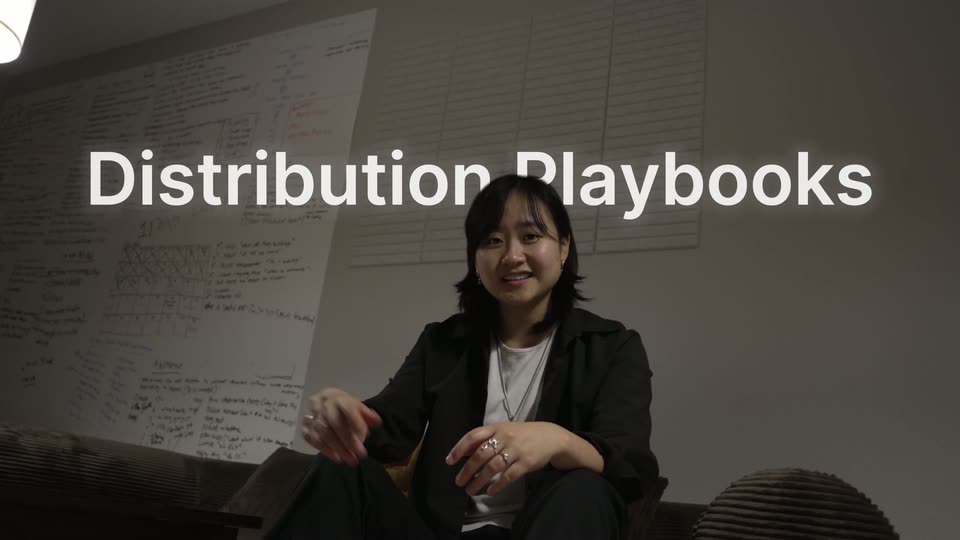
A woman in a black jacket sits on a couch in a dim room, gesturing as she talks, with sheets of handwritten notes pinned to the wall behind her. The title 'Distribution Playbooks' fades in across the upper frame, then out.
On-screen text: “Distribution Playbooks”
Camera: Static
11 · Feature reveal · 0:36–0:37
A monitor viewed at an angle shows a dark interface: a white serif prompt above an input box with placeholder text, and a row of small suggestion chips below. A small cursor arrow rests to the left. The frame is locked off and everything stays still.
Camera: Static
12 · Feature reveal · 0:37–0:38
A dark product interface fills the frame under a serif prompt reading “What's on your mind, Mohammad?”. Inside the input box, the line “im building spreadjam.com” types out letter by letter behind a blinking caret, while small gray suggestion links sit below the box.
Camera: Static
13 · Feature reveal · 0:38–0:39
A dark-mode chat window fills a monitor in a tight, angled close-up. Shallow focus keeps the centered prompt about building spreadjam.com sharp while the menu bar above and the reply below blur. The frame holds steady.
Camera: Static
14 · Feature reveal · 0:39–0:42
A close-up, angled view of a dark chat interface on a monitor, shot with shallow depth of field so the text reads soft and blurred. A prompt bubble and a multi-line answer about reaching first users fill the frame as the camera drifts slowly.
Camera: Static
15 · Feature reveal · 0:42–0:44
A dark chat screen is framed at a steep angle with shallow depth of field, the AI's response about a SpeedJam social monitoring workflow filling the frame. The text stays sharp near the center and blurs toward the edges as the camera drifts slowly.
Techniques: 3D mockup
Camera: Static
16 · Feature reveal · 0:44–0:45
A dark contact-list interface is framed at a slight angle. The view drifts slowly rightward across a table of names, emails and titles beneath a Contacts Found header and a row of filter fields.
Camera: Static
17 · Feature reveal · 0:45–0:46
A dark contacts table fills the screen, listing names, emails and titles under a heading and a row of filter criteria. A search field sits above the list. A thin bright line glows along the top edge while the text shows a faint horizontal shimmer.
Camera: Static
18 · Feature reveal · 0:46–0:47
A dark mind-map workflow of connected cards floats in 3D perspective, tilted and fading into black. A white text list runs down the left edge. The camera pushes in slowly, the depth layers sliding at different speeds.
Techniques: 3D mockup, Parallax
Camera: Static
19 · Feature reveal · 0:47–0:51
Two dark interface cards float on a dotted black grid as the frame pans right. The left card, ringed in glowing orange, shows an email draft; the right lists recipients with sent and sending states. Bold white captions label each card.
On-screen text: “Draft Personalized Emails”, “Send Approved Emails”
Camera: Pan
20 · Feature reveal · 0:51–0:54
On a dark dotted-grid background, three UI cards sit in a row while the camera drifts slowly right. The left card glows with a yellow border, the center card lists email recipients with sent, sending and queued states, and the right card lists follow-up days.
Camera: Pan
21 · Feature reveal · 0:54–0:57
Two dark interface panels sit on a dotted grid: the left lists emails with sent and sending statuses, the right a follow-up sequence. Bold white captions “Send Approved Emails” and “Schedule Follow-up Sequences” scroll horizontally across them, while a yellow node and red dots trace a workflow line behind.
On-screen text: “Send Approved Emails”, “Schedule Follow-up Sequences”
Techniques: Kinetic type
Camera: Pan
22 · Feature reveal · 0:57–0:58
Two dark UI panels sit on a dotted grid. The left panel lists sent emails, the right lists a follow up sequence. The composition pans right, sliding the left panel off screen while the right panel centers.
Techniques: UI zoom
Camera: Static
23 · Feature reveal · 0:58–1:00
A dark screen fills the frame in close-up, showing an inbox panel with monitor notifications and a red badge at the top right. A white cursor hovers near the lower entries. The camera eases back slightly, revealing a row of metrics along the bottom edge.
Camera: Static
24 · Feature reveal · 1:00–1:03
A man in a black shirt sits on a couch in a dim room, speaking to the camera and gesturing with open hands. A tan stuffed toy rests beside him, handwritten papers hang on the wall behind. The locked-off shot holds steady as he talks.
Camera: Static
25 · Feature reveal · 1:03–1:05
A dark dotted grid backdrop holds two interface nodes. A Connect GitHub node with an orange glowing border sits left, linked by a line with red nodes to an Analyze node partly off-frame right. The frame drifts slowly left.
Camera: Static
26 · Feature reveal · 1:05–1:09
On a dotted dark canvas, two workflow cards sit side by side, linked by a line with red nodes. The left card shows a connected GitHub status; the view slides right as the right card, Analyze Repository, glows red and reports Running.
Techniques: UI zoom
Camera: Pan
27 · Feature reveal · 1:09–1:09
A dark workflow UI on a dotted grid zooms in on a center node card with a glowing blue border, listing a Next.js repo analysis. Partial cards for GitHub connect and SEO audit flank it, linked by thin lines with red node dots.
Techniques: UI zoom
Camera: Static
28 · Feature reveal · 1:09–1:12
A tilted close-up of a dark interface on a monitor shows a list of file-reading lines that scrolls up as new entries appear, with a thin teal strip along the left edge and two suggestion buttons at the bottom.
Camera: Static
29 · Feature reveal · 1:12–1:14
A dark activity log on a monitor fills line by line with file-reading and search entries, each prefixed by a small icon, while the list scrolls and a feedback row of thumbs up, thumbs down and copy icons sits at the bottom.
Camera: Static
30 · Feature reveal · 1:14–1:16
A dark pull-request interface fills the frame, opening with a brief motion-blur ghost that sharpens. The camera pans right across status badges, iteration and file counts, a green branch icon with a pull-request title, and an agent summary block.
Camera: Static
31 · Feature reveal · 1:16–1:18
A code diff view of a pull request fills the frame, red deleted lines and green added lines beside the line numbers. The text is doubled in a ghosting effect, and a mouse cursor hovers near the middle line.
Camera: Static
32 · Feature reveal · 1:18–1:23
A dark code editor shows a side-by-side diff, red deletions on the left and green additions on the right. A mouse cursor hovers near line 120 while the frame slowly pushes in on the right column.
Techniques: UI zoom
Camera: Pan
33 · Feature reveal · 1:23–1:24
A man in a black sweater sits on a couch, gesturing with both hands as he speaks. The dim room shows a wall chart and a whiteboard behind him, with a stuffed toy on the seat. Locked-off medium shot.
Camera: Static
34 · Feature reveal · 1:24–1:24
A young man in a black long-sleeve shirt and silver chain sits on a couch, speaking to the camera with both palms open and gesturing. The dim room shows a whiteboard with handwriting on the left and a brown plush toy beside him.
Camera: Static
35 · Feature reveal · 1:24–1:30
A woman in a black jacket sits on a couch in a dim room, speaking to camera and gesturing with both hands. A brown plush toy and red flowers rest beside her. Static medium shot, steady pace.
Camera: Static
36 · Feature reveal · 1:30–1:32
A dark node-based interface on a dotted grid shows three connected cards: an orange-bordered config node, a keyword node with a sub-panel, and a monitor node at the edge. The view drifts slowly to the right.
Camera: Static
37 · Feature reveal · 1:32–1:36
A dark analytics dashboard holds a centered Slack integration card with a white Slack mark, the line Get alerts in Slack and a Connect Slack button, above four stat tiles. The view slowly zooms in on the card.
Techniques: UI zoom
Camera: Push in
38 · Feature reveal · 1:36–1:38
A dark dashboard panel centers a Slack integration card with the Slack mark, a headline and a Connect Slack button, while a row of stat counters sits along the bottom. The image sharpens and reframes slightly.
Camera: Static
39 · Other · 1:38–1:40
Two people sit on a couch in a dim room, a whiteboard of handwritten notes behind them. A large white title fades in across the center of the frame while the man gestures as he speaks.
On-screen text: “Open Source”
Camera: Static
40 · Other · 1:40–1:42
Two people sit on a couch before a whiteboard, the man gesturing as he talks. Small clips of a desk, a meeting, a green code screen and a crowd fade in and out around them.
Camera: Static
41 · Other · 1:42–1:43
Two people sit on a brown corduroy couch facing the camera in a locked-off frame. Around them, several floating video windows and interface screenshots play at once, including a green title screen, a white product panel, a dark map view, and b-roll of people working.
Techniques: Split screen
Camera: Static
42 · Other · 1:43–1:47
Two hosts sit on a couch while a collage of floating video clips and app screens surrounds them. The panels refresh with new footage, a green title card holds at top center, and an app mockup stays fixed mid-frame.
Camera: Static
43 · Outro · 1:47–1:52
Two people sit on a corduroy sofa in a dim room, a handwritten whiteboard behind them. Large centered words pop in one by one over the frame, the final one rendered as a white outline.
On-screen text: “You”, “Build”, “Spreads”, “Jam”
Techniques: Kinetic type
Camera: Static