0:29

Introducing Live Folders in Arc | Your sidebar is alive
The Browser Company · Productivity · Apr 2024
AdaL · Nov 2026 · 0:56 · AI-annotated
AdaL’s 0:56 launch film runs 28 scenes, about 2.0 s each. The product shows up at 0:05 and 3 features are revealed, with social proof. There is no explicit call to action; a voiceover carries the film. A launch video built as a workflow walkthrough: a question hook, three titled feature beats (start from assets, branch versions, multiple videos in one project), a rolling view counter, and a doll-delivered tagline before the logo. Signature moves are flat UI cards snapping into 3D pull-backs, word-by-word headline builds, and the recurring pink and blue light-streak backdrop.
Is this your launch? to your site or press kit.
The Browser Company · Productivity · Apr 2024
Apple · Hardware · Oct 2026
A dark-mode X feed in a three-column layout scrolls down, the top tweet's video giving way to a Stitch by Google post. A small floating input box with a cursor arrow hovers over the first video before scrolling out.
Camera: Pan
A dimmed X feed frames a dark video card where white bold text builds word by word to “Your launch video?”. The view zooms into the card as a macOS share bar with a cursor on an app icon slides up along the bottom.
On-screen text: “Your launch video?”
Techniques: Kinetic type, UI zoom, Cursor demo
Camera: Push in
A dark macOS dock sits under a bold white headline. A hand cursor taps the Arc icon, then the frame zooms into the pink A logo, which fills the screen.
On-screen text: “Your launch video?”, “everyone has a video they wis”
Techniques: Cursor demo, UI zoom
Camera: Push in
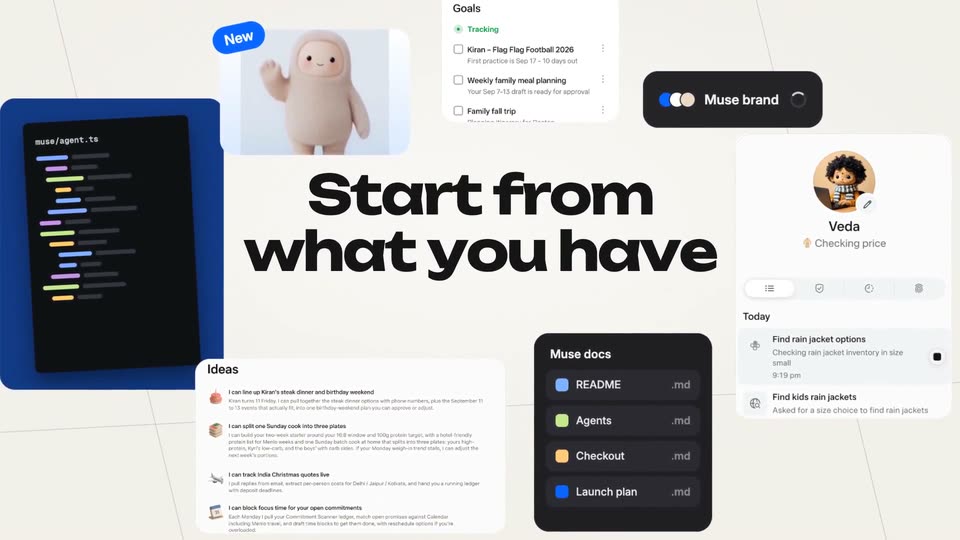
A whiteboard canvas of UI cards snaps from blur into focus: a dark code editor, Goals and Ideas lists, a Muse docs panel, a Veda profile, and a pink plush mascot. The big black headline at center then fades out, leaving the cards.
On-screen text: “Start from what you have”
Camera: Pull out
Flat UI cards on a light gray field fly apart into a 3D perspective, receding into a dark space streaked with pink and blue light, while a hand cursor hovers over the Ideas card.
Techniques: 3D mockup, Cursor demo
Camera: Pull out
A dark prompt field on black with blurred pink and blue light streaks. The prompt types out letter by letter beneath a stack of tilted document cards. A white hand cursor moves to the pink send button and clicks it, then the backdrop cuts to a dark blue grid.
Techniques: Kinetic type, Cursor demo, 3D mockup
Camera: Push in
A dark media grid of blurred thumbnails sits behind as a small anime avatar hops from a video card to an image card, its bubble cycling Importing, Generating, Editing. The product-demo.mp4 video card and hero-shot.png image card settle into the grid as the view zooms in.
Techniques: UI zoom
Camera: Pull out
A dark editor interface fills the frame: a top preview shows the headline on a light blue field, and a lower timeline holds video clips and audio waveforms. A pink-haired avatar with an Editing bubble slides from the preview down to the timeline while the playhead rests at zero.
On-screen text: “your personal AI agent”
Camera: Pull out
A video editor screen, preview window and multi-track timeline with audio waveforms, tilts back into 3D perspective as the camera pulls away, the interface floating above a dark blue grid floor.
Techniques: 3D mockup
Camera: Static
A white card tilts in 3D on a cream tiled floor, reading 'Muse is your personal AI agent' with 3D emoji props floating between the words. The camera levels to face it, a caption appears below, then the view zooms into the headline.
On-screen text: “Muse is your personal AI agent”, “First cut ready”
Techniques: 3D mockup, UI zoom
Camera: Pan
A pixelated purple-and-blue dotted frame surrounds a black field. The white headline sharpens from a soft blur into focus at the center, layered over a faint ghost of a canvas interface.
On-screen text: “Branch each promising idea”
Camera: Static
A dark Canvas view fills the screen as version cards grow from one to four, linked by thin connector lines, with a small avatar and a Branching badge at the right. The view then zooms into two cards side by side, each topped by a white version label.
On-screen text: “Branch each promising idea”, “v3 Product first”, “v4 Problem first”
Techniques: UI zoom
Camera: Pull out
Two panels compare v3 Product first and v4 Problem first over a dark dotted background. The left card swaps a Done! card, a checkout, and a tagline; the right holds a chat thread. The left panel then scales up to the front as an avatar moves up between the headers.
On-screen text: “v3 Product first”, “v4 Problem first”, “vs”, “CURRENT”
Techniques: Split screen, UI zoom
Camera: Push in
A white card with a pink bottom edge sits on a dark pixel-letter background. Inside, the words “your personal AI agent” and scattered emojis collapse into a centered “AI agent” with a single blue card icon, while a “v3 Product first” badge and an “Approved” tag frame it.
On-screen text: “v3”, “Product first”, “your personal AI agent”, “AI agent”
Techniques: Kinetic type
Camera: Push in
A white design card reading “A new kind of AI” sits in a review frame with version and approval badges. The view zooms into the card, which expands to fill the screen and reveals a Twitter feed showing a Muse post with a blob mascot image.
On-screen text: “A new kind of AI”
Techniques: UI zoom
Camera: Push in
A full X feed with left and right sidebars pushes in on a Muse tweet card. As the frame tightens, the lines “your personal AI agent” slide in beneath “Muse is” to complete the headline inside the post image.
On-screen text: “your personal AI agent”
Techniques: UI zoom, Kinetic type
Camera: Push in
A dark Twitter post fills the frame, its light blue card reading 'your personal AI agent' with calendar and notebook icons, counts below, and a column of round avatars at right. The shot holds, then the interface dissolves into a dark dotted grid of tiny pixel faces.
On-screen text: “your personal AI agent”
Camera: Push in
A dark pixelated frame dissolves into a blurred magenta-to-purple gradient as the word Multiple pops in at center in white, the first word of the line Multiple videos in one project.
On-screen text: “Multiple videos in one project”
Techniques: Kinetic type
Camera: Static
A blurred purple and magenta gradient fills the frame. A large light gray word, Multiple, sits centered, then settles into the smaller white line Multiple videos in one project. The background stays still throughout.
On-screen text: “Multiple”, “Multiple videos in one project”
Techniques: Kinetic type
Camera: Static
A purple-gradient chat UI shows a task checklist and a 'v3 is ready' message, while a dark input field types out 'Make 5 shorts and a teaser, and post them' word by word above a video-attached tag and a pink send button.
Techniques: Kinetic type
Camera: Static
A white card reading “Muse is” sits centered on a blurred purple gradient, then shrinks and slides up to become a header as a row of five dark cards with icons and labels rises into view beneath it.
On-screen text: “Muse is”
Camera: Static
A large card reads “Muse is” above a row of five teaser cards with white captions. A small 3D character pops in between the words, and phone and tablet mockups showing the Muse chat interface rise up behind the card row.
On-screen text: “Muse is”, “Introducing Muse”, “AI that works for you”, “Gets it done”, “Flight rebooked”, “Let's gooo”
Techniques: 3D mockup, Parallax
Camera: Static
Five phone mockups fan out in a 3D arc on a dark background with pink and blue light streaks. A large white view counter rolls up at the top as small follower badges pop, then the phones dim and the tagline “Yours, and more” appears across the center.
On-screen text: “1,602,432 views”, “+860K”, “+2.3M”, “+1.1M”, “Yours, and more”
Techniques: 3D mockup, Kinetic type
Camera: Push in
An anime woman with a black bob tipped in pink, in a black blazer, stands centered on white. She shifts her hand from her chest to an open presenting palm as the words one, prompt, away scale in around her.
On-screen text: “one”, “prompt”, “away”
Techniques: Kinetic type
Camera: Static
A close-up of an anime woman in a black suit presenting, with the tagline around her, zooms out to reveal she is one card in a grid of image cards.
On-screen text: “one prompt away”
Techniques: UI zoom
Camera: Pull out
A tilted 3D grid of content cards, mixing video thumbnails and text posts, floats on a white background. The grid rotates from a steep side angle toward a flat frontal view, keeping the central card with an anime figure and the words one prompt away in focus.
On-screen text: “one”, “prompt”, “away”
Techniques: 3D mockup
Camera: Pull out
White background. Black 'Made by' sits left as the pink 'A adal' slides in from the right to finish the credit line; a small gray card with an avatar exits above, then a pink circular logo with a white A drops in over the centered text.
On-screen text: “Made by”, “A adal video”
Techniques: Kinetic type
Camera: Static
A flat cartoon girl head with a black bob and pink inner hair sits centered above the wordmark on a plain white background. The head tilts and the hair shifts slightly in an idle loop while the text below stays locked in place.
On-screen text: “Adal video”
Camera: Static