0:35

Shopify Editions Winter ’26 | Trailer
Shopify · Business software · Dec 2025
Phone Harness · Oct 2026 · 1:00 · AI-annotated · YC Fall 2026
A presenter-led intro at the waterfront, app-screen overlays over blurred footage for the personal-phone demo, then flat 2D diagrams that tilt into 3D for the cloud feature, closing on a GitHub star counter and a centered logo. Signature moves: the red pixel phone logo and pixel cursor as recurring accents, and the 2D-to-3D camera tilt into a field of phones.
Shopify · Business software · Dec 2025
Anthropic · AI · Apr 2026
SKUVE · Sep 2026
A man in a black jacket and glasses stands at a waterfront railing, a suspension bridge behind him. He turns to face the camera and talks. A name lower-third and a red pixel logo with a wordmark appear on the left, while white captions run along the bottom.
On-screen text: “Oh hey, I didn't see you there.”, “Shawn Pana”, “prev. Browser Use”, “My name is Shawn,”, “and I'm building phone-harness,”, “phone-harness”, “which is the easiest way”, “to let an agent use a phone.”, “With phone-harness, your agent can”
Camera: Push in
A man in a black jacket and glasses talks to camera before the Bay Bridge. A chat window and a phone home screen appear as overlays, connected by lines to a red telephone icon. A white subtitle runs along the bottom.
On-screen text: “With phone-harness, your agent can”
Camera: Static
A dark chat window on the left updates with new messages while an iPhone on the right cycles through the Waymo app: home screen, destination search, results, pickup map, and a ride request card. A cursor clicks through the steps over a blurred live-action background.
On-screen text: “With phone-harness, your agent can”, “swipe, tap, and type”, “on your personal phone.”, “This means that your agent can”, “book you a Waymo,”, “grab verification codes for you,”
Techniques: Split screen, Cursor demo
Camera: Static
A split screen pairs a dark terminal on the left, its agent log updating line by line, with a Stripe window and iPhone Codes app on the right, where the login screen switches to the dashboard. A white cursor points at the setup guide.
On-screen text: “grab verification codes for you,”, “message people on your behalf,”
Techniques: Split screen, Cursor demo
Camera: Static
A man with glasses stands by a bridge, speaking to camera. Translucent app screens, a terminal and a phone, overlay him and fade out. Subtitles at the bottom read message people on your behalf, then or even use your dating apps for you.
On-screen text: “message people on your behalf,”, “or even use your dating apps for you.”
Camera: Pull out
A person in a black jacket and glasses stands before a suspension bridge and open water, gesturing with both hands while speaking. A translucent phone screen showing a social feed fades in at the right edge.
On-screen text: “or even use your dating apps for you.”
Camera: Static
A man in a black jacket talks in front of a bridge while a phone mockup on the right cycles through dating profiles, a red pixelated cursor tapping the X. The blurred background racks into focus as the phone slides away.
On-screen text: “or even use your dating apps for you.”
Techniques: Cursor demo
Camera: Static
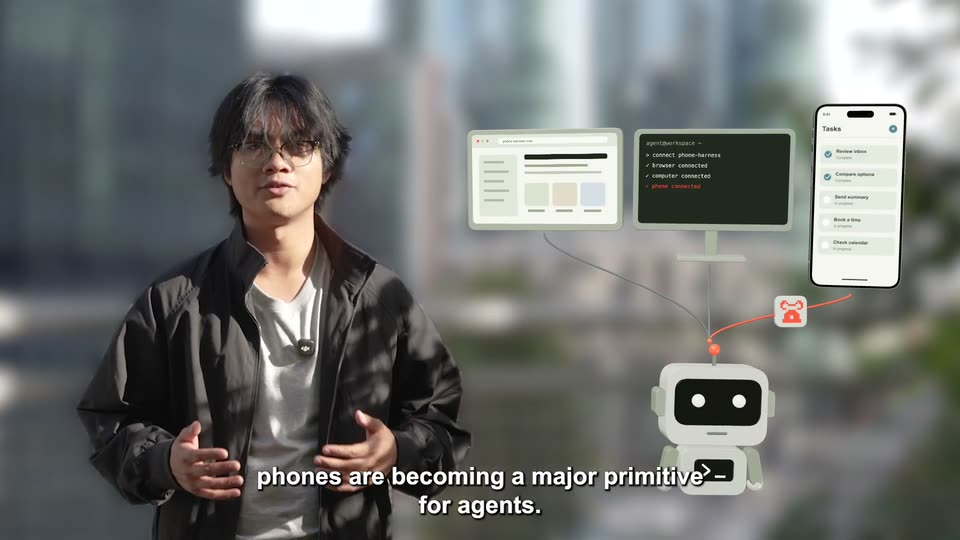
A man in a black jacket talks to camera before a blurred skyline. To his right, a white robot icon with a terminal chest appears, then a browser window, dark terminal and phone task list pop in above it, linked by thin lines, as subtitles run at the bottom.
On-screen text: “Alongside browsers and computers,”, “phones are becoming a major primitive for agents.”, “So that's why we're building the”
Camera: Static
A man in a black jacket stands against a blurred city backdrop, gesturing on a locked-off frame. To his right, a browser, terminal, phone and robot icon are linked by thin lines, a small red robot icon drifting. A caption line sits at the bottom.
On-screen text: “So that's why we're building the”, “phone-harness Cloud,”
Camera: Static
On a pale grid background, a pixelated red telephone icon sits beside the bold lowercase wordmark phone-harness. The word cloud slides in after a double slash as the lockup shifts left, while a white outlined caption at the bottom scales up and disappears.
On-screen text: “phone-harness Cloud,”
Techniques: Kinetic type
Camera: Static
On a light grid background, the orange pixel phone logo and wordmark slide from center to the top-left corner. A small pixel terminal, a horizontal orange line and a phone outline appear across the middle while a white caption stays fixed at the bottom.
On-screen text: “cloud-hosted phones that your agent can”
Camera: Static
A gray 3D robot on a grid background links to a 3D phone mockup through an orange line with moving dots. A red cursor swipes the Messages list, opens a chat, and types a reply that sends as a blue bubble. White outlined captions cycle at the bottom.
On-screen text: “phone-harness / cloud”, “cloud-hosted phones that your agent can”, “swipe, tap, and type on”, “autonomously,”, “in parallel,”
Techniques: 3D mockup, Cursor demo
Camera: Static
On a cream grid, a gray robot links to a phone running a Messages chat via an orange dashed line. The view then widens into a fan of five phones showing Shop, Trips, Messages, Calendar and Tasks, with the robot below.
On-screen text: “phone-harness / cloud”, “in parallel,”
Techniques: 3D mockup
Camera: Pull out
A flat diagram of five phone screens linked to a small robot tilts into a 3D field of hundreds of phones laid on a white grid. The camera glides across the rows as robot and character heads pop up between them.
On-screen text: “phone-harness / cloud”, “in parallel.”, “With phone-harness Cloud,”, “every agent can use its own phone.”, “Grokbot, Hermes, and more.”
Techniques: Morph, 3D mockup, Parallax
Camera: Push in
A vast 3D field of smartphones in a grid, each showing a different app screen, with floating 3D app logos hovering above. The camera glides low across the field as white captions appear at the bottom.
On-screen text: “Grokbot, Hermes, and more.”, “phone harness is free and open source”
Techniques: 3D mockup, Parallax
Camera: Static
A flat GitHub repository page fills the frame, then tilts into 3D perspective as a Star 1,289 badge pops in near the star button. A bottom caption swaps from “phone-harness is free and open source” to “with thousands of users around the world.”
On-screen text: “phone-harness is free and open source”, “Star 1,289”, “with thousands of users around the world.”
Techniques: 3D mockup
Camera: Push in
A tilted GitHub page in 3D perspective on a gray backdrop, its white Star button raised with a shadow and glow. The star count rolls from 2,484 to 4,000, then a small orange 3D piece drops onto the button, turning the star gold. White captions sit at the bottom.
On-screen text: “with thousands of users around the world.”, “Let your agent use your phone”
Techniques: 3D mockup
Camera: Push in
A repository page sits tilted in 3D perspective, its star button glowing as a small orange voxel character bounces on top of it. A caption at the bottom reads at phone-harness.com.
On-screen text: “at phone-harness.com.”
Techniques: 3D mockup
Camera: Static
On a plain off-white background, the orange pixel icon and black phone-harness wordmark begin blurred and drift left into a centered lockup as they come into focus. The bottom caption at phone-harness.com. fades out while the gray tagline Connect via MCP, CLI, or API fades in below the logo.
On-screen text: “at phone-harness.com.”, “Connect via MCP, CLI, or API”
Camera: Static