1:10

BlaBlaCar - How does it work?
BlaBlaCar · Sep 2017
Ramp’s 0:55 launch film runs 26 scenes, about 2.1 s each. The product shows up at 0:24 and 3 features are revealed. The call to action lands at 0:49 (89% in), over a voiceover. The video is built from rapid flat-color title cards that swap words on the beat, punctuated by 3D props and UI cards that drop into the type. A lime-green circle wipe marks the pivot from the luck joke to the product, and the lucky cat returns in the closing sky to tie the humor back to the brand.
Is this your launch? to your site or press kit.
BlaBlaCar · Sep 2017
SellRaze · Consumer · Oct 2025
Upsolve AI · B2B · Jun 2026
Films whose music sounds like this one, voice left out
AiApply · Electronic
Anthropic · Lo-fi hip-hop
Lightricks · Upbeat electronic music with a steady beat, synth bass, and bright melodic synths; transitions to a
On a plain beige background, the line “If your budgets” scales up beside a yellow folder icon with a cursor, then swaps to “are scattered across” as flat app-window illustrations in green, purple, and blue pop in around the text.
On-screen text: “If your budgets”, “are scattered across”
Techniques: Kinetic type
Camera: Static
Flat vector spreadsheet, email and chat windows drift inward around the frame edges as a yellow note and a file tab pop in, while centered text swaps phrase by phrase, ending on the word hope in rust brown.
On-screen text: “If your budgets”, “are scattered across”, “spreadsheets”, “emails”, “and pings”, “all you've really got”, “is the hope your spend is on track.”
Techniques: Kinetic type, Parallax
Camera: Push in
The centered black headline “is the hope your spend is on track.” sits on a cream field framed by flat illustrations of windows and sticky notes. A white “Budget exceeded” error dialog with a red X and orange OK button flashes in over the text, then vanishes.
On-screen text: “is the hope your spend is on track.”
Camera: Pull out
A flat macOS-style error dialog with an orange X icon, the text Budget exceeded and an OK button sits centered over a large black two-line headline on a pale gray background. The dialog hides the middle of the headline, leaving is the and pend on the top line and is on track. below, while the voiceover lists lucky superstitions.
On-screen text: “is the spend”, “is on track.”
Camera: Static
White text “So you...” holds on a plain blue field, then the frame cuts to two raised hands with crossed fingers while the words “cross” and “fingers” scale in at the corners.
On-screen text: “So you...”, “cross”, “fingers”
Techniques: Kinetic type
Camera: Static
A hand makes a crossed-fingers gesture against a flat light blue background, held still in a locked-off frame. Large white lowercase words, cross, your and fingers, sit around the hand and scale down over the shot.
On-screen text: “cross”, “your”, “fingers”
Techniques: Kinetic type
Camera: Static
On a flat mustard-yellow background, the white line “Shake a magic ball” holds a glossy 3D black eight-ball in place of the “8.” The word “ball” fades in at the start, then the whole line slides and slowly scales up while the ball drifts a few pixels.
On-screen text: “Shake a magic”, “ball”
Techniques: Kinetic type
Camera: Static
A sage green field framed by white lucky cat figurines, upside down along the top edge and upright along the bottom. In the center, the line and consult with builds up word by word in white lowercase type.
On-screen text: “Shake a magic”, “ball”, “and consult with”
Techniques: Kinetic type
Camera: Pull out
A white maneki-neko figurine with red ears and collar bobs in front of a sage green backdrop. The white lowercase text “the lucky cat.” spans the frame, hidden behind the cat’s ears, and the word “cat.” scales in. A second cat’s ears drift up out of frame.
On-screen text: “the lucky cat.”
Techniques: Kinetic type
Camera: Static
On a dusty pink background, white text “But.” scales in at center, then the word switches to “horseshoes” with a metallic 3D horseshoe tilted in the middle, overlapping the letters.
On-screen text: “But.”, “horseshoes”
Techniques: Kinetic type
Camera: Static
A white lowercase word sits centered on a flat pink background while a metallic 3D horseshoe spins in front of it, occluding the middle letters. The horseshoe turns on a vertical axis, alternating dark and bright silver faces with cross-shaped nail holes.
On-screen text: “horseshoes”
Techniques: 3D mockup
Camera: Push in
On a dark green background, the phrase four leaf clovers repeats in stacked lines that scale up and scroll vertically, the center lines bright white and the outer lines dim gray. Green four-leaf clover illustrations drift in from the corners and edges.
On-screen text: “four leaf clovers”
Techniques: Kinetic type
Camera: Push in
A brown lop-eared rabbit's head sits at the bottom right on a flat olive background. White text reads “and rabbits' feet”; the word “feet” starts tilted and large, then settles horizontal and smaller after “rabbits'”.
On-screen text: “and rabbits'”, “feet”
Techniques: Kinetic type
Camera: Push in
On a plain sage-gray background, the white caption 'feet' scales in at center, then the lines 'and rabbits'', 'aren't going to tell' and 'where your money is' appear one after another, each held still on a locked-off frame.
On-screen text: “feet”, “and rabbits'”, “aren't going to tell”, “where your money is”
Techniques: Kinetic type
Camera: Static
Centered white phrases “where your money is,” “actually,” then “going.” swap in sequence on a plain olive backdrop, while 3D dollar coins in gold, dark brown, and white float, tilt, and drift around the text.
On-screen text: “where your money is”, “actually”, “going.”
Techniques: Kinetic type
Camera: Static
A green circle scales up from the center, covering the white word 'going.' which shrinks, while small gold and white coin icons drift in the lower right before the circle passes over them.
On-screen text: “going.”
Techniques: Kinetic type, Masking
Camera: Static
A lime green circle expands from the center over a pale blue field until it fills the frame. The black word Introducing scales up, then the larger Ramp Budgets takes its place.
On-screen text: “Introducing”, “Ramp Budgets”
Techniques: Masking, Kinetic type
Camera: Static
Plain light blue background with white sans-serif type centered. The headline scales in, then lines of the tagline slide and swap in sequence, matching the voiceover, ending on the final line.
On-screen text: “Ramp Budgets”, “Live budget tracking”, “made for finance teams”, “who need answers”, “now”, “not after close.”
Techniques: Kinetic type
Camera: Static
White text reading “not after close.” sits centered on a flat periwinkle field and scales up, while gray bars close in from the top and bottom edges as the frame tightens.
On-screen text: “not after close.”
Techniques: Kinetic type
Camera: Static
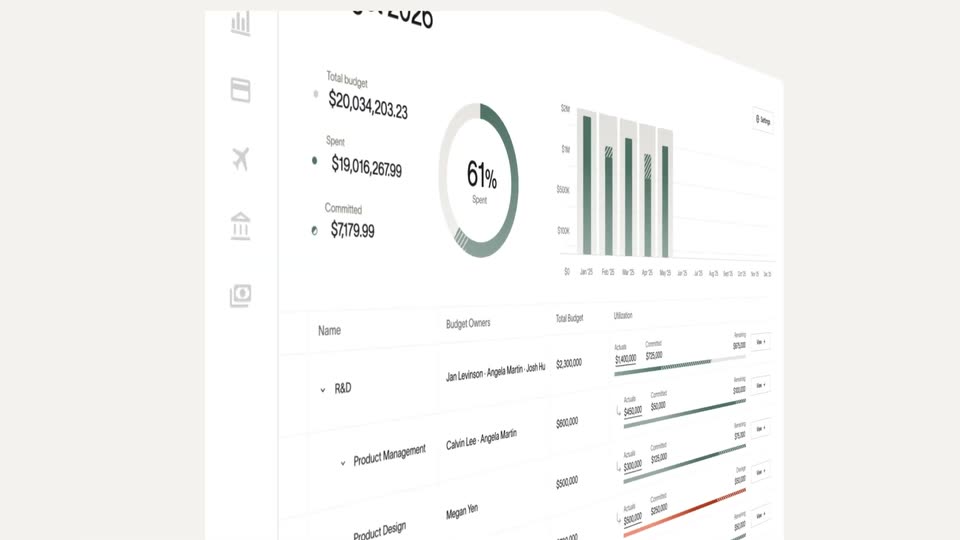
A flat budget dashboard, its donut chart counting from 10% to 61% beside three stat cards, tilts into 3D perspective to reveal a bar chart and owner table, the cards stacking vertically as a caption scales in.
On-screen text: “not after close.”
Techniques: 3D mockup
Camera: Static
A budget dashboard in 3D perspective rotates from an angled tilt to a flat front view. A bold headline Track spend in real time fades in on the left over the chart and table.
On-screen text: “Track spend in real time”
Techniques: 3D mockup
Camera: Static
A large black two-line headline sits on the left while a green bar chart and a Figma spend card settle on the right, two chart layers sliding together and the card fading into color.
On-screen text: “Track spend in real time”
Techniques: Parallax
Camera: Push in
Light gray background: the outgoing headline and monthly bar chart dissolve away as “Approve with context” settles on the left. On the right, a white request card with an avatar and green progress bar fades in over the chart, then gains the budget warning line.
On-screen text: “Track spend in real time”, “Approve with context”
Techniques: Kinetic type
Camera: Static
On a light gray field, a left-aligned headline crossfades into “Adjust before you overspend” while a stack of two white notification cards on the right collapses into a single card with an orange “$100k over” pill, then slides off to the right.
On-screen text: “Adjust before you overspend”
Techniques: Kinetic type
Camera: Static
Black sans-serif type on a lime background: “Less guess???” flips its question marks into “work.” to read “Less guesswork.”, then a glitch cut lands on “No luck required...”, where “luck” stutters into “lucky you.”
On-screen text: “Less guesswork.”, “No luck required...”, “lucky you.”
Techniques: Kinetic type, Morph
Camera: Static
A bright sky with a rainbow and drifting clouds, a faint 'lucky you.' caption at the bottom. The white 'ramp.com' text in the center gives way to the 'ramp' wordmark and mark as a white ceramic lucky cat with red ears rises into the bottom right, raising its paw.
On-screen text: “lucky you.”, “ramp.com”, “ramp”
Techniques: Kinetic type
Camera: Static