0:47

Jianna Liu - As products get faster to build, go-to-market becomes the advantage.
Cardinal · B2B · Jul 2026
LTX Studio · May 2026 · 0:40 · AI-annotated
LTX Studio’s 0:40 launch film runs 20 scenes, about 2.0 s each. The product shows up at 0:03 and 2 features are revealed. The call to action lands at 0:32 (79% in), over a voiceover. The video cuts between a live action Sisyphus metaphor and dark node editor UI shots at a brisk pace of about 19 cuts per minute. Signature moves are slow camera pushes and pulls through the node graph, white sans serif captions that scale in over the action, and the boulder motif that carries the story from problem to solution.
Is this your launch? to your site or press kit.
Cardinal · B2B · Jul 2026
TypeSafe AI · Sep 2026
A sweating man in a tan shirt leans forward, straining against a large granite rock, his face contorted in effort. The shot is a locked-off close-up. White text reading Generating and AI videos sits on either side of his head.
On-screen text: “Generating”, “AI videos”
Camera: Static
A man in a beige sweater and jeans strains to push a giant boulder up a concrete slope in a dim studio. White text reads Generating AI Videos at the top left and Can feel like this at the bottom right, scaling into place as the boulder creeps upward.
On-screen text: “Generating”, “AI Videos”, “Can feel like this”
Techniques: Kinetic type
Camera: Static
A man in a beige jacket and jeans pushes a large boulder up a sloped concrete floor, then slips and slides down as the rock rolls back toward the camera. White captions read 'Generating AI Videos' top left and 'Can feel like this' bottom right.
On-screen text: “Generating AI Videos”, “Can feel like this”
Camera: Pull out
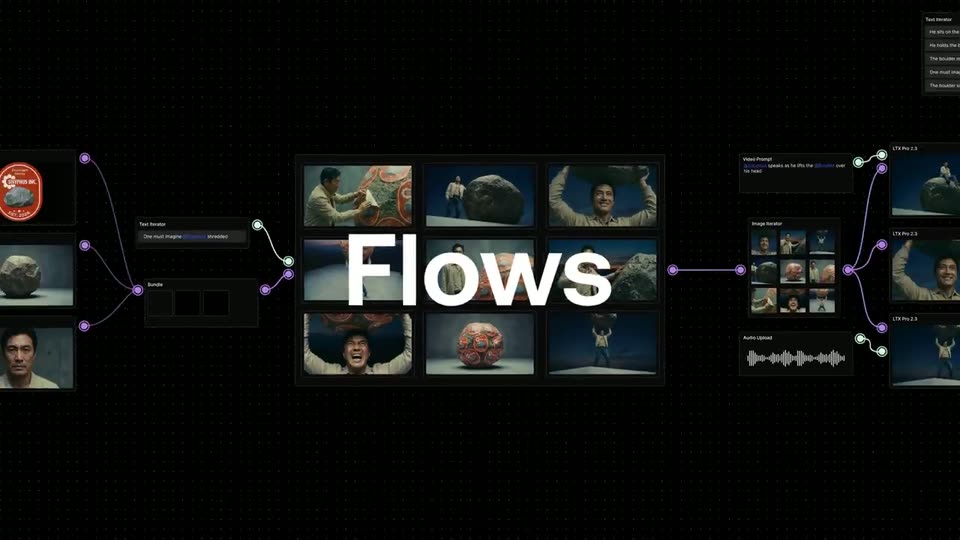
A dark node editor on a dotted background. The frame starts tight on a central card playing a clip of a man crushed by a boulder, then pulls back to reveal a grid of video thumbnails, side nodes, and the large word Flows across the middle.
On-screen text: “Generating AI Videos”, “Can feel like this”, “Flows”
Techniques: UI zoom
Camera: Pull out
On a black dotted canvas, the word Flows sits over a 3x3 grid of Sisyphus images inside a node graph. The camera zooms into the left nodes, follows purple connector lines past a Text Iterator and Bundle node, then pans right to the image grid.
On-screen text: “Flows”
Techniques: UI zoom
Camera: Push in
A dark node-based canvas opens on a 3x3 grid of generated clips showing a man with a rock and a logo-covered ball. The view pulls back to reveal the full workflow, with the grid linked by lines to prompt, image and audio nodes across the dotted background.
Techniques: UI zoom
Camera: Pull out
A dark node-graph interface on a dotted grid shows image, audio and script nodes joined by purple curves. The camera zooms into the node of a man pushing a painted boulder, which enlarges at center as the surrounding graph recedes.
Techniques: UI zoom
Camera: Push in
A rounded video card labeled LTX Pro 2.3 sits in a dark starfield, flanked by purple slider knobs. The card zooms to fill the frame, dropping the border, as a man in a beige jacket pushes a boulder that cracks open to flash white light.
On-screen text: “LTX Pro 2.3”
Techniques: Masking, UI zoom
Camera: Push in
A man in a khaki jacket studies a printed sheet in a dim blue room, his fingers turning its edge. A white caption reads across the center of the frame while he works.
On-screen text: “We know how tedious it can be”
Camera: Static
A man in a beige jacket strains against a huge boulder plastered with orange SISYPHUS INC. stickers, set against a bare gray wall. Centered white captions read “We know how tedious it can be” then “to build a campaign”.
On-screen text: “We know how tedious it can be”, “to build a campaign”
Camera: Pull out
Overhead shot of a man in a beige shirt pushing a giant boulder covered in orange Sisyphe Inc. labels across a concrete floor; he trips and falls. The caption One asset sits left and at a time right.
On-screen text: “One asset”, “at a time”
Camera: Static
A dark Templates dialog on a dotted grid shows a list of batch presets on the left and a node-flow preview on the right. The highlight moves from Batch background removal to Brand asset scaling as the preview re-lays out to the matching flow.
Camera: Static
Four people stand in a 2x2 grid beside a large boulder covered in orange SISYPHUS INC. stickers. Their outfits crossfade into white t-shirts printed with the same logo. A centered caption reads 'Explore different ideas in one click'.
On-screen text: “Explore different ideas in one click”
Techniques: Split screen
Camera: Static
A man in a white t-shirt with an orange logo stands beside a large boulder covered in orange SISYPHUS INC. labels, then quickly swaps to a different man in the same shirt while the boulder and backdrop stay still.
Camera: Static
A framed photo of a woman beside a rock covered in orange labels fills the screen, then the view pulls back to reveal it as one tile in a dark grid of project cards, each tagged with small prompt labels and dotted connector lines.
Techniques: UI zoom
Camera: Pull out
A node-based graph editor sits on a black dotted-grid canvas. Nodes hold video thumbnails, a red circular logo, a boulder and text lists, joined by thin white and purple connector lines. The view eases out to reveal the full network spanning the frame.
Camera: Pull out
A 3D man strains under a boulder wrapped in orange SISYPHUS INC. labels, held overhead on a flat platform. The camera pulls back from his face to a wide shot while the word Workflows fades in centered in white.
On-screen text: “Workflows”
Camera: Pull out
On a black field of small white dots, the bold white word “Workflows” snaps in with a horizontal motion blur, then a quick cut swaps it for the smaller line “Try it today.” centered in the same frame.
On-screen text: “Workflows”, “Try it today.”
Techniques: Kinetic type
Camera: Static
A black dotted grid holds the centered white line “Try it today,” then the frame cuts to the large gray Ltx logo centered on black.
On-screen text: “Try it today”, “Ltx”
Camera: Static
On a black background, a white Ltx wordmark appears large at center, then scales down to a smaller size and holds, locked-off, for the rest of the clip.
Techniques: Kinetic type
Camera: Static