0:53

DealPath SaaS Video - AI Sales Platform
DealPath · Jun 2026
Tower’s 1:13 launch film runs 36 scenes, about 2.0 s each. The product shows up at 0:19 and 3 features are revealed. The call to action lands at 1:09 (95% in), over a voiceover. The video alternates moody live-action office footage with clean, light-gray UI motion graphics, moving from a problem montage into three feature blocks that each pair a serif headline with a populating interface. Pacing is steady at around 119 bpm with quick cuts in the problem section and slow push-ins on the product screens, anchored by a black-on-white logo system and a recurring founder talking head.
Is this your launch? to your site or press kit.
DealPath · Jun 2026
OpenAI · AI · Feb 2026
Harbor · Healthcare · Mar 2026
Films whose music sounds like this one, voice left out
Menlo AI · Electronic
Walton · Corporate promotional electronic
Arcade · Upbeat electronic, modern orchestral
A man in a black zip-up top sits in a wooden chair, hands clasped in his lap, speaking directly to camera. Behind him is a wall of blue-tinted glass window panes with a small plant at the lower left. Static medium shot, steady pace.
Camera: Static
A man in a suit and glasses sits at a desk in a dim office at night, typing on a keyboard. Rows of dark monitors and glowing floor lamps fill the frame, with blinds covering the windows behind him.
Camera: Static
A bearded man in a dark suit and glasses types on a keyboard in a dim office, a small amber desk lamp glowing in front of him, as short email phrases slide in over the frame.
On-screen text: “Just following up...”, “to me”, “Hi Noah.”
Techniques: Kinetic type
Camera: Static
A blurred email view racks into focus, revealing a follow-up message from John Davies with a green circular avatar and a row of toolbar icons. The frame then cuts to a bespectacled man in a suit raising a finger in a bright office.
Camera: Push in
A man in a dark suit and glasses holds a pencil to his lips, gazing down in a dim office with a cool blue window behind him. As the camera drifts in slowly, email lines slide across the frame: a subject, a greeting, then the sender address.
On-screen text: “Just following up...”, “Hi Noah.”, “John Davies <[email protected]>”
Techniques: Kinetic type
Camera: Static
A bearded man in a dark suit and glasses holds a pencil to his lips in a dim office lit by blue light. The frame then bursts into a radial blur as the camera zooms rapidly from his face.
Techniques: Speed ramp
Camera: Push in
In a dark room, a low close-up shows two hands typing on a white-keyed keyboard. The fingers press the keycaps in sequence while side light catches the keys, the rest of the frame falling to black.
Camera: Push in
Extreme macro close-up of a screen, lines of dark text on a pale lavender background scroll vertically while a thin vertical band of pixel grid runs down the center. Shallow focus, slight blur.
Camera: Static
Extreme close-up of a person's eye under blue light, shallow depth of field. The reflection of a white UI grid sharpens in the pupil while the eye stays fixed on the screen.
Camera: Static
A close-up of a text document interface. A blue highlight expands from left to right across the line reading 'Please provide copies of all forms 1099'.
Camera: Static
A hand in a suit sleeve rests on a black mouse at a dark desk, fingers tapping as a keyboard sits blurred to the right. Shallow focus keeps the foreground monitor edge soft.
Camera: Static
A macro of pixelated white digits on a blue display cuts to a Windows 11 desktop, where a 'test' error dialog appears over the blue bloom wallpaper.
Camera: Pan
A macro close-up of a tilted monitor shows an All Files dropdown and a green Search button with a hand cursor resting on it. The view dissolves into a dense document table under an ENVIRONMENTAL MATTERS header, the search bar faintly overlaid, then returns to the button.
Techniques: Cursor demo
Camera: Static
A file manager view shows a highlighted row under a cursor, then cuts to a tight close-up of a list where date entries slide past a blurred left column. The camera stays locked off while the rows move vertically.
Camera: Static
A dark close-up of a person's face, eyes lowered, cuts to an extreme macro of a monitor where the pixelated word Help glows. A small date caption slides across the locked-off frame.
On-screen text: “May 22”
Camera: Static
A man in a dark suit and glasses sits at a desk in a dim office, both hands pressed to his forehead. He lowers them and stares down at a dark monitor. Cool blue window light fills the background; a red lamp glows at the right edge.
Camera: Static
A spreadsheet grid fills the frame, rows tagged with colored status chips like Open, Received, Pending and Overdue. A green outline marks one empty cell where a text caret blinks. The view slowly zooms in on the table.
Techniques: UI zoom
Camera: Static
A man in a black zip sweater sits centered in a wooden chair, speaking to camera against a blue windowed office wall. He holds a slight smile, hands clasped, then the shot cuts to a flat dark gray frame.
Camera: Static
On a light gray background, a folder icon labeled Documents fades in, followed by a spreadsheet icon labeled Requests and an envelope labeled Workflows, each turning from gray to black. The three icons then slide inward to form a centered row.
On-screen text: “Documents”, “Requests”, “Workflows”
Camera: Static
A black geometric logo is centered on a light gray background. It remains static for the first second, then slides upward.
Camera: Static
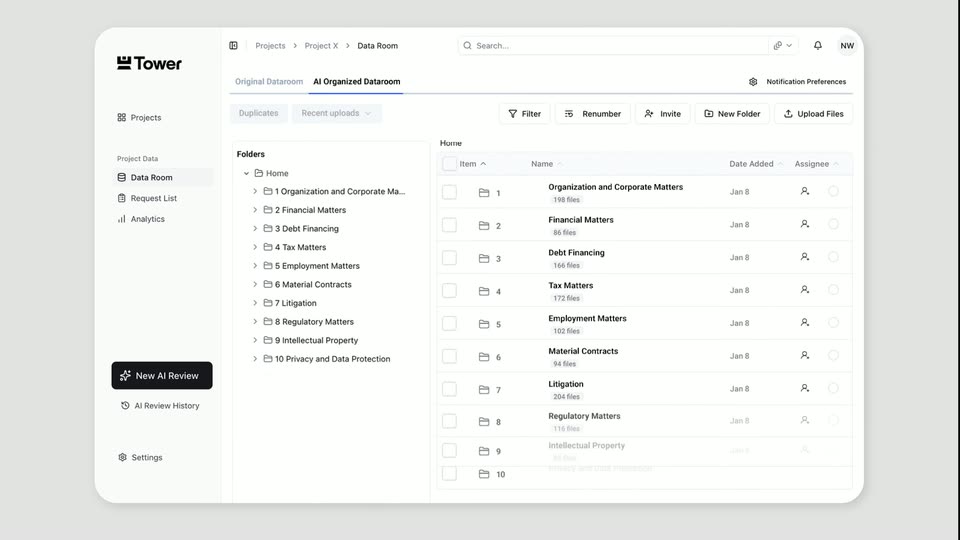
A rounded Tower data room screen on a light gray background. After a brief crossfade, the list fills with numbered folder rows one by one, and the left folder tree expands in step, under the active AI Organized Dataroom tab.
Camera: Pan
A split layout holds a gray panel on the left where a serif headline fades in, while the right shows a Due Diligence Request List interface. Sections expand and rows populate one by one, each file linking into its numbered slot with a small colored icon.
On-screen text: “Files automatically link to your request list.”
Techniques: Split screen
Camera: Pan
A light request list table occupies the left, its rows typing comments word by word while status icons flip to green checks. On the right, a black serif headline fades in: Live collaboration in one space.
On-screen text: “Live collaboration in one space.”
Camera: Pull out
A floating UI card for a Due Diligence Request List rotates slightly in 3D and settles flat on a light gray background. The panel holds a table of requests with status icons, then a slow push-in drifts the frame while the Send Request List button glows.
Techniques: 3D mockup
Camera: Pull out
A due-diligence request table reframes into a clean folder list on the left, folders sliding into place, while a large two-line headline fades in on the right over a light gray field.
On-screen text: “Identify risks and review documents”
Techniques: UI zoom
Camera: Pan
Split-screen interface: a gray panel on the left lists document folders with file counts, scrolling slowly as the Customer Contracts row flashes red and its checkbox fills with a blue tick. A white panel on the right holds the serif line about AI agents.
On-screen text: “Identify risks and review documents with AI agents.”
Techniques: Split screen
Camera: Pan
Two rounded interface cards, one white and one gray, sit tilted in 3D perspective and overlap, then merge into a single centered Customer Contracts table showing one document row with dates and a reasoning note.
Techniques: 3D mockup
Camera: Pan
A white customer contracts table sits on a pale gray field. The top toolbar toggles between a back-and-search row and a centered Tower Agent label with a sparkle icon; a hand cursor hovers the download control while a small spinner pulses in the assignees column.
Techniques: Cursor demo
Camera: Static
A white Tower Agent dialog sits over a blurred document view. A prompt types out in the input field, then lifts into a lavender chat bubble on the right as a three-dot typing indicator appears on the left.
Techniques: Kinetic type, Morph
Camera: Static
A Tower Agent chat panel with the prompt bubble 'Create a red flag report on these contracts.' sits over a blurred document, then dissolves away to reveal a Word document titled Red_Flag_Report_2026 with the header PROJECT X [RED FLAG] REPORT.
Camera: Pan
A Word document window crossfades in, then holds on a dark navy report page reading PROJECT X [RED FLAG] REPORT. The camera slowly pushes in on the page while the ribbon and text stay still.
Camera: Pan
A man in a black quarter-zip sweater talks in a close profile shot against a blurred blue window wall, then the frame cuts to a frontal medium shot of him seated in a wooden chair with hands folded.
Camera: Static
A man in a black zip-neck sweater sits centered in a wooden chair, speaking directly to camera. Behind him, a glass wall shows blue-tinted windows and a small plant. The shot is a static medium frame, locked off, with no added graphics.
Camera: Static
On a plain white field, a small black bracket shape grows and settles into the Tower logo mark as the bold wordmark fades from light gray to black. The gray tagline fades in beneath, and the lockup holds still.
On-screen text: “Infrastructure for due diligence.”
Techniques: Morph
Camera: Static
The Tower lockup with its tagline holds centered on a white background, then is replaced by a light gray “Learn More” caption in the same position.
On-screen text: “Infrastructure for due diligence.”, “Learn More”
Camera: Static
A white end card shows Learn More in black serif type, centered. The gray URL WWW.WITHTOWER.COM appears beneath it, then the frame holds still.
On-screen text: “Learn More”, “WWW.WITHTOWER.COM”
Camera: Static