0:39
Explore
00:00:00 / 00:41:15
- Length
- 0:41
- Scenes
- 22 · 1.9 s avg
- Product on screen
- 0:00
- Features shown
- 3
- Voiceover
- No
- Views
- 374K on X
as of November 22, 2026
Pruna AI’s 0:41 launch film runs 22 scenes, about 1.9 s each. The product is on screen from the first frame and 3 features are revealed. There is no explicit call to action. Dark, low-key look built on a near-black plum field with one saturated violet accent; footage is desaturated and graded cool, then blurred into a soft backdrop for the flat UI and spec overlays. The edit alternates short reference-to-generated transformation clips with left-aligned headline plus right-side data cards, using a consistent struck-through-word-to-new-word label, a bottom prompt bar with a purple Generate button that flips to a green Generated chip, and count-up numbers and slide-in/
Footage neededEstimated needs: 5 capture groups — your screens or recordings · 2 filmed passages — shoot, supply or replace · 4 graphic passages — draw or supply · 5 3D passages — build or supply
Is this your launch? to your site or press kit.
More like this

Pruna AI - Introducing P-Video-2-Pro-Reference based on @MiniMax_AI H3! 🎬 Combi, scene by scene
· 22 scenes as text
01 · Product intro · 0:00–0:03
A dark purple-tinted shot of a person walking down a corridor toward the camera. The Pruna AI logo and product title sit above; two tagline lines and a small caps line fade in, then the tint lifts to brighten the hallway.
On-screen text: “Pruna AI”, “P-Video-2-Pro-Reference”, “References in.”, “Video out.”, “BEST PRICE · BEST COST · BEST QUALITY”
Techniques: Kinetic type
Camera: Static
02 · Demo · 0:03–0:04
A generated clip of a figure in a coat walks away down a concrete corridor toward a closed door, filling the upper frame. Below it a dark prompt bar holds a video-ref thumbnail, the typed line An astronaut walks down a corridor., and a purple Generate button, with a cursor hovering over the button.
Techniques: Cursor demo
Camera: Static
03 · Demo · 0:04–0:06
A dim frame brightens to reveal an astronaut in a white suit walking away down a gray corridor toward a closed door. A purple GENERATED badge and a person-to-astronaut headline sit top-left, while a prompt bar with a green Generated button lines the bottom.
On-screen text: “GENERATED”, “person → astronaut”
Techniques: Cursor demo
Camera: Static
04 · Demo · 0:06–0:07
A generated clip of an astronaut walking down a grey corridor plays inside the product screen, with a prompt bar and status chip framing it. The top-left label person → astronaut and the bar fade out, then a Speed & price. headline fades in at the left.
On-screen text: “person → astronaut”, “Speed & price.”
Camera: Static
05 · Pricing · 0:07–0:12
A blurred dark corridor sits behind a left-aligned headline, Speed & price. Two dark purple data cards slide in on the right; their resolution pills and runtimes count up while prices fade in, then a footnote appears before the frame fades to white.
On-screen text: “SPEED AND PRICE”, “Speed & price.”, “480p”, “~1.9s”, “for a 5 s clip”, “Speed mode $0.02/s”, “Cost mode $0.015/s”, “768p”, “~4.0s”, “for a 5 s clipn Speed mode $0.035/s Cost mode $0.025/s Speed mode, 1 image reference. Output price per second; references billed separately.”
Techniques: Kinetic type
Camera: Static
06 · Demo · 0:12–0:13
A 3D cyclist in an orange jacket rides a black bike along a coastal road inside the product screen. A reference-video label and a prompt bar sit over the frame; the right-side option cards and the fog fade out as the prompt text starts to type.
Camera: Static
07 · Demo · 0:13–0:14
A cyclist in an orange jacket rides a black bike down a narrow seaside street with orange walls, framed as a reference video. A bottom prompt bar types a text prompt while a cursor clicks the purple Generate button.
On-screen text: “REFERENCE VIDEO”, “cyclist”
Techniques: Cursor demo
Camera: Static
08 · Demo · 0:14–0:17
A 3D panda in an orange jacket rides a bicycle toward camera down a narrow seaside street. A top label strikes through 'cyclist' with an arrow to 'panda'; a bottom bar shows the prompt and a Generated button.
Camera: Static
09 · Demo · 0:17–0:17
A 3D panda in an orange jacket cycles toward the camera along a seaside street. Top left shows a purple GENERATED chip and a struck-through cyclist with a purple arrow pointing to panda in white. A bottom bar holds a video-ref thumbnail, the prompt line, and a green Generated button.
On-screen text: “cyclist → panda”
Camera: Static
10 · Feature reveal · 0:17–0:19
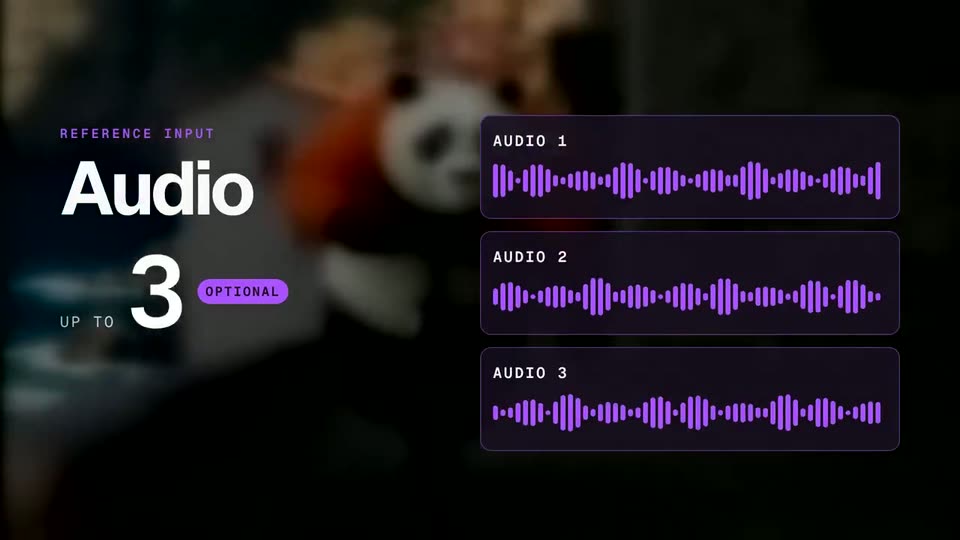
A blurred live-action room sits behind a flat overlay. On the left, a purple label decodes above a large white “Audio” and a counter that ticks from 0 to 3 beside a purple “OPTIONAL” pill. On the right, two dark waveform panels appear, then a third slides in, all with animated purple bars.
On-screen text: “REFERENCE INPUT”, “Audio”, “UP TO 3”, “OPTIONAL”
Techniques: Kinetic type
Camera: Pull out
11 · Feature reveal · 0:19–0:20
A blurred panda video fills the background. On the left, white text reads 'Audio 3' with a purple 'REFERENCE INPUT' tag above and a purple 'OPTIONAL' pill beside the number. On the right, three dark panels stack, each with a label and an animated purple waveform.
On-screen text: “REFERENCE INPUT”, “Audio”, “UP TO”, “3”, “OPTIONAL”
Camera: Pull out
12 · Demo · 0:20–0:22
A live-action clip of a man in a grey sweater running and leaping over a stone block plays as the canvas. Over it, a dark prompt bar types the text A robot jumps over a stone block while a cursor clicks the purple Generate button, which flips to Generated with a thin ring.
Techniques: Cursor demo
Camera: Static
13 · Demo · 0:22–0:25
A product result view plays a generated clip of a yellow robot running and leaping over a stone block in a paved courtyard. A human figure morphs into the robot at the start, while a top-left badge, a transformation title, and a bottom control bar with a reference thumbnail and prompt stay locked in place.
On-screen text: “GENERATED”, “man → robot”
Techniques: Morph, Cursor demo
Camera: Static
14 · Demo · 0:25–0:25
A yellow humanoid robot runs in from the right and leaps over a low stone block in a paved courtyard under a gray sky. Static overlays frame the clip: a purple GENERATED badge, a man-to-robot caption, and a bottom bar with a reference thumbnail and prompt.
On-screen text: “GENERATED”, “man → robot”, “A robot jumps over a stone block.”, “Generated”
Camera: Static
15 · Feature reveal · 0:25–0:26
A defocused plaza with a bench and a yellow sculpture sits behind a left-aligned headline and a right-aligned list of dark rounded cards. The counter under “Videos” ticks from 0 to 3 as a second card with a cyclist thumbnail slides in below the first.
On-screen text: “REFERENCE INPUT”, “Videos”, “UP TO”, “3”
Camera: Static
16 · Feature reveal · 0:26–0:28
Over a blurred outdoor backdrop, a dark UI panel pairs a purple REFERENCE INPUT label with a large white Videos headline and the number 3. Three thumbnail cards captioned VIDEO 1 to 3 stack on the right, the last sliding in, then the panel dissolves into a blurred room with a leather chair.
Camera: Static
17 · Demo · 0:28–0:30
A 3D brown leather armchair rotates slowly against a gray backdrop while a cursor types a prompt into the bottom input bar and clicks the purple Generate button, which becomes Generated; the top-left label swaps from studio to showroom.
On-screen text: “studio”, “showroom”
Techniques: Cursor demo
Camera: Static
18 · Demo · 0:30–0:33
A brown leather armchair turns slowly in a bright showroom, other seats and a table blurred behind it. A struck-through studio label and a purple arrow point to showroom at the top, while a reference bar with a prompt and a green Generated chip sit at the bottom.
On-screen text: “studio → showroom”
Techniques: 3D mockup
Camera: Push in
19 · Demo · 0:33–0:33
A brown leather armchair sits in a bright, blurred showroom and slowly rotates in place. A purple badge and a white caption with a purple arrow sit top left, while a dark reference bar with a thumbnail and a green status pill runs along the bottom.
On-screen text: “studio → showroom”
Camera: Static
20 · Feature reveal · 0:33–0:35
A defocused brown armchair sits in a bright room as a graphic overlay builds: small purple caps above a large white 'Images' and 'UP TO 9' on the left, while six video thumbnails pop into a 3x2 grid on the right.
On-screen text: “REFERENCE INPUT”, “Images”, “UP TO”, “9”
Camera: Static
21 · Feature reveal · 0:35–0:36
A defocused interior with a leather armchair fills the frame as a backdrop. On the left, a purple label and large white headline read out a spec, while a 3x3 grid of bordered example stills sits on the right. The layout holds static for the duration.
On-screen text: “REFERENCE INPUT”, “Images”, “UP TO”, “9”
Camera: Static
22 · Outro · 0:36–0:41
On a dark purple gradient with a soft central glow, the Pruna AI plum logo and wordmark sit at top center. The bold headline fades in, its second half in purple, followed by the tagline and a line of body copy. Locked-off frame, slow fade.
On-screen text: “Pruna AI”, “P-Video-2-Pro-Reference”, “References in. Video out.”, “Image, video and audio references. Speed and cost modes.”
Camera: Static