
1:16
Explore
00:00:00 / 01:19:02
- Length
- 1:19
- Scenes
- 34 · 2.3 s avg
- Product on screen
- 0:12
- Features shown
- 3
- Voiceover
- No
- Views
- 2K on YouTube
as of November 27, 2026
Pitch’s 1:19 launch film runs 34 scenes, about 2.3 s each. The product shows up at 0:12 and 3 features are revealed. There is no explicit call to action. The video is built as a chain of gradient title cards and tight UI close-ups, each feature introduced by a prompt bar that types its name and then demonstrated inside a mock deck. Signature moves: character-by-character typing, blur-to-focus rack shots, and status pills that confirm each AI action.
No filming indicatedEstimated needs: 4 capture groups — your screens or recordings · 1 official logo — reused across the film · 2 graphic passages — draw or supply · 1 3D passage — build or supply
Is this your launch? to your site or press kit.
More like this



Similar soundtrack
Films whose music sounds like this one, voice left out
0:56

It's here
Mercury · Electronic, Cinematic
1:07
Build games at the speed of thought with GladeKit
Glade · Modern electronic music
1:12

Convexia, An AI-Maximalist Pharma Company
Convexia · Electronic, Funk, Disco
Introducing Pitch AI actions, scene by scene
· 34 scenes as text
01 · Hook · 0:00–0:03
On a purple field with soft 3D shapes, the white headline “Anyone can create slides with AI” appears word by word, then a rounded input bar with a plus icon and arrow button frames it; the scene cuts to a dark gradient.
On-screen text: “Anyone can create slides with AI”
Techniques: Kinetic type
Camera: Static
02 · Hook · 0:03–0:05
On a black-to-purple gradient, a sentence reveals left to right and scales into place, the words made to win set in bold white. The frame stays locked off.
On-screen text: “But not all slides are made to win.”
Techniques: Kinetic type, Masking
Camera: Static
03 · Hook · 0:05–0:06
A white tagline sits on a near-black field, then scales up and defocuses, the letters growing larger and softer until the frame dissolves into blur.
On-screen text: “But not all slides are made to win.”
Techniques: Kinetic type
Camera: Static
04 · Problem · 0:06–0:08
A 3D tan mountain range drifts under a pale sky above a dark navy panel, where white outlined boxes read WINNING, PRESENTATIONS and ARE in a diagram layout. The boxes and terrain blur as they shift, suggesting a transition.
On-screen text: “WINNING”, “PRESENTATIONS”, “ARE”, “2025”
Techniques: Kinetic type, Parallax
Camera: Static
05 · Problem · 0:08–0:09
A black title card holds a white serif headline inside a thin white frame with small corner labels. Three solid orange circles drift slowly across the frame, one overlapping the headline's first letter.
On-screen text: “Our Brand”, “Voice & Tone”, “November 2025”, “On-brand”, “Words matter immensely”, “website.com”, “[email protected]”
Camera: Push in
06 · Problem · 0:09–0:11
A flat line-art browser window with a striped title bar sits on a cream background. The black serif word Personalized holds center over a thin progress bar that fills left to right.
On-screen text: “On-brand”, “Personalized”
Camera: Static
07 · Problem · 0:11–0:12
A black title card with the large white words 'And unique' set over a pale blue planet and vertical glitch streaks on the left. The text jitters slightly left and right while the frame stays locked, with small deck labels in the corners.
On-screen text: “Personalized”, “And”, “unique”
Camera: Static
08 · Feature reveal · 0:12–0:20
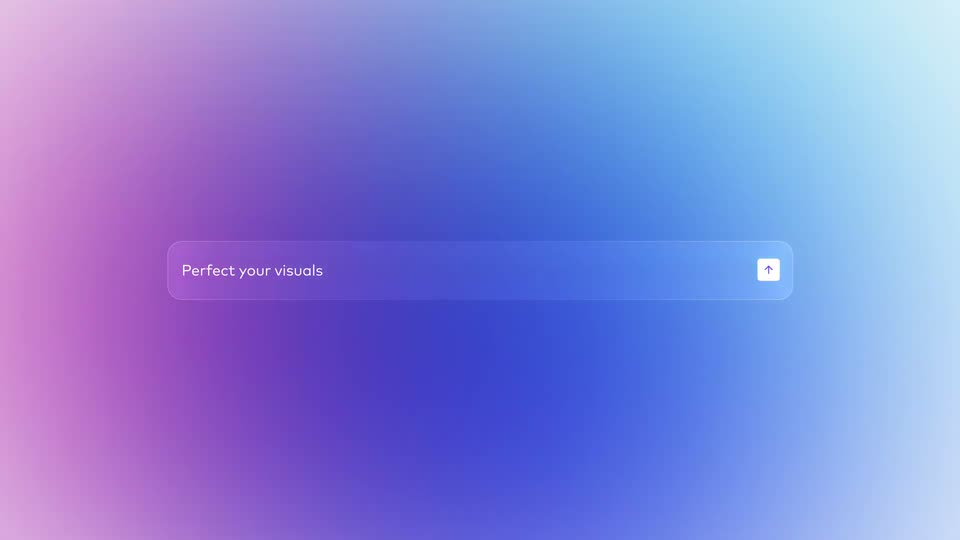
A glass prompt bar on a shifting purple-blue gradient types a headline character by character; a cursor clicks the send icon, a second line is typed, then the bar expands into a card revealing a strip of slide thumbnails.
On-screen text: “Create designer-grade slides fast, with Al actions”, “Perfect your visuals”
Techniques: Kinetic type, Cursor demo, Morph
Camera: Pull out
09 · Feature reveal · 0:20–0:21
A MindMagic product page with three bicycle cards sits in a rounded frame on a purple gradient. The frame opens soft and out of focus, then sharpens into a clear, locked-off view.
Camera: Pan
10 · Feature reveal · 0:21–0:22
A white product card on a purple gradient shows three bicycle photos with short captions. A command menu fades and slides up over the center, listing actions and a prompt field.
Camera: Static
11 · Feature reveal · 0:22–0:23
A white actions dropdown hovers over a bicycle product page, its “Enhance image resolution” row highlighted in gray. The frame stays locked off while a short caption slides in across the menu.
On-screen text: “Enhancing image resolution”
Techniques: Kinetic type
Camera: Static
12 · Feature reveal · 0:23–0:27
A matte black road bike on a dark backdrop sharpens from a blurry, dotted low-resolution image to a crisp one. A white status pill in the center shows a loading icon, then switches to a green check and a back link as the enhancement completes.
Techniques: Morph
Camera: Static
13 · Feature reveal · 0:27–0:29
A white UI panel shows three bicycle cards in a row, the middle on a dark tile over a soft yellow glow, each with a price tag and caption. A bottom bar holds a green check status left and a back label right that scales gently.
Camera: Static
14 · Feature reveal · 0:29–0:30
A white context menu fades from blur into sharp focus over a canvas showing three bicycle product images. The menu lists editing commands such as Remove image background, Expand image and Blur image background beneath an All actions tab.
Camera: Static
15 · Feature reveal · 0:30–0:31
A white interface panel with a pale yellow glow displays three bicycle cards in a row, each pairing a cutout bike image with a price and a short caption. A status pill at the bottom center holds a progress bar and the label Removing image background.
Camera: Static
16 · Feature reveal · 0:31–0:33
A product grid shows three bicycle cards on a pale yellow field. The center card's dark photo backdrop slides down and vanishes, revealing the black road bike on the bright background, while the side cards and their captions stay still.
Techniques: Masking
Camera: Static
17 · Feature reveal · 0:33–0:35
A flat product panel shows three bicycle cards on a yellow glow, each with a price tag and a short caption. A white toast bar settles in at the bottom. The whole panel then scales down and blurs out of focus.
Techniques: UI zoom
Camera: Pull out
18 · Feature reveal · 0:35–0:40
A pink-to-cyan gradient fills the frame as a translucent rounded input bar fades in at center. The tagline types in word by word on the left beside a white up-arrow button, then the whole bar fades out.
On-screen text: “Personalize every slide”
Techniques: Kinetic type
Camera: Static
19 · Feature reveal · 0:40–0:42
A blurred browser window on a pink-to-blue gradient racks into focus, revealing a presentation slide with an italic serif headline and a tilted dark business card, while an AI command palette at the bottom scrolls its action list and highlights an input field.
Techniques: 3D mockup
Camera: Static
20 · Feature reveal · 0:42–0:43
A white rounded panel with a tab row and a list of gradient-icon actions overlays a cream slide showing a dark serif headline. The composition holds static with no movement across the clip.
Camera: Static
21 · Feature reveal · 0:43–0:47
A white dialog card with a purple-outlined input field sits over a beige and dark diagonal background. Text is typed into the field while the camera pans right to reveal the Go back and Esc hints and a purple arrow button, which a black cursor clicks.
Techniques: Cursor demo
Camera: Pan
22 · Feature reveal · 0:47–0:50
A white pill-shaped status bar eases in over a beige desk with a dark laptop, showing “Rewriting slide...” with a purple icon and stop button. A soft purple gradient glow pulses along the bar’s left edge while the frame stays locked off.
Camera: Static
23 · Feature reveal · 0:50–0:51
A white pill-shaped toast holds center over a soft backdrop, its label crossfading from a blurred “Rewriting slide...” to a crisp “Slide rewritten” beside a green checkmark. The background shifts from warm beige to a pastel pink-blue gradient.
Camera: Static
24 · Feature reveal · 0:51–0:54
A pitch slide with a dark business card graphic swaps its italic serif headline and body copy from one promise to another, then the whole slide zooms out into a small card on a pale canvas while a white “Slide rewritten” toast stays pinned at the bottom.
On-screen text: “Slide rewritten”
Techniques: Kinetic type, UI zoom
Camera: Pull out
25 · Feature reveal · 0:54–0:59
A soft pink-to-blue gradient fills the frame as a glassy input bar fades in at center, typing out “Apply your brand” beside an up-arrow button. The bar then blurs as a white “Edit your brand tone” panel slides up from below.
Techniques: Kinetic type
Camera: Static
26 · Feature reveal · 0:59–1:03
A white modal titled Edit your brand tone sits centered on a blue-to-purple gradient. The tone paragraphs finish typing, then a cursor glides to the Publish changes button and clicks it, and a small loading spinner appears at the modal's lower left.
Techniques: Cursor demo
Camera: Static
27 · Feature reveal · 1:03–1:06
A brand tone settings screen sits in a browser window on a purple gradient; a dark toast slides up at the bottom. The camera zooms into the interface as a cursor moves, then cuts to a purple slide with a typewriter-style text box.
Techniques: UI zoom, Cursor demo
Camera: Push in
28 · Feature reveal · 1:06–1:07
A purple presentation slide holds a selected headline text box over a section labeled THE SOLUTION. A white command palette rises from the bottom edge and sharpens into focus, revealing a list of AI text actions and a focused input field.
Camera: Static
29 · Feature reveal · 1:07–1:09
A white command panel with tabs and a four-item list of AI actions overlays a lavender screen showing purple monospace document text. The top row, Match brand tone, is highlighted with an AI tag. The shot holds static.
Camera: Static
30 · Feature reveal · 1:09–1:11
A white pill-shaped input bar with a document icon and a purple stop button slides into place on a violet field, showing the label Matching brand tone. Three columns of underlined monospace text sit above it between two thin white lines.
Camera: Static
31 · Feature reveal · 1:11–1:14
A pale text card on a purple field shows a headline that crossfades to a shorter line, then the card scales up and tilts into 3D perspective with a soft drop shadow.
On-screen text: “Unified revenue data improves insights and reduces friction across your GTM teams.”, “A central home for your revenue data that improves insights and alignment.”
Techniques: 3D mockup
Camera: Pull out
32 · Other · 1:14–1:16
A rounded input bar with a white up-arrow button floats centered on a gradient that shifts from purple to pink and blue. White bold text types in letter by letter inside the bar, ending on the full phrase.
On-screen text: “Don't just present.”
Techniques: Kinetic type
Camera: Static
33 · Other · 1:16–1:17
A white glass chip reading “Don’t just present.” with an up-arrow button sits centered on a purple-to-blue gradient. The chip fades out as large 3D purple shapes, a rounded cube and a cone, drift into the frame around a small white cube.
On-screen text: “Don't just present.”
Camera: Static
34 · Outro · 1:17–1:19
A white Pitch logo and wordmark fade into the center of a flat violet field while blurred 3D spheres, cones and rounded slabs float at the frame edges.
On-screen text: “Pitch”
Camera: Static