2:35
Eric Nguyen - Introducing Omnii-1, our most powerful genome language model, and a m
Radical Numerics · Oct 2026
Microsoft’s 1:22 launch film runs 46 scenes, about 1.8 s each. The product shows up at 0:17 and 12 features are revealed. There is no explicit call to action; a voiceover carries the film. The video alternates live-action talking heads inside rounded cards with flat purple motion graphics, moving from a problem statement to a logo reveal, a rapid-fire feature rundown, and a closing benefits montage. Signature moves are the pink hand-drawn loops and underlines, white circular icon badges orbiting on dotted paths, and 3D-tilted UI mockups on dot-grid gradients.
Is this your launch? to your site or press kit.
Radical Numerics · Oct 2026
HyperFrames · Sep 2026
Hoplite · B2B · Nov 2026
Films whose music sounds like this one, voice left out
Sira · Electronic
Covu · Modern corporate electronic
A man in a light blue patterned shirt sits on a white couch in front of a bookshelf. He smiles and gestures with his hands while speaking directly to the camera.
Camera: Pull out
A man in a patterned shirt sits on a white couch before a bookshelf, gesturing as he talks. Above him, the purple headline scales up while a pink hand-drawn loop draws itself around the word essential.
On-screen text: “Video is essential”
Techniques: Kinetic type
Camera: Pull out
A man on a white sofa talks inside a rounded card on a lavender gradient. Purple icons in white circles pop in at left and right. Video is essential scales in, then Internal communications settles below the card as a pink underline draws under it.
On-screen text: “Video is essential”, “Internal communications”
Techniques: Kinetic type
Camera: Static
A horizontal pan glides right across three rounded video clips on a pale lavender dotted background: a man on a couch, a woman presenting in a meeting room, a man at a table. Purple icon circles float beside the clips and the purple headline sits at lower left.
On-screen text: “Internal communications”
Techniques: Split screen
Camera: Pan
On a purple dotted background, a rounded-rectangle clip of a woman presenting in a conference room sits at center. The white headline External communications scales in at the top with a pink underline, while two white circular icons, a megaphone and a monitor, pop in on either side.
On-screen text: “External communications”
Techniques: Kinetic type
Camera: Static
A purple dotted frame holds a rounded video window of a woman presenting in a conference room, flanked by three circular icon badges and a white headline above. The window shrinks to the center as the headline scales up and slides off the top edge, and the icons exit the frame.
On-screen text: “External communications”
Techniques: Kinetic type
Camera: Pull out
On a purple gradient with a dot grid, white circular icons fly in from the edges and settle into a row while the word Connect assembles from scattered letters, a white hand-drawn oval circles it, and through video appears below. The composition then slides left.
On-screen text: “Connect”, “through video”
Techniques: Kinetic type
Camera: Static
A purple-to-magenta gradient with a large soft circle drifts as the line “through video” and a white circular badge with a purple video glyph slide out of frame to the left.
On-screen text: “through video”
Camera: Static
Large purple circles drift across a violet gradient background at different speeds. On the right, two small circular icons, a video camera and a chat bubble, fade in linked by a dotted line.
Techniques: Parallax
Camera: Static
A woman in a coral sweater looks puzzled inside a teal rectangle on a purple gradient, while white circular icons with purple symbols orbit along a dotted elliptical path. The white headline “Where do I start?” appears above word by word, underlining “start” in pink.
On-screen text: “Where do I start?”
Techniques: Kinetic type
Camera: Pan
A confused woman in a pink sweater sits in a teal frame on a purple gradient, ringed by white circular tool icons linked by dotted lines. A white circle expands from her chest, wiping the screen to reveal the Microsoft logo.
On-screen text: “Where do I start?”
Techniques: Masking
Camera: Static
On a pale lavender gradient, the purple Clipchamp logo assembles as its top bar tilts into place, the wordmark settling beneath it. A circular cutout then opens in the logo's center to reveal a woman in a black blazer holding a tablet.
On-screen text: “Microsoft Clipchamp”
Techniques: Masking
Camera: Static
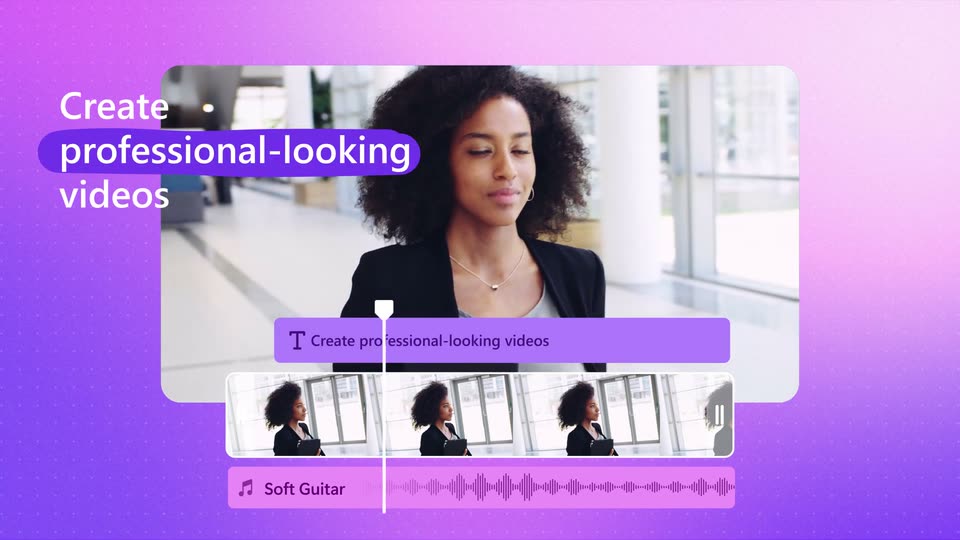
A flat video-editor mockup sits on a dotted purple field: a preview window of a woman holding a tablet, a filmstrip timeline, a pink audio track and a purple text track. A white playhead sweeps left to right while the preview zooms in, then a large stacked headline slides in on the left with the middle word highlighted.
On-screen text: “Microsoft Clipchamp”, “Soft Guitar”, “Create professional-looking videos”, “Create professional-looking videos”
Techniques: Kinetic type, UI zoom
Camera: Push in
On a purple dotted backdrop, a rounded video window of a woman in a black blazer shrinks and drops as the bold headline 'Make an impact' locks in above it. A caption bar with a T icon sits below, then a white hand-drawn loop scribbles across the frame.
On-screen text: “Make an impact”
Techniques: Masking
Camera: Static
A purple dotted gradient holds the headline Make an impact above a rounded video window of a smiling woman giving a thumbs up. Corner icons of chat, thumbs up, smiley and heart fade out as a white hand-drawn ellipse is drawn around the word impact.
On-screen text: “Make an impact”
Camera: Static
A bold navy headline sits above a rounded video card showing a smiling woman in a black blazer giving a thumbs up, on a purple gradient with a dotted pattern; the whole composition slides up and exits the top of the frame.
On-screen text: “Make an impact”
Camera: Static
A tilted white email compose window floats in 3D perspective over a purple dotted backdrop. The camera reframes to center the window, exposing the subject line, dashed body box and Send button, while a small photo drops to the bottom edge.
Techniques: 3D mockup
Camera: Static
Tilted email composer and company updates windows sit on a purple gradient. A hand cursor drags a purple video clip into the email, then onto the updates page, as the headline builds in above with a pink underline. The windows then slide to a new arrangement.
On-screen text: “Fits seamlessly into your workflow”
Techniques: Kinetic type, Cursor demo, 3D mockup
Camera: Static
On a dotted purple gradient panel, a 3D folder icon holds the center as white circular badges with purple editing icons (scissors, image, text, music, layout) pop in around it. A tilted window mockup with a video thumbnail and the headline 'Fits seamlessly into your' exit at the start.
On-screen text: “Fits seamlessly into your”
Techniques: 3D mockup
Camera: Static
A purple dotted gradient fills the frame around a central purple film clapperboard icon. White circular badges holding purple line icons for scissors, image, star, text, music, and shapes drift slowly around it.
Camera: Pan
A purple gradient panel covered in white circular icons, a text cursor, a film and a music note, slides left off frame. On the pale lavender background the word Intuitive scales in, underlined by a pink stroke, with wavy lines at the corners.
On-screen text: “Intuitive”
Techniques: Kinetic type
Camera: Static
A bold purple word Intuitive sits inside a pink hand-drawn oval on a lavender field dotted with squiggles, as User-friendly slides in underlined below. A white rounded card wipes in from the right, exposing a timeline UI at the bottom edge.
On-screen text: “Intuitive”, “User-friendly”
Techniques: Kinetic type, Masking
Camera: Pan
A dark video editor timeline bar sits under a preview of a man in a suit on a purple dotted background. A white label builds the word editor beneath Timeline while a hand cursor drags a clip leftward on the track.
On-screen text: “Timeline editor”
Techniques: Kinetic type, Cursor demo
Camera: Static
A dark video editor interface on a purple dotted background zooms in to fill the frame. A man in a suit plays in the preview window, a dark blue Timeline editor label sits to its right, and a cursor moves across the timeline clips and audio track.
On-screen text: “Timeline editor”
Techniques: UI zoom, Cursor demo
Camera: Static
On a purple dotted background, two video clips sit on a horizontal timeline. A cursor grabs a purple double-arrow handle and drags it, the clips separate and the left clip shrinks, demonstrating trimming. The word Trimming sits at the bottom right.
On-screen text: “Trimming”
Techniques: Cursor demo
Camera: Static
A horizontal filmstrip of video clips floats on a purple dotted gradient. The left and right clips swap between a man and a woman, while orange circles with a hand cursor hover over microphone and camera dropdowns, suggesting input selection.
Techniques: Cursor demo
Camera: Static
A webcam preview of a man on a couch sits above a control bar; a cartoon hand cursor taps the red record button as a pink circle draws around the 'Webcam' label. The panel slides up-left while a screen recorder window and 'Screen recorder' text slide in below.
On-screen text: “Webcam”, “Screen recorder”
Techniques: Cursor demo
Camera: Static
A purple dotted background holds two flat feature panels: a webcam feed of a man with a record control bar, and a window mockup of an about page with a woman's webcam feed. White camera icons label the panels as Webcam and Screen recorder while a cursor icon sits over the window.
On-screen text: “Webcam”, “Screen recorder”
Techniques: Split screen
Camera: Static
On a pink-to-purple dotted gradient, a webcam control bar with a red record button and a preview of a man sit beside an About us document card. The cluster slides aside and fades as a dark aspect-ratio panel with a cursor and a Video label fade in.
Camera: Static
A dark blue panel on the left lists aspect ratio buttons. A white cursor clicks 1:1, then 16:9, and the central preview of a woman with glasses expands from a square crop to a wide frame. A crop icon and the title sit top right.
On-screen text: “Video resizer”
Techniques: Cursor demo
Camera: Static
A video editor UI shows a portrait preview of a woman holding a pen while a cursor selects the 9:16 ratio in the left panel, labeled “Video resizer” at top right. The screen crossfades to a mountain landscape as the “Transitions” label fades in over it.
On-screen text: “Video resizer”, “Transitions”
Techniques: Cursor demo
Camera: Static
A close-up of the video preview and timeline strip, with a white “Transitions” label over a purple mountain scene, zooms out to reveal the full Clipchamp editor, showing the left media panel, right tool rail and bottom timeline.
On-screen text: “Transitions”
Techniques: UI zoom
Camera: Pull out
The ClipChamp editor mockup floats on a dotted purple field. In the preview window the words Start creating now type out letter by letter, then the whole interface tilts into 3D perspective.
Techniques: 3D mockup, Kinetic type
Camera: Pull out
A small purple gradient grid icon sits centered on a pale lavender field, then morphs into a taller tile with a tilted bar capping its top edge.
Techniques: Morph
Camera: Static
SharePoint and OneDrive icons sit on a dotted purple gradient as a film clapperboard icon slides down to join them. White lines connect the trio in a circle around a padlock icon, and a Microsoft 365 banner settles on top. The diagram slides left as a paper airplane flies in.
On-screen text: “Microsoft 365”
Camera: Pull out
Three circular video clips of people sit on a purple dotted gradient. A red play button and white paper planes travel along dashed lines toward the clips as white padlock icons pop in beside them, while a large purple shape fills the right side.
On-screen text: “Q”
Camera: Pan
A dotted pink blob and three circular video portraits with padlock icons sit on lavender, linked by dashed lines. The frame pans right, pushing the portraits off the left edge as a white paper plane drifts top right and a dark pill reading Enhance your work appears at center.
On-screen text: “Enhance your work”
Camera: Pan
A dark navy rounded card floats on a purple gradient background with concentric rounded squares and a dotted texture. White bold sans-serif text reading Enhance your work scales up in the center of the card.
On-screen text: “Enhance your work”
Techniques: Kinetic type
Camera: Static
On a purple dot-grid gradient, a rounded purple shape wipes away to reveal the white text 'Enhance your work', then the frame cuts to 'Elevate your brand' with a pink underline, ringed by floating icons: a layout tile, Aa and T badges, squiggles, a music note, and a color panel with a cursor.
On-screen text: “Enhance your work”, “Elevate your brand”, “Aa”
Techniques: Kinetic type, Masking, Particles
Camera: Pull out
A purple dotted background holds the white headline “Elevate your brand” surrounded by floating 3D icons: app tile, Aa badge, color palette, squiggles. A 3D website-builder interface slides up from the bottom, passes in front of the headline, and settles into a tilted perspective view.
On-screen text: “Elevate your brand”
Techniques: 3D mockup
Camera: Pull out
A flat browser mockup sits on a purple dotted gradient. A video tile of a smiling woman shrinks and docks into the page content area as the headline “Upgrade your communications” appears word by word above, “Upgrade” under a blue brushstroke; a cursor drifts to the right edge.
On-screen text: “Upgrade your communications”
Techniques: Kinetic type, Cursor demo
Camera: Static
A purple dotted backdrop holds a white browser window mockup containing a video of a smiling woman with a name tag. The frame zooms into the window, sliding the white headline up and out of the top.
On-screen text: “Upgrade your communications”
Techniques: UI zoom
Camera: Static
A rounded purple gradient card with a faint dot grid sits on a pale lavender field. White headline text appears at center, then a pink oval circles “required” while two 3D squiggles bounce in the corners.
On-screen text: “No experience required”
Techniques: Kinetic type
Camera: Static
A rounded purple-to-indigo gradient card with a faint dot grid holds the white headline, a pink hand-drawn loop circling the last word, and two 3D squiggle lines in the corners. The loop unwinds, then the headline and card fade out to a blank frame.
On-screen text: “No experience required”
Camera: Static
The Clipchamp logo builds on a pale lavender gradient. The purple clapper bar tilts into place above the body, which fills with horizontal purple bands, while the wordmark stays fixed below.
On-screen text: “Microsoft Clipchamp”
Techniques: Morph
Camera: Static
On a white background, the four-square Microsoft mark in red, green, blue and yellow scales up from a small size at center, then the gray wordmark Microsoft fades in to its right and holds still.
On-screen text: “Microsoft”
Camera: Static