0:59

Google Flow - Today we're expanding Flow into a full AI creative studio. We’ve rede
Google · AI · Feb 2026
Canva’s 2:00 launch film runs 57 scenes, about 2.1 s each. The product shows up at 0:13 and 7 features are revealed. The call to action lands at 1:48 (89% in), over a voiceover. The video opens on a sun-bleached live-action hook and a kinetic gradient tagline, then runs a tight chain of feature reveals, each introduced by a bold text card on near-black and proven in a 3D-tilted device that flattens into a flat screen capture. Its signature look is the cyan-to-purple gradient, rounded pill and outline shapes, and cursor-driven UI demos all cut to a steady 100 bpm pop track.
Is this your launch? to your site or press kit.
Films whose music sounds like this one, voice left out
ElevenLabs · Electronic
Versine · Electronic, Hip-Hop, Rock
Polygon · Electronic
A red-haired dancer in a dark tank top and red-striped pants spins and arches in a sun-bleached beach lot, arms flung wide. A hazy sky and lens flare fill the background. A large static word holds over the locked-off frame.
On-screen text: “DE”
Camera: Static
A woman with long hair dances on a hazy seaside boardwalk, arms raised, hair whipping, backlit by a low sun with lens flare. The white phrase “Get your stories” builds word by word and holds centered over her torso as the handheld camera tracks her.
On-screen text: “Get your stories”
Techniques: Kinetic type
Camera: Pan
On a dark field, a rounded pill mask plays hazy footage of a woman with arms raised. The white word moving sits centered and scales, while two cyan triangles above glide together into one and the offset cyan and purple outlines merge.
On-screen text: “Get your stories”, “moving”
Techniques: Kinetic type
Camera: Static
A cyan-to-purple gradient pill slides in from the left and settles centered, its equalizer bars bouncing. The white word grooving stays still in the middle while a small teal playhead triangle glides right along the top edge.
On-screen text: “grooving”
Camera: Static
A blue-to-purple gradient circle fills the dark frame with the word 'with' centered and an outlined cursor below. The circle shrinks into a small white play button with a cursor, then the word 'easy' appears in a purple-blue gradient.
On-screen text: “with”, “easy”, “grooving”
Techniques: Kinetic type, Morph
Camera: Static
On a near-black background, the lowercase word “easy” in a pink-to-blue gradient slides across the frame, then gives way to “breezy” in the same gradient, which holds still at center.
On-screen text: “easy”, “breezy”
Techniques: Kinetic type
Camera: Static
On a dark field, the gradient word snap scales up in the center as a white cursor shifts from an arrow to a pointing hand beneath it, while a dimmer line of letters drifts in from the right edge.
On-screen text: “snap”
Techniques: Kinetic type
Camera: Static
A white pointing-hand cursor rests on a dark field, then a blue gradient circle scales up from the center and swells to fill the frame, a white video camera icon fixed at its middle.
Camera: Push in
A masonry grid of colorful video template thumbnails pops in around a centered headline on a white background, then the whole grid scrolls downward, revealing new cards at the bottom as the top ones exit.
On-screen text: “Start your journey”, “with one of our”, “amazing video templates”
Techniques: Kinetic type
Camera: Pull out
A grid of colorful video template thumbnails drifts slowly downward across a white screen while two lines of centered text hold still in the middle.
On-screen text: “with one of our amazing video templates”
Camera: Push in
A white rounded card on a light background holds a circular plus button. A black arrow cursor and a white hand cursor sit beside it; the hand cursor slides up to tap the button as the card scales to fill the frame. The caption sits centered below.
On-screen text: “or create your vision”
Techniques: Cursor demo
Camera: Static
A laptop screen shows the Canva editor with a white canvas. The words from scratch type out letter by letter in the center as the cursor blinks. The frame stays locked off on the interface.
On-screen text: “or create your vision”
Camera: Push in
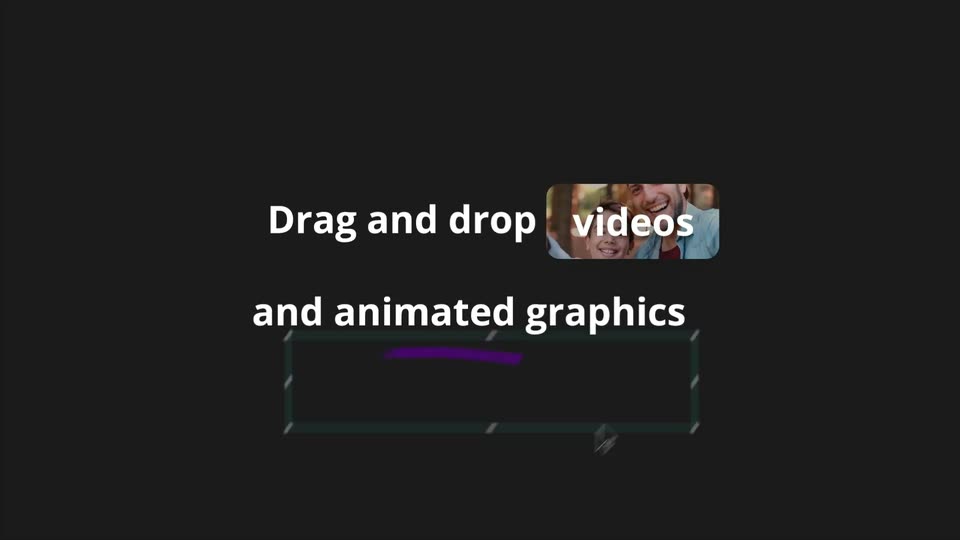
White bold text “Drag and drop” appears on a dark background as a video thumbnail labeled “videos” slides in beside it. Below, “and animated graphics” lands in a dashed selection box while a purple hand-drawn ellipse circles the words, a cursor visible.
On-screen text: “Drag and drop”, “videos”, “and animated graphics”
Techniques: Kinetic type, Cursor demo
Camera: Static
A laptop in 3D perspective shows the Canva video editor, the Videos panel open with a grid of fashion clips. A headline reads 'Drag and drop videos and animated graphics' as the word 'videos' scales in over the screen.
On-screen text: “Drag and drop”, “videos”, “and animated graphics”
Techniques: 3D mockup, Kinetic type
Camera: Pull out
A dark sidebar of menu items sits beside a grid of video thumbnails with timecodes. The panel eases from a slight 3D tilt to flat, a hand cursor hovers a woman's clip, then the grid slides left, revealing a white canvas where the clip lands in the center.
Techniques: 3D mockup, Cursor demo, UI zoom
Camera: Pull out
A locked-off shot of a video editing interface. A left sidebar stacks clip thumbnails while the main preview plays a woman applying lipstick. A cursor glides from the preview area over to the sidebar.
Techniques: Cursor demo
Camera: Static
A phone mockup in 3D perspective sits over a blurred desk. Inside the editor, a cursor moves down the left menu and taps Elements, swapping the right panel from a grid of video clips to a grid of colorful illustrated stickers, hearts and a red badge.
Techniques: 3D mockup, Cursor demo
Camera: Pull out
A locked-off screen recording of a video editor. A woman applies lip gloss in the canvas, the words fresh new gloss sit inside a hand-drawn white oval beside a red sale sticker, and a hand cursor hovers over the text. A tool sidebar lines the left, a timeline runs below.
On-screen text: “fresh new”, “gloss”
Techniques: Cursor demo
Camera: Pull out
A dark audio library interface. A white hand cursor clicks the Audio entry in the left sidebar, the menu expands with extra categories, and the track list on the right shifts as the cursor picks a row.
Techniques: Cursor demo
Camera: Static
A tablet in 3D perspective on the right shows a music library scrolling past categories like Epic, Trap and Piano, a cursor resting on the scrollbar. On the left, a white headline fades in over a blurred plant background.
On-screen text: “Find your jam amongst our collection of world-class music tracks”
Techniques: 3D mockup, Cursor demo
Camera: Pull out
Rounded chips with gradient outlines converge from scattered spots into the sentence “Edit videos and add transitions with ease” on a dark background. Two chips play short video clips, a mountain landscape and a woman, beside a purple play button and bowtie icon.
On-screen text: “Edit”, “videos”, “and”, “add”, “transitions”, “with ease”
Techniques: Kinetic type
Camera: Pull out
Close-up of a video editor's timeline: a large preview on top shows a yellow poster with a group photo, while a filmstrip below fills as designed thumbnails slide in. A black arrow points to the next slot, then a cursor clicks the plus button and a new empty frame appears.
On-screen text: “The triendshp”
Techniques: Cursor demo
Camera: Pull out
A design app screen shows a slide of people's legs beside a yellow panel above a filmstrip of thumbnails. A cursor moves across the strip and the view zooms into two group-photo slides, the right one gaining a yellow selection border.
Techniques: Cursor demo, UI zoom
Camera: Push in
A light interface holds two horizontal cards, each pairing a yellow panel with a group photo. A black cursor rests on a hand icon between them, then slides onto the right card as the hand icon disappears.
Techniques: Cursor demo
Camera: Static
A horizontal photo strip pans across a white background, showing a group photo and a woman, then the view pulls back to the full editor screen. A grid of transition thumbnails appears and the cursor moves to the Line Wipe option.
Techniques: UI zoom, Cursor demo
Camera: Pull out
A close-up of a photo app's Transitions panel zooms in on the option grid. A hand cursor taps the Line Wipe thumbnail, a purple border highlights it, then the cursor moves down and selects the up arrow in the Direction row.
Techniques: UI zoom, Cursor demo
Camera: Pull out
A slide-design tool fills the frame, its canvas showing a rooftop photo beside a yellow panel with curved black lettering and a short caption, plus a tinted third column. A transition panel and a row of slide thumbnails sit at the edges as the whole view slides left.
On-screen text: “WE'RE AWESOME!”, “And we'll be keep being awesome 'til we're old and grumpy.”
Camera: Pull out
A presentation editor screen fills the frame, its right edge framed by a monitor bezel and a blurred room. On a yellow slide, a circular black caption spins in at left while two photo bands of seated people slide in top and bottom, and a hand cursor rests on the play button as the right-side line grows.
Techniques: Cursor demo
Camera: Static
A design tool screen shows a yellow slide with a group photo of five friends. The slide advances, the photo fades in from a yellow overlay, and text appears line by line on the right. A hand cursor hovers on the play control below.
Techniques: Cursor demo
Camera: Static
On a dark background, a white two-line headline scales in with a soft blur. Below it, a row of teal rounded squares slides into place while the center one expands to reveal the word Pop, then the whole lockup blurs and slides out to the left.
On-screen text: “Make your scenes pop with animated presets”, “Pop”
Techniques: Kinetic type
Camera: Static
A cartoon hand cursor taps the crown badge on the Pop preset card, drawing a purple outline around it. The view then cuts to a dark editor canvas showing a friendship post with red arched lettering, a group photo, and a yellow caption bar.
Techniques: Cursor demo, UI zoom
Camera: Pull out
A split view pairs a template list on the left with the editor canvas on the right. A cursor hovers the Pop thumbnail as the design assembles on the blue canvas: an oval photo of friends scales up, pink arched text fades in, and a yellow caption box slides in.
Techniques: Split screen, Cursor demo
Camera: Static
Screen capture of a slide editor. A cursor glides over template cards in the left sidebar as the list scrolls, while the right canvas plays a blue slide: a group photo inside an oval mask, pink arched headline, yellow hand doodles and a yellow caption bar.
Techniques: Cursor demo
Camera: Static
A design tool interface fills the frame. A hand cursor clicks the Tumble transition card in the left panel, and the blue slide on the canvas plays its transition, revealing an oval photo of friends and pink arched lettering. The left panel then switches to the main menu as the slide settles.
Techniques: Cursor demo
Camera: Pan
A close-up of a design app interface shows a Page Animations panel with a grid of labeled preview cards. A mouse cursor drags the right scrollbar, scrolling the list down past options like Fade, Pan, and Rise while the dark left sidebar stays fixed.
Techniques: Cursor demo
Camera: Push in
Abstract cyan, purple and blue shapes drift in depth on a dark background while a centered white caption holds in place. The shapes blur as the view pushes through the field, the last word of the caption fading from gray to full white.
On-screen text: “Animate individual elements”
Techniques: Parallax
Camera: Static
A white mask wipes across to reveal a design editor. The left sidebar of animation presets scrolls vertically as a hand cursor hovers over the highlighted option, while a purple poster with a guitarist and cyan selection handles sits in the canvas.
Techniques: Masking, Cursor demo
Camera: Pull out
A design tool window pairs a left preset panel with a purple poster canvas. The selected Breathe preset card scales up and zooms into a full-screen view of the poster, a man holding a guitar beside white artist of the week type.
Techniques: UI zoom
Camera: Push in
A black-and-white cut-out of a man in a hat and glasses holding a white bass guitar sits on a purple gradient with a white curved shape. The bold white headline 'artist of the week' enters word by word on the left, then the date fades in below.
On-screen text: “audios co. presents”, “artist of the week”, “JUNE 3–10”
Techniques: Kinetic type
Camera: Push in
On a dark background, the phrase 'record yourself' sits centered, its 'o' a red record button. A cursor clicks the button, which turns into a teal stop icon with a soft halo, then the cursor drifts away.
On-screen text: “record yourself”
Techniques: Cursor demo, Morph
Camera: Static
A smiling young woman with long dark hair laughs and lifts her hand in a room lined with bookshelves. White text animates across the frame, settling into the line “Be the star of your own video”.
On-screen text: “record yourself”, “Be the star of your own video”
Techniques: Kinetic type
Camera: Pull out
A smiling woman in a denim shirt sits before bookshelves, full frame, with the white headline centered. The footage then shrinks into a white-bordered rectangle while a blurred copy of the same shot fills the background.
On-screen text: “Be the star of your own video”
Techniques: Masking
Camera: Pull out
A white settings window slides in from the right over a blurred dark screen. It shows a camera preview of a smiling woman beside a panel with two dropdowns and purple and gray buttons, while a cursor moves down to the lower button.
Techniques: Cursor demo
Camera: Pull out
A laptop on a wooden desk shows a screen-recording interface. A woman in a webcam frame laughs and smiles behind a red status bar, while a timer and recording controls sit at the top of the dark screen.
Camera: Pull out
On a dark background, the words collaborate, with, friends slide in stacked, each settling into a colored outlined box (yellow, teal, pink) while a circular avatar with a speech-bubble pointer pops in beside each, as if friends comment on each word.
On-screen text: “collaborate”, “with”, “friends”
Techniques: Kinetic type
Camera: Static
A purple share bar holds circular user avatars that pop in one by one from left to right until six sit in a row beside the Share button. Small dots flicker around the first avatar, and the bar floats above a pink canvas with white line doodles.
Techniques: Particles
Camera: Pull out
A video editor canvas shows a pink card with large red LOVE lettering. A text box fills in with a greeting while selection boxes and avatar stickers clear away, then the view zooms into the finished card.
Techniques: Kinetic type, UI zoom
Camera: Static
A slideshow editor interface shows a blue and red slide being built: a headline types itself into a text box while a photo of a smiling woman in a straw hat scales into a frame on the right, then the view zooms into the finished slide.
On-screen text: “Spend your”, “days, not”, “your money.”
Techniques: Kinetic type, UI zoom
Camera: Static
A design editor displays a slide with a blue and orange layout, a photo of a smiling woman in a straw hat holding a drink, and a white headline on the left. A top toolbar and a bottom thumbnail strip frame the canvas.
On-screen text: “Spend your days, not your money.”
Techniques: Kinetic type
Camera: Pan
A Canva editor shows a red birthday slide with a static white headline and circular photo avatars, each tied to a message card that types out a wish letter by letter. The view then zooms in until the slide fills the frame and the editor toolbar disappears.
On-screen text: “Happy birthday, Anna!”, “We love you very much.”
Techniques: UI zoom
Camera: Push in
Pink and teal confetti rains down over a dark background. White bold text reads “that's a party” centered, then grows to “Now that's a party” as the confetti spreads across the frame.
On-screen text: “that's a party”, “Now that's a party”
Techniques: Particles, Kinetic type
Camera: Pan
A white magnifying glass hovers over large white letters at the right edge, then the frame settles on a centered search field with a blue-to-purple gradient border. The query become a video pro types itself out letter by letter, and the field collapses into a thin blue-purple circle outline.
On-screen text: “become a video pro”
Techniques: Kinetic type, Morph
Camera: Static
A gradient blue-to-purple play icon, a circle with a triangle, sits centered on a dark field. It shrinks and slides left while a rounded rectangle outline draws in to its right.
Camera: Static
A blue play button sits left of a rounded outline that stretches from a square into a wide pill. A speech bubble above counts up from 6.5s to 230.0s, shifting blue to purple along the top edge. White text “in minutes” types in inside the shape.
On-screen text: “6.5s”, “64.0s”, “in minutes”, “102.3s”, “140.6s”, “198.1s”, “230.0s”
Techniques: Morph, Kinetic type
Camera: Static
On a flat dark background, four feature phrases swap in place at the center, each holding for a beat before the next replaces it: Ingredients library, Video timeline & Transitions, Simultaneous collaboration, Element animation. Every line carries a pink-to-blue gradient fill and the cycle repeats through the clip.
On-screen text: “Ingredients library”, “Video timeline & Transitions”, “Simultaneous collaboration”, “Element animation”
Techniques: Kinetic type
Camera: Static
A locked-off dark gray card holds the line You ready? in large gradient sans, pink to cyan. The type starts with a short 3D extrusion and settles into a flat face.
On-screen text: “You ready?”
Camera: Static
A cyan-to-purple gradient circle on a near-black background scales down to a centered badge while the word Canva fades in in white script, then holds still.
On-screen text: “Canva”
Camera: Static