
0:27
Explore
Gradium - A new frontier for on-device speech. We're open-sourcing Phonon, a s
Gradium · Oct 2026 · 0:47 · AI-annotated
- Length
- 0:47
- Scenes
- 19 · 2.5 s avg
- Product on screen
- 0:02
- Features shown
- 1
- Call to action
- 0:30 · 64%
- Voiceover
- Yes
00:00:00 / 00:47:29
Gradium’s 0:47 launch film runs 19 scenes, about 2.5 s each. The product shows up at 0:02 and 1 feature is revealed. The call to action lands at 0:30 (64% in), over a voiceover. The video is built on a black field with monochrome product shots, using lime-green as the single accent color for detection boxes and on-screen waveforms, and cutting at a steady 112 bpm pulse. Signature moves include the locked-off shelf detection gag, per-device spec cards with dotted leader lines, a wireframe tunnel fly-through, and a mosaic-to-logo brand reveal.
Footage neededEstimated needs: 1 official logo — reused across the film · 2 filmed passages — shoot, supply or replace · 5 graphic passages — draw or supply · 6 3D passages — build or supply
Is this your launch? to your site or press kit.
More like this

Gradium - A new frontier for on-device speech. We're open-sourcing Phonon, a s, scene by scene
· 19 scenes as text
01 · Hook · 0:00–0:02
Rows of small green monospace hexadecimal numbers scroll and update on a black background, the stream filling the frame with a dense wall of data by mid-scene.
Techniques: Kinetic type
Camera: Static
02 · Demo · 0:02–0:16
A locked-off grayscale shelf of gadgets: a white robot, laptops, phones, a radio, a cap. Bracket markers and '[ 0X ] DETECTED' labels pop in around each object, then lime-green boxes with number tags highlight them one by one, tinting the objects green while the rest stays monochrome.
On-screen text: “[ 01 ] DETECTED”, “[ 02 ] DETECTED”, “[ 03 ] DETECTED”, “[ 04 ] DETECTED”, “[ 05 ] DETECTED”, “[ 06 ] DETECTED”, “[ 07 ] DETECTED”, “[ 08 ] DETECTED”, “[ 09 ] DETECTED”, “[ 10 ] DETECTED”
Techniques: Kinetic type, Masking
Camera: Static
03 · Feature reveal · 0:16–0:18
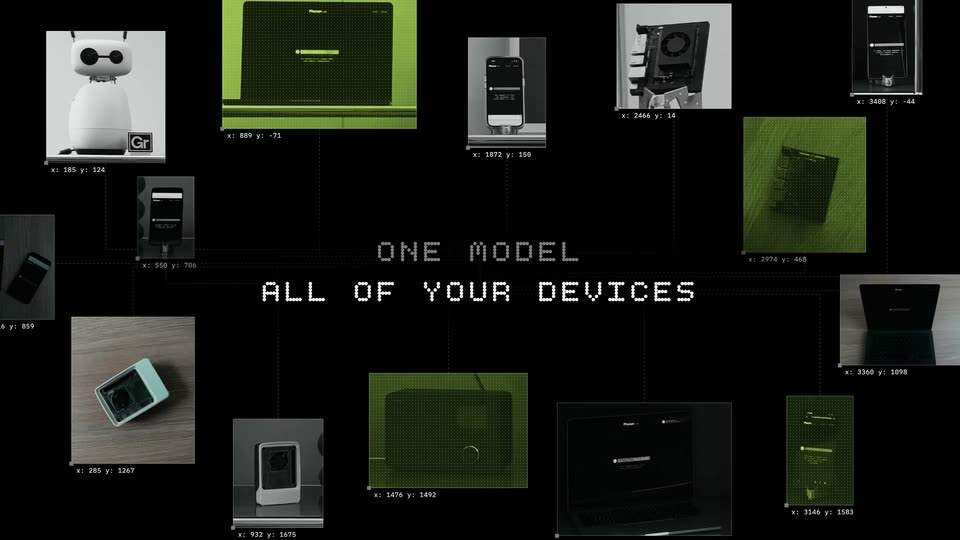
On black, a constellation of small device thumbnails, some tinted green, links together via dotted lines and coordinate readouts. They scale in around the centered pixelated headline ONE MODEL / ALL OF YOUR DEVICES, building the network diagram.
On-screen text: “ONE MODEL”, “ALL OF YOUR DEVICES”
Camera: Push in
04 · Feature reveal · 0:18–0:21
A tilted Galaxy S25 Ultra mockup fills the right side of a dark frame, its screen showing a green dotted progress bar and a play button. A spec card sits top-left. On the screen, a line of text types out character by character with a blinking cursor.
On-screen text: “[ 01 ]”, “GALAXY S25 ULTRA”, “2025 · SNAPDRAGON 8 ELITE”, “BROWSER · WEBASSEMBLY”, “▶ RUNS ON DEVICE”
Techniques: 3D mockup, Kinetic type
Camera: Static
05 · Feature reveal · 0:21–0:23
A 3D robot head with a lime face hangs from two coiled cables against a pale wall, a black info card labeling it REACHY MINI. A green square flashes behind the head, then a dark UI panel and a phone mockup wipe in from the left.
On-screen text: “[ 02 ]”, “REACHY MINI”, “2025 · ARM CPU”, “PYTHON · ON BOARD”, “RUNS ON DEVICE”
Techniques: 3D mockup, Masking
Camera: Static
06 · Feature reveal · 0:23–0:26
A laptop and a phone on a desk show the Phonon Lab interface; a dotted line runs from the laptop screen to a black label box top right reading MACBOOK PRO with spec lines. The camera slowly pushes in.
On-screen text: “[ 05 ]”, “MACBOOK PRO”, “2026 · APPLE M5”, “BROWSER · WEBGPU”, “RUNS ON DEVICE”
Camera: Static
07 · Feature reveal · 0:26–0:28
A 3D desk scene holds a phone with a live recording waveform on the left, a studio mic center, and a green circuit board in a bracket right. A black title box top left lists the Jetson Orin Nano Super specs, static while the phone UI animates.
On-screen text: “[03]”, “JETSON ORIN NANO SUPER”, “2024 · 67 TOPS · 8 GB LPDDR5”, “NVIDIA · ARM + GPU”, “RUNS ON DEVICE”
Techniques: 3D mockup
Camera: Static
08 · Feature reveal · 0:28–0:30
A dark smartphone tilts in 3D on a black set while a green play button and dotted waveform sit on its screen and a sentence types out letter by letter. A black info card at right lists the device specs and a dotted leader line points to the phone.
On-screen text: “[04]”, “ONEPLUS 5”, “2017 · SNAPDRAGON 835”, “BROWSER · WEBASSEMBLY”, “RUNS ON DEVICE”
Techniques: 3D mockup
Camera: Static
09 · CTA · 0:30–0:31
A thin white wireframe tunnel recedes to a central vanishing point on black. The view dollies forward as a small yellow square outline and a pale rectangle emerge at the center and grow larger.
Techniques: Parallax
Camera: Push in
10 · CTA · 0:31–0:32
A dark wireframe tunnel recedes to a vanishing point, its thin white lines forming a corridor. Small device mockups and a yellow square float inside. The words Great voices scale up at the center in white as the camera pushes forward.
On-screen text: “Great voices”
Techniques: Kinetic type, 3D mockup, Parallax
Camera: Push in
11 · CTA · 0:32–0:37
A dark 3D grid of product photos, phones, white robot devices, laptops and green app screens with coordinate labels, recedes as the camera flies through it. Centered white headlines appear in sequence: Great voices, that run on every device, Available today.
On-screen text: “Great voices”, “that run on every device”, “Available today”
Techniques: Kinetic type, 3D mockup, Parallax
Camera: Push in
12 · Outro · 0:37–0:38
A mosaic of small square product thumbnails, phones, laptops and green screens, wipes in from the right to fill the frame. The black negative space between the tiles narrows into a curved cutout at the center, revealing a logo shape.
Techniques: Masking
Camera: Pull out
13 · Outro · 0:38–0:41
On a black background, the word Phonor begins as a large mosaic of small green and white tiles, then scales down to the center. The letterforms resolve into solid white from left to right while the right edge breaks apart into drifting particles that fade out.
On-screen text: “Phonor”
Techniques: Kinetic type, Particles
Camera: Pull out
14 · Outro · 0:41–0:41
The Phonor brand logo and the gray extruded word Gradium fade in from black, centered on a plain black background, in a locked-off frame.
On-screen text: “Phonor”, “Gradium”
Camera: Static
15 · Outro · 0:41–0:42
The gray Gradium wordmark sits centered on a black field, static throughout the short clip, locked-off frame with no motion.
On-screen text: “Gradium”
Camera: Static
16 · Outro · 0:42–0:44
The gray wordmark Gradium holds centered on a black background. A faint 3D extrusion on the letterforms flattens into a clean logotype within the first second, after which the mark stays still and locked off for the rest of the shot.
On-screen text: “Gradium”
Camera: Static
17 · Outro · 0:44–0:45
On a black background, a single gray dot splits and multiplies, the circles sliding apart until they settle into an evenly spaced horizontal row, like a loading indicator.
Camera: Static
18 · Outro · 0:45–0:45
On a black field, a horizontal row of gray dots shifts and condenses toward the center, then a thin square frame draws in around the gray letters Gr as the dots resolve into the wordmark.
On-screen text: “Gr”
Techniques: Morph
Camera: Static
19 · Outro · 0:45–0:47
A gray Gr mark sits centered inside a thin square frame on a black field. The frame lines retract and the mark collapses into a small dot, which then swells slightly.
Techniques: Morph
Camera: Static