1:20

ShowAndTell: AI agents for dental patient operations
Avora · Healthcare · Nov 2024
Paragon’s 4:37 clip runs 32 scenes, about 8.7 s each. The product is on screen from the first frame and 1 feature is revealed. Opens on a static dark purple title card, then runs as one long screen recording demo with a fixed rounded webcam overlay in the corner and slow, deliberate cuts. The signature move is a smooth zoom in and out that tracks the cursor across nested UI panels, with occasional crossfades between the Paragon editor and the Monday.com and webhook.site screens.
Is this your launch? to your site or press kit.
Avora · Healthcare · Nov 2024
Basepilot · B2B · Mar 2024
A dark purple panel with the Paragon logo and the heading Custom Webhooks Demo sits beside a product screen showing a webhook trigger form. A rounded webcam video of a man in a dark shirt talks over the lower right, the only moving element in the static layout.
On-screen text: “Paragon”, “Custom Webhooks Demo”, “with Nick Wong, Product Manager”
Techniques: Split screen
Camera: Static
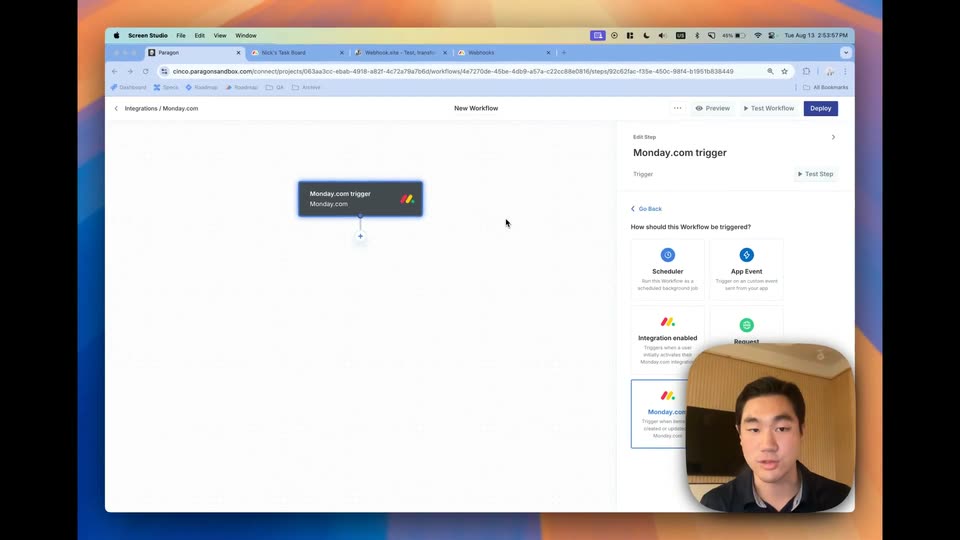
A dotted workflow canvas shows a dark Monday.com trigger node beside a right panel of trigger options, Monday.com highlighted. A presenter's webcam sits in a rounded box at bottom right. The frame zooms out to the full browser window, then back in on the top bar.
Techniques: UI zoom
Camera: Pull out
A locked-off screen recording of a Monday.com task board in Chrome, with a small webcam self-view of a man in the lower corner. The cursor rests on a browser tab, opening a tooltip, then the frame pulls back to show the whole desktop.
Techniques: Cursor demo
Camera: Pull out
A screen recording of the webhook.site dashboard. A tooltip hovers over a toolbar button, then the view crossfades into the workflow editor, where a Monday.com trigger card sits center and a node graph appears at right. A small webcam self-view of the presenter stays in the bottom-right corner.
Camera: Static
A workflow editor fills the screen, a Monday.com trigger node sits on the left canvas and a trigger-options panel lists choices on the right. A small video-call inset shows a man speaking in the corner. The cursor hovers the options, then the view zooms into the panel.
Techniques: Cursor demo, UI zoom
Camera: Push in
A workflow-builder screen shows a trigger-event dropdown listing options; the cursor moves down the list and hovers over New Trigger, then the view cuts to a canvas holding a Monday.com trigger node. A small facecam of a presenter sits in the bottom-right corner throughout.
Techniques: Cursor demo
Camera: Pull out
A browser form for creating a Monday.com trigger fills the screen, with a webcam self-view of the presenter in the corner. The view zooms in, then scrolls up as the cursor types a trigger name and description and clicks the Manual card, then zooms back out.
Techniques: UI zoom, Cursor demo
Camera: Pull out
A browser window shows a trigger setup form, switching from Basic Trigger Info to Manual Setup. The view then zooms into the Webhook Target URL field and scrolls down to the Response Type dropdown. A small webcam video of a presenter stays in the lower right corner.
Techniques: UI zoom
Camera: Push in
A close-up of the webhook setup form tracks the cursor as it clicks Copy, the URL field highlights and the button flips to Copied. The shot then pulls back to the full browser window while the presenter speaks in a corner cam.
Techniques: Cursor demo, UI zoom
Camera: Pull out
A browser shows the monday.com webhook docs. The page scrolls up to the Verifying a webhook URL section, then zooms in on the heading and the JSON challenge example. A presenter talks in a small video window at the bottom right.
Techniques: UI zoom
Camera: Push in
A browser window shows Monday.com developer documentation on verifying a webhook URL. The frame zooms out from a close-up of the article to the full window, revealing the menu bar and tabs. A small video call window with a man sits in the bottom right corner.
Techniques: UI zoom
Camera: Pull out
A browser window shows a webhook setup page with a small webcam inset of a presenter in the bottom right. The frame zooms into the target URL field, then into a response dropdown where a cursor picks Echo request body, and pulls back to the full page.
Techniques: UI zoom, Cursor demo
Camera: Pull out
A screen capture of the monday.com task board sits on a colorful desktop, with a small webcam self-view in the corner. The cursor moves to the Automate button, the Automation center opens, and the user types webhooks into the search field, revealing template cards.
Techniques: Cursor demo
Camera: Static
A purple Monday.com panel in a browser lists three account connections, then switches to a webhook URL field with a Connect button and a diagram linking two hexagon logos. A webcam video of a man sits in the bottom right corner. The cursor moves between the frames.
Techniques: Cursor demo
Camera: Static
A browser window shows a webhook setup page. A cursor rests on a button, then moves to the address bar where a dropdown opens, while an Executing status spins. A small webcam feed of a man sits in the lower right corner.
Techniques: Cursor demo
Camera: Static
A purple monday.com screen shows a webhook panel with a hexagon icon, a filled URL field, and a Connect button; a presenter's webcam overlay sits bottom right. The cursor clicks Connect, the panel fades out, and the line 'When an item is created, send a webhook' appears centered.
Techniques: Cursor demo
Camera: Static
A Chrome window on a Mac desktop shows the Monday.com Automation center with one active webhook rule listed. A small webcam self-view of a presenter in a dark shirt sits in the bottom-right corner while the cursor drifts across the toolbar and menu bar.
Techniques: Cursor demo
Camera: Static
A browser window shows the Paragon Create Trigger page. The view zooms into the webhook event panel, then reframes on the Event Handling form as a cursor opens the validation dropdown and selects No signature. A rounded webcam tile of the presenter stays in the corner.
Techniques: UI zoom, Cursor demo
Camera: Static
A locked-off screen recording of a Monday.com integration page in a browser. The cursor clicks the Overview tab, then the Create Workflow button, opening a blank New Workflow canvas. A small self-view video of a man speaking sits in the bottom right corner.
Techniques: Cursor demo
Camera: Static
A dark Monday.com trigger card sits on a dotted canvas. The view zooms in as the cursor clicks it, opening a right panel listing trigger events. The cursor picks New Item trigger and the list collapses. A small face-cam video stays in the bottom right corner.
Techniques: UI zoom, Cursor demo
Camera: Push in
A workflow editor screen: a dark trigger card sits on the left while the cursor selects a Request step from the right panel, then the view zooms onto the added card and its URL field. A rounded webcam self-view of the presenter overlays the bottom-right corner.
Techniques: Cursor demo, UI zoom
Camera: Pull out
After a brief cut-in, a screen recording of a Paragon workflow editor holds a locked-off frame: a Monday.com trigger node links to an API step. A cursor clicks Test Step, and a waiting-for-payload line slides in. A rounded webcam feed of the presenter sits bottom right.
Techniques: Cursor demo
Camera: Pull out
A Chrome window shows the Monday.com Automation center with one active webhook automation, while a rounded webcam feed of a presenter sits in the bottom right corner. A cursor hovers over the search field.
Techniques: Cursor demo
Camera: Static
A locked-off screen recording of a Monday.com board: the cursor types 'Test 1' into a new row, then switches to the Paragon tab to show a Monday.com trigger in a workflow builder. A presenter's face-cam is pinned to the bottom-right.
Techniques: Cursor demo
Camera: Push in
A screen recording of a workflow builder shows a node canvas beside a settings panel. The view zooms into the green 'Step tested successfully' JSON block, then reframes onto the Request step's URL and body fields, with a small face-cam of a man fixed in the corner.
Techniques: UI zoom
Camera: Push in
A white webhook settings panel occupies the frame, with a small presenter webcam in the lower right corner. The panel eases in from a brief crossfade, then a cursor types 'data' into the Body key field and '{}' into the value field.
Techniques: Cursor demo
Camera: Push in
A close-up of a workflow form zooms out to reveal the full browser window with a two-node canvas. The cursor moves to the top right and clicks Test Workflow, showing Testing Workflow... A small webcam feed of the presenter stays in the bottom right corner.
Techniques: UI zoom, Cursor demo
Camera: Pull out
A browser window shows a workflow editor with two connected nodes. A cursor hovers the Test Workflow button as a spinner and a Testing Workflow status appear in the right panel. A small webcam feed of a man sits in the lower right corner.
Techniques: Cursor demo
Camera: Static
A locked-off screen recording shows the monday.com board in Chrome; a cursor types Test 2 into a new row above Test 1, then the page cuts to a workflow success screen. A presenter's webcam stays in the lower right.
Techniques: Cursor demo
Camera: Static
A screen recording of a workflow editor zooms into a results panel showing a green check, 'Workflow tested successfully!' and two step rows. A man's webcam feed sits in the bottom right corner, then the view cuts to a webhook.site page with JSON data.
Techniques: UI zoom
Camera: Push in
A browser window showing a webhook request page with a JSON payload zooms in until the Raw Content code block fills the frame, then holds still. A small rounded webcam feed of a man stays pinned in the bottom right while the cursor drifts over the code.
Techniques: UI zoom, Cursor demo
Camera: Push in
A close-up of two workflow nodes, a dark Monday.com trigger and a light HTTP request card, zooms out to the full Paragon editor. The right panel shows a green tested successfully check, and a man in a corner webcam talks.
Techniques: UI zoom
Camera: Pull out