3:01

Introducing Enterprise AppGen: AI-Assisted Development from Retool
Retool · Developer tools · Oct 2025
Basepilot · Mar 2024 · 2:06 · Full motion · AI-annotated
Basepilot’s 2:06 launch film runs 28 scenes, about 4.5 s each. The product is on screen from the first frame and 1 feature is revealed. The call to action lands at 1:57 (93% in), over a voiceover. The video opens with a self-introduction and product pitch over a static screen capture, then runs one long continuous feature demo of the Company research workflow across LinkedIn and HubSpot, framed by a fixed right-hand panel and a corner webcam inset, and closes with a direct invitation to collaborate. Pacing is steady and screen-driven, built on small cuts between app windows while the workflow panel highlights each step in turn, all set against a diagonal orange-to-purple gradient backdrop
Is this your launch? to your site or press kit.
Retool · Developer tools · Oct 2025
Avora · Healthcare · Nov 2024
Supabase · Developer tools · Jul 2025
A static screen capture of LinkedIn Sales Navigator with rows of saved companies, the Basepilot side panel open on the right, and a circular webcam feed of the presenter in the lower left. A cursor hovers over the panel while he speaks.
Camera: Static
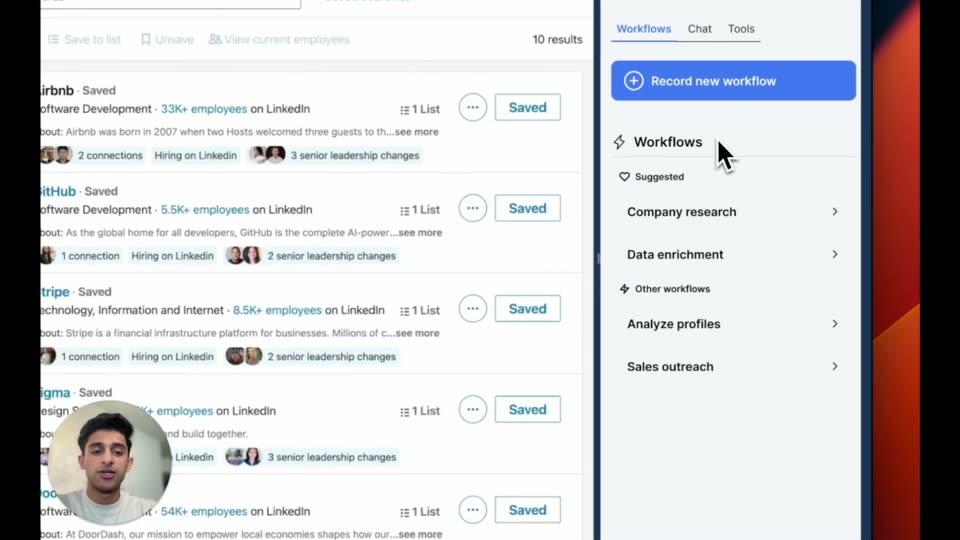
A screen recording shows a LinkedIn saved-searches list on the left with a small facecam of a man in the lower corner, and a BasePilot panel on the right listing workflows. A cursor hovers over the right panel, pointing at Company research and the Workflows header.
Techniques: Split screen, Cursor demo
Camera: Push in
A split screen shows a LinkedIn saved-companies list on the left and a Company research workflow panel on the right. A cursor clicks the Start workflow button, and the panel updates to an In progress state with Pause and Stop controls. A presenter's headshot sits in the lower-left corner.
Techniques: Split screen, Cursor demo
Camera: Pull out
LinkedIn Sales Navigator shows a company list on the left and a BasePilot workflow panel on the right. The left view cuts to the Airbnb profile as the right panel highlights the Go to company profile step. A cursor hovers over the steps; a webcam of the presenter sits bottom-left.
Techniques: Cursor demo
Camera: Pull out
A browser window shows the LinkedIn Sales Navigator interface beside the BasePilot panel. A cursor moves down the workflow steps list, hovering each task. A circular webcam feed of a presenter sits in the lower left corner over a multicolor gradient background.
Techniques: Cursor demo
Camera: Static
A screen recording shows the Airbnb site beside the BasePilot panel, where the cursor rests on the highlighted 'Go to Hubspot, create company' step. A small circular webcam of the presenter sits in the lower-left corner.
Techniques: Cursor demo
Camera: Static
A locked-off screen capture shows a HubSpot Companies table beside a BasePilot AI panel; a round webcam feed of a man sits in the lower left corner. A mouse cursor hovers over the 'Go to Hubspot, create company' step while the rest of the interface stays still.
Camera: Static
A screen recording of the BasePilot interface fills the frame over a dark gradient backdrop. A circular webcam feed of a man sits in the lower left. On the right, a workflow panel lists steps while a cursor hovers, and the form on the left shows Airbnb details being entered.
Techniques: Cursor demo
Camera: Push in
A HubSpot company page for Airbnb sits beside a BasePilot workflow panel on a colorful gradient. A mouse cursor clicks each workflow step in sequence while a small circular webcam of the presenter stays in the bottom left corner.
Techniques: Cursor demo
Camera: Pull out
A browser window shows LinkedIn Sales Navigator beside the BasePilot research panel. A cursor glides down the workflow steps, highlighting each row as it passes. A circular webcam inset of the presenter sits in the lower left over a colorful gradient backdrop.
Techniques: Cursor demo
Camera: Static
A browser window displays a LinkedIn Sales Navigator search for Airbnb CEOs on the left and a HubSpot workflow panel on the right. A cursor moves up to hover over the 'Search for CEO' step.
Techniques: Cursor demo
Camera: Static
A screen recording of an automation workflow: the right panel lists the Company research steps while the left fills from skeleton lines into named employee profile cards. A cursor hovers on the loop step and a circular webcam of a presenter sits in the lower left.
Techniques: Cursor demo
Camera: Push in
A screen recording shows a LinkedIn profile list on the left and a workflow panel on the right. A profile detail card for W. Steven Garrett opens in the center with a sunset banner. A circular presenter webcam sits in the lower-left corner.
Techniques: UI zoom
Camera: Static
A contact list scrolls up on the left while a center profile card switches from Jasmine Grimm to Brian Chesky. A workflow panel on the right shows a cursor over a step, and a circular webcam of a presenter sits bottom left.
Techniques: Cursor demo
Camera: Static
A screen recording of LinkedIn Sales Navigator fills the frame, showing a search list, a Brian Chesky profile panel, and a workflow sidebar. A presenter sits in a circular inset at the bottom left. A cursor rests over a workflow step on the right.
Camera: Pull out
A screen recording of a LinkedIn Sales Navigator profile page sits beside a Baseline AI workflow panel. The highlighted step in the right panel moves down from 'Search for CEO' to 'Create contact in Hubspot' as a small circular webcam feed of a man holds in the lower left.
Camera: Static
A browser screen shows a HubSpot contact form centered between a company panel and a workflow sidebar, over a colorful gradient backdrop. A circular webcam of a presenter sits in the lower left while the mouse cursor hovers over a workflow step.
Techniques: Cursor demo
Camera: Static
A contact form on the left auto-fills the last name, LinkedIn URL, and job title fields, while a workflow-steps panel on the right keeps the Create contact in Hubspot step highlighted in blue. A small circular webcam of the presenter sits in the lower-left corner.
Techniques: UI zoom, Cursor demo
Camera: Push in
A HubSpot contact page for Brian Chesky fills the left of the screen, with a Company research workflow panel open on the right. A cursor drifts down and rests on the highlighted Create contact in HubSpot step.
Techniques: Cursor demo
Camera: Pull out
A screen recording shows a HubSpot companies list, then a Sales Navigator list, while a Basepilot automation panel stays fixed on the right. A circular webcam of the presenter sits lower left. The scene opens with a short dissolve of a contact page.
Camera: Pull out
A screen recording of the Sales Navigator account list with the Baseline workflow panel on the right. A cursor clicks through the workflow steps as the list reorders and the view opens a company account history page. A circular webcam of the presenter sits in the bottom left.
Techniques: Cursor demo
Camera: Static
A browser window shows the GitHub homepage beside a Basepool assistant panel running a Company research workflow, its steps lighting up in sequence. A circular webcam of the presenter and a green caption sit in the lower left corner over a gradient background.
On-screen text: “ductivity”, “ccelerate innovation”, “ur AI-powered platform increases the”
Camera: Static
A screen recording of a HubSpot companies list shows a teal Create company form opening and filling with GitHub details, then switching to the new company record. A circular webcam of a presenter sits bottom left while a cursor steps through the Basepilot workflow panel on the right.
Techniques: Cursor demo
Camera: Static
A browser window pairs LinkedIn Sales Navigator with the Basepilot panel. The left view crossfades from a GitHub company page to an account search dropdown while the right panel swaps from a company research workflow to a contact enrichment list. A circular presenter webcam sits in the lower left.
Camera: Static
A LinkedIn Sales Navigator search results list fills the left of the screen while a workflow panel sits on the right. A profile card for Thomas Dohmke opens over the list, and a small circular webcam of the presenter rests in the bottom left corner.
Camera: Static
A screen recording of LinkedIn Sales Navigator fills the frame, with a Basepilot workflow panel on the right and a cursor hovering over a step. A speaker appears in a small circular webcam inset at the lower left, against a colorful gradient backdrop.
Techniques: Cursor demo
Camera: Static
A screen recording shows a HubSpot contact form completing, a success banner, then a company list. A cursor clicks the red Stop button on the right assistant panel, which flips to Complete with a Start workflow button. A circular webcam of a man sits lower left.
Techniques: Cursor demo, UI zoom
Camera: Push in
A blurred LinkedIn Sales Navigator screen sharpens into focus, showing a saved-company list beside a right-hand Company research workflow panel. A circular webcam of the presenter occupies the lower left, where he talks and gestures. A cursor rests on the bottom row.
Techniques: UI zoom
Camera: Pull out