
0:32
Explore
Orior - Introducing Copy a pose in Grok @bot . See a pose on X or Pinterest?
Orior AI · Oct 2026 · 0:37 · Full motion · AI-annotated
- Length
- 0:37
- Scenes
- 19 · 2.0 s avg
- Product on screen
- 0:00
- Features shown
- 1
- Call to action
- 0:32 · 87%
- Voiceover
- No
- Views
- 49K on X
as of November 23, 2026
00:00:00 / 00:37:12
- Length
- 0:37
- Scenes
- 19 · 2.0 s avg
- Product on screen
- 0:00
- Features shown
- 1
- Call to action
- 0:32 · 87%
- Voiceover
- No
- Views
- 49K on X
as of November 23, 2026
Orior AI’s 0:37 launch film runs 19 scenes, about 2.0 s each. The product is on screen from the first frame and 1 feature is revealed. The call to action lands at 0:32 (87% in). A cream minimalist launch built around a single iPhone mockup that the camera zooms, tilts and rotates through, with a fixed yellow caption pinned to the bottom of every frame. Pacing is steady at one beat per caption change, and the signature moves are the blur-to-sharp reveal of the swapped face and the 3D phone that flattens into a locked-off comparison grid before the end card.
No filming indicatedEstimated needs: 2 capture groups — your screens or recordings · 1 official logo — reused across the film · 1 graphic passage — draw or supply · 10 3D passages — build or supply
Is this your launch? to your site or press kit.
More like this






Orior - Introducing Copy a pose in Grok @bot . See a pose on X or Pinterest?, scene by scene
· 19 scenes as text
01 · Product intro · 0:00–0:03
A black circle with two white pill eyes and a soft shadow floats on a cream background. A white rounded star blooms inside it, then the circle widens into an oval and the eyes curve into happy arcs as a yellow caption fades in below.
On-screen text: “の”, “Grok Bot, meet Orior.”
Techniques: Morph
Camera: Static
02 · Demo · 0:03–0:04
A black frame cuts to a white field holding a front-facing iPhone mockup showing a chat screen. The view zooms into the screen until it blurs out, a yellow caption pinned at the bottom.
On-screen text: “Connect C1bot to Crok Bot, with MCP.”
Techniques: UI zoom
Camera: Static
03 · Demo · 0:04–0:07
The view opens tight on a phone keyboard as a connect command is typed, then reframes to the full device. A dark bubble sends the message and an approval card with a Connect button appears. A yellow caption holds at the bottom edge.
On-screen text: “Connect Orirai to Grok Bot, with MCP.”
Techniques: UI zoom
Camera: Pull out
04 · Demo · 0:07–0:08
A 3D phone mockup on a pale background scales down to settle, showing a chat screen with an MCP connection card and a black Connect button. A yellow caption sits at the bottom edge of the frame.
On-screen text: “Connect Orior to Grok Bot, with MCP.”
Techniques: 3D mockup
Camera: Pull out
05 · Demo · 0:08–0:09
A flat phone mockup on a light gray background shows a white card titled Connect Grok Bot to Orior with an account row and Cancel and Connect buttons. The camera slowly zooms into the card as the background blurs, while a yellow caption stays fixed at the bottom.
On-screen text: “Connect Orior to Grok Bot, with MCP.”
Techniques: UI zoom
Camera: Push in
06 · Demo · 0:09–0:10
A front-facing phone mockup on a light gray background shows the Orior connect screen; the interface zooms out to reveal the Content Studio chat above the card while a yellow caption sits at the bottom.
On-screen text: “Connect Orior to Grok Bot, with MCP.”
Techniques: 3D mockup, UI zoom
Camera: Static
07 · Demo · 0:10–0:11
A front-facing phone mockup on a white background displays a chat interface; the conversation about connecting Orior MCP scrolls and fades slightly as the connection completes. A yellow caption sits below the device.
On-screen text: “Connect Orior to Grok Bot, with MCP.”
Camera: Static
08 · Feature reveal · 0:11–0:13
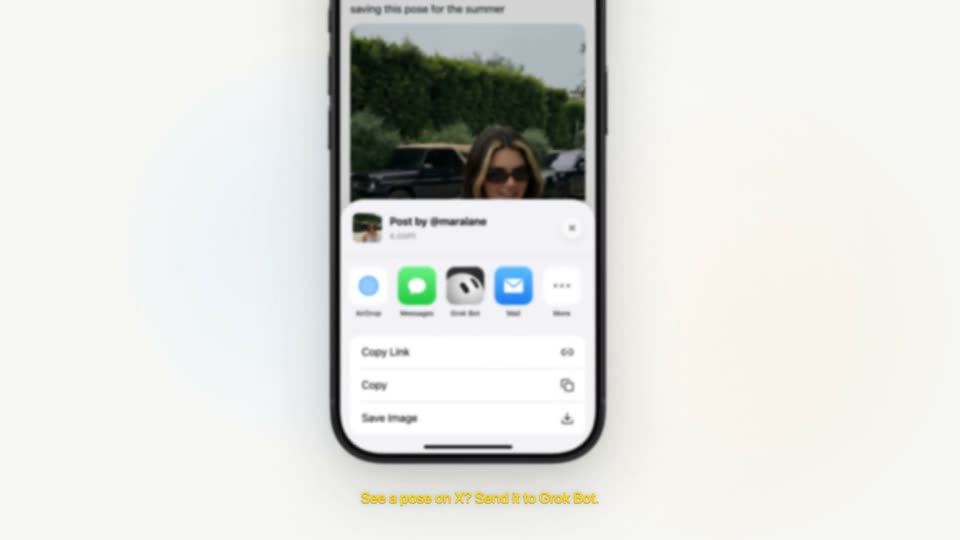
A flat phone mockup centered on a light background shows an X post with a photo of two women in swimwear. The camera zooms into the screen as an iOS share sheet slides up, listing the Grok Bot app among the share options.
On-screen text: “See a pose on X? Send it to Grok Bot.”
Techniques: UI zoom
Camera: Pull out
09 · Feature reveal · 0:13–0:14
A phone mockup sits in 3D on a plain light background. A white sheet slides up over a social post, a thumbnail and the words copy this pose fill the message field, and a yellow caption reads at the bottom.
On-screen text: “See a pose on X? Send it to Grok Bot.”
Techniques: 3D mockup
Camera: Push in
10 · Feature reveal · 0:14–0:15
A 3D iPhone mockup centers on a pale background. Inside, an X post shows a woman in a blue tank top, with a Grok Bot sheet overlaid typing a command. The camera pushes in on the device while a yellow caption holds at the bottom.
On-screen text: “See a pose on X? Send it to Grok Bot.”
Camera: Static
11 · Feature reveal · 0:15–0:16
A phone mockup in 3D perspective rotates from a tilted side angle to a flat front view, displaying a chat with a photo and a prompt bubble. A yellow caption at the bottom swaps between two lines.
On-screen text: “See a pose on X? Send it to Grok.”, “Grok copies it with your character.”
Techniques: 3D mockup
Camera: Static
12 · Feature reveal · 0:16–0:21
A flat phone on a pale background shows a chat screen. The frame opens zoomed into the lower half and pulls back to the full device. A black prompt bubble tops a card with two photo tiles; the right tile resolves from a gray blur into a blonde woman in the same pose.
On-screen text: “Or from Pinterest.”
Techniques: UI zoom
Camera: Static
13 · Feature reveal · 0:21–0:22
A centered phone mockup shows a Pinterest pin on a light background. The frame zooms into the screen as a share sheet slides up, then the device tilts into 3D perspective with a soft reflection. A yellow caption stays locked at the bottom.
On-screen text: “Or from Pinterest.”
Techniques: UI zoom, 3D mockup
Camera: Static
14 · Feature reveal · 0:22–0:24
A 3D iPhone mockup sits centered on a light gray background, angled slightly. On its screen a composer sheet shows a photo thumbnail and the line typing in, while yellow caption text holds at the bottom of the frame.
On-screen text: “Or from Pinterest.”
Techniques: 3D mockup
Camera: Static
15 · Feature reveal · 0:24–0:25
A 3D iPhone mockup on a pale background displays a chat screen. The view zooms into the interface, revealing a Copy a pose panel with a reference photo and an empty frame, while a yellow tagline holds at the bottom.
On-screen text: “Same pose. Your character.”
Techniques: 3D mockup, UI zoom
Camera: Push in
16 · Feature reveal · 0:25–0:27
A tilted smartphone mockup rotates slowly in 3D on a plain light background. Inside, a chat card shows a photo of a crouching woman next to a blurred figure that resolves into a clear photo of a blonde woman in the same pose. A yellow caption sits at the bottom.
On-screen text: “Same pose. Your character.”
Techniques: 3D mockup
Camera: Pull out
17 · Feature reveal · 0:27–0:28
A 3D phone mockup on a light background shows a chat screen with a pose card. The two image tiles and the result photo scale out into a flat row, the phone blurs behind, and the yellow caption grows into a large gray headline.
On-screen text: “Same pose. Your character.”
Techniques: 3D mockup, Morph, Kinetic type
Camera: Static
18 · Feature reveal · 0:28–0:32
A bold black headline on a cream field sits above four portrait cards in two pairs, each pairing a source photo with a face-swapped version, tagged by small Pose and Your character pills. The Pose pill slides in while the cards hold a locked-off frame.
On-screen text: “Same pose. Your character.”
Camera: Static
19 · CTA · 0:32–0:37
Three phone mockups in 3D perspective show the same pose across three photos, then they fade out and a centered end card fades in with a black flower logo, the headline, subline and URL.
On-screen text: “Same pose. Your character.”, “Copy any pose.”, “Now in Grok Bot.”, “oriorai.com/mcp”
Techniques: 3D mockup, Kinetic type
Camera: Static