
0:18
Explore
Origami - Introducing voice cloning to Origami. (🔊 Audio: ON to hear the AI-cl
Origami · Oct 2026 · 0:46 · Full motion · AI-annotated
- Length
- 0:46
- Scenes
- 13 · 3.5 s avg
- Product on screen
- 0:00
- Features shown
- 1
- Call to action
- 0:41 · 90%
- Voiceover
- Yes
- Views
- 3.1K on X
as of November 18, 2026
00:00:00 / 00:46:06
- Length
- 0:46
- Scenes
- 13 · 3.5 s avg
- Product on screen
- 0:00
- Features shown
- 1
- Call to action
- 0:41 · 90%
- Voiceover
- Yes
- Views
- 3.1K on X
as of November 18, 2026
Origami’s 0:46 launch film runs 13 scenes, about 3.5 s each. The product is on screen from the first frame and 1 feature is revealed. The call to action lands at 0:41 (90% in), over a voiceover. The video is built as a single-feature walkthrough: a centered title card names the product, then a cursor moves through the app UI with pink highlight rings marking each click, from voice setup to a generated voice note. The style stays on a white dotted-grid canvas with pink accents, using the pulsing waveform and the origami bird as recurring signature moves.
No filming indicatedEstimated needs: 1 capture group — your screens or recordings
Is this your launch? to your site or press kit.
More like this


Origami - Introducing voice cloning to Origami. (🔊 Audio: ON to hear the AI-cl, scene by scene
· 13 scenes as text
01 · Product intro · 0:00–0:03
On a white background, a small pink origami bird logo sits above a centered three-line headline. The text fades in from light gray to full black and pink, holds, then fades out, while a pink audio waveform pulses along the bottom.
On-screen text: “Introducing”, “voice cloning”, “to Origami.”
Camera: Pull out
02 · Feature reveal · 0:03–0:04
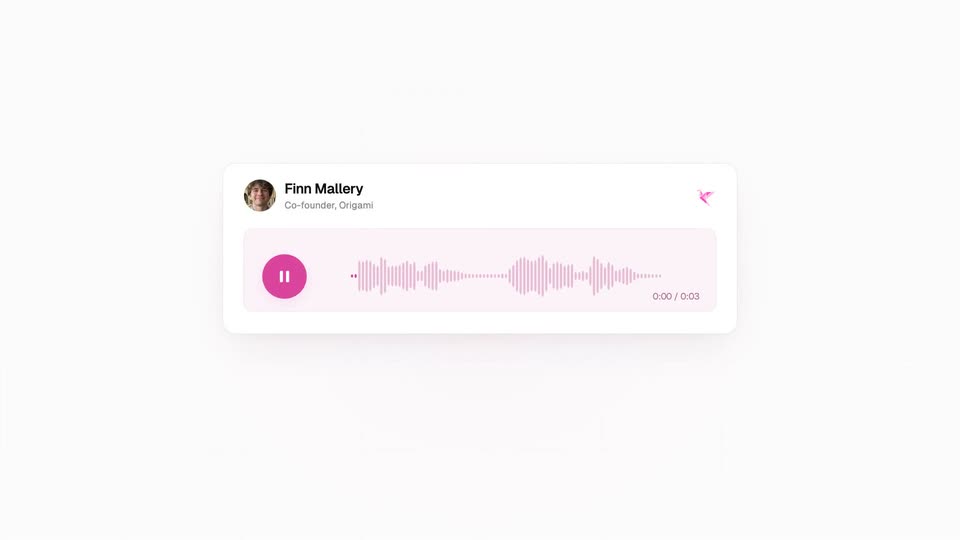
A white voice-message card with a pink waveform sits centered on a light gray field. The card fills in: a pink play button, a circular avatar, the sender name, and a 0:00 / 0:03 timer fade in around the static waveform.
On-screen text: “Introducing”, “to Origami.”
Camera: Static
03 · Feature reveal · 0:04–0:08
A white voice card with a pink waveform plays on a light gray field; the pause icon flips to play as the timer hits 0:03. Below, a black headline holds while pink words appear one by one, then a caption fades in. The view pulls back to reveal the app.
On-screen text: “And this sentence?”, “I never recorded it.”, “Generated in Finn's voice”
Techniques: Kinetic type, UI zoom
Camera: Static
04 · Feature reveal · 0:08–0:10
The Senders page of the Origami app fills the frame as a pink waveform and a caption fade out. A cursor then moves to the Edit persona button, which is ringed in pink.
On-screen text: “And this sentence? I never recorded it.”
Techniques: Cursor demo
Camera: Push in
05 · Feature reveal · 0:10–0:12
A blurred sender list sits behind a centered persona modal for Finn Mallery. A cursor glides to the AI voice row and clicks the Set up button, which flashes a pink ring.
Techniques: Cursor demo
Camera: Push in
06 · Feature reveal · 0:12–0:14
A white modal titled Create your AI voice is centered over a blurred contact list. A cursor glides to the Allow microphone button and clicks it, triggering a pink ripple. The background stays still and out of focus.
Techniques: Cursor demo
Camera: Static
07 · Feature reveal · 0:14–0:17
A centered 'Create your AI Voice' modal sits over a blurred senders page. The Voice name field is focused with a pink border, the text types from 'Finn' to 'Finn's voice', then the border turns gray as focus leaves. The magenta Continue button stays put.
Camera: Static
08 · Feature reveal · 0:17–0:23
A white 'Create your AI voice' modal sits over a blurred app. A pink record dot and timer count up while the read-aloud paragraph scrolls, then a cursor ticks the consent checkbox and clicks the pink Create button.
Techniques: Cursor demo
Camera: Static
09 · Feature reveal · 0:23–0:28
The campaign editor zooms into the template canvas as the cursor clicks Edit manually, then scrolls to a LinkedIn DM card and clicks Make this a voice note, expanding it into a voice note panel with a Generate button and waveform.
Techniques: UI zoom, Cursor demo
Camera: Push in
10 · Feature reveal · 0:28–0:29
A flat white panel sits centered on a cream background, showing a voice-note editor. A selected radio option, a Generate button with a gray waveform, and a message box where the name Alex is highlighted in pink.
Camera: Static
11 · Feature reveal · 0:29–0:32
A light workflow editor on a dotted grid shows an email card at the top. A pink dashed '+ Add step' button opens a dropdown of step types. A cursor slides onto the list and a pink ring highlights 'LinkedIn voice note'.
Techniques: Cursor demo
Camera: Push in
12 · Feature reveal · 0:32–0:41
A black-and-pink two-line headline sits above a white voice-note card on a light grid background. A cursor clicks the round play button, the waveform fills with a running timer, and gray captions of the spoken line fade in below the card.
On-screen text: “Written for each person.”, “Spoken in your voice.”, ““Hey Alex, thanks for connecting.””, ““Thought this might be relevant to what you're building.””
Techniques: Cursor demo
Camera: Static
13 · CTA · 0:41–0:46
A pink origami bird sits above stacked lines on a white grid background. 'Your voice.' fades in black, 'At scale.' drops in pink, then 'origami.chat' with an arrow, a trust caption and three customer logos fade up, while a pink audio waveform pulses along the bottom.
On-screen text: “Your voice.”, “At scale.”, “origami.chat →”, “Trusted by 1,000+ active customers, including”, “CBRE”, “MERCURY”, “Cognition”
Techniques: Kinetic type
Camera: Static