1:37

mlop: intro
mlop · B2B · Apr 2025
OpenWork · Jan 2026 · 1:58 · Full motion · AI-annotated
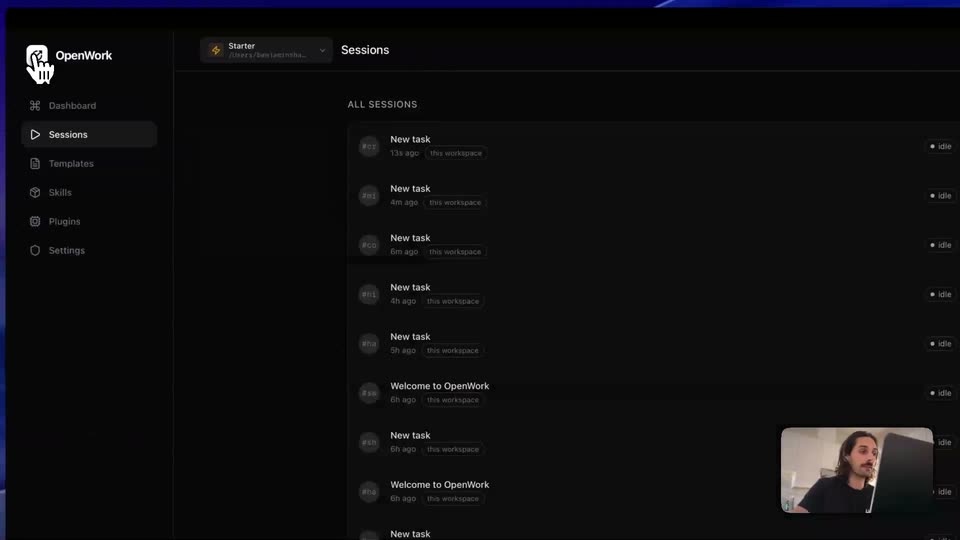
OpenWork’s 1:58 launch film runs 32 scenes, about 3.7 s each. The product is on screen from the first frame and 3 features are revealed. There is no explicit call to action; a voiceover carries the film. A single locked-off screen capture of the dark OpenWork app with a small talking-head inset pinned to the corner, narrated live by the host as he moves from the dashboard to the chat, then to skills and plugins. The pacing is steady and the camera never moves, so the cursor and the interface changes carry the story while the host gestures in the corner.
Is this your launch? to your site or press kit.
mlop · B2B · Apr 2025
Miniswap · Consumer · Nov 2025
Google · AI · Apr 2026
A dark OpenWork dashboard fills the frame, showing a sidebar, a task prompt box and a recent sessions list. A small talking-head video sits in the bottom-right corner, where a bearded man gestures as he speaks. A blue gradient glows behind the window.
Camera: Static
A dark OpenWork dashboard sits static, showing a sidebar, a task prompt box and a list of recent sessions. A small video call window in the bottom right corner shows a man with long hair speaking and gesturing. The interface does not move.
Camera: Static
A dark dashboard interface fills the frame, showing a left sidebar, a What should we do today prompt, and a list of recent sessions. A small video-call window in the lower right shows a man in a black shirt gesturing as he speaks. The camera is locked off.
Camera: Static
A dark OpenWork dashboard fills the frame, showing a prompt box, a template section and a recent sessions list, with a small video of a man speaking in the lower right corner. At the end the view zooms in and a cursor appears near the New Task button.
Techniques: UI zoom, Cursor demo
Camera: Push in
A dark product screen shifts from a dashboard with a prompt card and a recent-sessions list to a centered empty state. A lightning icon and the line “Ready to work” slide into the middle, a hand cursor hovers near the top right, and a small webcam video of a man sits in the bottom-right corner.
Techniques: Cursor demo
Camera: Static
A dark chat-style interface fills the frame, a centered 'Ready to work' prompt with helper text, a left task list and a right folder panel, plus a small webcam feed of a presenter in the lower right corner. The view eases in from a brief vertical scroll.
Camera: Pan
A dark chat-style interface sits in a locked-off frame, an empty canvas under the heading Ready to work. A task input bar with a model label rests at the bottom, while a small webcam feed of a bearded man in a black shirt occupies the lower right corner.
Camera: Static
A dark chat-style interface fills the frame, its center empty, with a left sidebar, a right Working files panel and a bottom input bar holding a model tag and placeholder. A small webcam inset of a man with headphones sits bottom right. The shot is static.
Camera: Static
A dark code editor fills the frame, canvas empty. A left sidebar and top-right panel show faint labels, and a bottom bar holds a model pill plus a prompt field with a cursor icon. A webcam tile lower right shows a man in a black shirt, the only moving element.
Camera: Static
A dark, mostly empty interface holds a left sidebar, a top-right files panel, and a bottom input bar showing a model pill and a text cursor. A small webcam feed of a bearded man in a black shirt sits in the bottom-right corner. The frame stays still.
Camera: Static
A dark OpenWork interface fills the frame over a blurred blue background, with a task list on the left, a context panel on the right, and a small facecam of a man in the lower right. The view eases in toward the screen.
Techniques: UI zoom
Camera: Pull out
A dark OpenWork chat interface fills the frame, showing a left task list, a central message thread with a white input box, and right-side panels. A small talking-head video of a man plays in the bottom-right corner over a blue gradient backdrop.
Camera: Static
A dark OpenWork chat screen fills the frame with a task list on the left and a presenter's webcam feed in the bottom right corner. A prompt is typed into the bottom input bar, sent as a white bubble, and a banana.md file card slides in below it.
Camera: Static
A dark chat app fills the frame: task list left, conversation center, artifacts panel right, with a small webcam of a talking man in the lower right. The frame stays locked while a cursor drifts up to the banana.md entry in the right panel.
Techniques: Cursor demo
Camera: Static
A dark chat interface fills the frame as the conversation scrolls up, revealing the assistant's confirmation that a German banana.md file was created. A small face cam of a man in a black shirt talks in the lower right corner over a blue abstract wallpaper.
Camera: Static
A dark chat interface fills the frame with a task sidebar, a conversation thread, and a right panel of file artifacts. A small video inset at bottom right shows a man with long hair and a mustache in a black shirt talking and gesturing. The frame stays locked off.
Camera: Static
A dark OpenWork window fills a blue blurred desktop, its chat showing a prompt and a finished reply with a banana.md file card. A small video-call tile at lower right holds a man in a black shirt who gestures as he speaks. The frame stays locked off.
Camera: Static
A dark chat interface fills the frame, task list left, artifacts panel right. The view zooms into the conversation thread where a user bubble requests a German banana file. A small webcam video of a long-haired man sits in the bottom-right corner.
Techniques: UI zoom
Camera: Push in
A dark task-chat interface fills the screen. A hand cursor glides down the left sidebar from the back arrow to the workspace row, while a small live video of a man at a laptop holds the bottom right corner. The New task entry slides in the sidebar list.
Techniques: Cursor demo
Camera: Static
A dark OpenWork dashboard lists sessions under ALL SESSIONS. A white cursor moves to the Skills item in the left sidebar, and the main panel swaps to a Skills page with an install field and curated package cards. A small presenter video plays in the bottom-right corner.
Techniques: Cursor demo
Camera: Static
A dark OpenWork dashboard fills the frame, the left sidebar highlighting the Skills entry while the main panel lists curated packages, each with an Install button. A small picture-in-picture in the lower right shows a long-haired man gesturing as he speaks.
Camera: Pull out
A dark OpenWork interface fills the frame with a small webcam inset of a presenter in the bottom right. The Skills view transitions to the Plugins view while a hand cursor points at the left sidebar.
Techniques: Cursor demo
Camera: Push in
A dark OpenWork plugins page fills the frame as a hand cursor taps the Plugins menu and hovers a plugin row. The view then pulls back into a rounded window over a blue gradient, with the presenter in a small corner video inset.
Techniques: Cursor demo, UI zoom
Camera: Pull out
A dark OpenWork plugins page sits in a locked frame, listing suggested plugins with Setup and Add buttons. A white cursor drifts down from the first row to the browser row. A small webcam of a presenter sits in the bottom right corner.
Techniques: Cursor demo
Camera: Static
A dark OpenWork interface shows the Plugins page with a list of suggested plugins, the frame locked off and a cursor hovering over the browser row. A small video of a man talking and gesturing sits in the lower right corner.
Camera: Static
A dark OpenWork plugins page stays locked off, listing suggested plugins with Add buttons. A small rounded webcam inset in the bottom right shows a man in a black shirt talking and gesturing in a kitchen. The interface is static; only the presenter moves.
Camera: Static
A static screen capture of the dark OpenWork interface shows the Plugins page with a list of suggested plugins, over a blue-purple abstract wallpaper. A rounded webcam inset in the bottom-right corner shows a man in a black shirt talking and gesturing.
Camera: Static
A dark OpenWork app window fills the frame on a blue gradient backdrop, showing a Plugins panel with a list of suggested plugins and add fields. A small inset video in the lower right shows a man with long hair and a mustache talking and gesturing.
Camera: Static
A locked-off screen capture shows a dark app window on the Plugins page, listing suggested plugins and an add-plugin field, with a Local Engine status card at the bottom left. A small rounded webcam feed of a man talking and gesturing sits in the bottom-right corner.
Camera: Static
A dark OpenWork interface shows the Plugins panel with a list of suggested plugins and an add field, while a small video inset in the corner shows a man talking and gesturing. A cursor hovers over the Add button.
Techniques: Cursor demo
Camera: Static
A dark OpenWork plugins screen fills the frame, listing suggested plugins and an add-plugin field. A small rounded webcam inset in the lower right shows a man in a black shirt talking and gesturing. The interface stays locked and static throughout.
Camera: Static
A dark OpenWork plugins page fills the frame, listing suggested plugins with add buttons, while a small webcam inset of a man holding a tablet sits in the bottom right. The frame stays locked off as he speaks, a cursor arrow appearing near the lower center.
Camera: Static