
0:20
Explore
Ari, your CFO, in every meeting | Ari x Tana
Tana · Nov 2026 · 0:35 · AI-annotated
- Length
- 0:35
- Scenes
- 14 · 2.5 s avg
- Product on screen
- 0:00
- Voiceover
- Yes
00:00:00 / 00:35:01
Tana’s 0:35 launch film runs 14 scenes, about 2.5 s each. The product shows up at 0:00. There is no explicit call to action; a voiceover carries the film. The video is a single continuous meeting: each spoken question triggers the agent to slide a data card into the chat, with slow zooms between wide app views and close-ups. Pacing is measured, driven by typing text and sliding stat tiles, and it closes on a serif tagline card over near-black.
No filming indicatedEstimated needs: 2 capture groups — your screens or recordings · 1 official logo — reused across the film · 1 graphic passage — draw or supply · 1 3D passage — build or supply
Is this your launch? to your site or press kit.
More like this



Ari, your CFO, in every meeting | Ari x Tana, scene by scene
· 14 scenes as text
01 · Hook · 0:00–0:00
A solid black frame holds a small white horizontal bar centered, with faint gray glows in the upper right and lower left corners. The bar stays still for the duration of the clip.
Camera: Static
02 · Product intro · 0:00–0:03
A dark video-call window sits on a soft gradient. Four participant tiles and a small fifth fill the left side, while a floating card reads Bragé's Ari is listening. On the right, a chat line types out What's our headcount in Norway?
Camera: Push in
03 · Demo · 0:03–0:04
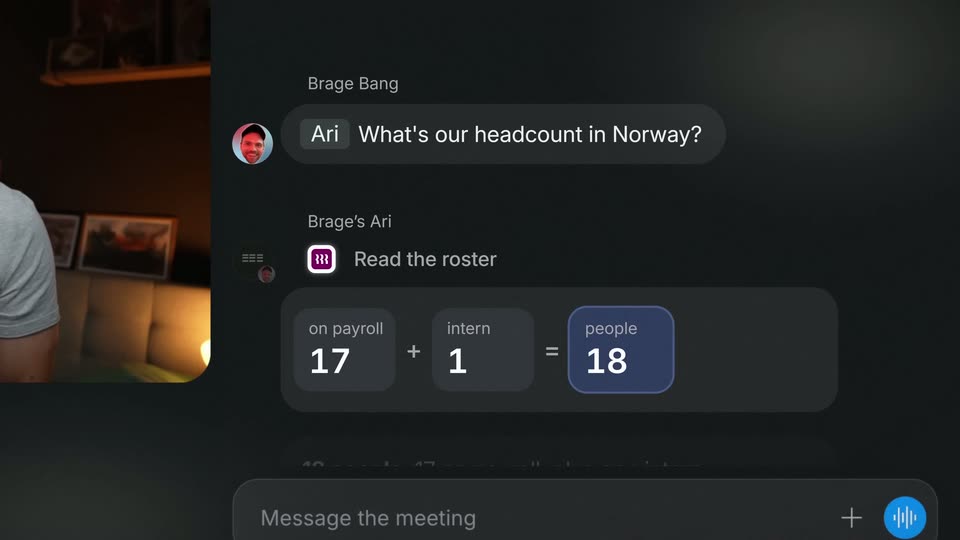
A dark meeting chat sits beside a small video call window of a man in a grey shirt. The bot Brage's Ari answers a headcount question, and a card slides in reading 17 plus 1 equals 18, the result highlighted in blue.
Camera: Push in
04 · Demo · 0:04–0:08
A dark chat panel is shown in close-up as a blue January 20 stat tile slides into the roster row. The view then pulls back to reveal the full meeting window with a five-person video grid and a shared slide.
Techniques: UI zoom
Camera: Pull out
05 · Demo · 0:08–0:09
A dark app window on a soft gradient background shows a browser pane with a “Bring your own agents” page on the left and a chat panel on the right. In the chat, a new message types out word by word beneath a headcount calculation.
Camera: Static
06 · Demo · 0:09–0:11
A dark meeting app fills the frame, a shared slide on the left and a live chat on the right. The view slowly zooms in as a new message from Ari types in at the bottom, asking about last month's marketing spend.
Techniques: UI zoom
Camera: Push in
07 · Demo · 0:11–0:14
A dark meeting chat panel scrolls as the assistant posts a QuickBooks card: October forecast struck through, September actual highlighted in blue, then a clarifying message. A video-call window with a speaking woman stays at the left edge while the view slowly zooms into the chat.
Techniques: UI zoom
Camera: Push in
08 · Demo · 0:14–0:15
A woman in a video call tile sits left of a dark meeting chat. The chat lists an October forecast and a highlighted September actual, and a message flags $23,886 as the last real number while warning that $29,587 is still a forecast. The shot holds still.
Camera: Static
09 · Demo · 0:15–0:16
A pricing page with three plan cards, Free, Pro and Business, fills the frame, then the view quickly pulls back to reveal the browser window and top navigation. A circular avatar of a person appears at the lower right with a caption.
On-screen text: “Brage's AI is listening...”
Techniques: UI zoom
Camera: Pull out
10 · Demo · 0:16–0:17
A browser window displays a pricing page with three tiers, Free, Pro and Business, beneath a headline about meeting hours. A circular widget with a small face and a listening label floats in the lower right, a presenter pill sits lower left. The shot holds nearly still.
Camera: Pull out
11 · Demo · 0:17–0:22
A dark app window in 3D perspective slides in from the right and settles against a soft gradient. Inside, a shared pricing page and a five-person video grid sit beside a chat panel where a message types out word by word, then the view zooms into the chat.
Techniques: 3D mockup, UI zoom
Camera: Push in
12 · Demo · 0:22–0:25
A dark chat interface fills the right side, a small video tile of a woman sits at the lower left. A blue line graph draws across a card titled Path to $10M ARR, its area fill fades in, then a new message bubble slides up at the bottom.
Camera: Push in
13 · Demo · 0:25–0:31
A two-pane product view: left, a pricing card and a three-person video call; right, a chat with an ARR chart. The chart fills an orange band for legacy customers, the headline number drops from 4,100 to 3,200, and a tan highlight sweeps the chat message.
Techniques: Split screen
Camera: Static
14 · Outro · 0:31–0:35
A near-black background holds a centered lockup of the cfo.ai and tana logos with a small × between them. The serif headline “Your CFO, in every meeting.” and a row of four small gray icons fade in from a soft blur, then hold static.
On-screen text: “cfo.ai”, “tana”, “Your CFO, in every meeting.”
Camera: Static