1:58

OpenWork: The open-source alternative to Claude Cowork
OpenWork · B2B · Jan 2026
mlop · Apr 2025 · 1:37 · Full motion · AI-annotated
mlop’s 1:37 launch film runs 11 scenes, about 8.8 s each. The product is on screen from the first frame and 2 features are revealed. There is no explicit call to action; a voiceover carries the film. The video is a single continuous screen-share demo anchored by a persistent circular webcam avatar, moving from a Colab notebook to the metrics dashboard and then to the model-graph diagnostics. Pacing is steady with locked-off UI shots, cursor-driven interactions, and blue highlights that flag the elements being discussed.
Is this your launch? to your site or press kit.
OpenWork · B2B · Jan 2026
Harbera · Healthcare · Feb 2025
Replit · Developer tools · Nov 2026
A dark Colab notebook shows a Python DCGAN training loop; the code scrolls up and down while a circular webcam of the presenter sits in the lower right. Log lines from the MLog SDK appear at the bottom of the screen.
Techniques: Cursor demo
Camera: Static
A dark metrics dashboard fills a browser window. The view scrolls up to bring the address bar and three line charts into frame while a cursor glides onto the first chart. Rows of generated face thumbnails sit below the charts.
Techniques: Cursor demo
Camera: Static
A dark metrics dashboard shows three line charts above a row of generated-face grids. A cursor hovers the charts to reveal tooltips, then scrolls down as the user pages through the grids and toggles them to a list view. A circular webcam of a man sits in the corner.
Techniques: Cursor demo
Camera: Pan
A dark training dashboard shows three loss charts above a row of three panels filled with grids of generated faces. The panel titles count down from 23 to 20 as the grids refresh to earlier steps. A circular webcam feed of a man sits in the lower right corner.
Camera: Static
A dark ML experiment dashboard shows three loss charts above a grid of generated face images. A cursor hovers over the left sidebar icons, then a tooltip and link preview appear at the bottom left. A circular webcam of a man with glasses sits in the corner.
Techniques: Cursor demo
Camera: Static
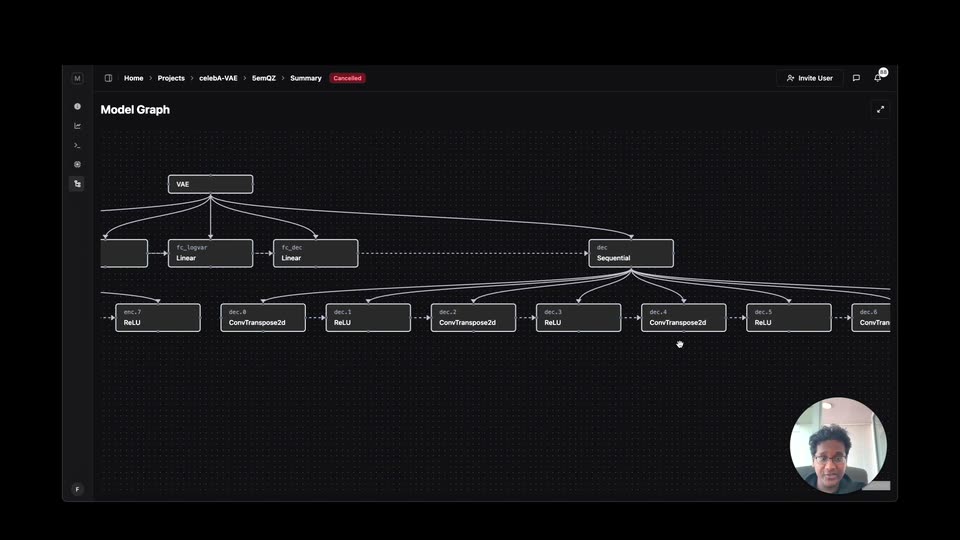
A dark node graph zooms in from a wide view to a close-up of the VAE layer tree. A cursor clicks the dec:2 ConvTranspose2d node, opening a left panel with four blue parameter and gradient histograms.
Techniques: UI zoom, Cursor demo
Camera: Push in
A dark model-graph screen stays locked off. A cursor clicks play on a parameter histogram; the slider runs 41 steps and the blue bars reshape, then it plays the gradient histogram. A circular video-call avatar sits bottom right.
Techniques: Cursor demo
Camera: Static
A dark code editor fills the frame, a small circular video call of a man sits in the lower right, and a text caret moves between lines. The view cuts to a Gmail inbox where an alert email from mlog about recon_loss is highlighted.
Techniques: Cursor demo
Camera: Static
A dark Gmail inbox sits in a locked-off frame. The search bar holds the query from:[email protected], and a single email row with a warning icon fills the list. A circular webcam feed of a man appears in the lower right corner.
Camera: Static
A dark code editor fills the frame, locked off, with a Python training loop in a notebook and one line highlighted in blue. A circular video call of a man sits in the bottom right, and a thin progress bar runs along the bottom edge.
Camera: Static
A dark model-graph screen: a node diagram with a blue-highlighted ConvTranspose2d box on the right, a popup of four blue histograms on the left, and a circular webcam of a talking man bottom right. Locked-off frame.
Camera: Static