
0:59
Explore
00:00:00 / 00:39:01
- Length
- 0:39
- Scenes
- 28 · 1.4 s avg
- Product on screen
- 0:35
- Features shown
- 5
- Voiceover
- No
- Views
- 2.8M on X
as of November 15, 2026
OpenArt’s 0:39 launch film runs 28 scenes, about 1.4 s each. The product shows up at 0:35 and 5 features are revealed. There is no explicit call to action. Built as a chain of typed prompts, each capability is announced in a rounded input card and paid off in a fast scatter of generated cards that snap into grids. The style is defined by locked-off white title cards with a single magenta accent word, and by card choreography that shuffles, blurs and re-forms at a 150 bpm cut rate.
Footage neededEstimated needs: 4 capture groups — your screens or recordings · 3 filmed passages — shoot, supply or replace · 9 graphic passages — draw or supply · 5 3D passages — build or supply
Is this your launch? to your site or press kit.
More like this



OpenArt - GPT Image 2 is now live on OpenArt. 🎨 OpenAI's newest image model -, scene by scene
· 28 scenes as text
01 · Hook · 0:00–0:04
Flat design cards for headphones, perfume, a watch and a children's book fill the white frame in a scattered collage, then fade out as the headline appears in two lines, 'exactly' in pink, before fading to an empty rounded card outline.
On-screen text: “Images that say exactly”, “what you mean.”
Techniques: Kinetic type
Camera: Pull out
02 · Feature reveal · 0:04–0:08
A rounded prompt field on white types out a sentence as a small product image slides into its corner. A cursor clicks the black send button, then the field blurs and product shots scatter across the frame.
Techniques: Kinetic type, Cursor demo
Camera: Push in
03 · Feature reveal · 0:08–0:10
Scattered, blurred renders of an orange-keyed dial device drift across a white canvas, then ease into an orderly grid. A dark overlay panel with circular diagrams slides in at the center, and gray and white labels fade in to caption the layout.
On-screen text: “FINGERTIPS”, “surface. Engineered for flow.”, “UI/Function Visualization Overlay”, “Interaction Scene”, “Precision Control”, “Fine Tuning”
Techniques: Parallax
Camera: Push in
04 · Feature reveal · 0:10–0:11
A fast montage of overlapping marketing cards and interface panels shuffles across the frame, motion-blurred, showing the orange-keyed device, a hand holding it, and dark UI overlays. Near the end a card with the headline “TAKE CONTROL OF YOUR WORKFLOW.” slides in at the bottom center.
On-screen text: “TAKE CONTROL OF YOUR WORKFLOW.”
Techniques: Parallax, 3D mockup
Camera: Pan
05 · Feature reveal · 0:11–0:12
A bright white wash fades off a product landing page mockup, then a clean rounded input bar settles in the center. The placeholder text types out character by character while plus, slider, mic and send icons sit in a row below it.
On-screen text: “TAKE CONTROL OF YOUR WORKFLOW.”
Techniques: Kinetic type
Camera: Static
06 · Feature reveal · 0:12–0:15
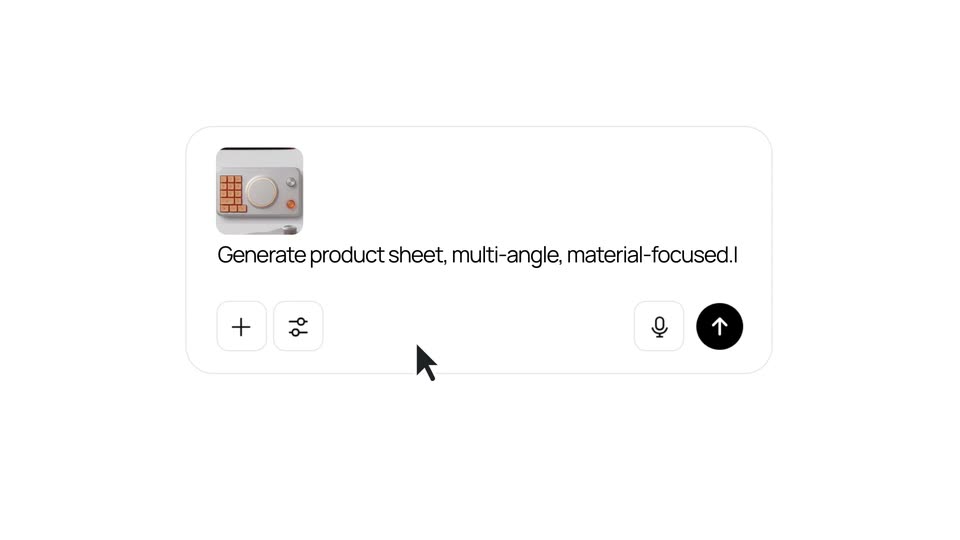
A rounded prompt box on a white background holds a typed line of text. A square portrait of a man is dragged up into the box from below, then a cursor moves to the black send button.
Techniques: Cursor demo
Camera: Static
07 · Feature reveal · 0:15–0:16
A white chat input holds a face thumbnail and a typed prompt; a cursor taps the black send button, then the view zooms into a full character sheet document with a grid of labeled expressions and a two-frame scene strip.
Techniques: Cursor demo, UI zoom
Camera: Pull out
08 · Feature reveal · 0:16–0:17
A layered collage of character-design panels (identity card, camera study, wardrobe sheet, scene strip, material close-ups, infographic) sits on a light grey field. The stacked cards drift apart with soft drop shadows as the frame eases out to reveal the full spread.
Camera: Pull out
09 · Feature reveal · 0:17–0:21
A prompt box on white types the line “Director-level, panel-driven, manga storyboard.” as two manga character thumbnails appear above it. A cursor clicks the send button, and the box fades into a full character illustration.
Techniques: Kinetic type, Cursor demo
Camera: Pull out
10 · Feature reveal · 0:21–0:22
Faint pencil character sketches and bio text fade in on a white canvas as comic panels of a ruined city and a glowing blue eye appear, then a 3D page titled ECHOES OF GRIM rotates in from the right.
Techniques: 3D mockup
Camera: Pull out
11 · Feature reveal · 0:22–0:24
An open manga storyboard book lies on a woven fabric surface, angled in 3D perspective. The right-hand page flips forward to the next spread, revealing new panels of character sketches and a chapter breakdown grid.
Techniques: 3D mockup
Camera: Pull out
12 · Feature reveal · 0:24–0:25
A plain off-white background holds the black phrase “Perfect text.” at center. The closing phrase “Every time.” types in letter by letter in pink beside it, while the frame stays locked off.
On-screen text: “Perfect text. Every time.”
Techniques: Kinetic type
Camera: Static
13 · Feature reveal · 0:25–0:26
A centered line reads Perfect text. in black and Every time. in magenta on a plain off-white background. The frame holds still with no motion.
On-screen text: “Perfect text. Every time.”
Camera: Static
14 · Feature reveal · 0:26–0:27
Three poster mockups sit side by side on a light background. The left shows a film still of a woman in a leather jacket, the center a serum bottle ad, and the right reveals a black earbud case in a dark 3D scene as it fades in from a gray panel.
On-screen text: “Perfect text. Every time.”, “AURORA”
Techniques: Split screen, Masking
Camera: Static
15 · Feature reveal · 0:27–0:28
Three vertical panels scale in side by side and settle to full size: a dashboard mockup on the left, a lifestyle photo of a woman with a backpack placing a bottle on a table in the center, and a watch product card on the right. The center panel carries the headline overlay while the side panels hold interface layouts.
On-screen text: “ESCAPE THE ORDINARY”, “SUSTAINABLE LIVING”, “AURORA”
Techniques: Split screen
Camera: Pull out
16 · Feature reveal · 0:28–0:29
A collage of rectangular photo panels drifts over a white background, each tile sliding at its own speed. The tiles show a library reader, a woman with a newspaper, a poster-covered wall, architectural blueprints, a modern building, a corkboard and an open magazine.
Techniques: Parallax
Camera: Pull out
17 · Feature reveal · 0:29–0:31
A bright, overexposed workspace with people and laptops dissolves to plain white. Centered text reads “Edit precisely.” in black above “No regenerating from scratch.”, the first phrase in magenta, as “from scratch.” fills in.
On-screen text: “Edit precisely.”, “No regenerating from scratch.”
Techniques: Kinetic type
Camera: Static
18 · Feature reveal · 0:31–0:32
A woman in a beige cardigan sits on a wooden chair by a tall glass window, holding a mug and gazing outside. The shot cuts to a second woman in a green shirt seated on a bed, adjusting her cuff. Two calm live-action clips.
On-screen text: “Edit precisely.”, “No regenerating from scratch.”
Camera: Static
19 · Feature reveal · 0:32–0:32
A top-down photo of a cluttered desk crossfades into an anime illustration of a girl with long dark hair sitting by a tall window, gazing at a sunset over a city.
Camera: Static
20 · Feature reveal · 0:32–0:32
A 3D boy in a brown leather jacket holds a yellowed map in a sunlit forest, his eyes wide as he looks up. The camera pushes in on him while the mossy stream and trees stay soft in the background.
Camera: Pull out
21 · Feature reveal · 0:32–0:33
A comic-book panel of a caped hero and a gear-laden city against a swirling blue and orange sky cuts to a neon cyberpunk street where a hooded figure stands before a glowing arcade sign.
On-screen text: “DYNAMIC DEPTH”
Camera: Static
22 · Feature reveal · 0:33–0:33
A rapid hard-cut montage flashes three stylized images: a clay elephant holding a yellow bird, a black-and-white ink sketch of a woman running through an alley, then a 3D cartoon girl in a pink dress with a cat.
Camera: Static
23 · Feature reveal · 0:33–0:34
A black-and-white model in a tailored black suit poses against a sunlit concrete wall, then the frame cuts to a dancer in a flowing green, blue and black gown spinning in a bright concrete hall.
Camera: Static
24 · Feature reveal · 0:34–0:34
A person in a black leather suit crouches low in a bare concrete room, one gloved hand stretched toward the lens. The low, wide camera angle tilts the gray walls, and the pose shifts slightly as the hand extends forward.
Camera: Pull out
25 · Feature reveal · 0:34–0:35
Macro close-up of a knurled metal volume dial with a red index dot and a thin blue LED ring at its base. Thin white callout labels with leader lines point to its edges and texture while the camera drifts slightly, blurring the keys behind.
On-screen text: “PRECISION MACHINED EDGE”, “DIAL UNIT 01”, “MICRO-TEXTURED FINISH”, “POLISHED CERAMIC BEVEL”, “ENGRAVING”, “PRECISION VOLUME”, “ACTIVE LED”
Techniques: Parallax
Camera: Static
26 · Feature reveal · 0:35–0:35
A macro shot of brushed dark metal with thin white callout lines zooms out to reveal a full blueprint sheet of a black game controller. The sheet holds a 3D render, a wireframe exploded view, material swatches and color variants, all framed by a white technical grid.
On-screen text: “FUTURISTIC CONTROL DEVICE // MODEL X-501”, “EXPLODED VIEW”, “RUBBER GRIP”, “GLASS”, “USABILITY DEMO”
Techniques: UI zoom
Camera: Static
27 · Product intro · 0:35–0:36
A flat character model sheet fills the frame, panels for portrait, expression grid, angle study, wardrobe and color palette on a dark board. A white wash floods in from the right and a magenta GPT word pops over the hero portrait.
On-screen text: “GPT”
Camera: Static
28 · Outro · 0:36–0:39
A white title card centers the headline, GPT Image 2 in magenta with is here. in black, and the tagline Create something real. below. The lines fade in from gray to full color in the first half second, then hold on a locked-off frame.
On-screen text: “GPT Image 2 is here.”, “Create something real.”
Camera: Static