2:34

Introducing Latent
Latent · B2B · Oct 2026
Notra · Jun 2026 · 0:33 · Full motion · AI-annotated
Notra’s 0:33 launch film runs 14 scenes, about 2.4 s each. The product is on screen from the first frame and 2 features are revealed. The call to action lands at 0:30 (91% in). The video alternates centered serif headline cards with flat UI mockups on a cream field, each feature announced by a headline and then demoed inside a static browser frame at a steady pace of about seven cuts per minute. Signature moves include purple italic accent words, a growing purple underline, and a confetti burst that punctuates the copy to Paper moment.
Is this your launch? to your site or press kit.
Latent · B2B · Oct 2026
Essential · Feb 2026
A purple feather mark and the bold wordmark Notra sit centered on a cream background as a gray serif tagline fades in beneath them, then a white commit card blurs into view.
On-screen text: “Notra”, “You shipped. Now show it”
Camera: Static
A flat GitHub pull request page for emdash sits on a light gray background, showing the title and a comment with a Sound settings preview. The view then zooms into the top, framing the PR title and the preview panel.
Techniques: UI zoom
Camera: Static
A flat GitHub pull request card sits on a light gray field. A cursor clicks the green Merge button, flipping the badge from Open to Merged and printing a success line. The card fades out and the serif line From merged appears, with merged in purple italic.
On-screen text: “From merged”
Techniques: Cursor demo
Camera: Static
A centered serif line reads 'From merged PR' on a pale cream field, 'merged' in purple. It is replaced by 'To launch visual, in your brand.' as a blurred app window fades in behind the type.
On-screen text: “From merged PR”, “To launch visual, in your brand.”
Camera: Static
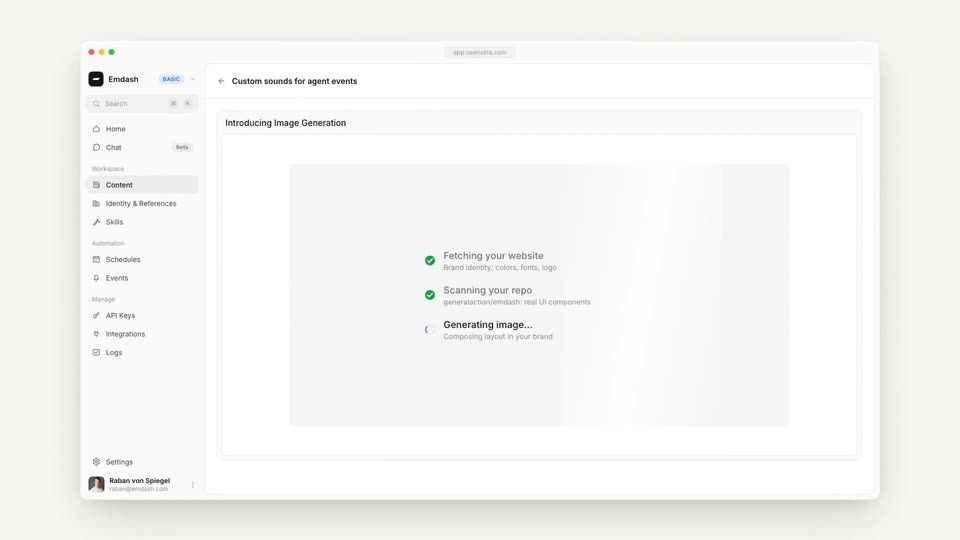
A light web app window labeled Emdash floats on a pale gray background. In the main panel, a task list fills in step by step: green checks appear beside Fetching your website and Scanning your repo, while a third line, Generating image, spins with a loading indicator.
Camera: Static
A centered serif headline, Pixel perfect, holds still while a browser window mockup of the Emdash settings page scrolls up past it and exits the top. Then a second large serif headline, Built with designers, scrolls in from the bottom.
On-screen text: “Pixel perfect”, “Real logos and app components, vector sharp.”, “Built with designers”
Techniques: Parallax
Camera: Static
A serif headline in black with “designers” in purple slides up to center on a light gray field, then a small gray subline settles beneath it. The frame holds still on the centered text.
On-screen text: “Built with designers in mind”, “Straight from your repo to your canvas.”
Techniques: Kinetic type
Camera: Pan
A browser window displays the Emdash settings page, a dark panel with notifications and sound options beside a custom sounds block. A cursor hovers at the top right by the Copy for Figma button while a headline slides in.
On-screen text: “Built with designers in mind”, “Straight from your repo to your canvas.”
Techniques: Kinetic type, Cursor demo
Camera: Static
A flat browser view of a settings page. A cursor clicks the dropdown beside the copy button, the menu opens, and the cursor picks Copy for Paper. The button label updates and a green check toast slides in at the bottom right.
On-screen text: “app.usenotra.com”
Techniques: Cursor demo
Camera: Static
A blank editor canvas holds two small buttons; a dark feature card with the Emdash logo and a settings panel pops into the center amid a confetti burst, then the frame zooms into the left page sidebar.
Techniques: Particles, UI zoom
Camera: Static
The Paper app opens with a dark layer panel on the left and an empty light canvas. A serif headline fades in, then the panel collapses and the canvas reframes to show a dark Emdash settings mockup, with a second headline fading in above it.
On-screen text: “Organized, editable layers.”, “Real text, frames, and shapes. Not a flat image.”, “Edit anything.”, “It's real text. Just retype it.”
Techniques: UI zoom
Camera: Push in
A light beige frame holds a serif headline, “Works with Paper and Figma,” above two white rounded cards with the Paper and Figma logos and labels. A small gray disclaimer sits at the bottom. The locked-off shot fades in from a faint state.
On-screen text: “Works with Paper and Figma.”, “Paper”, “Figma”, “Notra is not affiliated with Paper or Figma.”
Camera: Static
A crossfade blurs the Paper and Figma cards and the line Works with Paper and Figma. as the Notra logo and the tagline Image generation. Live now settle into focus on a plain off-white background.
On-screen text: “Works with Paper and Figma.”, “Image generation. Live now”
Camera: Static
On a cream field, the Notra feather mark and wordmark sit centered above a serif headline and a small gray URL. A tiny purple dot grows into a short underline beneath the word now. The frame stays locked off.
On-screen text: “Notra”, “Image generation. Live now”, “usenotra.com”
Camera: Static