1:30

Alkera AI (S26) | Launch Video
Alkera AI · B2B · Jul 2026
Latent · Oct 2026 · 2:34 · AI-annotated · YC Fall 2026
The video stitches tight product UI walkthroughs to flat cream stat cards and simple line diagrams, cutting on each voiceover sentence. Signature moves include zooming into table rows, red connector lines from tokens to evidence cards, and oversized black numerals that count up beside filling progress bars.
Alkera AI · B2B · Jul 2026
Item · Oct 2026
GitHub · Developer tools · Nov 2024
A light-themed review queue table with a timeline histogram on top pans horizontally to the right, revealing the right-hand columns, while a cursor drifts upward over the rows.
Techniques: Cursor demo
Camera: Static
A light-themed review queue interface with a left navigation sidebar and a dense table of requests. A cursor glides over the rows as the view zooms in slightly on the list.
Techniques: Cursor demo, UI zoom
Camera: Static
A review queue table lists AI responses with risk scores and verdicts, a cursor hovers a row. The view then opens a detail panel showing the request and answer, a sentence highlighted in blue, with a verdict sidebar on the right.
Techniques: Cursor demo
Camera: Static
The review-queue screen zooms into its central card: a question about a home office deduction above an answer with words highlighted in blue and red. A cursor sits at the question's left edge, and the right panel holds a verdict form with a blue Confirm failure button.
Techniques: UI zoom
Camera: Push in
An eval dashboard fills the frame. A cursor glides over a highlighted answer; a red line links a token to a side card that stacks the quoted claim, the named forms, and the failure mode. The view zooms in on the text, then pulls back to the verdict panel.
Techniques: Cursor demo, UI zoom
Camera: Push in
A flat review UI holds a blue Analyze with judge button under a row of flag chips. A white cost card fades in over the left, stacking three rows with filling progress bars, then fades out to reveal a verdict panel on the right.
Techniques: Cursor demo
Camera: Pan
A review-queue dashboard zooms into a flagged answer while a cursor hovers over risk tooltips. A floating card shows the text scored token by token, then the view pulls back as the cursor clicks Escalate and three black caption pills pop in at the bottom.
On-screen text: “AS THE MODEL WRITES”, “Latent reads every token as it's written”, “Judge or reviewer waiting for the whole answer”, “flagged, while it's still writing”, “only now can it start reading”, “No judge”, “No sample”, “No human in the loop until it's needed”
Techniques: UI zoom, Cursor demo
Camera: Pull out
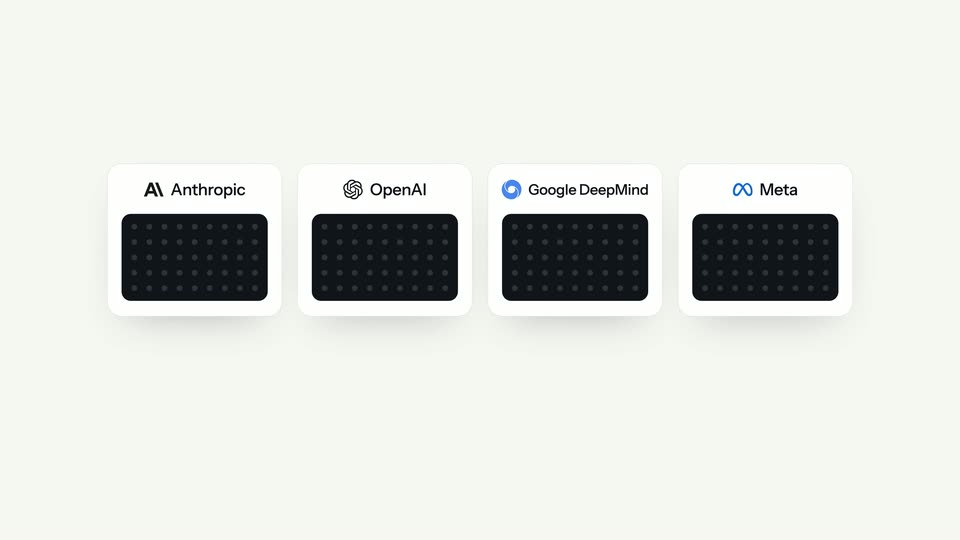
On a cream background, four white rounded cards fade in from left to right, each pairing a company logo and name with a dark rounded block of dotted grid. The cards appear in a staggered sequence, the rightmost finishing last.
On-screen text: “Anthropic”, “OpenAI”, “Google DeepMind”, “Meta”
Camera: Static
Four white cards for Anthropic, OpenAI, Google DeepMind, Meta sit on beige; blue ringed dots drift inside each dark panel. Bullet chips fade in below, a rounded border with a padlock draws around the group as it scales down, and gray industry labels fade in around it.
On-screen text: “Anthropic”, “OpenAI”, “Google DeepMind”, “Meta”, “Interpretability teams”, “Years of research”, “Resources almost no one else has”, “Tax software”, “Banking”, “Insurance', 'Healthcare', 'Legal', 'Retail', 'Telecom', 'Customer support', 'Travel', 'Education', 'Logistics', 'Public sector', 'Your team', 'Real estate', 'HR”
Camera: Pull out
A radial diagram on a cream field crossfades from a faded panel of AI labs to a blue Latent hub, its dashed spokes lighting up to twenty outlined industry pills. It cuts to a dark code window with a short Python call.
Camera: Static
A dark code editor card titled app.py pops in and settles on a light gray field. Two green lines, import runlatent and runlatent.auto_instrument(), sit above a boxed client call. White pill captions, +2 lines and your call unchanged, fade in at the right.
On-screen text: “+2 lines”, “your call, unchanged”
Camera: Push in
A dark code panel floats over the review queue with a green '+2 lines' badge and a 'Your call, unchanged' check. The panel clears, the view zooms into the table, blue outlines mark rows, and a dark tooltip reads '2,532 of 2,532 answers read' before fading to cream.
Techniques: UI zoom
Camera: Push in
On a flat cream background, a large “660×” stat fades in at left with a gray caption and two cost bars that fill left to right. A second “176×” stat block with speed bars then fades in at right, both settling into black type.
On-screen text: “660×”, “cheaper than a judge on every answer”, “A judge model, per 1,000 answers”, “$10.61”, “Latent, per 1,000 answers”, “$0.016”, “176×”, “faster than a judge”, “A judge model, median”, “4.4 s”
Techniques: Kinetic type
Camera: Static
A wavy line of small gray dots flows from “All of your traffic” on the left into a central blue eye icon, then out to “Your users” on the right, while one blue dot branches to “Judge or reviewers” and the caption “only the 10% it flags” fades in.
On-screen text: “Latent reads every answer”, “All of your traffic”, “Judge or reviewers”, “Your users”, “only the 10% it flags”
Techniques: Particles
Camera: Static
A large 4x and gray caption sit on a cream field above two labeled bars. The gray random-review bar fills to a quarter while the blue Latent-flags bar fills to full width, then the frame fades out and a small blue To logo appears.
On-screen text: “4×”, “the failures caught, at the same 10% review budget”, “Review 10% of answers at random”, “1×”, “Review the 10% Latent flags”, “4×”
Camera: Static
A sentence about the home office deduction types out word by word on a cream background, phrases flagged with blue and red highlighter. A black pill 'runs in under 30 ms' and a gray caption appear, then the frame crossfades into the product UI.
On-screen text: “To claim the simplified home office deduction, you will need to fill out Schedule C (Form 1040). Specifically, you will need to complete Form 1040-SS (Schedule ”, “runs in under 30 ms”, “while the model is still writing”
Techniques: Kinetic type
Camera: Static
A product dashboard with a left sidebar and a Calibration card fills the frame; the view then pans right, reframing onto a report panel where a large counter reads 1 and a blue line climbs a 100 to 2,000 axis.
Techniques: UI zoom
Camera: Static
A calibration panel fills its progress bar to 500 of 500 while a counter climbs to 6,260 answers read and a two-line chart updates with small status pills. The left card then morphs into a results table with four stat blocks.
Techniques: Morph
Camera: Push in
A dashboard close-up shows a data table on the left and a line chart on the right, with four flow boxes below lighting up one by one. The view then pulls back to reveal the full review queue interface, adding a left sidebar and a second table.
Techniques: UI zoom
Camera: Static
A light review queue table fills the frame; the rows scroll up a few lines as a red hand-drawn oval circles the Escalate verdict in the top row. A cursor hovers over the list.
Techniques: Cursor demo
Camera: Static
A product dashboard fills the frame: a review-queue table with risk bars, thresholds and Escalate verdicts under a timeline of flagged events. A mouse cursor glides onto the Policy item in the left sidebar, which is ringed by a circle.
Techniques: Cursor demo
Camera: Static
The settings page scrolls down as a cursor clicks three radio options, the selection moving from 'Deliver it and log it' to 'Hold it and ask a stronger model'. It scrolls back up and a black tooltip appears beside the 'Review queue' tab before a crossfade.
Techniques: Cursor demo
Camera: Push in
A horizontal row of white Q&A cards drifts left past a fixed blue eye logo and vertical line at top center. The card under the marker gains a red outline and a red 'flagged as sensitive' pill as the row keeps scrolling.
Camera: Pan
A pale beige UI field shows white rounded cards. FAQ cards with a blue center logo give way to provider cards for Anthropic, OpenAI, Google DeepMind, and Meta, each with a dot grid and a small blue node. The cards slide in on a locked-off frame.
Camera: Static
On a cream background, four white cards for Anthropic, OpenAI, Google DeepMind and Meta sit in a row, each holding a dark dotted panel where purple circles drift. A fifth card, Your team, slides in from the right with a blue outline. The camera stays locked off.
Camera: Static
A dashed rounded rectangle draws itself around three connected cards labeled Your app, Your model and Latent on a cream background. Faded provider labels slide out, and the Your stack tag turns blue and swaps to Your VPC with a lock icon.
On-screen text: “Al Anthropic”, “OpenAI”, “Google DeepMind”, “∞Meta”, “Your team”, “Your stack”, “Your app”, “Your model”, “Your VPC”
Camera: Static
On a cream background, a small blue eye mark scales up at center as a thin ring pulses out. The black wordmark Latent appears beside it, then a dark terminal pill with the white monospace install command and a small gray URL fade in below.
On-screen text: “Latent”, “$ pip install runlatent”, “runlatent.ai”
Camera: Static