1:43

Anthropic - We’re expanding Claude for Financial Services, with an Excel add-in,
Anthropic · AI · Oct 2025
Notion · Jul 2026 · 0:51 · AI-annotated
Notion’s 0:51 launch film runs 12 scenes, about 4.3 s each. The product is on screen from the first frame. There is no explicit call to action. A launch film for Notion's beta 'Notion as code' feature, built as one continuous proof: a title card, a Claude Code session that types a prompt and generates the workspace in TypeScript, a deploy, then a tour of the resulting Notion UI, closed by a value card and the logo.
Is this your launch? to your site or press kit.
Anthropic · AI · Oct 2025
Perplexity · AI · Jun 2026
Help Scout · Oct 2026
On a plain cream background, the headline “Now in beta:” reveals through a horizontal mask, then the second line “Notion as code” fades in beneath it, the word “code” trailing in last. The frame stays locked and the text holds still.
On-screen text: “Now in beta:”, “Notion as code”
Techniques: Masking, Kinetic type
Camera: Static
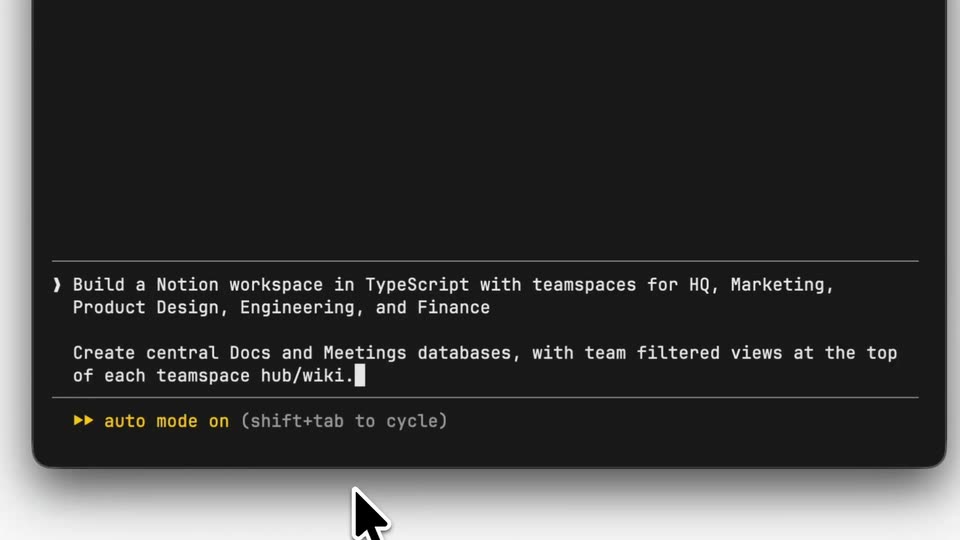
A dark Claude Code terminal window sits on a light gray field, then the frame zooms into the input area at the bottom. A long prompt types out character by character and scrolls upward as new lines appear, while a black arrow cursor rests at the bottom edge and a yellow status line stays fixed below the text.
On-screen text: “Now in beta:”, “Notion as code”
Techniques: UI zoom, Cursor demo
Camera: Push in
A dark terminal window floats on a light gray field, settling into frame as its log fills in. White monospace lines type out and scroll upward, the prompt block stays highlighted, and the red status line ticks up its token count while a block cursor blinks at the prompt.
Camera: Pull out
A dark code editor window on a light gray background types out a Notion workspace script. Lines scroll upward as new code appears, a block cursor blinks at the prompt, and a mouse pointer hovers below the window.
Camera: Static
A dark code editor window on a light gray background scrolls TypeScript code rapidly upward as it is generated, line numbers shifting, a white cursor arrow resting over the lines, and a small “1 new message” badge and status bar pinned at the bottom.
Techniques: Cursor demo
Camera: Static
A dark terminal window on a light gray background scrolls through a code diff and agent status lines. The prompt types out “deploy it!” as the frame zooms in, then the window rotates in 3D to reveal a Notion workspace list behind it.
Techniques: UI zoom, 3D mockup
Camera: Pan
A Notion window mockup sits centered on a white background, easing in with a brief blur. The left sidebar list scrolls to refresh its items, then a cursor moves up and hovers the Docs entry, which expands and updates the top breadcrumb.
Techniques: Cursor demo
Camera: Static
A Notion window displays a Docs table with a left sidebar. A hand cursor moves down to Marketing Hub, and the main panel cross-fades from the document list to the Marketing Hub page.
Techniques: Cursor demo
Camera: Static
A Notion workspace interface sits in slight 3D perspective on a white background, the Marketing Hub page open with a megaphone icon and a docs table. A hand cursor hovers over the Marketing Hub item in the left sidebar.
Techniques: 3D mockup, Cursor demo
Camera: Static
On a plain cream background, the headline 'Define in TypeScript' slides into the center, then 'Deploy via API' appears on a second line below, its last letter fading in from gray to black. The frame stays locked off.
On-screen text: “Define in TypeScript”, “Deploy via API”
Techniques: Kinetic type
Camera: Static
A small black isometric cube with a white front face bearing the letter N holds centered on a plain cream background. The mark stays static for the full shot.
Camera: Static
On an off-white background, the black Notion cube icon rotates from an angled 3D view to a flat front face as the Notion wordmark fades in to its right. The lockup holds centered in a locked-off frame.
Camera: Static