1:09

Motion Graphics Explainer Video for Cybersecurity Platform | EasyDMARC
EasyDMARC · Oct 2026
Notion’s 2:34 launch film runs 76 scenes, about 2.0 s each. The product shows up at 0:08. There is no explicit call to action; a voiceover carries the film. The video is built as one continuous voiceover narrative over a flat, light interface, opening on an abstract white field and closing on the brand lockup. Its signature moves are slow zooms out of tight page crops, horizontal motion-blur wipes between views, and a recurring blue hand cursor that clicks and drags to demonstrate each capability at a calm, steady pace.
Is this your launch? to your site or press kit.
EasyDMARC · Oct 2026
Endstack · B2B · Aug 2026
Films whose music sounds like this one, voice left out
Notion · Electronic, with sections of jazz and rock
Conversion · Upbeat electronic and jazz
Tella · Modern electronic
A blank white field holds a thin vertical line that flashes in on the left at the midpoint, then vanishes, leaving the screen empty. The voiceover states the craving for clarity and organization.
Camera: Static
A plain white frame holds a faint vertical seam at the left edge as a short gray bar and two soft gray rectangles blur into view, suggesting a layout taking shape at a slow, gentle pace.
Camera: Static
A light two-column interface lists WORKSPACE and PRIVATE items, each row a small icon and a label. The rows settle in with a soft horizontal blur, hold steady, then the left column streaks sideways with motion blur while the right stays still.
Camera: Pan
A blank white document fills the frame as the view pans right. A faint menu column with cut-off words slides out of frame at the left edge, while a thin vertical text caret drifts left toward the center.
Camera: Static
A thin black vertical line, like a text cursor, blinks once on a plain white background and then disappears.
Camera: Static
A light workspace sidebar lists emoji-labeled items under a WORKSPACE header. The cursor glides from the highlighted Tasks row up to Company Home, and the row highlight shifts with it.
Techniques: Cursor demo
Camera: Static
A tight crop of a Notion page, Company Home, with a bridge banner and two emoji-linked columns, zooms out to show the full window and its sidebar. The backdrop then turns cream.
Techniques: UI zoom
Camera: Pull out
A black line-drawn face in a white circle sits at center on a cream field, then more white circles with different line-drawn faces pop in around it at varied sizes, scattering across the frame like a team constellation.
Camera: Pull out
Ten white circular badges, each holding a black line-drawn face, float on a pale beige background. They drift gently to the right, with slight position shifts that suggest a slow pan across a flat illustration field.
Camera: Pan
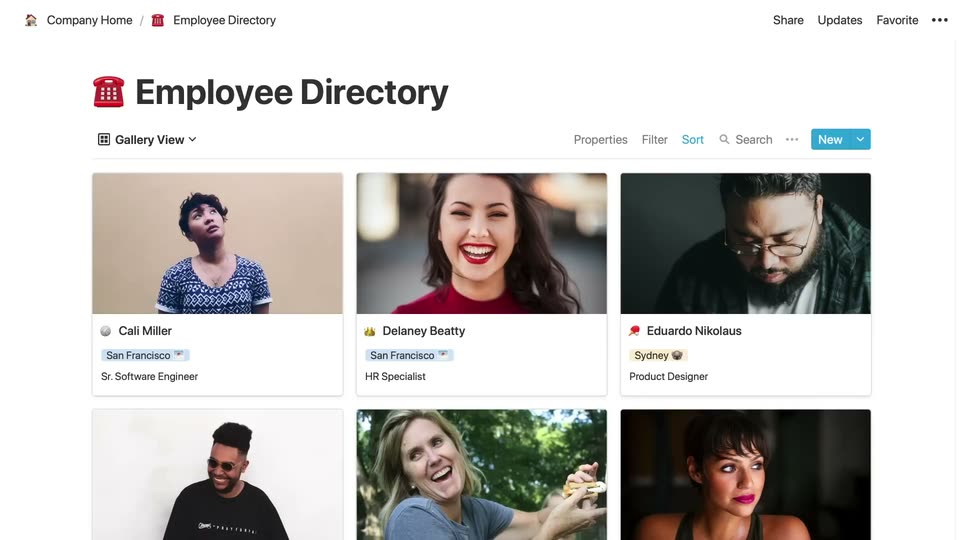
A Notion Employee Directory page settles into view: a red phone icon and bold title sit above a grid of six employee cards, each with a photo, name, location tag and job title. The opening frame shows the layout sliding into place with overlapping cards, then it holds static.
Camera: Static
A Notion Engineering page slides in from the right and settles into a centered view, with a brief horizontal double-image as the layers align. The page shows a banner, the Engineering heading, an on-call callout, and two link columns.
Techniques: Parallax
Camera: Pan
The Notion interface displays the Engineering page, with a black-and-white banner photo, a crossed tools icon, and two columns of links, then switches to the Meeting Notes page, a table of meetings tagged with colored property labels.
Camera: Pan
A Meeting Notes list view crossfades into a single note detail panel. The rows dim while a property column (last edited time, type, department, created by) fades in on the right, and a note thread with a question and a comment appears at the bottom.
Camera: Static
A meeting notes page scrolls down past blockers and action items, a caret blinks at the end of a new line, then the view cuts to a task board of sprint columns with labeled cards.
Camera: Pan
The view starts tight on a three-column task board, then pulls back to reveal the full app window on a blue backdrop, with a workspace sidebar on the left. The board stays static once framed.
Techniques: UI zoom
Camera: Pull out
A flat product screen on a blue background cross-fades from a Tasks kanban board with three sprint columns to a Sales page listing resources and activities, while the sidebar highlight slides down from Tasks to Sales.
Camera: Static
A product interface window sits on a blue background. The sidebar selection moves from Sales to Marketing, and the main panel swaps to match: the banner, heading, resource lists and bottom image gallery all change to the Marketing page. The framing stays static throughout.
Camera: Static
A flat Notion-style window sits on a blue field. The sidebar highlight slides from Marketing to Engineering while the main panel crossfades from a Marketing page with a popcorn icon and mood board to an Engineering page with crossed tools.
Camera: Static
A full Notion workspace window sits centered on a flat blue field. The page shows an Engineering header under a black-and-white banner photo, a left sidebar of workspace links, and two columns of underlined links. The frame holds still with no motion.
Camera: Static
A Notion board titled Weekly Agenda shows Mon, Tue, Wed columns; a hand cursor checks off tasks under Tue, turning them gray with strikethrough. The view cuts to a Tasks table listing projects with priority and sprint tags.
Techniques: Cursor demo
Camera: Static
A cursor clicks the Tasks dropdown at top left, a views menu opens, and the cursor picks Calendar. The task table crossfades into an October 2020 calendar view with task chips placed on dates.
Techniques: Cursor demo
Camera: Static
A white calendar grid for October 2020 holds a task card under the 27th. A cursor slides to the Calendar dropdown at the top left and clicks it, opening a vertical menu of view names that fades in over the grid.
Techniques: Cursor demo
Camera: Static
A dropdown list of task views opens over a pale calendar grid. A cursor glides down the rows and rests on By Status, which fills with a gray highlight. The rest of the board stays still.
Techniques: Cursor demo
Camera: Static
A cursor hovers over a task card, opens its menu, then drags the Apple Login card from In Progress into the Complete column. The view pulls back to reveal a left sidebar listing the workspace pages.
Techniques: Cursor demo, UI zoom
Camera: Pull out
A Notion workspace shows a sidebar and a Tasks board. A cursor hovers a card, then adds an Untitled page in the sidebar and creates a new My Tasks column on the board.
Techniques: Cursor demo
Camera: Static
A Notion editor fills in the page title letter by letter until it reads Research, the caret blinking at the end while the matching sidebar entry updates in sync.
Techniques: Kinetic type
Camera: Push in
Locked-off view of a blank document editor on a white background. The bold heading Research slides in at the top left, then a sentence types out character by character behind a blinking text caret.
Techniques: Kinetic type
Camera: Static
A flat blue canvas holds two Great Wave prints with file-name labels. A cursor drags a thin marquee rectangle to a large area around both images, and their labels light up blue. The marquee then shrinks back to a small box and the labels unhighlight.
On-screen text: “Research”, “Katsushika Hokusai is best known for his woodblock prints...”
Techniques: Cursor demo
Camera: Static
A white editor slide titled Research shows a cursor dragging a small wave-print thumbnail with a blue file label from the bottom right toward the left. The image lands in two placeholder boxes that fill with the Great Wave print while the heading scales up and the caption slides down.
On-screen text: “Research”, “Katsushika Hokusai is best known for his woodblock prints...”, “hokusai-”, “katsu...ve.jpg”
Techniques: Cursor demo
Camera: Pull out
A document page scrolls down past a Research heading, a Hokusai caption and two Great Wave prints. The cursor hovers the right print, revealing a Caption/Original bar, then clicks a pasted YouTube link; a menu opens and a black video player loads below.
On-screen text: “https://www.youtube.com/watch?v=sM_z56RdKLs&feature=youtu.be”
Techniques: Cursor demo
Camera: Pull out
A black video player card titled Hokusai: The End of an Era sits below two wave prints; a gray loading spinner spins in the center, then fades as the frame darkens and a small menu arrow slides in from the right edge.
On-screen text: “https://www.youtube.com/watch?v=sM_z56RdKLs&feature=youtu.be”
Camera: Static
A light page shows a YouTube-style player beneath two Hokusai thumbnails. The player's dim wave print brightens as playback controls fade in at the bottom, while a cursor sits at the right edge.
Camera: Pan
A product screen scrolls down: a paused YouTube player showing a blue-and-white wave print slides out of the top of the frame, leaving the placeholder line 'Type '/' for commands' at the top of a white page.
Camera: Pan
A white command-menu panel on a plain white background lists block options (Text, Page, To-do list, Heading 1, Heading 2, Heading 3, Bulleted list, Numbered list) that scroll upward, while a blinking caret sits beside the gray prompt 'Type '/' for commands'.
Camera: Pan
A white panel listing block types scrolls upward, then a diagonal wipe reveals a page with the heading Miss and a photo of astronaut figurines on a desk with small red flags.
Techniques: Masking
Camera: Pan
A document page with an astronaut photo and a “Mission, Vision, Values” heading scrolls down as the view zooms in. The “Trust and amplify” block is highlighted, a grab handle appears, and the cursor drags it above “Think rigorously”.
Techniques: UI zoom, Cursor demo
Camera: Push in
A Notion workspace sidebar list resolves from a blur, emoji icons beside each page. A hand cursor hovers down the rows onto Mission, Vision, Values, then a blue Add members button pops in at the lower right.
Techniques: Cursor demo
Camera: Pan
A blue rounded button labeled Add members sits centered on a plain white field. A white hand cursor with a black outline appears at the button's right edge and holds its hover position for the rest of the clip.
Techniques: Cursor demo
Camera: Static
On a white background a light blue Add members button with a hand cursor opens into an invite panel showing a search field, a Member dropdown and a blue Invite button. The cursor then moves down to rest on the Invite button.
Techniques: Cursor demo
Camera: Static
A light gray invite bar sits on a white field. An email types into the input box letter by letter, the helper line below disappears, and a matching contact row with a circled A slides in under the field as a cursor arrow hovers beneath.
Techniques: Cursor demo
Camera: Static
A white hand cursor slides left toward the blue Invite button and clicks it. Above it sits an email field with a Member dropdown, and below a person selector list shows one entry. Locked-off frame.
Techniques: Cursor demo
Camera: Static
A flat product interface shows an invite row with an email, a Member dropdown and a blue Invite button under a hand cursor, then reframes to a workspace sidebar listing emoji-tagged pages before fading to white.
Techniques: Cursor demo
Camera: Static
A light sidebar lists workspace pages with emoji icons. A cursor hovers the plus button, a dark tooltip appears above it, and the page list scrolls up a few lines.
Techniques: Cursor demo
Camera: Static
A cursor hovers over a plus button in a workspace sidebar. The view pans right, sliding the list out of frame to center and zoom in on a large 'Untitled' title.
Techniques: Cursor demo, UI zoom
Camera: Pan
On a white background, a large title types out as 'Tasks for today' while the old word 'Untitled' scales away, and three checkbox lines fade in one by one beneath it. The finished block then slides left with motion blur.
On-screen text: “Untitled”, “Tasks for today”
Techniques: Kinetic type
Camera: Pan
A close-up of the Company Goals - 2021 page shows a blue car icon above a numbered Q1 to Q4 list. The view then zooms out to reveal the workspace sidebar, with nested page entries and the goals row highlighted.
Techniques: UI zoom
Camera: Pan
A workspace sidebar expands the Company Goals row to reveal Q1 through Q4, and the right panel swaps from a car icon and Company title to a numbered Q1 page with a nested task list.
Camera: Static
A two-pane wiki interface fills the frame. The left tree reflows as a nested page is selected, its child items swapping, while the right pane keeps the blue 1 badge, the Q1 title, and a four-line link list steady.
Camera: Pan
A close-up of a Q1 goals page scrolls down past the Marketing objectives and checkboxes, expands the team member list, then pulls back to reveal the full interface with its left navigation sidebar.
Techniques: UI zoom
Camera: Pull out
A wiki interface displays a Marketing page with a popcorn icon and a list of objectives. The view then switches to a Company Home page, showing a landscape banner, a mission statement, and columns for team and policy links.
Camera: Static
A light workspace interface shows a left navigation tree beside a Company Home page with a banner, mission text and two link columns. A gray hover highlight slides down the tree from Marketing to Sales.
Camera: Static
A wiki screen shows a left sidebar tree and a Sales page with a red line-chart icon and two bulleted objectives. The view scrolls slowly downward, revealing more sidebar entries.
Camera: Static
A flat product interface shows a left sidebar of folders and a Meeting Notes list with colored tags. A large semi-transparent Sales label with a chart icon fades out at the start while the view scrolls up to settle on the Meeting Notes heading.
On-screen text: “Sales”
Camera: Static
A Notion workspace fills the frame, left sidebar listing pages with Tasks for today highlighted. The main panel dissolves from a Meeting Notes list into a Tasks for today checklist of three unchecked items.
Camera: Static
On a white background, a row of black-and-white circular face avatars flies in from the left with motion blur and settles into a horizontal line, beside the interface labels Share and Updates.
Camera: Static
A Notion page fades in from low opacity. A slash command types /table, opening a dropdown of database blocks, then a four-column table (Idea, Channel, Publishing date, Assigned to) appears to the right as the view sharpens.
Camera: Pull out
A light workspace table fills in row by row under a top bar with three avatars: post ideas type out, channel names and colored status pills pop into place, and small avatar icons drop into the assigned-to column.
Camera: Static
A white record card titled AMA with CTO scales open over a blurred table. A date picker dropdown opens and the publishing date flips from Feb 4 to Feb 16, then an assignee name fills in and a formatting toolbar pops up under a selected to-do line.
Techniques: UI zoom
Camera: Static
A wide interface canvas pans to the right, revealing a comment box with text being typed and a second user's panel on the right side.
Camera: Pan
A comment thread on white. A reply types itself out, a toolbar pops up, a cursor clicks Link and a URL field fills, “here” becomes a link, and the sender label “Eduardo (Sydney)” drops in. The view then whips right with motion blur to reveal a data table.
Techniques: Cursor demo, Speed ramp
Camera: Pan
A full-screen task table with colored priority tags and status labels fills the frame. A Views dropdown slides open on the left, its menu items stacking vertically while the table behind blurs.
Camera: Push in
A task board with a red backpack logo and a views dropdown open over the left column. The menu closes to show the full priority board, then a cut jumps to a User Research view with a New dropdown open at the top right.
Camera: Pull out
A light database screen shows a User Research table with five session rows, each pairing a name, date, email, avatar and colored status tags. The list holds still as small plus and drag handles appear beside the rows.
Camera: Static
A white detail card sits centered over a dimmed project table, showing a circular profile photo, the name Anthony James, and rows of property fields with status labels. The card stays static while the background list remains darkened behind it.
Camera: Static
A cursor travels down the workspace sidebar and highlights Sales CRM. The interface then scrolls down, reframing onto a database of deal cards, each showing a contact name, email and a dollar amount under the Lead and Qualified columns.
Techniques: Cursor demo, UI zoom
Camera: Pan
A Notion workspace shows a Sales CRM board with two columns of record cards. A black cursor hovers on the Sales CRM row in the left sidebar, highlighting it and revealing action icons. The view holds still.
Techniques: Cursor demo
Camera: Static
A product interface crossfades from a Sales CRM board of deal cards to an Employee Directory grid of staff headshots, the left sidebar scrolling up to the Sales item. The two views overlap at half opacity through the short transition.
Camera: Pan
A white Employee Directory board fills the frame, four columns of profile cards under Engineering, Design, Marketing and Sales headers. The whole board eases in with a slight horizontal drift, the labels briefly doubled before locking into place.
Camera: Static
A translucent share panel fades in over a plant background, showing toggle rows, then sharpens into a white panel with a webinar plan card and a Copy link button.
Camera: Static
A Notion page settles onto a checklist under “Outline of webinar.” A light blue highlight fills the rows and expands to cover the whole block, then a hand cursor glides to the top-left corner beside the add and drag controls.
Techniques: Cursor demo
Camera: Pan
A project checklist document sits in a white editor view. A hand cursor clicks the Write description box, filling it blue and striking the label through, then moves down to the next item.
Techniques: Cursor demo
Camera: Pan
A white document lists a project checklist with checkboxes and a Figma card. The view then zooms in on a row of integration logos, Figma, Jira and Evernote, which soften as the frame tightens.
Techniques: UI zoom
Camera: Pull out
A black line illustration shows three figures pressing their hands against a stacked list of app logos and names, as if holding it back. The shot opens tight on the list and pulls back to reveal the full drawing, then fades to white.
On-screen text: “Google Docs”, “asana”, “Jira”, “Evernote”, “GitHub Wiki”, “Dropbox”, “Trello”, “Airtable”, “Confluence”
Camera: Pull out
A plain white frame holds a single thin vertical gray line on the left, which fades in as the clip opens, setting up an incoming reveal.
Camera: Static
A Notion-style app window on a pale gray background shows a left sidebar of workspace and private pages and an empty main page with a blinking text caret. A gray mask band at the left edge fades out as the window settles into the center.
Techniques: Masking
Camera: Pull out
A black cube icon with a white N scales up from the center and settles left of center, as the word Notion appears in black to its right on a plain white background. The lockup then holds still.
On-screen text: “Notion”
Camera: Static