2:32


RoboParty - 🚀RP1 is officially here. 🌍Putting control of robotics back in develo
RoboParty · Oct 2026
Nikon’s 1:24 launch film runs 48 scenes, about 1.8 s each. The product shows up at 0:05 and 5 features are revealed. The call to action lands at 1:21 (96% in), over a voiceover. A presenter-led firmware walkthrough that interleaves locked-off shots of her on a blue grid backdrop with full-frame menu captures and live-action demos, opened by a product montage and closed with a URL and logo card. Its signature moves are diagonal wipes that grade flat log footage to full color, yellow selection bars stepping through menus, and a strict blue-and-black palette.
Is this your launch? to your site or press kit.
RoboParty · Oct 2026
Clicks Health · B2B · Oct 2025
Operon · Industrials
Films whose music sounds like this one, voice left out
Cogent · Modern electronic
Lovable · Upbeat electronic
ClickUp · Upbeat electronic
A black Nikon Z6II on a tripod sits centered against a blue wall with diagonal grid shadows. The camera slowly rotates, the lens hood and glass catching the light as the body turns.
Techniques: 3D mockup
Camera: Static
A black Nikon Z camera body without a lens, sensor exposed, sits on a tripod against a blue backdrop. The shot cuts to a man in a white shirt holding the same body in a bright office, with a second man seated at a table behind him.
Camera: Push in
Over-the-shoulder view of a filmmaker holding a Nikon Z camera; the flip-out screen is in focus, showing a red REC mark and a framing box, while a man in a blue shirt stands blurred by a bright window. The camera holds a locked-off frame.
Camera: Static
A bearded man in a black t-shirt and backwards cap holds a camera rig with a long lens, looking down at it. Low-angle static shot against a blue sky and green trees. He grips the rig's handle and adjusts it, framed from the waist up.
On-screen text: “05 M 1/50 +10 M 0.0 2800 u”
Camera: Pull out
A blonde woman in a black top holds a black camera against a blue wall with a faint grid pattern, smiling at the lens. White text reading ZR FIRMWARE 2.0 fades in on the right side of the frame.
On-screen text: “ZR FIRMWARE”, “2.0”
Camera: Static
A split screen compares two takes of a woman drinking from a glass outdoors. The left panel labeled R3D NE and the right labeled H.265 develop from a flat log image to a full color grade through a diagonal wipe, while she raises the glass and drinks.
On-screen text: “Support for Log3G10 and REDWideGamutRGB when recording in H.265.”, “R3D NE”, “H.265”, “Delivering compact file sizes with high color-grading latitude.”
Techniques: Split screen, Masking
Camera: Static
A woman with long dark wavy hair sits in a dim, amber-lit room, lifting a strand near her ear. A pink cursive neon word and a yellow-red infinity loop glow out of focus at the left. She holds a soft pensive expression as the camera stays still on her.
Camera: Static
A camera menu screen holds still. A yellow highlight bar steps down the High ISO NR options from Normal to Low, with a yellow outline around Off, beside a left icon rail where the video icon glows green.
Camera: Static
A dark camera menu fills the frame, a left icon rail with the video icon highlighted green. The High ISO NR list shows High, Normal, Low, and Off, the last highlighted in a yellow bar. The frame stays locked and still.
Camera: Static
A locked-off camera viewfinder frames two potted plants against a blue backdrop. Red focus peaking traces the leaf edges, a red focus box sits centered between the plants, and the distance readout shifts from 1.2m to 2m.
Camera: Static
A camera viewfinder overlay sits over a still shot of two potted plants with red focus-peaking dots. The center menu box toggles the 3D LUT line from Enable (monitor) to Enable (HDMI priority) while the surrounding control buttons and waveform stay fixed.
Camera: Static
A static camera viewfinder overlay frames a shot of two potted plants against a blue wall. The HUD displays a central 3D LUT dialog, top status pills, a left histogram, and a bottom control row with a hand cursor on the bracket button.
Camera: Static
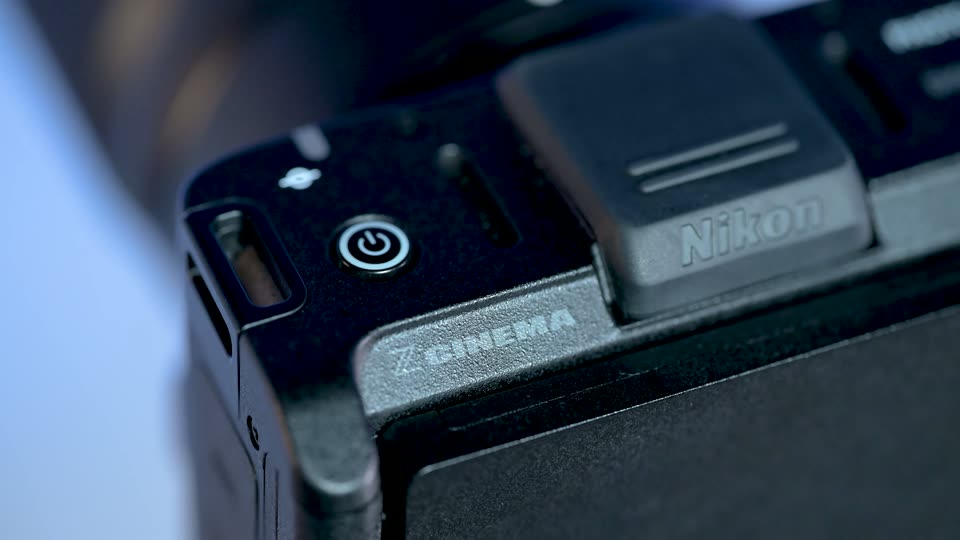
Extreme close-up of a black camera body, locked off, as the power button ring lights up white. Cut to a blonde presenter in a blue-lit room holding the small camera.
Camera: Static
A blonde woman in a black top holds a black mirrorless camera at chest height and speaks to camera, centered against a blue wall with a faint window grid pattern. The shot is a locked-off medium close-up with no camera movement.
On-screen text: “Niko”
Camera: Static
A static close-up of the back of a black cinema camera against a flat blue backdrop. The embossed Nikon | RED mark sits on the textured gray panel, the Z CINEMA label runs along the top hinge, and a blurred lens hangs at the left edge.
Camera: Static
A woman walks through a garden and drinks from a cup, shown in two identical side-by-side clips. Both start in a flat, desaturated log look, then a diagonal wipe grades them to full color. Labels R3D NE and H.265 fade in below each panel.
On-screen text: “Support for Log3GI0 and REDWideGamutRGB when recording in H.265.”, “R3D NE”, “H.265”, “Delivering compact file sizes with high color-grading latitude.”
Techniques: Split screen, Masking
Camera: Static
Split-screen comparison of the same woman drinking from a cup in a courtyard, labeled R3D NE and H.265. The flat log footage reveals a color-graded version through a diagonal wipe across both panels.
On-screen text: “Support for Log3G10 and REDWideGamutRGB when recording in H.265.”, “R3D NE”, “H.265”, “Delivering compact file sizes with high color-grading latitude.”
Techniques: Split screen, Masking
Camera: Static
A black camera menu titled VIDEO RECORDING MENU fills the frame. The Video file type row is highlighted in yellow, reading H.265 10-bit, while the video camera icon in the left rail glows green. The screen holds static.
Camera: Static
A close-up of a camera settings menu lists video file types, the H.265 10-bit row highlighted in yellow above a gray note box. The frame holds still while the voiceover explains the format.
Camera: Static
A close-up of a camera menu lists the Tone mode options SDR, HLG, N-Log and Log3G10, the last row highlighted in yellow, with a gray note below about compatible monitors. The screen stays static for the full shot.
Camera: Static
A woman with dark wavy hair in a floral shirt sits in a dim room lit by pink and red neon signs. She turns her head and raises a hand to her neck while white caption text fades in at the bottom left and a small label appears top right.
On-screen text: “Four selectable levels of high ISO noise reduction”, “Available for H.265/Log3G10, H.265/N-Log, and Prores422HQ/N-Log.”, “High ISO NR [Off]”
Camera: Static
A locked-off close-up of the camera's video recording menu, the High ISO NR row highlighted in yellow with its value on the right, while static caption lines at the bottom explain the selectable noise reduction levels and supported codecs.
On-screen text: “Four selectable levels”, “of high ISO noise reduction”, “Available for H.265/Log3G10, H.265/N-Log, and Prores422HQ/N-Log.”, “High ISO NR [Off]”
Camera: Static
A dark camera settings menu fills the frame. A left icon rail lists tools, and the main panel shows the High ISO NR options, with Normal highlighted in a yellow bar. The frame stays locked and static throughout.
Camera: Static
A camera settings menu on black shows the High ISO NR list of High, Normal, Low, Off. The Normal row has a yellow outline and the Low row is filled yellow, with a green video icon marking the active tab in the left sidebar.
Camera: Static
A dark camera menu screen sits static. The High ISO NR list shows High, Normal, Low, Off; Off is filled yellow and Normal carries a yellow selection box. A left icon rail marks the video camera active in green.
Camera: Static
A blonde woman in a black top holds a black compact camera at chest height and speaks, centered against a blue backdrop with a tilted window grid pattern. The shot is locked-off, and static setting labels accompany the frame.
On-screen text: “High ISO NR”, “Normal”, “Low”
Camera: Static
A camera settings menu on a black background. A white line drawing of the body sits left, two controls marked yellow, beside a grid of function-button labels. The screen then changes to a three-line submenu, the top row highlighted in yellow.
Camera: Static
A camera menu grid on black lists P, S, A, M columns for exposure settings. A yellow selection box steps across the columns, lighting the arrow buttons above and below the active one, while a Details button appears at the bottom.
On-screen text: “g2 Command dials”
Techniques: Cursor demo
Camera: Static
A black camera menu titled “g2 Command dials” shows a central yellow tile cycling from 30 to WB to K, framed by up and down arrows and two gray dial icons, with an ISO label right and an OK button below. The frame stays locked off.
Camera: Static
A macro close-up of the black Nikon ZR top panel sits against a soft blue backdrop, the lens blurred in the background. Feature callout labels appear beside the buttons and dials while the frame stays locked off.
On-screen text: “g2 Command dials”, “Exposure setting/Subfunction (mode M)”, “ISO”, “OK”, “K”
Camera: Static
A camera's custom controls menu fills the screen: a line drawing of the body with a highlighted button on the left, a grid of function assignments on the right, the Fn1 ASSIST cell lit in yellow.
Camera: Static
A camera menu screen fills the frame, the top bar reading Fn1 button beside a purple g2 mark. The list of options stays still, the 3D LUT/View assist row boxed in yellow. No motion occurs.
Camera: Static
A blonde presenter in a black top stands before a blue wall with a projected window grid, holding a compact black camera in both hands. She gestures with her right hand while speaking, facing the camera in a medium shot.
Camera: Static
A camera viewfinder interface frames two potted plants against a blue gradient wall. A focus peaking square blinks in the center, shifting from green to orange as the distance readout steps from 2m to 3m.
Camera: Static
A camera viewfinder frames two potted plants against a blue backdrop. Red focus-peaking lines trace the leaf and grass edges as the focus distance readout shifts from 1.1m to 2m. The HUD shows REC, 4.0K, MF and Log3610.
Camera: Static
A tilted camera monitor fills the frame in a shallow-focus close-up. Its screen shows a live view of a beige rose and dried stems, overlaid with a red focus reticle, a green line and a waveform, while the real flowers behind blur out.
Techniques: 3D mockup
Camera: Static
An extreme close-up of a black camera body racks focus from a soft white Nikon logo to crisp body texture, then eases back to reveal a photographer and a leafy plant in the blurred background. The frame holds steady with a slow pull.
Camera: Static
A black field monitor on a round wooden table displays a flower still with white camera data overlays, while a blurred crew and ladder sit in a sunlit studio set. The locked-off shot holds steady.
Camera: Static
A locked-off camera viewfinder overlays a still shot of two potted plants against a gray wall. A centered menu dialog reading 3D LUT Enable (monitor) holds, then fades out, while the top and bottom control rows and the lower-left histogram remain static.
Camera: Static
A camera viewfinder overlays a still shot of two potted plants against a blue gradient wall. A center dialog reads 3D LUT Enable (HDMI priority) while top and bottom toggle bars and a waveform monitor stay static.
Camera: Static
A blonde presenter in a black top holds a black mirrorless camera at chest height, speaking to camera. She stands centered against a blue backdrop with a projected window grid. The shot is a static medium frame.
Camera: Static
A black Nikon Z camera body without a lens, exposing the sensor, sits on a tripod head against a blue gradient backdrop. The body turns slowly to reveal its right side.
Camera: Static
A blonde woman in a black long-sleeve top stands centered before a blue wall with a faint projected grid, holding a black Nikon camera at chest height. She speaks to the lens in a locked-off medium shot.
Camera: Static
A man in a cap holds a Nikon camera with a long lens toward the frame, palm trees and a shoreline behind him. The shot is locked off while bright sunlight flares and blooms across the lens, washing out his face.
Camera: Static
A low-angle shot frames a person in a black t-shirt holding a camera mounted on a gimbal rig against a bright blue sky. The hands rotate the rig while the camera tilts to follow, with green trees and a roofline visible at the bottom.
Camera: Pull out
A black Nikon mirrorless camera with a lens hood pans slowly on a fluid tripod head against a blue wall patterned with soft window shadows. The body and lens turn from a side angle to face the viewer.
Camera: Static
A blonde woman in a black top stands centered against a blue backdrop with a faint window grid, holding a small black Nikon camera at chest height. She faces the lens and speaks, shifting slightly. The URL NIKONUSA.COM sits in the lower right corner.
On-screen text: “NIKONUSA.COM”
Camera: Static
The Nikon logo lockup, a yellow square with white diagonal streaks and a black wordmark, sits centered on a black background and holds still for the full shot.
Camera: Static