
0:29
Explore
00:00:00 / 00:30:01
- Length
- 0:30
- Scenes
- 11 · 2.7 s avg
- Product on screen
- 0:00
- Call to action
- 0:27 · 91%
- Voiceover
- No
- Views
- 99K on X
as of November 22, 2026
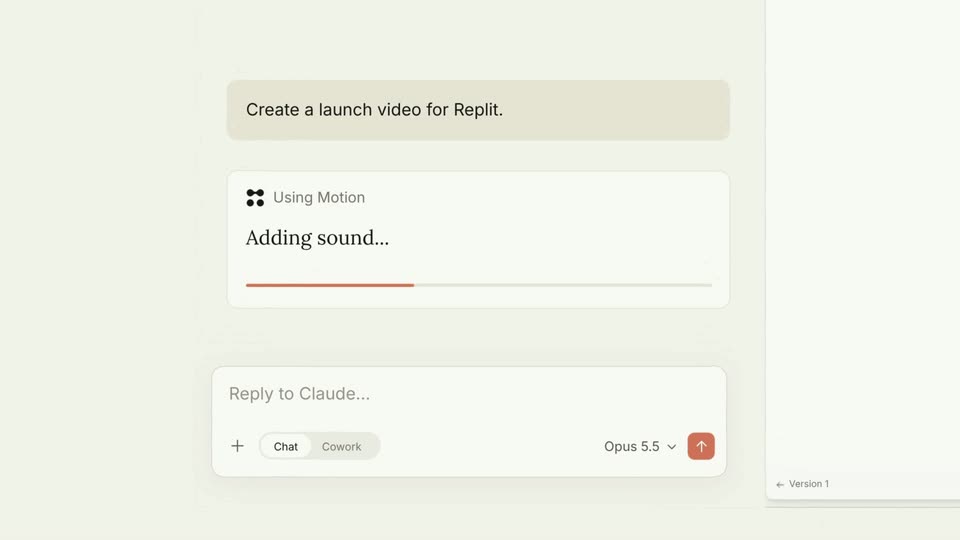
Motion’s 0:30 launch film runs 11 scenes, about 2.7 s each. The product is on screen from the first frame. The call to action lands at 0:27 (91% in). The video is staged as a live chat transcript: a prompt is typed, a progress bar runs, the generated Replit video plays inside a preview card, then a one-line edit triggers a second pass. Signature moves are masked line reveals, coral pills that zoom and morph to highlight words, and a locked cream-and-coral frame with serif headlines.
No filming indicatedEstimated needs: 2 capture groups — your screens or recordings
Is this your launch? to your site or press kit.
More like this




Motion - Introducing Claude Opus 5.5 for launch videos. Give it an idea, your, scene by scene
· 11 scenes as text
01 · Product intro · 0:00–0:04
An orange asterisk mark scales in at the top right of a cream card. “Claude Opus 5.5” fades in, then “for launch videos” rises through a mask, followed by a small “Powered by Motion” credit. Finally a chat input panel with a cursor slides in from the right.
On-screen text: “Claude Opus 5.5”, “for launch videos”, “Powered by Motion”
Techniques: Kinetic type, Masking, Cursor demo
Camera: Static
02 · Demo · 0:04–0:10
A prompt types into the chat input, then a cursor clicks the orange send button. A status card appears with a filling progress bar, its label switching from Designing to Rendering, and the layout shifts to reveal a video preview panel on the right.
Techniques: Cursor demo
Camera: Pan
03 · Demo · 0:10–0:11
A cream-toned app screen with a 'Your launch video' header zooms into its preview canvas, where large dark text reads 'We now' and a coral rounded chip labeled 'connect' pops in beside it.
Techniques: UI zoom, Kinetic type
Camera: Pull out
04 · Demo · 0:11–0:13
A cream preview card displays the headline 'We now connect with over', two words in red pills. The frame zooms onto the line, a black cursor clicks a round red plus button, and the canvas changes to a large red '0 Tools' above a blue plus button.
On-screen text: “We now connect with over”, “0 Tools”
Techniques: UI zoom, Cursor demo
Camera: Static
05 · Demo · 0:13–0:16
A flat preview window shows a large dark counter reading 'Tools' that ticks up from 311 to 448 above a semicircle of red and white tool icons, then crossfades to a three-line feature list with a Figma button.
On-screen text: “311 Tools”, “447 Tools”, “448 Tools”, “Import designs with”, “Connect with your docs”, “Add SMS, voice calls”
Techniques: Kinetic type
Camera: Static
06 · Demo · 0:16–0:20
A light green chat UI: the cursor types “Change that.” in the prompt field and clicks the orange send button. The line posts as a gray pill, a “Refining your launch video…” status appears, and the right preview panel refreshes with a new item list, one line in orange.
Techniques: Cursor demo
Camera: Pan
07 · Demo · 0:20–0:21
A flat interface card titled “Your launch video” shows a vertical list of feature phrases scrolling upward. Orange rounded pills naming apps (Dropbox, Asana, Jira, Salesforce, HubSpot) sit at the right edge beside the highlighted row.
Camera: Static
08 · Demo · 0:21–0:21
A flat page view titled “Your launch video” with a badge and caption holds a large red video block. The block morphs from a sharp rectangle into a rounded square while the white text “And many” scales in the center.
On-screen text: “And many”
Techniques: Morph, Kinetic type
Camera: Static
09 · Demo · 0:21–0:25
Inside a flat mockup of a video player, a ring of app icons orbits a Replit logo card while a red square rounds into a circle behind the word More. The circle fills the frame, then shrinks to a pill highlighting each word of What are you going to build?
On-screen text: “And many”, “More”, “What are”, “you”, “going to”, “build?”
Techniques: Kinetic type, Morph
Camera: Static
10 · Demo · 0:25–0:27
A white file card titled Your launch video holds an abstract red shape that morphs into the Replit logo mark as the card fades out, leaving the logo centered on white.
On-screen text: “Your launch video”, “v2 Updated”, “Replit launch video”, “Replit”
Techniques: Morph, Masking
Camera: Static
11 · CTA · 0:27–0:30
On a cream background, a left-aligned text block reads a serif headline, a sans subtitle, a small gray line, and a large URL, while an orange asterisk mark sits on the right. The frame stays locked and static throughout.
On-screen text: “Claude Opus 5.5”, “for launch videos”, “available at”, “motion.so”
Camera: Static