
1:17
Explore
00:00:00 / 01:20:09
- Length
- 1:20
- Scenes
- 56 · 1.4 s avg
- Product on screen
- 0:00
- Voiceover
- Yes
- Views
- 935K on X
as of November 14, 2026
Motion’s 1:20 launch film runs 56 scenes, about 1.4 s each. The product is on screen from the first frame, with social proof. There is no explicit call to action; a voiceover carries the film. The video is a first-person story of making a launch video with Motion, built as a chain of UI demos, client chat reactions, and a rapid-fire montage of sample motion styles. Its style is defined by 3D-tilted interface panels, white caption pills synced to the voiceover, and hard cuts between dark UI and light chat cards at about 35 cuts per minute.
Footage neededEstimated needs: 7 capture groups — your screens or recordings · 1 official logo — reused across the film · 2 filmed passages — shoot, supply or replace · 16 graphic passages — draw or supply · 2 3D passages — build or supply
Is this your launch? to your site or press kit.
More like this
1:21

Saksham - We have solved video editing once and for all and…. It’s FREE Avail
Cardboard · B2B · Sep 2026
0:50

Creative Freedom
Affinity · Oct 2025
Adish Jain ☕️ - we’re launching Motion, the frontier agent for tasteful motion design, scene by scene
· 56 scenes as text
01 · Product intro · 0:00–0:00
A close-up of a tablet screen shows a dark Messages notification banner floating over a white card with partial body copy. The banner carries a green chat icon and the line “Client: Launch is in 5 mins! Where is the video?!”. The frame holds still.
Camera: Static
02 · Product intro · 0:00–0:02
Black bold sans text reads 'I'm Motion' centered on a pale gray field, then swaps to the larger line 'and we're back'. The flat card cuts to a 3D-tilted social media post showing a video player over a colorful abstract backdrop.
On-screen text: “I'm Motion”, “and we're back”
Techniques: Kinetic type, 3D mockup
Camera: Static
03 · Product intro · 0:02–0:03
Tight close-up of a social post screen: a video player shows the white line
On-screen text: “and we're back”, “you guys really loved”
Techniques: Kinetic type
Camera: Static
04 · Product intro · 0:03–0:04
Close-up of a social post showing a dark Build panel with Visuals, Motion and Sound rows, beside a Mom browser window with a blue chat bubble. A white caption box at the bottom reads you guys really loved.
On-screen text: “you guys really loved”
Camera: Static
05 · Product intro · 0:04–0:07
A chat window titled Mom with a blue bubble sits center frame, then the view pulls back to a desktop where an X post left and a video player reading I am Motion right line up side by side. White caption pills swap at the bottom.
On-screen text: “you guys really loved”, “my first draft”, “uh oh time to make a video”
Techniques: Split screen
Camera: Pull out
06 · Problem · 0:07–0:09
A tilted tablet screen in 3D perspective fills the frame on a dark backdrop. A dark notification banner with a green chat icon rests over a white post card. A white lowercase caption, 'uh oh time to make a video', holds at the bottom as the banner settles.
On-screen text: “uh oh time to make a video”
Techniques: 3D mockup
Camera: Static
07 · Problem · 0:09–0:10
A dark video-editor window scales up at the center of a cluttered desktop, covering a LinkedIn post and a Messages alert, while a white caption box sits at the bottom edge above the dock.
On-screen text: “uh oh time to make a video”
Techniques: UI zoom
Camera: Pull out
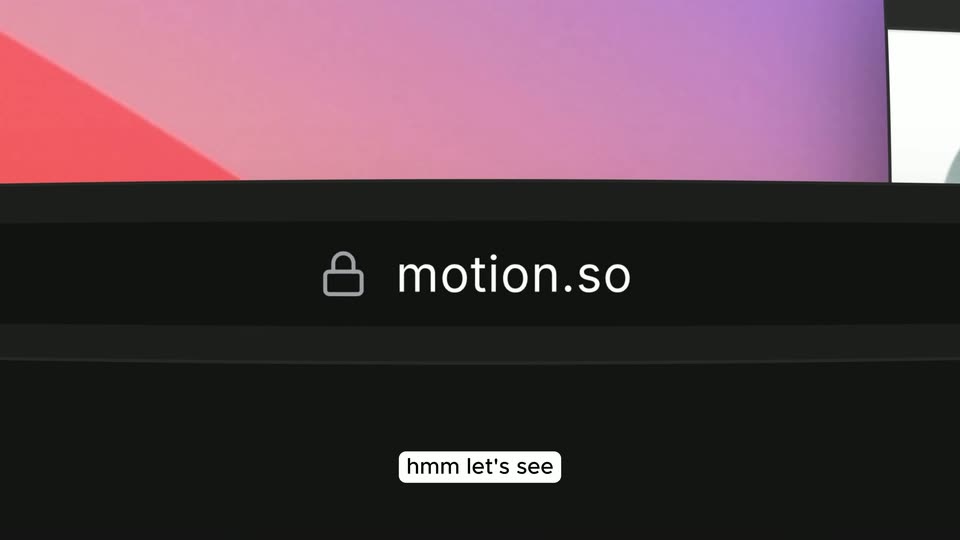
08 · Demo · 0:10–0:11
A locked-off close-up of a browser address bar over a pink and red gradient page. The lock icon sits left as the URL types out letter by letter behind a blinking blue cursor, while a white caption pill reading hmm let's see pops in below.
On-screen text: “hmm let's see”
Techniques: Kinetic type
Camera: Static
09 · Demo · 0:11–0:13
A dark prompt box types out 'Make a 30-second launch video for Motion.' with a blinking caret as the camera zooms into the field. A white caption 'hmm let's see' sits at the bottom, and Aspect, Duration and DESIGN.md controls line the footer.
On-screen text: “hmm let's see”, “motion.so”
Techniques: UI zoom
Camera: Pan
10 · Demo · 0:13–0:16
A dark interface bar: the cursor opens the duration dropdown and selects 30s-1 min, a checkmark appears. The view pulls back to the full panel, and the cursor hovers the DESIGN.md chip, which highlights.
Techniques: Cursor demo, UI zoom
Camera: Static
11 · Demo · 0:16–0:19
A dark dropdown menu of design system presets scrolls down past brand logos and names, then the menu closes and a cursor rests on the white circular send button. White caption bubbles read “ooh a custom design.md”, then “this one”.
On-screen text: “ooh a custom design.md”, “this one”
Techniques: Cursor demo
Camera: Pull out
12 · Demo · 0:19–0:20
A dark interface panel floats in 3D perspective. A cursor hovers over the white circular send button beside the Plan label, then clicks as a ripple ring expands. A small caption reading this one sits below the panel and fades out.
On-screen text: “this one”
Techniques: Cursor demo
Camera: Static
13 · Demo · 0:20–0:20
A black void with thin purple lines radiating from the center as red and blue light streaks fly outward, while a white pill caption reading “and send” holds at the bottom.
On-screen text: “Plan”, “0”, “and send”
Techniques: Particles
Camera: Static
14 · Demo · 0:20–0:24
A chat UI on a light background shows a typed prompt in an input field, then the screen darkens as a reply line and a progress card appear, cycling from “Tuning the look” to “Designing scene 1/3” with a moving bar. Bottom subtitle pills swap in sync with the voiceover.
On-screen text: “and send”, “oh it's faster”, “and also cheaper”
Camera: Static
15 · Demo · 0:24–0:26
A dark chat panel fades out on the left as the central gradient logo and label switch from V1 to V2. Blue selection boxes with corner handles appear around both elements, then release, while a cursor hovers beside them. A bottom caption swaps to “and it's completely editable”.
On-screen text: “than before”, “and it's completely editable”
Techniques: Cursor demo
Camera: Push in
16 · Demo · 0:26–0:28
A dark interface shows a black Export button with a download icon; a cursor slides in from below and hovers over it. A caption at the bottom reads “and it's completely editable”, then swaps to “looks great let's just export it”.
On-screen text: “and it's completely editable”, “looks great let's just export it”
Techniques: Cursor demo
Camera: Static
17 · Demo · 0:28–0:29
Close-up of a dark interface. A pill reads Rendering video with the percent ticking from 5 to 100, then the pill shrinks into a small Exported chip while a cursor arrow hovers over it. A white caption box sits at the bottom.
On-screen text: “looks great let's just export it”
Techniques: Cursor demo, Morph
Camera: Static
18 · Social proof · 0:29–0:31
A light chat screen holds a gray bubble reading “Launch is in 5 mins!! Where's the video?!” above a white input line. A purple video card with a play button and 0:30 tag sits at right; a cursor taps it, then the card slides up and right as a new bubble, “wait how did you make it so fast??”, fades in below.
On-screen text: “Launch is in 5 mins!! Where's the video?!”, “looks great let's just export it”, “wait how did you make it so fast??”
Techniques: Cursor demo
Camera: Static
19 · Social proof · 0:31–0:32
A flat chat view on a pale gray field. A light gray message bubble holds the line “wait how did you make it so fast??” while a purple gradient video card with a round play button sits in the top right. The bubble and card hold still as the clip ends.
Camera: Static
20 · Social proof · 0:32–0:32
A pale gray chat bubble holding the question “wait how did you make it so fast??” rests left of center on a near-white background, while a purple gradient card with a white play button is cropped in the top-right corner. The frame stays locked off with no motion.
On-screen text: “wait how did you make it so fast??”
Camera: Static
21 · Social proof · 0:32–0:33
A light gray chat screen with a purple video card, play button and 0:30 label at the top. A gray bubble on the left reads “u make it so fast??” and a blue bubble on the right reads “Made it with Motion”, both sliding up into place on a locked-off frame.
On-screen text: “u make it so fast??”, “Made it with Motion”
Camera: Static
22 · Social proof · 0:33–0:34
Close-up of a light chat thread with a locked-off frame. A gray bubble reads “wait how did you make it so fast??” and a blue bubble sits at the right edge. Three gray typing dots pulse in a left bubble, then resolve into the message “this looks incredible”.
On-screen text: “wait how did you make it so fast??”, “Made it with Motion”, “this looks incredible”
Techniques: Masking
Camera: Static
23 · Social proof · 0:34–0:36
A light chat screen with blue message bubbles. The list scrolls up as the bubble “you think so?” fades in, then a small gray caption “but motion isn't” fades in at the bottom.
On-screen text: “Made it with Motion”, “you think so?”, “but motion isn't”
Camera: Static
24 · Social proof · 0:36–0:37
A blue iMessage-style bubble reading “you think so?” slides into a light gray frame, a second bubble cut off at the top edge. A white caption box at the bottom swaps from “but motion isn’t” to “just a launch video tool” while the camera stays locked off.
On-screen text: “but motion isn't”, “just a launch video tool”
Camera: Static
25 · Other · 0:37–0:39
On a black background, LAUNCH, VIDEO and TOOL stack diagonally from the top left, each word sliding or scaling in with a green underline. A small caption pill at the bottom reads “just a launch video tool”, then switches to “it's an engine for”.
On-screen text: “LAUNCH”, “just a launch video tool”, “VIDEO”, “TOOL”, “it's an engine for”
Techniques: Kinetic type
Camera: Push in
26 · Other · 0:39–0:40
Stacked white words LAUNCH, VIDEO, TOOL fill the left of a black frame, each with a green underline accent. LAUNCH slides in while VIDEO and TOOL scale up. A small caption it's an engine for sits in a white box at the bottom.
On-screen text: “LAUNCH”, “VIDEO”, “TOOL”, “it's an engine for”
Techniques: Kinetic type
Camera: Push in
27 · Other · 0:40–0:42
On a black background, the white word Everything holds centered, then fades out to black. The words VIDEO and TOOL scale in and out at the start of the shot.
On-screen text: “VIDEO”, “TOOL”, “Everything”
Techniques: Kinetic type
Camera: Static
28 · Other · 0:42–0:43
Black screen. The word types in letter by letter in white with red and blue chromatic fringing, a glowing white cursor bar standing after the last letter.
On-screen text: “the”
Techniques: Kinetic type
Camera: Static
29 · Other · 0:43–0:44
Large white lowercase type on a black field scrolls left behind a glowing vertical caret at the right edge, revealing the phrase word by word. The line reads the worlds then best motion as the caret holds the reveal point.
On-screen text: “the worlds best motion”
Techniques: Kinetic type, Masking
Camera: Pull out
30 · Other · 0:44–0:45
White lowercase text on black, a glowing caret bar holds the right edge. The word design scrolls left as agent types in behind the caret, letters sliding across the frame.
On-screen text: “design”, “agent”
Techniques: Kinetic type
Camera: Static
31 · Other · 0:45–0:46
A dark screen holds a rounded square button with a white up arrow at center. A cursor glides in from the lower right and rests on the button, which lights up with a blue glow and fills to solid blue as it is pressed.
On-screen text: “agent|”
Techniques: Cursor demo
Camera: Static
32 · Demo · 0:46–0:48
A Polaroid of a man in a black shirt at a table fades in on a textured off-white background. He gestures, then leans forward resting his hands to show a watch. Below the frame, the title THE WATCH JOURNEY appears on two yellow highlight bars.
On-screen text: “fig 1.”, “THE WATCH”, “JOURNEY”
Camera: Pan
33 · Demo · 0:48–0:50
Split screen: a man in a black tee talks while holding a steel watch on the left; on a grid-paper panel right, the DEEP WATCHES headline sits above a taped spec card of a white chronograph, and a second card with a diamond watch slides in from the right.
On-screen text: “fig 1.”, “THE WATCH”, “JOURNEY”, “DEEP”, “WATCHES”, “REF: 116500LN”, “CAL: 4130 CHRONO”, “MAT: OYSTERSTEEL”, “REF: 126500ST”, “CAL: 4302 AUTO”
Techniques: Split screen
Camera: Static
34 · Demo · 0:50–0:52
On a dark background, a green dot with a white curved stem sits at left. A five-rank list builds downward: Taylor Swift, Bad Bunny, The Weeknd, Drake, Peso Pluma, each label followed by a horizontal bar that fills in green, purple, gray, gray, red.
On-screen text: “1. TAYLOR SWIFT”, “2. BAD BUNNY”, “3. THE WEEKND”, “4. DRAKE”, “5. PESO PLUMA”
Camera: Static
35 · Demo · 0:52–0:54
A cream grid holds a hub diagram: a central OpenAI card links by green lines to eight labeled cards, snapping from blur to sharp focus. A black UNIFIED SUPERAPP bar slides down from the top while a green AGENT-FIRST ECOSYSTEM bar slides up from the bottom.
On-screen text: “UNIFIED SUPERAPP”, “AGENT-FIRST ECOSYSTEM”
Camera: Pull out
36 · Demo · 0:54–0:56
On a cream dot-grid field, a centered black square contracts to a small dark red tile, which then scales up; the tile holds the italic word Building. The headline UNIFIED SUPERAPP slides in while AGENTS and AGENT-FIRST ECOSYSTEM stay locked off.
On-screen text: “UNIFIED SUPERAPP”, “AGENTS”, “AGENT-FIRST ECOSYSTEM”
Techniques: Kinetic type
Camera: Pull out
37 · Demo · 0:56–0:57
Concentric rings of glowing cyan segments and small hex labels form a circular HUD on a near-black field. The camera pushes forward through the rings toward a central lens shape with a cyan dot, an orange dashed ring spinning around it.
Techniques: Parallax
Camera: Push in
38 · Demo · 0:57–0:58
A dark grid holds a cyan AND logic gate at center, crossed by a horizontal wire line. The gate pulses bright cyan with a glow as a SIG_I label appears on the left and a 1 on the right, then fades back to a dim outline.
On-screen text: “AND”, “SIG_I”, “1”
Camera: Static
39 · Demo · 0:58–0:59
Two teal logic gate diagrams sit on a dark grid. Each OR gate feeds a NOT gate through thin lines. The top OR label slides left while the rest holds still.
Camera: Static
40 · Demo · 0:59–1:00
On a dark navy blueprint grid, the white monospace label 0XFF0A_L1_HOT_PATH holds near center as the view reframes. Two elongated capsule linkages, one dashed, one solid, slide in from the left beside a dashed rectangle, and small rotated cyan tags HYD-SYS1 and .1° scale in.
On-screen text: “0XFF0A_L1_HOT_PATH”, “HYD-SYS1”, “.1°”
Camera: Static
41 · Demo · 1:00–1:01
A dark blueprint grid holds a white line-art mechanical arm with dashed outlines. The arm rotates and reconfigures between poses as small cyan angle labels update beside the joints.
Camera: Pull out
42 · Demo · 1:01–1:02
A white line-art schematic of a two-wheel strut assembly sits on a dark grid. The wheels translate and the cyan strut line tilts as a small readout updates its angle value on the right.
On-screen text: “HYD-SYS 1”, “88.2°”, “89.2°”, “89.7°”
Camera: Static
43 · Demo · 1:02–1:03
A white line-drawn rocket with a cyan glow and orange flame holds center on a dark grid while the left altitude scale climbs and cyan arcs brighten around it. The caption MAX-Q with Maximum Aerodynamic Pressure and an orange rule appears on the right.
On-screen text: “MAX-Q”, “Maximum Aerodynamic Pressure”, “89.7°”
Camera: Static
44 · Demo · 1:03–1:04
A flat brown sloth with a green cap and a yellow pencil in its head sits beside a white calendar card with a teal header. A red marker circle draws itself around the black text 2 WEEKS AGO on the card.
On-screen text: “2 WEEKS”, “AGO”
Camera: Push in
45 · Demo · 1:04–1:05
A flat illustration shows a brown sloth in a green graduation cap with a yellow tassel, next to a white calendar page reading 2 WEEKS AGO circled in red. The frame fades in from a dimmed state to full pastel color.
On-screen text: “2 WEEKS”, “AGO”
Camera: Push in
46 · Demo · 1:05–1:08
A hand-drawn teal card fills the frame, then the view pulls back to reveal a pyramid of stacked colorful cards. A cartoon dog in a cap sits on a wooden throne atop the stack as yellow sparkles pop around the edges.
On-screen text: “1”
Techniques: Particles
Camera: Pull out
47 · Demo · 1:08–1:10
A dark rounded prompt bar on black types out “Make a launch video for our new product” letter by letter. The frame zooms in on the bar as a white cursor glides up to hover the Plan pill.
Techniques: UI zoom, Cursor demo
Camera: Static
48 · Demo · 1:10–1:11
A dark rounded bar holds an orange “Plan on” pill with a layers icon and a square orange arrow button. A white cursor glides from the pill to the arrow and clicks it, the arrow button flipping to a black fill with an orange outline.
Techniques: Cursor demo
Camera: Static
49 · Demo · 1:11–1:12
The frame is solid black for the full clip, a brief hold with no on-screen elements or motion.
Camera: Static
50 · Demo · 1:12–1:12
A dark rounded card floats on a black background, an orange dot with a glowing ring on the left and a white label on the right. The label swaps from 'Planning first' to 'Thinking through the brief' while a sliver of a second card peeks in at the left edge. The frame stays locked off.
Camera: Static
51 · Demo · 1:12–1:15
A sketch-style video player sits on a pale gray field under a static caption. The cursor slides in from the right and clicks the thumbs-up icon, which fills red, as the frame zooms tight on the like, dislike, and share row.
On-screen text: “Thinking through the brief”
Techniques: Cursor demo, UI zoom
Camera: Static
52 · Outro · 1:15–1:16
The frame holds on solid black for the entire clip, with no visible element, text, or motion, carrying only the voiceover.
Camera: Static
53 · Outro · 1:16–1:18
On a black background, a white logo assembles in the center: a bone shape of two circles joined by a bar, with two dots below, and the wordmark motion.so appears beneath. The frame is locked off as the dots scale into place.
On-screen text: “motion.so”
Camera: Static
54 · Outro · 1:18–1:19
A white logo mark, a bowtie shape above two dots, sits centered above the wordmark motion.so on a plain black background. The frame is static and locked off.
On-screen text: “motion.so”
Camera: Static
55 · Outro · 1:19–1:19
A white logo mark of two circles joined by a bar above two more circles sits over the wordmark, centered on a black background. The frame holds still as the sign-off.
On-screen text: “motion.so”
Camera: Static
56 · Outro · 1:19–1:20
A white four-dot mark, its top two dots joined by a bar, sits above the wordmark motion.so, centered on a black field. The frame holds still as the sign-off.
On-screen text: “motion.so”
Camera: Static