1:21
Saksham - We have solved video editing once and for all and…. It’s FREE Avail
Cardboard · B2B · Sep 2026
Mirage · Oct 2026 · 1:17 · AI-annotated
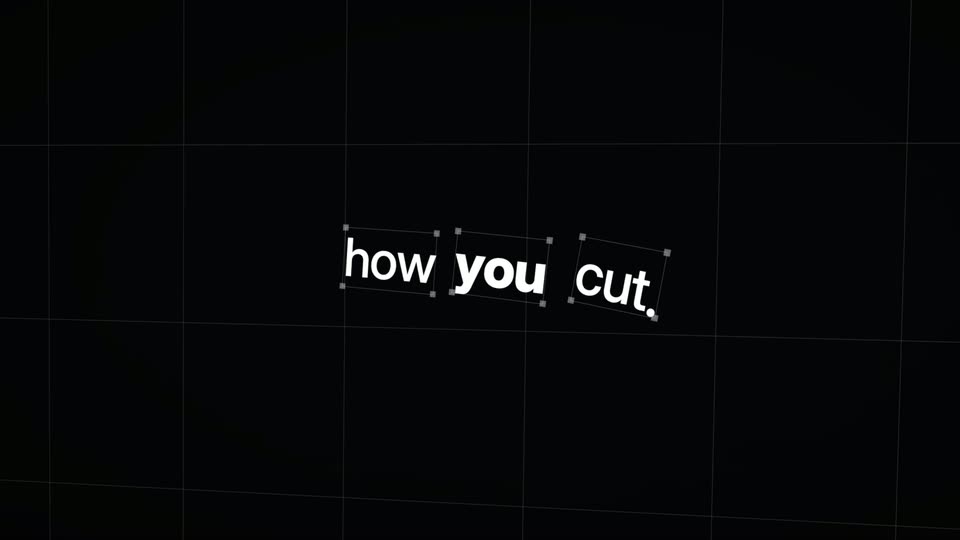
Mirage’s 1:17 launch film runs 47 scenes, about 1.7 s each. The product shows up at 0:03. There is no explicit call to action; a voiceover carries the film. Structured as a retro pixel OS story: a format-error problem, a converter install, a prompted agent workflow, then a long 3D showreel of a chrome horse and rider, closed by a vintage CRT logo card. Pacing is fast at about 26 cuts per minute, with CRT scanlines, particle dissolves, and wireframe grids as recurring visual moves.
Is this your launch? to your site or press kit.
Cardboard · B2B · Sep 2026
Pika · AI · Jul 2026
Whip · Consumer · May 2026
A retro pixel interface lists three app icons, Tesseract, Premiere Pro and After Effects, with file icons below. A pixel cursor drags the gallop.tsrct file toward Premiere Pro, then clicks cut_v3.pproj, opening a context menu with Open and Open With Tesseract.
On-screen text: “Made with Tesseract”
Techniques: Cursor demo
Camera: Static
A scanlined CRT shows a pixel OS with a fanned stack of FORMAT.SYS error dialogs. The front dialog reads UNSUPPORTED FILE. as a pixel cursor clicks OK; the text swaps to NOPE. with a sad icon, then the screen bursts into static around a purple pixel diamond logo.
On-screen text: “Made with Tesseract”
Techniques: Cursor demo
Camera: Static
A retro CRT terminal fans out FORMAT.SYS windows; a pixel cursor clicks INSTALL and they dissolve into particles, reforming as three neon app icons above a row of file icons. The green-and-purple headline and the line Open-source converters settle at the top.
On-screen text: “TESSERACT ⇄ PREMIERE PRO ⇄ AFTER EFFECTS”, “Open-source converters.”
Techniques: Particles, Cursor demo
Camera: Static
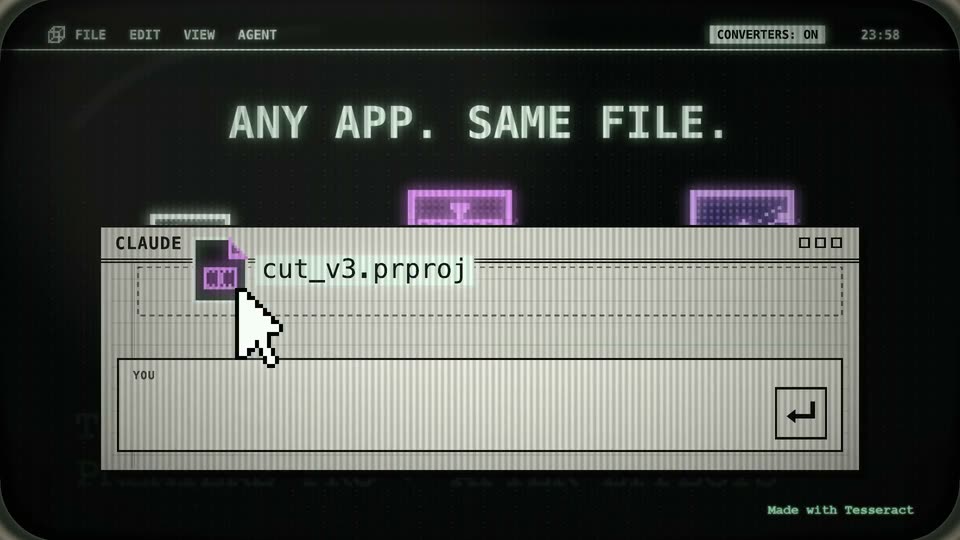
A retro terminal screen shows three glowing app icons above a row of project files, a pixel cursor on cut_v3.prproj. The grid fades as a CLAUDE window slides in, the file name lands in its dashed drop zone and in the input bar beside an enter key.
On-screen text: “TESSERACT ⇄ PREMIERE PRO ⇄ AFTER EFFECTS”, “Open-Source Converters”, “ANY APP. SAME FILE.”, “Made with Tesseract”
Techniques: Cursor demo
Camera: Static
A retro terminal window on a black CRT screen shows a command typed word by word into an input field, with a pixel cursor drifting along the left edge. The window then shrinks as a detailed Premiere Pro project window with a timeline opens behind it.
On-screen text: “PREMIERE PRO ⇄ AFTER EFFECTS”, “Made with Tesseract”
Camera: Push in
A CRT monitor shows a retro video editor: a BIN list, a SOURCE and a PROGRAM monitor playing a dithered horse-and-rider animation, and a multi-track timeline whose playhead runs right. A pixel cursor sits over a bottom command bar that swaps the typed prompt, while a green scanline glows across the program monitor and the frame zooms in.
On-screen text: “YOU @Tesseract cut it to the beat”, “C:/> @Tesseract make it .aep”, “Made with Tesseract”
Techniques: Light sweep, UI zoom
Camera: Static
A dark editing timeline sits in 3D perspective, green clip blocks and audio waveforms on angled tracks over a wireframe grid. A hollow cube hovers above. The board tilts into a steeper angle while a command bar with a pixel cursor holds the bottom edge.
On-screen text: “Made with Tesseract”
Techniques: 3D mockup
Camera: Static
A retro After Effects window fills the frame: a dithered horse and rider gallop in the viewer panel while a white pixel cursor moves through the layers timeline. An easing curve sits in the graph editor, and a command line holds the prompt along the bottom.
On-screen text: “Made with Tesseract”
Techniques: Cursor demo
Camera: Static
A dark After Effects style editor fills the frame. Its panels reconfigure from a viewer and graph editor to a bin, source and 3D-tilted timeline, while a pixel cursor slides left and the top filename glitches.
On-screen text: “C:/> @Tesseract make it .aep EXECUTED”, “Made with Tesseract”
Techniques: 3D mockup, Cursor demo
Camera: Static
A dark editor interface shows a dotted horse-and-rider preview in a viewer panel beside a graph editor and a layers timeline, then the view cuts to the same figure rendered as a field of white text filling the screen while an export progress bar slides in at the bottom.
On-screen text: “Made with Tesseract”
Camera: Push in
A grainy CRT-framed screen shows a wireframe 3D horse and rider with a sliding export bar, then cuts to a desktop with a top menu bar and three file icons. A pixel cursor rests in the lower left corner.
On-screen text: “EXPORT cut_v4.mp4”, “Made with Tesseract”
Camera: Pull out
A retro terminal window with a top menu bar and three file icons below. The agent label switches from CLAUDE to CHATGPT as the input line types '@Tesseract take', framed by a glowing border and a CRT scanline texture.
On-screen text: “Made with Tesseract”
Camera: Static
A dark retro terminal UI types “@Tesseract take the wheel.” in a command bar as a green enter key lights up and a pixelated cursor slides to it. Tilted terminal cards fan out behind the bar and the top menu bar glitches.
On-screen text: “Made with Tesseract”
Techniques: Cursor demo
Camera: Static
A dark retro terminal view shows scattered paper tickets tagged with agent names and a command bar reading “@Tesseract take the wheel.” A pixelated white cursor glides in from the bottom left and hovers over the green send button, which glows as it is clicked.
On-screen text: “Made with Tesseract”
Techniques: Cursor demo
Camera: Push in
A torn vertical strip bearing the monospace text AGENT_03 and @TESSERA flickers behind heavy horizontal scanlines and motion blur, then collapses to black. Thin green wireframe lines with downward arrowheads fade in along the right edge, while a pixelated white cursor rests in the lower left corner.
On-screen text: “Made with Tesseract”
Camera: Static
A chrome horse and rider stands on a dark wireframe grid as numbered cards of wireframe horse poses converge into a rotating ring that expands to fill the frame. The view then cuts to the grid floor, where a white diamond glows. A pixel cursor rests in the lower left.
On-screen text: “Made with Tesseract”
Techniques: 3D mockup
Camera: Static
A camera flies through a dark 3D wireframe grid, following a glowing teal spline with white square handles and diamond control points. The view zooms toward one handle as a pixel cursor drifts across the frame. Axis numbers and a green Made with Tesseract tag sit at the edges.
On-screen text: “Made with Tesseract”
Techniques: 3D mockup, Parallax, UI zoom
Camera: Pull out
A white square face inside a wireframe cube floats in a teal 3D grid, its surface filling with a map texture as the view shifts. A cyan beam sweeps across the frame while a pixel cursor drifts at the left edge.
On-screen text: “Made with Tesseract”
Techniques: 3D mockup, Light sweep, Parallax
Camera: Push in
A glowing white diamond outline holds a swirl of liquid chrome, then expands into a thin teal rectangle as the metal resolves into a galloping horse. The outlined word GALLOP fills in white at the left edge while small teal captions lock into the corners.
On-screen text: “GALLOP”, “04 / GAIT”, “Made with Tesseract”, “1878 / 12 CAMERAS / 1 HORSE”
Techniques: Morph
Camera: Static
A liquid-metal horse gallops in profile across a scratched black backdrop. The giant word GALLOP sits over it, its cream fill sweeping left to right while the rest stays teal outline, and two thin teal scan lines glide across the frame.
On-screen text: “GALLOP”, “04 / GAIT”, “1878 / 12 CAMERAS”, “1 HORSE”, “Made with Tesseract”
Techniques: Kinetic type
Camera: Static
A dark teal 3D grid holds stacked transparent planes labeled with layer names, the word GALLOP in white and teal outline floating mid-frame, a small motorcycle image on one plane. A pixel cursor and a file path caption sit bottom left as the camera drifts slowly.
On-screen text: “gallop.tsrct → gallop.aep”, “Made with Tesseract”
Techniques: 3D mockup, Parallax
Camera: Static
A teal 3D grid floor holds an exploded stack of labeled layer planes receding in perspective, the white GALLOP title and a liquid-metal horse floating at the core. The camera pulls through the stack and the composition flattens to a full frame, the horse rearing behind large white GALLOP type.
On-screen text: “GALLOP”, “gallop.tsrct → gallop.aep”, “Made with Tesseract +”
Techniques: 3D mockup
Camera: Static
A glowing cyan wireframe cube spins slowly in 3D space on a black field, its faces holding dark panels with the word GALLOP and question marks over hex code. A pixelated white cursor arrow rests at the lower left while a small teal credit line sits at the lower right.
On-screen text: “Made with Tesseract +”
Techniques: 3D mockup
Camera: Pull out
A chrome horse-and-rider model gallops across a glowing grid floor inside a camera HUD with crosshairs and a pixel cursor. GALLOP sits cropped at the right edge. .PRPROJ and .AEP slam in overhead with white streak bursts as the model dissolves into lines, then re-forms in a 2.39:1 frame.
On-screen text: “GALLOP”, “Made with Tesseract +”, “.PRPROJ”, “.AEP”
Techniques: 3D mockup, Kinetic type, Particles
Camera: Push in
A chrome horse-and-rider model stands on a dark grid floor as white aspect-ratio wireframes flicker around it. Its surface glitches into a rainbow heat map and pixel blocks with green scrambled code, then snaps back to polished metal. A pixel cursor sits in the lower left.
On-screen text: “Made with Tesseract”
Techniques: 3D mockup, Morph
Camera: Static
A 2x2 grid on black shows a horse and rider in four analysis styles: grayscale distortion, red-orange heatmap, cyan wireframe, and red skeleton, all animating the gallop. A pixelated white cursor sits at lower left.
On-screen text: “Made with Tesseract”
Techniques: Split screen
Camera: Static
A grid of panels, each holding a running horse and rider rendered as wireframe, heat-map, low-poly or pixel art, multiplies from eight cells to a full wall. A pixelated white cursor rests at the lower left, and a small credit line sits bottom right.
On-screen text: “Made with Tesseract”
Camera: Static
A grid of small, colorful horse thumbnails fills the screen. A large, glitchy wireframe horse emerges in the center, blurring the grid behind it. A pixelated white cursor rests in the bottom left.
On-screen text: “Made with Tesseract”
Camera: Static
On a black canvas, a white line outline of a galloping horse shifts pose, trailing faint ghost lines. A pixelated white cursor drags along a teal timeline with diamond markers at the bottom. A small gray caption appears at the lower left.
On-screen text: “Made with Tesseract”, “ALL FOUR OFF THE GROUND - 1978”
Techniques: Cursor demo
Camera: Pan
A chrome 3D horse-and-rider sculpture stands on a dark retro grid floor beside a vertical green light beam. It dissolves into a swarm of white particles that reorganize into a curved S shape against a dark green field.
On-screen text: “1080P / 30 FPS”, “Made with Tesseract”
Techniques: Particles, Morph
Camera: Pan
On a dark teal field, small plus signs cluster into a four-legged animal silhouette, with a pixel cursor and corner marks. The frame splits into a 2x2 grid, each panel showing the formation from a different angle, one in 3D on a wire floor.
On-screen text: “1080P / 30 FPS”, “Made with Tesseract”
Techniques: Split screen
Camera: Static
A dark green interface displays a moving swarm of pixelated white horses and green square outlines. A white pixelated cursor rests in the bottom left, and a small readout shows 1080P and 30 FPS in the top right.
On-screen text: “1080P / 30 FPS”, “Made with Tesseract”
Techniques: Particles
Camera: Static
On a dark teal 3D grid, a swarm of white running-horse sprites, each marked with a small green square, bursts outward from a tight central cluster of dots. A pixelated white cursor rests in the lower left corner. Corner crosshairs and a top-right resolution readout frame the scene.
On-screen text: “Made with Tesseract”
Techniques: Particles
Camera: Static
A dark teal viewport framed by crosshair marks and a HUD holds a dense cluster of pixel-white horse sprites, each tagged with a green square. The view tilts into a 3D perspective grid as the horses scatter across the floor, a white pixel cursor in the lower left.
On-screen text: “Made with Tesseract +”
Camera: Static
A 3D viewport over a dark teal grid floor shows dozens of pale horse sprites, each tagged with a green bounding box, while a pixelated white cursor rests in the lower left. The camera slowly reframes to reveal the full spread of sprites.
On-screen text: “Made with Tesseract +”
Techniques: 3D mockup
Camera: Static
A dense swarm of white pixel-horse sprites with green saddle marks swirls around a central cluster on a dark teal gradient, framed by corner plus markers and a pixel cursor at lower left. A top-right readout and a bottom-right credit stay static while the flock rotates.
On-screen text: “1080P / 30 FPS”, “Made with Tesseract +”
Techniques: Particles
Camera: Pull out
A pixel cursor rests bottom-left while a swarm of white horse icons and star particles drifts across a dark teal field. The left horses shrink and blend into the cloud, the whole group tightening into one creature silhouette with spread limbs.
On-screen text: “Made with Tesseract”
Techniques: Particles, Morph
Camera: Static
On a black radar grid, a green animal-like figure of tangled lines and dots redraws itself, its strokes blurring as if moving at speed. A pixel cursor holds the lower left while small HUD text marks the corners.
On-screen text: “1080P / 30 FPS”, “Made with Tesseract”
Camera: Push in
A black field of drifting white dots and thin looping white and teal curves shifts and re-forms, framed by a thin border with corner plus marks and a pixel arrow icon in the lower left.
On-screen text: “+”, “1080P / 30 FPS”, “Made with Tesseract”
Techniques: Particles
Camera: Pull out
A pixelated white cursor drags from the lower left toward the center of a dark teal field, pulling a tangled trail of green line streaks and dots behind it. The scribbled particle mass grows denser as the cursor settles in the middle, framed by thin HUD corner marks.
On-screen text: “1080P / 30 FPS”, “Made with Tesseract +”
Techniques: Cursor demo, Particles
Camera: Pull out
A dark teal grid of small squares holds a white pixelated horse silhouette inside a circular vignette. The flat grid then rotates into 3D perspective, tilting back and to the right, while a pixelated arrow cursor rests at the lower left corner.
On-screen text: “Made with Tesseract”
Camera: Pull out
A tilted 3D grid of small square tiles on a dark teal field rotates, its lit white cells forming a rearing horse. A pixelated white cursor sits at the lower left; a thin frame with corner ticks and a resolution readout brackets the shot. A faint light band crosses the grid.
On-screen text: “1080P / 30 FPS”, “Made with Tesseract”
Techniques: 3D mockup, Light sweep
Camera: Static
A liquid-chrome horse and rider gallop in side profile against a dark green grid backdrop, the metallic surface rippling as the pose shifts. A pixelated white cursor sits in the lower left while small crosshair markers drift across the right, framed by a HUD border with corner plus marks.
On-screen text: “1080P / 30 FPS”, “Made with Tesseract”
Camera: Static
A chrome wireframe horse floats over a perspective grid, framed by a HUD of numbered vertical columns. The columns scroll sideways as the horse morphs into a narrow vertical strip, with a pixel cursor tracking in the master panel on the right.
On-screen text: “Made with Tesseract”
Techniques: 3D mockup, Morph
Camera: Pull out
A retro pixel interface on a dark CRT screen shows three app icons and file icons. A dialog box titled Tesseract Converters pops up with the prompt Insert disk 2 of ? and a row of slots, while a large pixel cursor glides to the OK button.
On-screen text: “Made with Tesseract”
Techniques: Cursor demo
Camera: Static
A beige CRT monitor sits on a desk beside a warm lamp, its screen showing a retro converter dialog reading “Insert disk 2 of ?” above three file icons. The screen image dims to black as the scene ends.
On-screen text: “Made with Tesseract”
Camera: Static
A vintage CRT monitor sits on a desk in a dim room, lit by a left-side lamp. Its screen shows a teal-to-orange gradient with a black stacked-disc logo and the wordmark TESSERACT By Mirage, fading in. A green pixel caption reads Made with Tesseract in the corner.
On-screen text: “TESSERACT”, “By Mirage”, “Made with Tesseract”
Techniques: 3D mockup
Camera: Static