1:08
Explore
Aniket Pawar - Introducing MotionVideo ✦ A home for the best motion design, from Op
MotionVideo · Oct 2026 · 0:29 · Full motion · AI-annotated
- Length
- 0:29
- Scenes
- 20 · 1.5 s avg
- Product on screen
- 0:04
- Features shown
- 3
- Voiceover
- No
- Views
- 17K on X
as of November 22, 2026
00:00:00 / 00:29:16
- Length
- 0:29
- Scenes
- 20 · 1.5 s avg
- Product on screen
- 0:04
- Features shown
- 3
- Voiceover
- No
- Views
- 17K on X
as of November 22, 2026
MotionVideo’s 0:29 launch film runs 20 scenes, about 1.5 s each. The product shows up at 0:04 and 3 features are revealed. There is no explicit call to action. The video opens with locked-off type on near-black that builds word by word, names the product with a logo and a gold-highlighted tagline, then tours the interface and walks three features (prompts, search, extra sections) using 3D-tilted grids of UI cards that drift sideways. Pacing is fast at about twenty cuts a minute, with short centered type beats and a gold highlight bar as the signature accent, closing on the logo lockup over a warming orange gradient.
No filming indicatedEstimated needs: 4 capture groups — your screens or recordings · 1 official logo — reused across the film · 3 3D passages — build or supply
Is this your launch? to your site or press kit.
More like this


Aniket Pawar - Introducing MotionVideo ✦ A home for the best motion design, from Op, scene by scene
· 20 scenes as text
01 · Hook · 0:00–0:03
White sans-serif lines build word by word on a black field, the word drops flashing gold before settling. A smaller line slides in, then a huge Not here. scales up to fill the frame.
On-screen text: “Great motion drops daily.”, “The prompt gets buried.”, “Not here.”
Techniques: Kinetic type
Camera: Static
02 · Hook · 0:03–0:04
A white form card sits centered on black, styled like a boarding pass with grid lines, pink and blue highlight bars and French reservation labels. The card shrinks and reflows, the layout collapsing into the large words FORM and SPACING over the faint form.
On-screen text: “Réservez votre vol”, “PAID FOR”, “× 10,000 DECISIONS”, “FORM”, “SPACING”
Techniques: Kinetic type, Morph
Camera: Static
03 · Product intro · 0:04–0:05
On a black field, a white angular zigzag mark forms and the MotionVideo wordmark appears beside it, with two small gold squares stacked to the left. The logo holds as a sign-off.
Camera: Static
04 · Product intro · 0:05–0:06
On a black field, the line 'Stop scrolling past motion' scales up from center, 'motion' in gold and the rest in white. A gold highlight bar then appears behind the full phrase. Locked-off frame.
On-screen text: “Stop scrolling past motion”
Techniques: Kinetic type
Camera: Static
05 · Product intro · 0:06–0:07
A white phrase on a black background carries a gold highlight bar behind the words. The whole line scales down toward the center, the highlight shrinking until it sits behind the final word “motion”.
On-screen text: “Stop scrolling past motion”
Techniques: Kinetic type
Camera: Static
06 · Product intro · 0:07–0:09
On a black field, the white lowercase tagline holds centered as a gold highlight bar wipes across the line, then the bar slides off and the text settles still. The camera stays locked off.
On-screen text: “Stop scrolling past motion”, “motion worth making.”
Techniques: Kinetic type, Light sweep
Camera: Static
07 · Demo · 0:09–0:09
On a black background, the headline 'AI-made motion design' sits at top as a rounded browser window fades up below it. The headline completes with 'in one', the word 'in' boxed in yellow, revealing the app's thumbnail grid and chat panels.
On-screen text: “AI-made motion design in one”
Techniques: Kinetic type
Camera: Pan
08 · Demo · 0:09–0:11
A tilted 3D grid of motion-design preview cards drifts sideways, revealing UI screens and video thumbnails. The top headline swaps from one line to the next, each with a yellow highlight box behind the key words.
On-screen text: “AI-made motion design in one place.”, “Every idea, without the prompt.”
Techniques: 3D mockup
Camera: Push in
09 · Feature reveal · 0:11–0:12
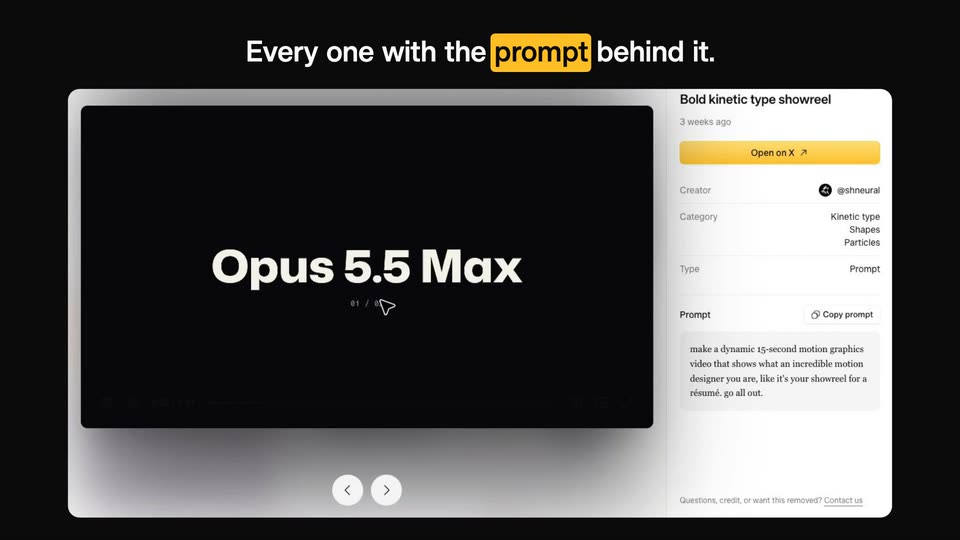
A dark scene opens on a white headline, the word prompt boxed in yellow, its last words filling in from gray. Below, a tilted 3D card of the product UI shows a black video panel reading Opus 5.5 Max beside a white details panel with a yellow button.
On-screen text: “Every one with the prompt behind it.”
Techniques: Kinetic type, 3D mockup
Camera: Static
10 · Feature reveal · 0:12–0:14
A flat product card sits on black beneath a white headline. Its left video player plays an orange shape tracing a dashed arc while the right panel lists the prompt text, the view reframing slightly toward the panel.
On-screen text: “Every one with the prompt behind it.”
Techniques: UI zoom
Camera: Push in
11 · Feature reveal · 0:14–0:15
A product interface on a black background: an orange preview card on the left where large black letters slide in, and a white detail panel on the right with a prompt field and a cursor resting on the Copy prompt button. A white headline sits above.
On-screen text: “Every one with the prompt behind it.”
Techniques: Cursor demo
Camera: Static
12 · Feature reveal · 0:15–0:15
A split interface shows orange 3D kinetic type with selection handles on the left and a prompt table on the right. A cursor clicks the Copy prompt button, which flips to Copied. Above, a white headline highlights the word prompt in orange.
On-screen text: “Every one with the prompt behind it.”
Techniques: Cursor demo
Camera: Static
13 · Feature reveal · 0:15–0:16
A black screen holds a white headline above a floating interface card. The card's left panel loops a blue letter S in motion, while the right panel lists category, type and a prompt block with a Copied button and a cursor arrow.
On-screen text: “Every one with the prompt behind it.”
Camera: Static
14 · Feature reveal · 0:16–0:17
A top headline over a prompt card with a Copied button cuts to a search dropdown over a blurred thumbnail grid. The headline swaps to a new phrase and a yellow highlight box slides onto the key word.
On-screen text: “Every one with the prompt behind it.”, “Search by look, tool or creator.”
Techniques: Kinetic type, Cursor demo
Camera: Push in
15 · Feature reveal · 0:17–0:19
A blurred card grid fills the background behind a white search panel. The panel types the query launch film, and a dropdown list of matching results slides in below it. A black cursor hovers over the list. A headline sits above the panel.
On-screen text: “Search by look, tool or creator.”
Techniques: Cursor demo
Camera: Push in
16 · Feature reveal · 0:19–0:20
A blurred app grid sits behind a sharp search dropdown whose results list scrolls up past a static cursor, under a top headline. The frame then cuts to a dark three-column layout of category cards, each holding a small interface screenshot.
On-screen text: “Search by look, tool or creator.”, “Plus the tools, skills and creatives behind them.”, “AI tools and mockups”, “Skills”, “Open-source agent skills”, “Creatives”, “Motion studios and designers”
Camera: Pan
17 · Feature reveal · 0:20–0:24
On a black field, a white headline holds the top while a row of tilted web-page cards scrolls left beneath it. Each card pairs a page screenshot with a dark label panel naming a section and its URL. The cards curve in 3D, the center one facing forward.
On-screen text: “Plus the tools, skills and creatives behind them.”
Techniques: 3D mockup
Camera: Pan
18 · Outro · 0:24–0:25
On a black grid background, the white Miro mark glides from the left to center as the previous scene's webpage mockup and headline slide off to the right. The wordmark letters then fill in beside the mark, completing the sign-off.
Camera: Pan
19 · Outro · 0:25–0:27
A white MotionVideo logo lockup sits centered on a black background with faint dotted grid lines. The lockup slides left, then the icon and wordmark fill with a gold gradient.
On-screen text: “MotionVideo”
Techniques: Kinetic type
Camera: Static
20 · Outro · 0:27–0:29
A white flag-like logo mark and the MotionVideo wordmark sit centered on a vertical gradient running from white at the top to warm orange at the bottom. The gradient slowly deepens in color while the lockup holds its position.
Camera: Static